

Yes, OpenClaw can trade stocks. Using broker API integrations like Alpaca, Interactive Brokers, and Longport, OpenClaw connects to stock markets and can execute trades autonomously on your behalf. But before you hand over your portfolio to an AI agent, there are some critical things you need to understand first.
OpenClaw is an open-source AI agent framework that can execute stock trades automatically through broker APIs. It works by connecting to your brokerage, reading market data, applying a strategy you define, and placing orders without manual input. That said, profitable and safe use requires careful setup, proper risk management, and a solid understanding of both the platform and the markets.
What Exactly Is OpenClaw?
OpenClaw (formerly known as Clawdbot, then Moltbot) is an open-source AI agent framework that surged to over 250,000 GitHub stars within four months of its release in late 2025, making it one of the fastest-growing AI projects ever. Unlike traditional trading software where you click buttons and set parameters in a dashboard, OpenClaw belongs to a new generation of “executable AI agents.” These agents connect to applications through APIs, read market data, analyze conditions, and place trades based on strategies you define, all autonomously.
The framework runs locally on your machine and extends its capabilities through “skills,” which are modular code packages that teach OpenClaw how to interact with specific exchanges, execute strategies, or perform specialized analysis. As of early 2026, the official ClawHub marketplace hosts over 5,700 skills, with over 300 focused specifically on finance and investing.
What really makes OpenClaw stand out is its natural language control. You can instruct it using plain English rather than writing complex code. You can say something like “Only buy when the broader market trend is positive and position size is under 30% of portfolio” and the LLM will interpret and apply that logic contextually.
Can OpenClaw Actually Trade Stocks?
Yes, and this is where it gets both exciting and a little dangerous. OpenClaw connects to stock markets primarily through broker API integrations. Popular supported brokers include Alpaca (which also offers paper trading), Interactive Brokers, and Longport for US, Hong Kong, and Chinese equities. Once connected, the agent can monitor prices, generate buy and sell signals, calculate position sizes, and submit real orders automatically.
In This real-world test where someone gave OpenClaw $10,000 to trade stocks, the agent was set up to look for signals, rebalance based on news and price action, and hold positions in names like Google, Nvidia, and Bitcoin. The results were mixed but educational. The strategy worked as intended technically. Whether it made money was a different story.
That is the core lesson here. OpenClaw can absolutely trade stocks. The question is whether it will do so profitably and safely, and that depends entirely on how you set it up.
How OpenClaw’s Trading Architecture Works
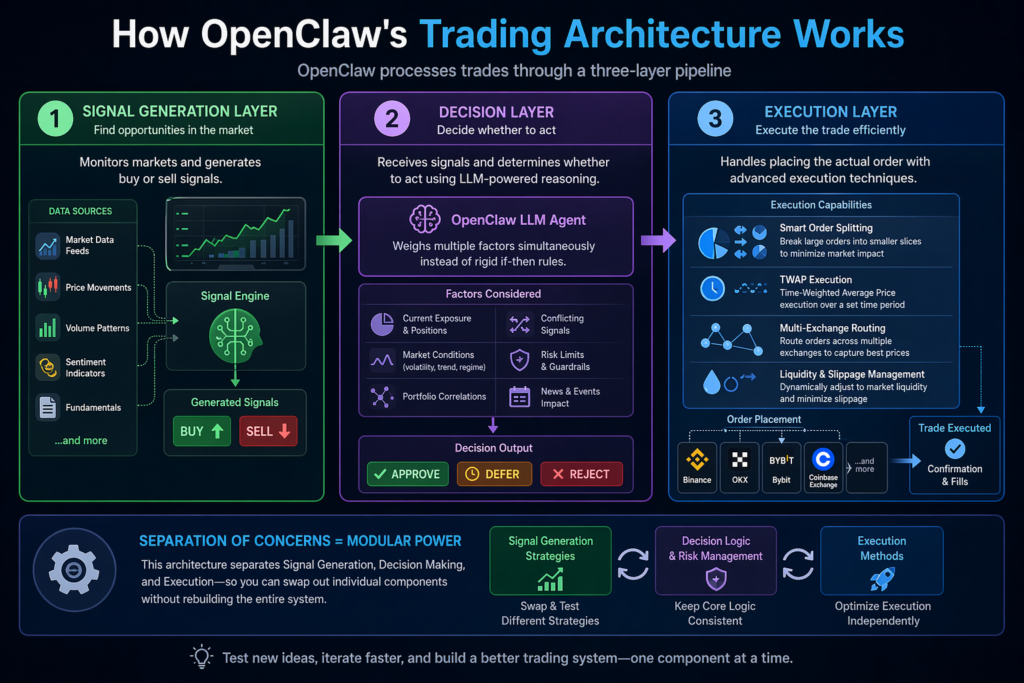
OpenClaw processes trades through a three-layer pipeline:
Signal Generation Layer: This layer monitors markets and generates buy or sell signals. Skills here connect to market data feeds, analyze price movements, volume patterns, sentiment indicators, or fundamentals, and flag potential opportunities.
Decision Layer: The decision layer receives those signals and determines whether to act. This is where OpenClaw’s LLM capabilities shine. Instead of rigid if-then rules, the agent weighs multiple factors simultaneously, including current exposure, conflicting signals, and market conditions.
Execution Layer: Once approved, the execution layer handles placing the actual order. Advanced execution skills can split large orders to minimize market impact, implement TWAP (time-weighted average pricing), or route orders across multiple exchanges to capture best prices.
This separation of concerns is powerful because it lets you swap out individual components. You can test different signal generation strategies while keeping the same risk management and execution logic unchanged.
10 Tips to Trade Stocks Safely with OpenClaw
This is the part that most people skip straight to and then regret it later. Based on everything professionals have learned from using OpenClaw in real trading environments, here are the 10 most important safety tips.
Tip 1: Always Start with Paper Trading
Before risking a single real dollar, run your OpenClaw setup in paper trading mode. Brokers like Alpaca offer sandbox environments that simulate live trading with fake money. The advice from NexusTrade’s deep-dive on proper AI trading is blunt: people who skip paper trading and hand live capital to an untested AI agent are setting themselves up for losses.
Run your paper trading setup for a minimum of two to four weeks. This validates that your signal pipeline works correctly, confirms that risk limits fire as expected, and gives you real data on how the agent behaves during different market conditions.
Pro Tip: Don’t just check if the paper trades are profitable. Check if the agent is placing orders in the right direction, at the right sizes, with the right timing. A bug that buys 10,000 shares instead of 100 would be catastrophic on a live account.
Tip 2: Never Give Your API Keys Withdrawal Permissions
This is non-negotiable. When you generate API keys from your broker to connect OpenClaw, disable withdrawal permissions entirely. Trading API keys should only have permission to place and cancel orders, not to transfer funds out of your account.
If your API keys are ever compromised, attackers can only manipulate your positions, not drain your account to an external wallet. That is a terrible outcome, but it is far less catastrophic than losing your entire balance to a transfer.
Tip 3: Verify Every Skill Before Installing
In early 2026, ClawHub purged 2,419 suspicious skills after discovering that 1,184 were actively distributing wallet-stealing malware. One malicious package disguised as a Polymarket trading bot had been downloaded over 14,000 times before it was caught. Security researcher Paul McCarty reportedly found malware within two minutes of browsing ClawHub. That is how prevalent the problem is.
Before installing any skill, check the GitHub repository for star count, commit history, and contributor profiles. Use free scanning tools like ClawSecure (which runs a six-layer security audit covering 55+ threat patterns) or ClawScan, which detects prompt injection attempts and credential stealers. These tools are free and take minutes to run.
Tip 4: Don’t Use OpenClaw as a Discretionary Trader
This is probably the biggest conceptual mistake people make. Most retail users connect OpenClaw to their broker and essentially tell it “here is some money, figure out what to trade.” Research from Tsinghua and Beijing University testing LLMs as discretionary traders found that the best-performing model achieved just 2.5% returns with a risk-adjusted Sortino ratio of 0.031. That is genuinely terrible performance.
LLMs are not good discretionary traders. What they are incredibly good at is designing systems, generating hypotheses, writing trading rules, and iterating on strategies based on real data. Use OpenClaw as a strategy engineer and execution layer, not as the person making judgment calls on every trade.
Tip 5: Backtest Your Strategy Properly Before Going Live
A backtest is not just a formality. It is your primary evidence that a strategy has any merit before you put money on it. Before trading live, your backtest needs to pass a sane checklist:
Frameworks like Microsoft’s Qlib (37,500+ GitHub stars) integrate well with OpenClaw and include built-in safeguards against look-ahead bias and overfitting. Realistic benchmarks from Qlib on Chinese A-shares show 10 to 20% annualized excess returns. Be deeply skeptical of backtests claiming 50%+ annual returns. Those numbers usually reflect a short test window during a favorable market period.
Tip 6: Use the 1-2% Position Sizing Rule
Never risk more than 1 to 2% of your total portfolio on a single trade. This is one of the most fundamental rules in professional risk management and it applies just as strongly to automated trading.
If your OpenClaw agent has a logic error or encounters an unexpected market event, proper position sizing is what keeps a bad day from becoming a catastrophic loss. Implement this rule directly in your skill’s code or risk management layer, not just as a guideline you plan to watch manually.
Tip 7: Run OpenClaw in an Isolated Container
OpenClaw stores API keys in plaintext at ~/.openclaw/ on your machine. That directory is a known target for info-stealers. If your machine is compromised, everything OpenClaw controls is accessible.
Deploy OpenClaw in a Docker container with non-root access, a read-only filesystem, and restricted network access. Never run it on a machine that stores cryptocurrency wallets, password managers, or SSH keys. If you are using a cloud server (AWS, Google Cloud, Tencent Cloud), treat that server as a dedicated trading machine with nothing else on it.
Tip 8: Set Broker-Level Position Limits as a Hard Stop
Software-level risk checks inside OpenClaw can fail. A bug in a skill, an unexpected API timeout, or a malformed response from a data feed can cause your in-code risk limits to be bypassed entirely. This is why you should always set hard position limits directly at the broker level.
Most brokers allow you to configure maximum order sizes and daily loss limits through their API settings or account controls. These limits exist outside of OpenClaw entirely, so they fire even if the agent’s own logic fails. Think of them as a circuit breaker.
Tip 9: Rotate Your API Keys Monthly and Audit Permissions Regularly
API key hygiene is something most people set up once and forget. That is a mistake. Rotate your trading API keys on a monthly schedule, and every time you rotate them, audit which skills have access to which keys.
Over time, it is easy to accumulate permissions that are no longer needed. An old skill you tested three months ago might still have access to an active API key. Revoke anything unused. The fewer points of access that exist, the smaller your attack surface.
Tip 10: Build a Kill Switch and Monitor Actively
Every automated trading system needs a way to shut everything down immediately. Build or configure a kill switch that disables all trading activity with a single command. This should be accessible from your phone so you can act fast if you see something wrong.
In the early weeks of any live deployment, monitor the agent’s activity continuously. Set up alerts for unusual behavior: abnormal order frequency, unexpected position sizes, or trades in assets you have not explicitly authorized. Automation is powerful precisely because it acts fast. The same speed that makes it useful can make errors expensive if you are not watching.
OpenClaw vs. Other Automated Trading Tools
What Trading Strategies Work Best with OpenClaw?
Momentum and Trend-Following: These work well because the logic is straightforward to code and OpenClaw can monitor dozens of assets simultaneously. A basic version uses moving average crossovers as entry and exit signals.
Mean Reversion: This strategy bets on prices returning to their average after extreme moves. It works well in range-bound markets and pairs naturally with OpenClaw’s ability to scan multiple assets for Bollinger Band breakouts or RSI extremes.
Sentiment-Driven Strategies: OpenClaw’s native LLM capabilities make it particularly suited for analyzing news sentiment, Reddit threads, and market commentary to generate signals. The challenge is filtering noise from actual signal.
Pairs Trading: This identifies two historically correlated assets and trades the spread between them. OpenClaw can monitor correlation matrices across dozens of pairs and execute both legs of a trade simultaneously.
In my experience reviewing automated trading setups, momentum strategies tend to be the best starting point for most users. They have clear rules, are easy to backtest cleanly, and do not require the statistical depth that pairs trading demands.
2026 Trends in OpenClaw Stock Trading
The AI agent space has evolved quickly, and OpenClaw is no exception. Here is what is shaping how people use it for stock trading in 2026:
-
Multi-market agents: Single OpenClaw setups now routinely manage stocks, crypto, and prediction markets simultaneously from one agent framework.
-
LLM-driven strategy generation: Instead of writing trading rules from scratch, traders are using OpenClaw to generate and backtest strategy candidates automatically, then deploying the winners.
-
Tighter security standards: Following the ClawHub malware incident in early 2026, the community has pushed for ClawSecure and ClawScan as standard pre-installation practices.
-
Semi-automated workflows: A growing number of serious traders are using OpenClaw in semi-automated mode, where the agent generates trade recommendations and a human approves them before execution. This captures the analysis benefits without fully surrendering control.
-
Broker MCP integrations: Platforms like Public.com now offer official MCP (Model Context Protocol) servers that let OpenClaw place real stock, options, and crypto orders through a secure, standardized interface.
Step-by-Step: How to Get Started with OpenClaw Stock Trading
-
Install OpenClaw from the official GitHub repository. It is a Node.js framework requiring Node.js 22 or newer, and it runs on Windows, macOS, and Linux.
-
Set up a paper trading account with a supported broker like Alpaca. Enable API access and generate a read-only key first.
-
Browse ClawHub for a stock trading skill relevant to your strategy. Review the source code before installing anything.
-
Scan the skill with ClawSecure or ClawScan before installation.
-
Configure the skill with your paper trading API keys. Set your initial strategy parameters.
-
Run in paper mode for a minimum of two weeks. Log every signal and compare outcomes to what you expected.
-
Review and adjust your strategy based on paper trading results. Backtest any changes.
-
Generate a live API key with trade-only permissions (no withdrawals) and IP whitelisting enabled.
-
Deploy to isolated infrastructure (a Docker container or dedicated cloud VM).
-
Start small with 1 to 5% of your intended capital. Monitor closely for the first four weeks before scaling.
Frequently Asked Questions
Can OpenClaw trade stocks automatically without me watching?
Yes, OpenClaw runs continuously and can execute trades 24/7 without manual input. That said, you should configure monitoring alerts and a kill switch so you can intervene quickly if something goes wrong. Full automation does not mean zero oversight.
Is automated stock trading with OpenClaw legal?
In most jurisdictions, yes. Algorithmic trading through broker APIs is legal for retail traders in the US, UK, EU, and most major markets. Regulations vary by country, so verify the rules in your specific location before deploying.
Does OpenClaw work with US stock brokers?
Yes. OpenClaw has community-built skills for brokers including Alpaca, Interactive Brokers, and Longport. Alpaca is the most commonly used for US equities because it offers commission-free trading and a well-documented paper trading API.
How much money do I need to start trading with OpenClaw?
You can test with as little as $100 to $500, but for meaningful live trading with proper position sizing, most practitioners recommend starting with at least $5,000 to $10,000. This lets you diversify across positions and keep transaction costs proportional.
Can OpenClaw guarantee stock trading profits?
No. No automated trading system can guarantee profits. Research shows that even sophisticated LLM-based trading setups underperformed simple benchmarks when used incorrectly. Profitability depends entirely on your strategy quality, risk management, and market conditions.
What is the biggest mistake new OpenClaw traders make?
Treating OpenClaw as a discretionary trader rather than a strategy execution tool. Giving an LLM money to trade based on vibes with no backtesting or defined strategy is the fastest path to losses. Use it to execute well-tested rules, not to make judgment calls.
Is OpenClaw free?
Yes, the core framework is fully open-source and free. You will pay for cloud infrastructure to run it (roughly $10 to $50 per month for basic setups) and normal trading commissions, but the software itself costs nothing.
Bottom Line
OpenClaw can absolutely trade stocks, and in the right hands it is a genuinely powerful tool. The open-source framework gives you full control over your trading infrastructure at virtually zero software cost, with support for every major market through broker APIs. But “can trade” and “should trade” are two different things. The platform’s flexibility is exactly what makes it dangerous for unprepared users.
Start with paper trading. Verify every skill. Protect your API keys. Build a kill switch. Treat it as an execution layer for strategies you already understand, not as a magic money machine. Do those things and you will be in the top tier of OpenClaw traders by default, because most people skip all of them.



