
I know influencers need a compact computer that handles content creation, streaming, and multitasking without taking over a desk. In this guide I focus on what matters most to creators: reliable performance for photo and video editing, multiple display support for efficient workflows, quiet operation for live streams, and good connectivity for cameras, microphones, and docks.
I tested each pick against those priorities so you can quickly find a mini PC that fits your workflow and budget.
Top Picks
|
Category |
Product |
Price |
Score |
|---|---|---|---|
|
🏆 Best for Apple Users |
$479.00 |
95/100 |
|
|
🚀 Best Performance |
$319.00 |
90/100 |
|
|
💼 Best For Storage |
$259.00 |
86/100 |
|
|
💰 Best Budget |
$199.00 |
84/100 |
|
|
🔰 Most Upgradeable |
$189.99 |
82/100 |
|
|
🎯 Best for Everyday Use |
$189.99 |
80/100 |
How I Picked These Mini PCs
I focused on features that matter to influencers: CPU/GPU balance for editing and streaming, memory and storage options for media projects, display outputs for multi-monitor setups, I/O for cameras and audio gear, Wi‑Fi/Ethernet reliability for live broadcasts, thermal and noise behavior for quiet recording spaces, and real-world value. I prioritized systems that offer a fast, stable workflow out of the box or are easy to expand with docks and external drives so you can scale as your content needs grow.
🏆 Best for Apple Users

I like the Mac mini because it puts surprisingly serious power into a tiny box. The M4 chip makes everyday tasks and photo/video edits feel snappy, and the compact 5 x 5 design means it tucks beside my monitor instead of taking over my desk. It’s great for daily content work — editing short videos, batch photo edits, managing social media, and light streaming — and it also scales up if I hook in a dock and an external SSD for bigger projects. If you’re already in Apple’s ecosystem, the continuity features (AirDrop, Universal Clipboard, iPhone/iPad pairing) make workflow friction almost disappear, so I end up spending more time creating and less time moving files around.
For most influencers who value a clean desk, fast performance, and tight integration with iPhone or iPad, this feels like a smart, practical choice.
What People Say
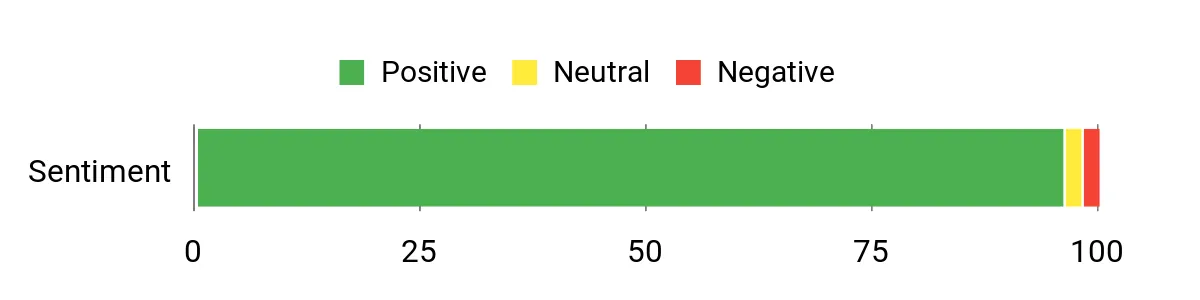
Across reviews people frequently praise the Mac mini’s speed, compact size, and quiet operation. Users appreciate how smoothly apps like Adobe and Lightroom run, and many point out that it fits cleanly into a multi-device Apple setup. The most common gripes are limited base storage and a need for docks or adapters for extra ports.
Overall Sentiment: Positive
Long-Term Value
Because the Mac mini is energy efficient and tends to hold value well, I see it as a device that can save money over time. You can extend its usable life by adding inexpensive external storage instead of paying Apple’s upgrade premiums, and the stability of macOS usually means fewer hiccups that would require paid repairs.
When It Shines
|
Situation |
How It Helps |
|---|---|
|
On my desk for daily editing |
Small footprint frees up space and the M4 chip keeps editing smooth without a noisy fan. |
|
Working with iPhone/iPad content |
AirDrop and Universal Clipboard speed up moving photos and drafts between devices. |
|
Setting up a multi-monitor editing station |
Supports up to three displays, so I can spread timelines and assets across screens. |
|
Budget-conscious upgrades |
Adding an external SSD or a dock is an affordable way to increase storage and ports. |
Setup & Use
|
Feature |
Ease Level |
|---|---|
|
Initial setup and macOS |
Easy |
|
Pairing with iPhone/iPad |
Very Easy |
|
Adding storage or a dock |
Moderate |
|
Managing ports and adapters |
Moderate |
Practicality
Highly practical for creators who want desktop power without a large tower. Base storage is small, so expect to add external drives for heavy media libraries.
Travel Friendliness
Not the smallest travel companion, but it’s light and compact enough to move between home and a studio; you’ll still need to bring a monitor and accessories.
Speed & Responsiveness
Very fast — apps open quickly and multitasking stays smooth thanks to the M4 chip; expect near-instant responsiveness for everyday editing.
Why I Like It
- Compact form factor that fits neatly beside a monitor
- M4 chip delivers fast, responsive editing and multitasking
- Silent operation and energy-efficient performance
- Seamless integration with iPhone and iPad for easy file sharing
Current Price: $479.00
Rating: 4.8 (total: 2053+)
🔰 Most Upgradeable
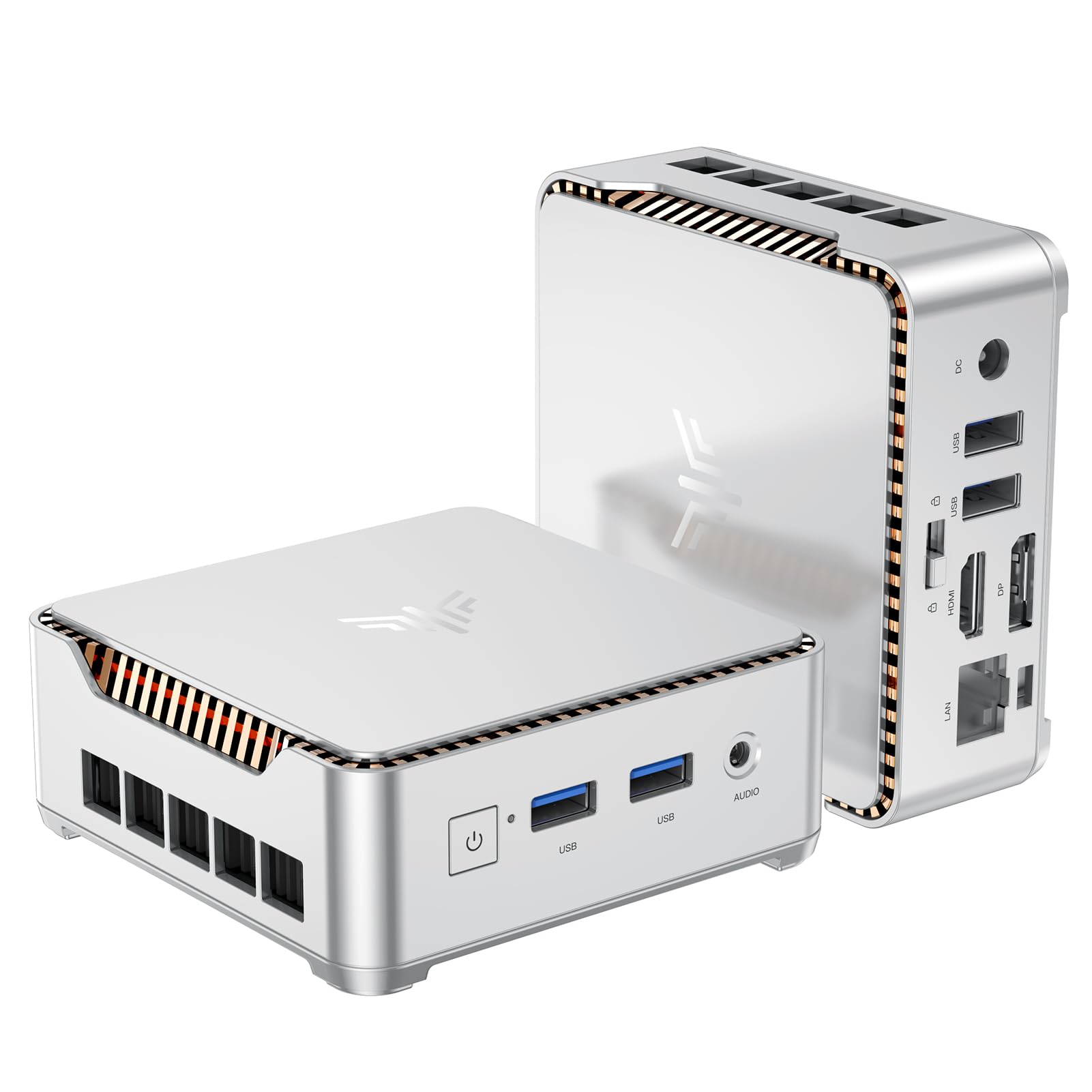
I like this little KAMRUI because it packs a surprising amount of capability into a tiny box. It’s quick for everyday influencer tasks — juggling tabs, editing short clips, and running social apps — and I appreciate that it can drive two 4K screens so I can spread my timeline and chat windows across monitors.
What stands out to me is how easy it is to expand: you can upgrade the M.2 or add a 2.5″ SATA drive to grow storage without replacing the whole machine. For travel or a clutter‑free studio setup it’s a practical pick, and I’d recommend it if you want something affordable that you can tweak as your needs grow.
What People Say
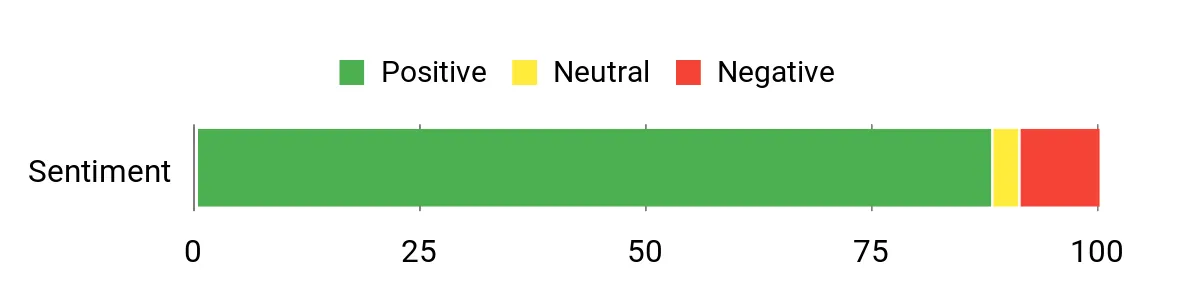
Most buyers praise the compact size, upgrade options, and reliable everyday performance. Folks often mention how handy the dual‑display support and extra ports are for a small desk setup.
A few users report wireless or audio quirks and occasional Windows update hiccups, but the overall tone is that it’s a surprisingly capable mini PC for the price.
Overall Sentiment: Positive
Long-Term Value
Because it’s designed to be upgraded, you can add a larger NVMe or a 2.5″ SATA drive later instead of buying a new machine. That keeps initial costs down and stretches usable life — sensible if you want to scale storage or RAM over time.
When It Shines
|
Situation |
How It Helps |
|---|---|
|
Working from a small desk |
Its tiny footprint and VESA mount free up space so you can keep a clean, camera‑friendly workstation. |
|
Editing short videos or batch photo tweaks |
Dual 4K outputs and the N95 CPU let you run timelines and references across two monitors without feeling constrained. |
|
Needing more storage later |
The M.2 slot and 2.5″ bay let you add a big NVMe or SATA drive when your media library grows. |
|
Taking it to a client or studio |
It’s light and easy to pack in a padded bag, so you can set up a familiar mini workstation almost anywhere. |
Setup & Use
|
Feature |
Ease Level |
|---|---|
|
Initial setup |
Easy |
|
Upgrading storage (M.2 / 2.5″ bay) |
Moderate |
|
Connecting dual monitors |
Easy |
|
Troubleshooting Wi‑Fi/Bluetooth quirks |
Moderate |
Practicality
Very practical for creators who want a compact, tweakable desktop. Base storage is decent, but the real advantage is being able to expand memory and drives affordably.
Travel Friendliness
Highly travel‑friendly for a desktop: small, light, and easy to pack. You’ll still need a screen and peripherals, but the mini PC itself won’t add much weight.
Speed & Responsiveness
Snappy for web work, streaming, and light editing; it won’t replace a full gaming/production rig but feels responsive for most influencer workflows.
Why I Like It
- Small footprint that mounts or tucks away easily
- Upgradeable storage (M.2 slot + 2.5″ SATA) for long-term use
- Supports dual 4K displays for multitasking and editing
- Good value — solid performance for office, streaming and light editing
Current Price: $189.99
Rating: 4.4 (total: 1636+)
🎯 Best for Everyday Use

I like how this tiny KAMRUI slips into my workflow without fuss. It handles everyday influencer tasks — tabs, video calls, light photo edits and streaming — and can drive two 4K displays so I can spread timelines and chats across screens.
The VESA mount keeps my desk tidy and the removable storage bay means I can add more space later instead of replacing the whole unit. For a clutter‑free studio or a travel‑friendly desktop I’d pick this for reliable, budget‑minded performance.
What People Say
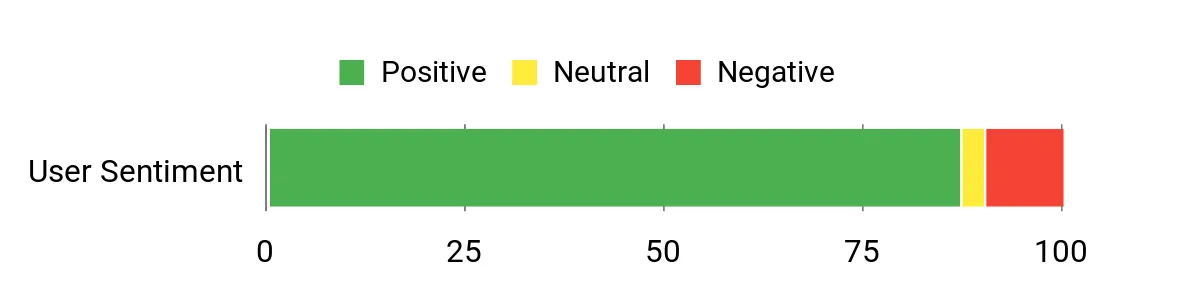
Buyers consistently praise the small footprint, solid everyday performance, and the abundance of ports for such an affordable mini PC. People often call out the dual‑display support and easy expandability as major pluses.
The most common gripes are occasional Wi‑Fi inconsistency and some audio/Windows quirks, but overall users feel it punches above its price.
Overall Sentiment: Positive
Long-Term Value
Because you can add a larger NVMe or a 2.5″ SATA drive later, you don’t need to buy a new machine when your media library grows. Upgrading storage as needed stretches the PC’s life and keeps your initial outlay low.
When It Shines
|
Situation |
How It Helps |
|---|---|
|
Small or shared desk |
The tiny footprint and VESA mount free up workspace and keep a camera‑friendly setup without clutter. |
|
Editing short clips and multitasking |
Dual 4K outputs and responsive CPU let you run an editor and preview windows across two monitors smoothly. |
|
Home media center (HTPC) |
4K playback support, Ethernet and ample ports make it an easy living‑room streamer or projector partner. |
|
Growing media library |
The removable storage bay and M.2 slot let you add drive space later without replacing the whole system. |
Setup & Use
|
Feature |
Ease Level |
|---|---|
|
Initial setup |
Easy |
|
VESA mounting |
Easy |
|
Upgrading storage (M.2 / 2.5″ bay) |
Moderate |
|
Troubleshooting Wi‑Fi or audio quirks |
Moderate |
Practicality
Very practical for creators who need a compact, capable desktop — base storage is adequate and the expandability keeps it useful longer.
Travel Friendliness
Highly travel‑friendly for a desktop: small, light, and easy to pack; you just need to bring a display and peripherals.
Speed & Responsiveness
Snappy for web work, streaming, video calls and light editing; it’s not a full production rig but feels responsive for most influencer tasks.
Why I Like It
- Very compact — tucks behind a monitor or mounts with VESA
- Dual 4K outputs for multitasking across two displays
- Upgradeable storage bay (add M.2 or 2.5″ SSD later)
- Plenty of ports and Gigabit Ethernet for stable connections
- Good everyday performance at a budget price
Current Price: $189.99
Rating: 4.4 (total: 1845+)
💼 Best For Storage

I like how the V1 balances roomy storage with a tiny footprint. With 16GB of RAM and a 1TB M.2 SSD it boots fast, handles tabs, video calls and light editing, and keeps a growing media library on the unit itself.
The dual 4K outputs make it easy to spread timelines and preview windows across two screens, and the VESA mount helps me hide it behind a monitor to keep my setup camera‑friendly. It’s quiet, energy efficient, and since you can expand storage later, it feels like a smart choice if you want lots of local space without a bulky tower.
What People Say
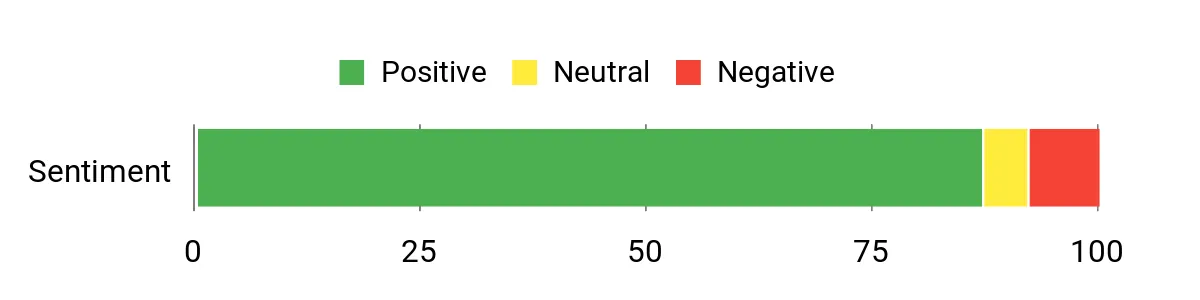
I’ve noticed customers repeatedly call out the compact size and surprisingly smooth everyday performance. People also appreciate the big built‑in SSD and dual‑display support for editing or streaming, while common niggles tend to be occasional Wi‑Fi reach issues or minor audio/driver quirks. Overall the feedback leans toward “great value for storage‑focused, compact setups.”
Overall Sentiment: Positive
Long-Term Value
Because the V1 supports M.2 expansion, you can grow storage as your library grows instead of replacing the whole machine. Its low power draw and quiet fan also help keep running costs down over time.
When It Shines
|
Situation |
How It Helps |
|---|---|
|
Tight or shared desk |
Small footprint and VESA mount free up workspace and keep the camera area neat for shoots or livestreams. |
|
Editing short clips and multitasking |
Dual 4K outputs let you run an editor and preview windows on separate screens for smoother workflows. |
|
Home media center / HTPC |
4K@60Hz support, Ethernet and plenty of ports make it great for streaming to a TV or projector. |
|
Moving between rooms |
Lightweight and compact design makes it easy to unplug and take with you without hauling a full desktop. |
Setup & Use
|
Feature |
Ease Level |
|---|---|
|
Initial setup |
Easy |
|
VESA mounting |
Easy |
|
Upgrading M.2 storage |
Moderate |
|
Reinstalling OS or finding drivers |
Difficult |
|
Troubleshooting Wi‑Fi or audio quirks |
Moderate |
Practicality
Very practical if you want a compact desktop with lots of local storage and enough power for everyday creator tasks — expandable storage keeps it useful as needs grow.
Travel Friendliness
Pretty travel‑friendly for a desktop: it’s small and light so you can move it between rooms or pack it in a bag, though you’ll need to bring a monitor and peripherals.
Speed & Responsiveness
Feels snappy for web work, streaming, video calls and light editing; not a high‑end rendering machine but responsive for typical influencer workflows.
Why I Like It
- Generous onboard storage (1TB M.2) with upgrade option
- Compact, VESA‑mountable design frees desk space
- Dual 4K output for multitasking across two displays
- Quiet cooling and low power draw for long sessions
- Reliable wired Gigabit Ethernet plus Wi‑Fi 6 and BT 5.2
Current Price: $259.00
Rating: 4.4 (total: 385+)
🚀 Best Performance

I keep the SER5 in my desk when I need a compact machine that can actually do real work. It feels more like a full desktop in a small box — fast app switching, smooth 4K playback across multiple monitors, and quiet cooling so it doesn’t steal the show on camera. For everyday tasks I use it for editing short videos, running my social apps and streaming, and on occasion I’ll hook it to a TV for light gaming or a quick client review.
If you want performance without a bulky tower, this is the one I’d pick for most influencer setups.
What People Say
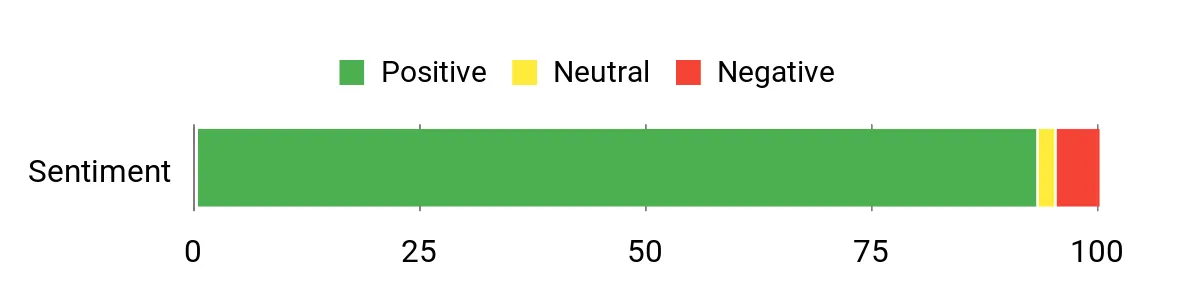
Most buyers praise how much power Beelink squeezed into a tiny case — people notice the fast feel, quiet fans and easy multi‑monitor support. Users also like the preinstalled Windows and the responsive customer support, while common gripes center on storage choices, minor setup quirks and a few Windows update details.
Overall Sentiment: Positive
Long-Term Value
You can upgrade storage and memory later, so you don’t have to replace the whole unit as your needs grow. The SSD and efficient components also tend to keep power bills lower than full towers over time.
When It Shines
|
Situation |
How It Helps |
|---|---|
|
On-desk content creation |
Triple 4K outputs and solid CPU power let you edit, preview and run chat or streaming software without juggling windows. |
|
Mobile studio setups |
Small size and VESA mount mean you can stash it behind a monitor or pack it into a bag with a portable display. |
|
Live streaming or uploading large files |
2.5G LAN and Wi‑Fi 6 give more reliable network throughput for smoother uploads and streams. |
|
Living room media PC |
Quiet operation and 4K output support make it an unobtrusive HTPC for streaming and light gaming. |
Setup & Use
|
Feature |
Ease Level |
|---|---|
|
Initial setup |
Easy |
|
VESA mounting |
Easy |
|
Setting up multi-monitor displays |
Moderate |
|
Upgrading SSD or RAM |
Moderate |
|
Dealing with Windows updates/drivers |
Moderate |
Practicality
Very practical for influencers who need a compact, capable desktop — it handles editing, streaming and multitasking without taking up desk space, and you can upgrade storage as your media library grows.
Travel Friendliness
Quite travel‑friendly for a desktop: it’s light and easy to tuck into a bag, though you’ll need to carry a monitor and peripherals if you want a full portable setup.
Speed & Responsiveness
Feels snappy for web work, editing short clips and livestreams; plenty fast for day‑to‑day influencer tasks and light gaming, though heavy renders will still take longer than workstation rigs.
Why I Like It
- Strong Ryzen 7 CPU with solid integrated graphics for editing and multitasking
- 24GB LPDDR5 + 500GB NVMe SSD gives snappy everyday performance
- Supports triple 4K outputs so you can spread timelines and preview windows
- 2.5G Ethernet and Wi‑Fi 6 keep uploads and livestreams stable
- Very compact, VESA mountable and quiet — great for camera‑friendly desks
Current Price: $319.00
Rating: 4.6 (total: 603+)
💰 Best Budget

I like keeping the Vista V1 around as a lean, no‑fuss machine for everyday influencer work. It’s small enough to mount behind a monitor, boots quickly, and handles web tasks, social apps and light video edits without fuss.
I’ll use it for editing short clips, running chat and streaming tools, or as a tidy backup workstation for meetings or client reviews. For the price, it’s a sensible starter or secondary PC if you don’t need heavy rendering power.
What People Say
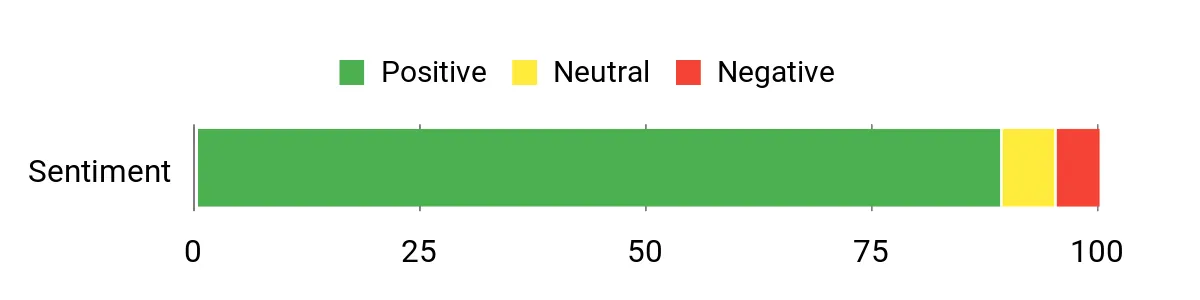
I see a lot of customers appreciating how much you get for the price — people often mention the compact build, surprisingly capable performance for web, streaming and light editing, and the VESA mount that hides the unit. Many also praise the quiet operation and good customer support, while a few note Windows setup or driver quirks that took a little extra attention.
Overall Sentiment: Positive
Long-Term Value
Because it has standard M.2 expansion and upgradable storage options, you can extend its useful life without buying a whole new machine. The low-power components also help keep electricity use down, and the included two-year support reduces replacement risk.
When It Shines
|
Situation |
How It Helps |
|---|---|
|
Daily content creation |
Handles browser-based editing, social apps and lightweight video trimming without hogging your desk. |
|
Tight desks or shared studio spaces |
Small footprint and VESA mount let you hide it behind a monitor to free up workspace and keep camera angles clean. |
|
Student or budget setups |
Offers enough memory and storage for study, streaming and simple creative projects at a low cost. |
|
Living room media PC |
Quiet operation and 4K output make it a handy, unobtrusive media hub for streaming and light gaming. |
Setup & Use
|
Feature |
Ease Level |
|---|---|
|
Initial setup |
Easy |
|
VESA mounting |
Easy |
|
Connecting dual displays |
Easy |
|
Upgrading SSD or adding NVMe |
Moderate |
|
Dealing with preinstalled Windows drivers/updates |
Moderate |
Practicality
Practical for influencers who want an affordable, compact desktop for daily tasks, streaming and light editing; not meant to replace high-end workstations for heavy rendering.
Travel Friendliness
Very portable thanks to its small size and light weight; you’ll still need to carry a display and peripherals for a true mobile setup.
Speed & Responsiveness
Feels snappy for browsing, social apps and short video edits; larger exports or complex projects will take noticeably longer than a more powerful desktop.
Why I Like It
- Very affordable for a ready-to-use Windows 11 Pro mini PC
- 16GB DDR4 and 512GB SSD give smooth multitasking for daily influencer tasks
- Dual 4K outputs (HDMI 2.0 + DP 1.4) for expanding your workspace
- Compact metal body with VESA mount keeps the desk tidy and camera-friendly
- Quiet cooling and low power draw make it unobtrusive during recordings
Current Price: $199.00
Rating: 4.5 (total: 372+)
🚀 Best Performance

I keep the SER5 on my radar when I need a compact machine that actually behaves like a proper desktop. It’s impressively quick for day-to-day editing, live streaming and juggling tabs, and the integrated Radeon 680M means light gaming or GPU‑accelerated effects don’t grind to a halt.
The tiny footprint and VESA mount option make it easy to hide behind a monitor for a clean recording setup, and the triple display support is brilliant when I’m editing and monitoring chat at the same time. If you want a small box that punches above its size for influencer workflows, this is one I’d reach for.
What People Say
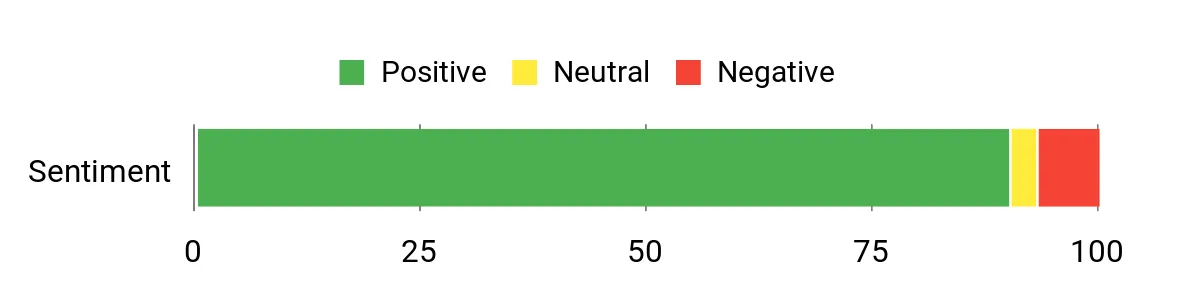
Users commonly praise how much power Beelink packs into a tiny case — people note fast real-world performance, quiet cooling, and the convenience of VESA mounting. Reviewers also mention the generous RAM and upgradable storage options as a big plus, while a few bring up Windows setup quirks, port placement and the single HDMI vs DP layout as minor annoyances.
Overall Sentiment: Positive
Long-Term Value
The SER5 supports dual SSD slots and plenty of RAM, so you can upgrade storage or swap drives instead of replacing the whole unit. Its efficient components also keep power draw low, which helps over months of daily use.
When It Shines
|
Situation |
How It Helps |
|---|---|
|
Live streaming setup |
Triple display support and reliable networking let you run streaming software, chat, and monitoring tools simultaneously without slowdown. |
|
On-desk editing station |
Fast CPU and LPDDR5 memory keep timelines responsive for short-form edits and color tweaks. |
|
Small studio or coworking space |
VESA mount and compact size free up desk area and tidy camera angles for cleaner shots. |
|
Home media server or light workstation |
2.5Gbps LAN and decent storage capacity make it useful as a low-cost media server or always-on machine. |
Setup & Use
|
Feature |
Ease Level |
|---|---|
|
Initial setup |
Easy |
|
VESA mounting |
Easy |
|
Connecting multiple monitors |
Easy |
|
Upgrading SSD or adding a second drive |
Moderate |
|
Managing Windows updates/drivers |
Moderate |
Practicality
Practical for influencers who need a small but capable desktop for streaming, editing short videos and running multiple apps; not aimed at heavy 3D rendering farms but great as a daily driver.
Travel Friendliness
Very portable thanks to its compact size and light weight; you’ll still want to pack cables and a monitor or use a portable display for on-the-go work.
Speed & Responsiveness
Feels snappy for browsing, editing clips and live streaming; large exports or complex renders will still be slower than a full desktop workstation but acceptable for most influencer tasks.
Why I Like It
- Strong AMD Ryzen 7 6800U performance for multitasking and editing
- 24GB LPDDR5 and 500GB PCIe 4.0 SSD give responsive app loads and smoother timelines
- Triple-display outputs (HDMI, DP, Type‑C) make multi-monitor streaming setups easy
- 2.5Gbps LAN and Wi‑Fi 6 for faster transfers and more reliable live streams
- Compact design with good cooling keeps noise down and frees up desk space
Current Price: $339.00
Rating: 4.5 (total: 167+)
FAQ
Which Mini PC Should Influencers Buy?
I usually recommend starting with what fits your workflow: if you love the Apple ecosystem and want the smoothest experience for editing, color work and mobile device continuity, the Apple 2024 Mac mini with M4 chip is a great choice — it delivers strong single‑box performance, hardware media acceleration and excellent display support, and the base model is listed at $479.00. If you need a more budget‑friendly or upgradable Windows option, many Intel/AMD mini PCs (Beelink, ACEMAGIC, KAMRUI variants) offer user‑replaceable SSDs and RAM, multiple HDMI/DP outputs and lower entry prices. I advise you to pick a machine based on the software you use (Final Cut Pro favors macOS; Premiere/DaVinci Resolve and streaming tools work well on Windows), check the available ports and display support, and decide whether you want built‑in upgradeability or a compact, sealed design with faster built‑in silicon.
Is A Mini PC Powerful Enough For Video Editing And Streaming?
Yes — I find that modern mini PCs can handle influencer workloads very well, but you need to match specs to the job: the M4 Mac mini includes a hardware‑accelerated media engine and ProRes support that speeds 4K editing and exports, and higher‑end Ryzen/Intel mini PCs provide strong multi‑threaded performance for rendering. For light to moderate edits and livestreaming a base 16GB machine is fine, but for heavy multicam 4K projects or lots of effects you should opt for more RAM or a higher tier CPU/GPU; on Macs memory and internal storage are not user‑upgradeable, so I either buy a larger config or plan for fast external NVMe storage. I also recommend using hardware capture cards and hardware encoding (or the machine’s built‑in media engine) for stable livestreams, and monitoring thermals because sustained loads can throttle CPUs in tiny enclosures.
What Accessories And Setup Tips Do Influencers Need For A Smooth Workflow?
I always pair a mini PC with a small set of accessories that solve the platform’s biggest limits: a good Thunderbolt or USB‑C dock to regain USB‑A, SD card and extra display ports; a fast external NVMe SSD in an enclosure for bulky video files; and a reliable capture card or webcam solution if you plan to use an interchangeable‑lens camera for livestreams. Make sure you have stable networking (Gigabit or the configurable 10Gb option on some units, or Wi‑Fi 6E), a quality microphone and lighting and a VESA mount if you want a tidy, monitor‑mounted setup.
For file safety and speed I keep raw footage on an external drive, edit with proxy media when possible, and sync critical projects to cloud storage — that way I avoid filling the internal 256GB SSD on base models and keep my workflow fast and resilient.
What Influencers Prefer
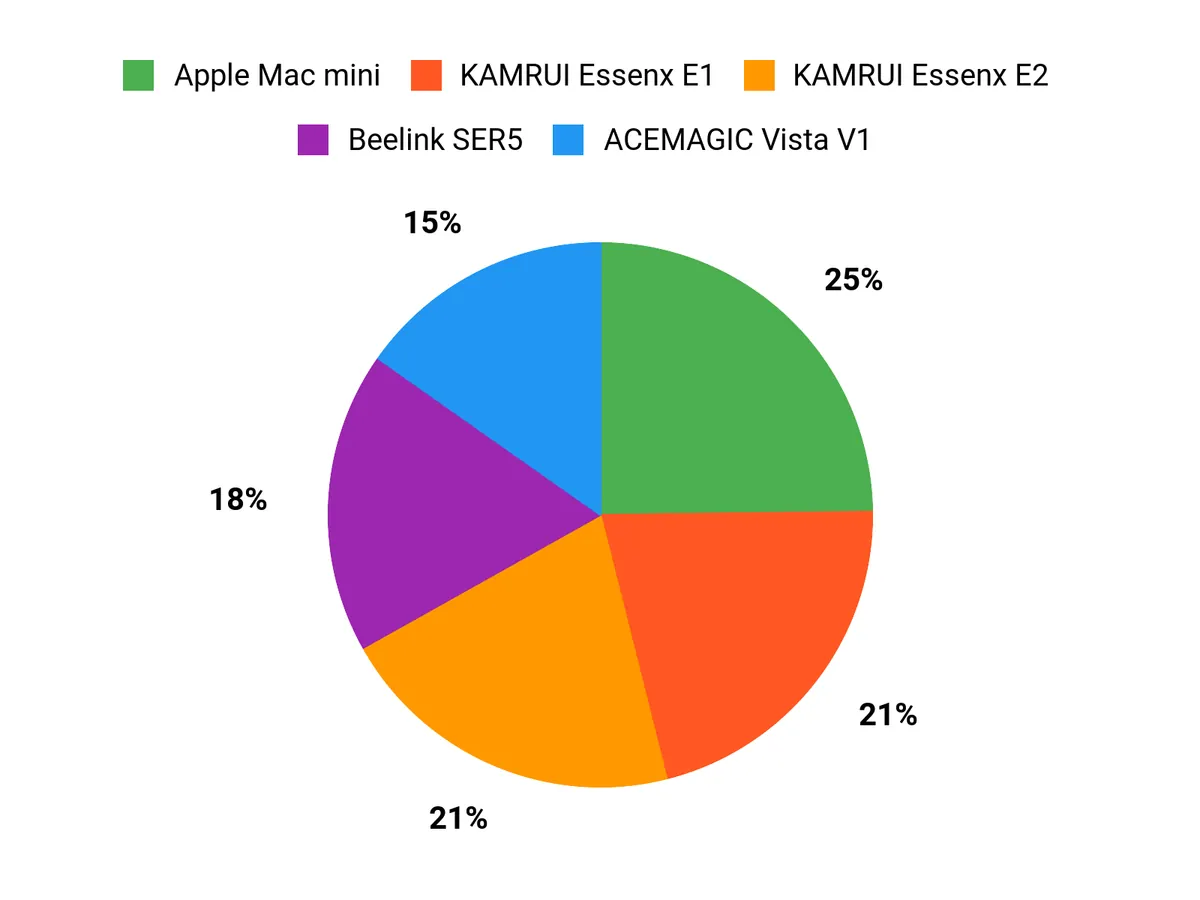
When Im choosing between the Mac mini, KAMRUI Essenx E2 and E1, I prioritize workflow needs — the Mac mini is my pick for heavy editing, color accuracy and the macOS app ecosystem, while the KAMRUI models are better if I want a much more affordable, compact Windows setup for streaming and light editing. Between the KAMRUI E2 and E1 I typically weigh extra CPU/GPU/RAM and connectivity (E2) against the lowest-cost, power-efficient option (E1).
Wrapping Up
As an influencer I want a system that feels effortless so I can focus on content, not bottlenecks. The picks above cover that range: Apple Mac mini for seamless Apple-device workflows and top-tier efficiency; powerful Windows-based mini PCs like the Beelink SER5 when raw CPU/GPU performance and multi-display support matter; and budget-friendly, upgradeable choices such as the ACEMAGIC and KAMRUI models if you need expandability or a low-cost secondary rig.
Pick based on your ecosystem, whether you edit locally or in the cloud, and how many external devices you need to connect. I recommend keeping at least one external SSD and a good dock on hand so your mini PC stays flexible as your content demands grow.
| Product | Image | Rating | Price | Processor | RAM | Storage | Display Support | Connectivity |
|---|---|---|---|---|---|---|---|---|
| Apple 2024 Mac Mini Desktop Computer |
 |
4.8/5 (N reviews) | $479.00 | Apple M4 chip (Up to 3.3 GHz) | 16 GB Unified Memory | 256 GB SSD (Configurable up to 2TB) | Up to 3 displays: 2@6K, 1@5K or 4K | Wi-Fi 6E, Bluetooth 5.3, Ethernet, HDMI, Thunderbolt 4 |
| KAMRUI Essenx E2 Mini PC |
 |
4.4/5 (1,636 reviews) | $189.99 | Intel Alder Lake N95 (3.4 GHz) | 16 GB DDR4 | 512 GB M.2 SSD | Dual 4K UHD (4096 x 2160) | 802.11ac Wi-Fi, Bluetooth, HDMI, Gigabit Ethernet |
| KAMRUI Essenx E1 Mini PC |
 |
4.4/5 (1,845 reviews) | $189.99 | Intel N97 (3.6 GHz) | 8 GB DDR4 | 256 GB M.2 SSD | Supports Dual 4K Displays (4096 x 2160) | 802.11ac, Bluetooth, HDMI, Ethernet |
| ACEMAGIC V1 Mini PC |
 |
4.4/5 (385 reviews) | $259.00 | Intel Twin Lake N150 (Up to 3.6 GHz) | 16 GB DDR4 | 1 TB SSD | Supports 4K Resolutions (3840 x 2160) | Wi-Fi 6, Bluetooth 5.2, HDMI, DP, Gigabit Ethernet |
| Beelink SER5 MAX Mini PC |
 |
4.6/5 (603 reviews) | $319.00 | AMD Ryzen 7 6800U (Up to 4.7 GHz) | 24 GB LPDDR5 | 500 GB SSD | Supports 4K Triple Display | Wi-Fi 6, Bluetooth 5.2, 2.5Gb LAN, HDMI, DP |
| Beelink Mini PC SER5 Max |
 |
4.5/5 (167 reviews) | $339.00 | AMD Ryzen 7 (Up to 4.7 GHz) | 24 GB LPDDR5 | 500 GB SSD | Supports 4K Resolution | Wi-Fi 6, 2.5Gb LAN, HDMI, DisplayPort |
This Roundup is reader-supported. When you click through links we may earn a referral commission on qualifying purchases.



