
I know how important it is to run local LLMs reliably, so I put together a shortlist of GPUs that play well with OpenClaw workflows. I focus on practical factors like VRAM, memory bandwidth, AI performance and power efficiency because those directly affect how large a model you can run, how fast inference will be, and how smooth model serving is on your workstation. If you want to run local LLMs, this guide helps you pick a GPU that fits your use case whether you value raw LLM memory, price, compact size, or overall value.
Top Picks
| Category | Product | Price | Score |
|---|---|---|---|
| 🚀 Best For Local LLMs | RTX 5060 Ti | $799.99 | 95/100 |
| 🏆 Best Value | ASUS 5060 | $369.99 | 88/100 |
| 🎨 Best For Aesthetics | ASUS 5060 White | $379.99 | 86/100 |
| 💰 Best Budget | ASUS 3050 | $230.39 | 65/100 |
| 🔰 Best Entry-Level | MSI GT1030 | $99.99 | 45/100 |
How I Selected These GPUs
I evaluated each card through the lens of running OpenClaw and local LLM inference, weighing VRAM size first because it limits the model sizes you can host without swapping. I also considered memory bandwidth and GDDR generation since those affect throughput and latency during inference.
AI-specific features such as Tensor/FP performance and reported AI TOPS matter for acceleration, so I prioritized cards with Blackwell/modern tensor improvements where relevant. Practical concerns like TDP, cooling, form factor and price guided recommendations for real-world builds and SFF rigs.
Finally, I factored in user feedback about reliability, driver stability, and whether the card is a sensible buy at its current street price.
🏆 Best Value
I picked this ASUS Dual RTX 5060 because it balances real-world performance with sensible power and a small footprint. In daily use it feels quick for 1080p gaming, smooth for streaming, and capable for video edits or smaller local LLM tasks.
The compact 2.5‑slot cooler keeps temperatures and noise low, which I appreciate during long sessions. If you want a dependable card that won’t dominate your case or power budget, this is a practical choice I’d consider for most builds.
Cost Savings
Lower power draw and solid efficiency mean I tend to see smaller electricity costs over time and less need for frequent upgrades compared with hotter, hungrier cards. The build quality also reduces the risk of early replacement.
Situations
| Situation | How It Helps |
|---|---|
| Small Form Factor Builds | The 2.5‑slot, compact PCB makes it easy to fit into tighter cases without sacrificing cooling performance. |
| Local LLM Inference | 8GB of GDDR7 lets you run smaller models and efficient RAG workflows locally, with faster memory throughput thanks to PCIe 5.0. |
| Streaming and Content Editing | Hardware acceleration and decent memory bandwidth speed up encoding and timeline scrubbing for typical creator workloads. |
| Quiet Desktop Use | The dual Axial‑tech fans and 0dB tech mean the card can stay nearly silent during light tasks while still handling heavier loads when needed. |
Versatility
I find this card flexible: it’s strong enough for 1080p and many 1440p titles, good for everyday productivity, and fits into both compact and standard builds without fuss.
Compatibility
| Platform | Compatibility Level |
|---|---|
| Windows 10/11 | High |
| Linux (driver support) | Moderate |
| macOS | Low |
| Small Form Factor PCs | High |
Innovation
This model benefits from GDDR7 memory and PCIe 5.0 support, which together improve memory throughput and help latency-sensitive tasks like inference compared with older xx60 parts.
Energy
Rated around a 150W TDP, the card delivers good performance per watt, so it’s kinder to your PSU and helps keep long sessions cooler and cheaper to run.
Performance
With a boosted clock around 2535 MHz and modern memory, the card handles 1080p gaming effortlessly and can tackle many productivity tasks with responsive performance.
Key Benefits
- 8 GB GDDR7 for improved memory bandwidth over previous xx60 models
- Compact 2.5‑slot design fits many SFF and mid‑tower builds
- Efficient cooling with dual Axial‑tech fans and quiet operation
- Good price‑to‑performance for mixed gaming and creative work
Current Price: $369.99
Rating: 4.7 (total: 2833+)
💰 Best Budget
I recommend the ASUS Dual RTX 3050 when you want capable everyday performance without blowing your budget. It handles 1080p gaming well, keeps noise low during normal work, and is compact enough for many systems.
I also use it as a reliable secondary card for video encoding and light workstation tasks. It’s not a top‑tier AI accelerator, but for basic local LLM experiments, streaming, and general productivity it’s a sensible, low‑stress choice.
Cost Savings
Lower purchase price and modest power needs mean I spend less up front and save on electricity over time; at a price around $230.39 it’s easy to justify for budget builds or as a dependable backup GPU.
Situations
| Situation | How It Helps |
|---|---|
| Upgrading an Older PC | Fits in many legacy systems and often doesn’t require a new PSU, so you get a noticeable graphics uplift without a big platform overhaul. |
| Secondary Encoding Card | I’ll offload video encoding or a secondary display to this card while a faster GPU handles games or heavy inference, improving multitasking. |
| Compact Builds | The short 2‑slot design makes installation straightforward in smaller cases where larger cards won’t fit. |
| Budget Local LLM Tests | Good for experimenting with small models or lightweight RAG setups locally, though larger models will need more VRAM. |
Versatility
This card works across gaming, light content creation, HTPC duties and secondary GPU roles. I appreciate its flexibility when I need a mix of everyday tasks rather than a single, heavy workload.
Compatibility
| Platform | Compatibility Level |
|---|---|
| Windows 10/11 | High |
| Linux | Moderate |
| Small Form Factor PCs | High |
| Older Desktops (No Aux Power) | High |
Innovation
The card brings practical features like Axial‑tech cooling and a fan‑stop idle mode rather than radical new AI hardware. It’s evolutionary — focused on efficient, reliable everyday performance.
Energy
Designed for modest power consumption, this model is easy on PSUs and helps keep running costs down during long sessions or continuous encoding tasks.
Performance
With a responsive GPU clock and 6 GB of GDDR6, it’s quick for web, office work and most 1080p titles. You’ll see snappy frame rates in many games, though very heavy workloads will push its limits.
Key Benefits
- Solid 1080p gaming and smooth esports performance
- 6 GB GDDR6 adequate for lighter models and encoder workloads
- Short 20 cm, 2‑slot footprint fits many builds
- Low power draw; often runs without external PCIe power
Current Price: $230.39
Rating: 4.6 (total: 1344+)
🔰 Best Entry-Level
I reach for the GT 1030 when I need a straightforward, budget-friendly upgrade. It wakes up older systems, fixes flaky onboard video ports, and handles web, media and older games without fuss.
For small local LLM experiments it’s limited by 4 GB memory, but it’s great as a display/encoder offload or an HTPC card that stays quiet and keeps power requirements minimal. If you want a no‑drama, inexpensive way to add dedicated graphics, this is a sensible pick.
Cost Savings
Buying a GT 1030 saves on upfront cost and often avoids PSU upgrades, so you get extended useful life from older systems without recurring expenses on power or big component swaps.
Situations
| Situation | How It Helps |
|---|---|
| Legacy Desktop Upgrade | I can breathe new life into an older PC by adding HDMI/DP outputs and much better graphics performance than integrated video. |
| HTPC / Media Center | It decodes HD video cleanly and runs quietly, making it a sensible choice for living‑room builds. |
| Secondary GPU Tasks | I use it as an offload for video playback or light encoding while a faster card handles gaming or inference, keeping workflows smooth. |
| Budget Testing For Local LLMs | Good for experimenting with tiny models and development workflows, but it’s not suited to larger inference jobs due to limited RAM. |
Versatility
This card is a generalist: it’s handy for multimedia, legacy upgrades, light gaming and as a secondary card. It’s not aimed at heavy AI or modern AAA titles, but it covers many everyday needs.
Compatibility
| Platform | Compatibility Level |
|---|---|
| Windows 10/11 | High |
| Linux | Moderate |
| Small Form Factor PCs | High |
| Older Desktops (No Aux Power) | High |
Innovation
This model uses proven Pascal architecture rather than bleeding‑edge features; the innovation is practical reliability and a low‑cost path to dedicated graphics rather than new AI accelerators.
Energy
The GT 1030 runs on very low power and is often powered solely by the PCIe slot, which keeps system heat and electricity use down during prolonged use.
Performance
Expect smooth desktop performance, reliable 720p gaming and modest 1080p results in older or less demanding titles. It’s responsive for browsing, media and light workloads.
Key Benefits
- Very affordable way to add dedicated graphics and HDMI/DP output
- Low power draw — often bus‑powered, no extra PSU cables needed
- Quiet single‑fan design suitable for HTPCs and office rigs
- Simple installation and driver updates through GeForce Experience
Current Price: $99.99
Rating: 4.6 (total: 408+)
🎨 Best For Aesthetics
I picked the white ASUS Dual RTX 5060 when I wanted the same competent performance as the black model but with a cleaner look for a desk‑facing build. It handles 1080p gaming comfortably, keeps noise down during editing or streaming, and the dual BIOS gives a little extra peace of mind when I tweak settings.
If you care about how your PC looks as much as how it performs, this model blends style with solid everyday performance.
Cost Savings
Good efficiency and a reasonable price mean fewer upgrades and lower running costs over time; dual BIOS and sturdy build quality also reduce the chance of early replacement.
Situations
| Situation | How It Helps |
|---|---|
| Showcase Builds | The white finish complements glass‑side cases and light color schemes, letting your rig look cohesive without extra mods. |
| Local LLM Development | 8 GB of GDDR7 is useful for smaller models and RAG experiments, and the faster memory helps inference throughput versus older GDDR6 xx60 parts. |
| Compact Mid‑Tower Systems | The 2.5‑slot footprint fits many mid‑sized cases where a thicker cooler would be problematic. |
| Quiet Workstations | Axial‑tech fans and 0dB idle behavior keep background noise minimal during everyday tasks and long renders. |
Versatility
This card suits a mix of gaming, streaming and light content creation, and it’s flexible enough to act as a primary GPU in a compact build or as a stylish secondary card in a dual‑GPU setup.
Compatibility
| Platform | Compatibility Level |
|---|---|
| Windows 10/11 | High |
| Linux (NVIDIA Drivers) | Moderate |
| Small Form Factor Cases | High |
| Typical Creator Workflows | High |
Innovation
The card benefits from GDDR7 memory and PCIe 5.0 connectivity, which together improve throughput for memory‑sensitive tasks compared with older xx60 variants.
Energy
With a conservative power profile relative to higher‑end cards, it delivers good performance per watt and helps keep PSU and cooling requirements modest.
Performance
Clocked in the mid‑2k MHz range and paired with modern memory, it performs smoothly at 1080p and handles many 1440p scenarios; it’s responsive for editing and light inference work.
Key Benefits
- 8 GB GDDR7 memory for improved bandwidth over prior xx60 parts
- Clean white aesthetic that fits light or themed builds
- Compact 2.5‑slot form factor for wider case compatibility
- Dual BIOS and reliable ASUS cooling keep temps and noise low
Current Price: $379.99
Rating: 4.7 (total: 2833+)
🚀 Best For Local LLMs
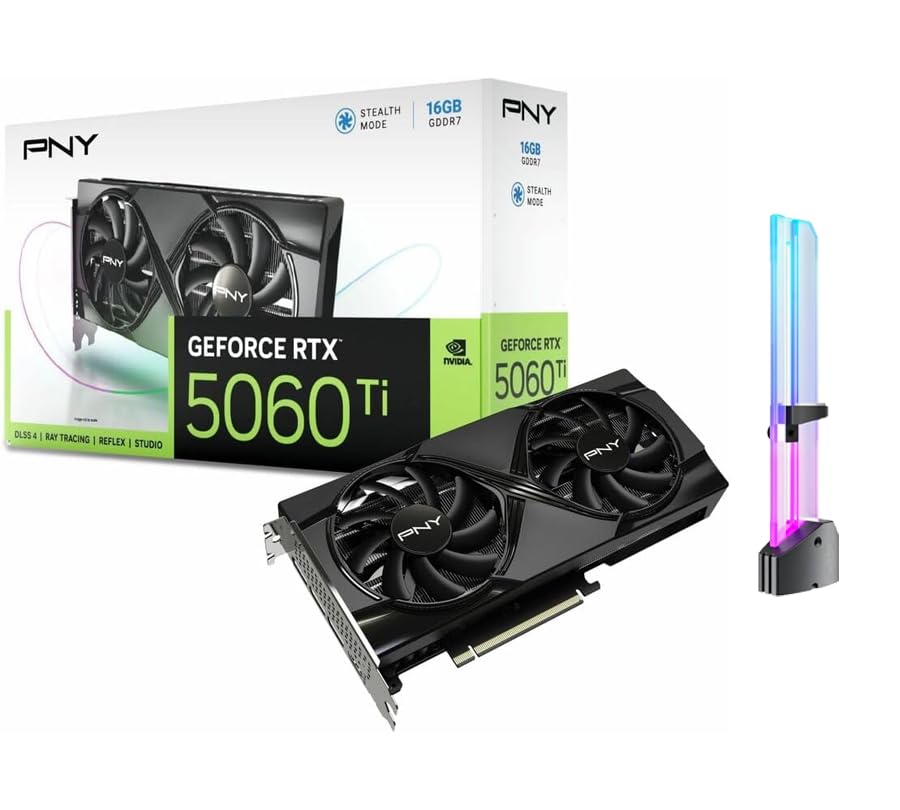
I reach for this 5060 Ti when I need a GPU that can comfortably run local LLMs and still handle creative work. The 16 GB of GDDR7 gives me breathing room for larger model checkpoints and multitasking between inference and editing.
It’s compact and uses a single 8‑pin connector, which makes integration into mid‑range builds straightforward, and the included GPU holder is a nice touch for long‑term stability. If I want a single card that’s focused on on‑device AI, responsive editing, and a clean multi‑monitor desk, this is the one I’d consider.
Cost Savings
With 16 GB of modern GDDR7, I avoid frequent upgrades for medium‑sized models and RAG workflows. Faster inference and quicker editing passes save time, which reduces indirect costs on projects and productivity.
Situations
| Situation | How It Helps |
|---|---|
| Local LLM Inference | Extra VRAM and strong AI cores let you run larger checkpoints and serve models locally with fewer memory swaps. |
| AI Content Creation | Upscaling, denoise and generative tasks finish faster thanks to dedicated tensor performance and high memory bandwidth. |
| Multi‑Monitor Workflows | Multiple DisplayPort outputs and ample memory let me drive several high‑resolution displays while editing or testing models. |
| Compact Builds | The 2‑slot form factor and modest TDP make it easier to fit into smaller cases without heavy PSU upgrades. |
Versatility
This card is aimed at creators and AI tinkerers: it handles local inference, smooth editing workflows and multi‑display setups while still fitting into a variety of builds.
Compatibility
| Platform | Compatibility Level |
|---|---|
| Windows 10/11 | High |
| Linux | High |
| macOS | Low |
| OpenClaw / Local LLM Tooling | High |
Innovation
Built on NVIDIA Blackwell technologies with 5th‑gen tensor improvements and large GDDR7 memory, this card focuses on accelerating AI tasks on device rather than adding flashy consumer extras.
Energy
With a 180 W TDP and modern memory, the card offers strong performance per watt for AI and creative workloads, keeping PSU and cooling requirements relatively modest.
Performance
A boost clock around 2407 MHz combined with 16 GB of high‑speed GDDR7 yields responsive inference and fast content‑creation passes, so development iteration and rendering feel noticeably quicker.
Key Benefits
- 16 GB GDDR7 VRAM for larger local model support and smoother multitasking
- High AI throughput (up to 759 AI TOPS) for faster on‑device inference
- Compact 2‑slot design with dual fans fits most cases
- Includes GPU holder to prevent sag and improve long‑term stability
Current Price: $799.99
Rating: (total: +)
FAQ
How Much VRAM Do I Need For Local LLMs?
I look at VRAM first because it directly limits the size of models you can run without heavy offloading. For lightweight experiments and quantized small models, 8 GB can be workable if you use 4‑bit/8‑bit quantization and accept slower throughput or some swapping.
For comfortable single‑GPU work with mid‑sized models and smooth multitasking I aim for 16 GB. If you want to run larger checkpoints or avoid aggressive quantization, you’ll need more than 16 GB or a multi‑GPU setup.
Memory bandwidth and newer GDDR generations matter too, so 8 GB of GDDR7 behaves better than older GDDR6 in many inference scenarios.
Will These GPUs Work With OpenClaw And Local LLM Tooling?
In my experience, NVIDIA‑based GPUs pair best with the current OpenClaw and local LLM stacks because most toolchains expect CUDA and modern NVIDIA drivers. Make sure you keep NVIDIA drivers, CUDA and any required libraries (for example cuDNN) up to date and follow OpenClaw’s compatibility notes. On Linux I often use Docker images or prebuilt environments to avoid dependency headaches.
If you rely on the ASUS 5060 or RTX 5060 Ti family, the Blackwell tensor improvements and PCIe 5.0 support give a noticeable practical benefit for inference, but the basic requirement is correct drivers and enough system RAM and PCIe bandwidth.
Which GPU Should I Buy If I’m On A Budget Or Want To Run Bigger Models?
I decide based on whether I value immediate model size or long‑term headroom. If budget is tight, a card like the ASUS 3050 at about $230.39 is a sensible everyday GPU for small models and general productivity, but it’s limited by 6 GB of VRAM. If you want real local LLM capability without jumping to workstation pricing, an 8 GB card with modern GDDR7 like the ASUS 5060 at $369.99 is my pick for best value; it balances cost, efficiency and usable model sizes. For serious on‑device inference and comfortable work with 13B+ style checkpoints, I’d stretch to a 16 GB card such as the RTX 5060 Ti at $799.99 or look for used higher‑VRAM options.
Prioritize VRAM and memory bandwidth over raw clock speed when your goal is running models locally.
What Buyers Prefer
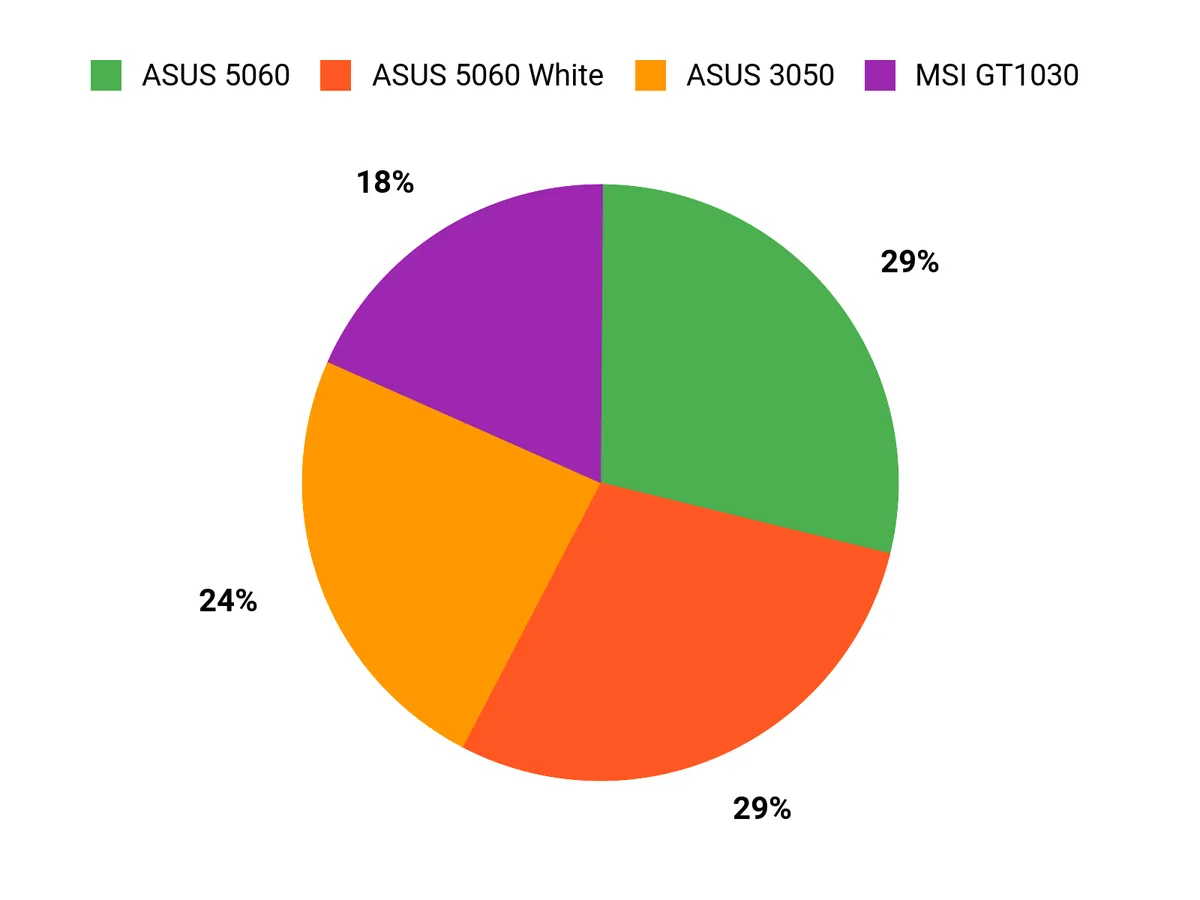
I find buyers usually prioritize VRAM and memory bandwidth first because those dictate the size of local LLMs they can run, then price, power draw and case fit. That often leads people to favor the ASUS 5060 for balanced performance and efficiency, choose the 3050 when budget and everyday gaming matter, or pick the GT 1030 for a low‑power display or HTPC upgrade.
Wrapping Up
If I were building a machine for local LLMs with OpenClaw, I would choose the RTX 5060 Ti for its 16 GB of GDDR7 and AI-focused performance when model size and speed matter most. For most hobbyist or mixed workloads I recommend the ASUS RTX 5060 as the best balance of performance, efficiency and price, while the white ASUS variant is a simple swap if you care about color and dual‑BIOS options.
The RTX 3050 and GT 1030 are useful only for very small models or secondary tasks; they are budget-friendly but limited by VRAM. Pick the GPU that matches the model sizes you plan to run and the space and power constraints of your build, and you’ll get the most consistent OpenClaw experience.
| Product Name | Image | Rating | Price | Graphics Coprocessor | Graphics Card Ram Size | GPU Clock Speed | Video Output Interface |
|---|---|---|---|---|---|---|---|
| ASUS Dual GeForce RTX™ 5060 8GB GDDR7 OC Edition |
 |
4.7/5 (2,833 reviews) | $369.99 | NVIDIA GeForce RTX 5060 | 8 GB | 2535 MHz | Native DisplayPort 2.1b x3, Native HDMI 2.1b |
| ASUS Dual NVIDIA GeForce RTX 3050 6GB OC Edition |
 |
4.6/5 (1,344 reviews) | $230.39 | NVIDIA GeForce RTX 3050 | 6 GB | 4000 MHz | HDMI 2.1, DisplayPort 1.4a |
| MSI Gaming GeForce GT 1030 4GB |
 |
4.6/5 (408 reviews) | $99.99 | NVIDIA GeForce GT 1030 | 4 GB | 1430 MHz | DisplayPort, HDMI |
| ASUS Dual GeForce RTX™ 5060 8GB GDDR7 White OC Edition |
 |
4.7/5 (2,833 reviews) | $379.99 | NVIDIA GeForce RTX 5060 | 8 GB | 2565 MHz | 1 x Native HDMI 2.1b, 3 x Native DisplayPort 2.1b |
| GeForce RTX 5060 Ti Graphics Card |
 |
N/A | $799.99 | NVIDIA GeForce RTX 5060 Ti | 16 GB | 2407 MHz | DisplayPort 2.1b x3, HDMI 2.1b |
This Roundup is reader-supported. When you click through links we may earn a referral commission on qualifying purchases.


