
I know how confusing Apple’s lineup can feel when you are trying to pick a laptop that fits your work, wallet, and workflow. I wrote this comparison to cut through the specs and show which MacBook fits which real-world use case, so you can decide quickly whether you need raw power, a balanced daily machine, or an affordable AI-ready device.
Top Picks
|
Category |
Product |
Price |
Score |
|---|---|---|---|
|
🏆 Best Performance |
$1,549.00 |
95/100 |
|
|
🎯 Best All-Rounder |
$899.00 |
90/100 |
|
|
💰 Best Budget Option for Students With Good AI Features |
$599.00 |
82/100 |
How I Chose These MacBooks
I focused on the attributes that actually affect daily use: chip performance for CPU and GPU tasks, unified memory and storage configurations, display quality and brightness, battery life in real workloads, port selection and expandability, and the form factor for portability. I also weighed price-to-performance and the new AI capabilities that distinguish the Neo and newer Apple silicon, then matched those strengths to common user needs like video editing, office work, and travel.
🏆 Best Performance

I reach for this 14.2-inch MacBook Pro when I need a laptop that disappears under heavy workloads and still feels smooth. The M5 chip gives me consistent speed for video timelines, large photo libraries, and multitasking without the fan noise or throttling I used to dread. The Liquid Retina XDR display makes color-critical work easier and the speakers and battery mean I can edit on a plane or a couch without hunting for a charger. If you do creative work, code, or run demanding apps, this is the machine I’d choose for long sessions and reliable performance.
|
Pros |
Cons |
|---|---|
|
✅ Top-tier performance with M5 chip |
❌ Higher price than Air and Neo models |
|
✅ Outstanding XDR display and speaker system |
❌ Slightly heavier for extended carrying |
|
✅ Long battery life for a pro-class laptop |
❌ Base storage may require upgrades for large media libraries |
|
✅ Premium build and tactile keyboard feel |
Long-Term Value
I view this as an investment: the M5 platform and robust build translate to years of fast performance, fewer mid-cycle upgrades, and stronger resale value compared with lower-tier models. That often offsets the higher upfront cost over the device’s lifetime.
When It Helps Most
|
Situation |
How It Helps |
|---|---|
|
Video Editing |
The M5’s CPU and GPU keep render and export times low, and the XDR display helps me judge HDR and color more reliably. |
|
On-Location Photo Shoots |
Built-in SDXC slot, HDMI, and long battery life mean I can offload, preview, and edit without carrying adapters or hunting for power. |
|
Software Development |
I can run emulators, containers, and multiple IDEs without slowdowns, which keeps my workflow fluid during complex builds. |
|
Frequent Travel |
Despite being a pro laptop, it’s compact enough for a carry-on and the battery keeps me productive through flights and layovers. |
Versatility
This Pro handles a wide range of tasks: from creative apps and pro codecs to daily productivity. I can switch from heavy editing to writing and spreadsheets without feeling like the machine is overqualified or underpowered.
Aesthetic Appeal
I appreciate the Space Black finish and the sturdy, slightly weighted feel. It looks professional without being flashy, and the keyboard surround and trackpad give a premium tactile experience I notice every day.
Innovation
The M5 brings improved neural processing, media engine hardware acceleration, and better power efficiency. Those translate into faster AI-assisted workflows, smoother video handling, and longer unplugged sessions for me.
Practicality
Ports like SDXC and HDMI, three Thunderbolt 4 ports, and MagSafe charging make this one of the most practical pro laptops I’ve used. It’s less fanfare and more thoughtful details that reduce the number of dongles I carry.
Key Benefits
-
Sustained multi-core performance for heavy apps
-
High-brightness Liquid Retina XDR for accurate color and HDR work
-
Strong battery life that holds up during long editing or travel days
-
Solid port selection including SDXC and HDMI for on-location shoots
Current Price: $1,549.00
Rating: 4.7 (total: 254+)
🎯 Best All-Rounder

I reach for the 13.6-inch MacBook Air when I want a dependable laptop that travels well and keeps me productive all day. It balances speed and portability so I can jump between video calls, light editing, and long writing sessions without hunting for outlets. The display is sharp enough for photo tweaks, the battery lasts through a full workday, and the setup between my iPhone and Mac always feels seamless.
For most people who want solid performance without carrying a heavier machine, this is the one I’d recommend for daily use and occasional creative work.
|
Pros |
Cons |
|---|---|
|
✅ Excellent portability and build quality |
❌ Base storage may feel small for large media libraries |
|
✅ Great battery life for typical workloads |
❌ Not as powerful as the Pro for heavy video or 3D work |
|
✅ Sharp Liquid Retina display for media and productivity |
❌ Limited port selection compared with larger Pro models |
|
✅ Seamless integration with Apple ecosystem |
Long-Term Value
This Air is designed to stay useful for several years thanks to efficient silicon, strong battery life, and consistent software updates. That means fewer replacements and solid resale value, so the upfront cost tends to spread out over a long usable life.
When It Helps Most
|
Situation |
How It Helps |
|---|---|
|
Students and Note-Takers |
Its light weight and all-day battery let me move between classes and study spots without carrying a charger or bulky bag. |
|
Remote Work and Meetings |
The 12MP Center Stage camera and clear microphones make video calls feel natural, and the performance handles multiple tabs and apps smoothly. |
|
Casual Photo and Video Editing |
The M4 chip and bright Liquid Retina display let me do quick edits and color checks without waiting on renders for basic projects. |
|
Frequent Travelers |
Compact dimensions and reliable battery life mean I can work during flights and layovers with minimal fuss. |
Versatility
This Air covers a wide range of everyday tasks comfortably. I can switch from spreadsheets to creative apps and back without feeling constrained, which makes it a flexible choice for a lot of users.
Aesthetic Appeal
I like the clean Silver finish and slim profile; it looks modern without drawing attention and fits well in both professional and casual settings.
Innovation
The M4 brings efficient performance and improved media engines, which translates to snappier app behavior, better battery management, and smoother playback for streaming and editing.
Practicality
With MagSafe charging, two Thunderbolt 4 ports, and a light chassis, this Air is practical for daily use and travel; you get essential connectivity without extra bulk.
Key Benefits
-
Lightweight and easy to carry for daily commuting or travel
-
Strong battery life that supports a full workday
-
Fast, efficient M4 chip for smooth multitasking
-
Good camera and microphones for video calls
Current Price: $899.00
Rating: 4.8 (total: 6070+)
💰 Best Budget Option for Students With Strong AI Features

I reach for the 13-inch MacBook Neo when I want a compact laptop that covers the essentials and adds some modern AI niceties. It handles browsing, streaming, document work, and light editing without fuss, and the battery gets me through a typical day away from a desk.
The 1080p camera and spatial audio make video calls feel clearer than on many budget laptops, and the weight and size mean I actually take it with me to cafés and short trips. If I need a no-nonsense Mac that keeps costs down while offering Apple Intelligence, this is the one I suggest for students, frequent travelers, and anyone who values portability first.
|
Pros |
Cons |
|---|---|
|
✅ Great price for a modern Mac experience |
❌ 8GB RAM and 256GB storage are modest for heavy multitasking |
|
✅ Compact form factor that’s easy to carry |
❌ Fewer ports compared with larger models |
|
✅ AI and media engines that help with everyday tasks |
❌ Not aimed at pro-level video or 3D workflows |
|
✅ Decent display and camera for this class |
Long-Term Value
Buying the Neo means lower upfront cost while still getting several years of software updates and efficient hardware. For users who don’t need pro-level power, that usually translates to fewer upgrades and a better short-term total cost of ownership.
When It Helps Most
|
Situation |
How It Helps |
|---|---|
|
Students |
Light enough to carry between classes, with battery life and video quality that make remote lectures and note-taking easy. |
|
Remote Meetings |
The 1080p FaceTime camera and clear microphones make it simple to look and sound good on calls without extra accessories. |
|
Casual Content Creation |
I can edit short videos and photos, preview color on the Liquid Retina screen, and export basic projects without long waits. |
|
Travel and Commuting |
Its compact size and weight let me work on planes or trains, and the battery life reduces the need to hunt for outlets. |
Versatility
This Neo is tailored to everyday workflows: web, documents, video calls, light media tasks and AI-assisted features. It’s not a one-machine-for-every-pro need, but it covers most personal and student scenarios well.
Aesthetic Appeal
The Neo’s clean lines and color options like Silver and Blush give it a modern look that fits both casual and professional environments without feeling oversized.
Innovation
The A18 Pro brings a focused blend of efficiency and AI capability. It powers features like on-device intelligence and media acceleration that make everyday tasks feel quicker and smarter.
Practicality
With a couple of USB-C ports, a headphone jack, and solid battery life, this model minimizes what you need to carry while keeping essential connectivity intact.
Key Benefits
-
Affordable entry to Apple silicon with AI features
-
Lightweight and pocketable 13-inch design
-
Good battery life for day-to-day use
-
1080p FaceTime camera and solid speakers for calls
Current Price: $599.00
Rating: (total: +)
FAQ
Which MacBook Should I Buy?
I usually narrow the choice by what I actually do day to day. If I edit video, run heavy creative apps, or need the fastest sustained performance, I go for the 14.2-inch MacBook Pro with the M5 (around $1,549.00) because it handles large projects without slowing down. For most people who want a light, capable laptop for work, school, and occasional creative tasks, the MacBook Air with M4 (about $899.00) is the sweet spot.
If my priority is portability and keeping costs low while still getting on-device AI features, I pick the MacBook Neo (around $599.00). A practical tip I use is to match your typical workload to the chip, RAM, and storage rather than chasing the highest spec you might rarely use.
Will The Neo Or Air Be Fast Enough For My Work?
From my experience, the Neo is perfectly fine for browsing, streaming, document work, and light photo or short-video edits thanks to the A18 Pro, but the 8GB RAM and 256GB storage are modest for heavy multitasking. The Air with the M4 and 16GB of unified memory feels noticeably more responsive when I have many apps and browser tabs open and when I do casual editing, so it’s a safer choice for multitaskers and creatives on a budget.
If your work regularly involves long renders, 3D, or pro codecs, I would choose the Pro because those workloads scale with the extra CPU/GPU power.
How Long Will These Macs Last And Are They Worth The Price?
I factor longevity into value: Apple machines tend to get years of updates and keep usable performance, so spending a bit more up front on the right model often pays off. The Pro is the most future-proof for demanding users and usually holds higher resale value, the Air is a balanced buy that typically stays capable for five years or more, and the Neo is a cost-effective choice that still gets modern features for everyday use.
My practical advice is to buy the best RAM and storage you can afford at purchase because these are not user-upgradable, and consider accessories like an external drive or cloud storage if you want to save on initial cost while keeping flexibility.
What Buyers Prefer
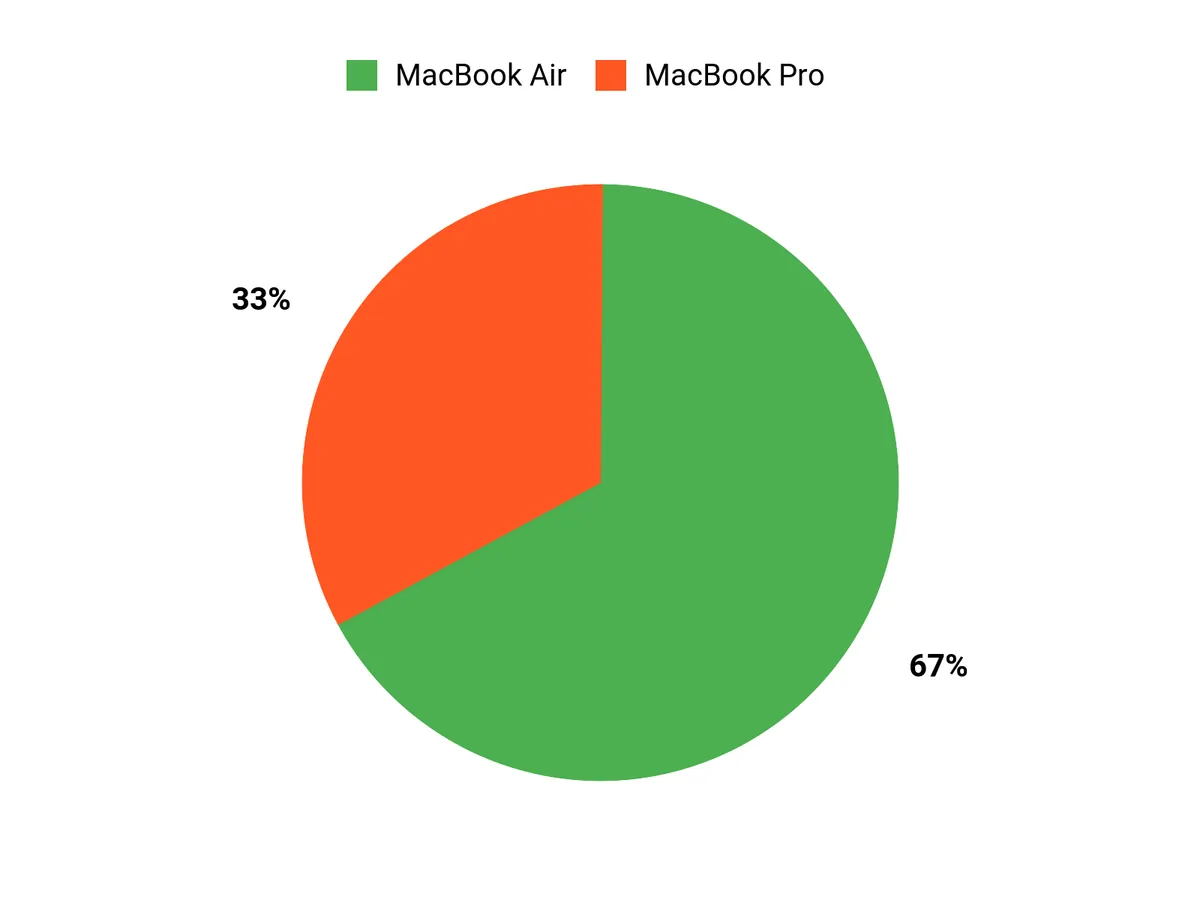
I see buyers prioritize three things: raw performance, everyday portability, and affordability with modern AI features. Those needing heavy creative or professional work usually pick the Pro, people who want a balanced, lightweight daily machine go for the Air, and budget-conscious users or students favor the Neo for its price and portability.
Wrapping Up
If you want the fastest, most capable Mac for creative work and heavy multitasking, I recommend the 14.2-inch MacBook Pro with the M5. Its 10-core CPU, 10-core GPU, Liquid Retina XDR display, and long battery life make it the tool I would choose for video editing, 3D work, and any task that benefits from sustained performance. For most people who need a reliable everyday machine with great battery life and strong performance without the Pro price, the 13.6-inch MacBook Air with the M4 chip is the sweet spot, offering portability and a sharp Retina display that I find excellent for productivity and light creative work.
If your priority is an affordable Mac with modern AI features and solid portability for web-focused workflows, the 13-inch MacBook Neo with the A18 Pro chip delivers the best value and I would pick it for students, travelers, or anyone who wants Apple Intelligence on a budget. Ultimately I matched each model to the workflows I see most often so you can pick the MacBook that saves you time and fits your budget.
|
Apple 2025 MacBook Pro |
Apple 2025 MacBook Air |
Apple 2026 MacBook Neo |
|
|---|---|---|---|
|
|
|
|
|
|
Rating |
4.7/5 (25 reviews) |
4.8/5 (30 reviews) |
N/A |
|
Processor |
Apple M5 chip, 10-Core CPU and GPU |
Apple M4 chip, 10-Core CPU and 8-Core GPU |
Apple A18 Pro chip, 6-Core CPU and 5-Core GPU |
|
Memory |
16 GB Unified Memory |
16 GB Unified Memory |
8 GB Unified Memory |
|
Display |
14.2-inch Liquid Retina XDR, 3024 x 1964 Resolution, 1000 nits Brightness |
13.6-inch Liquid Retina, 2560 x 1664 Resolution, 500 nits Brightness |
13-inch Liquid Retina, 2408 x 1506 Resolution, 500 nits Brightness |
|
Battery Life |
Up to 24 hours video streaming |
Up to 18 hours video streaming |
Up to 16 hours video streaming |
|
Price |
$1,549.00 |
$899.00 |
$599.00 |
This Roundup is reader-supported. When you click through links we may earn a referral commission on qualifying purchases.



