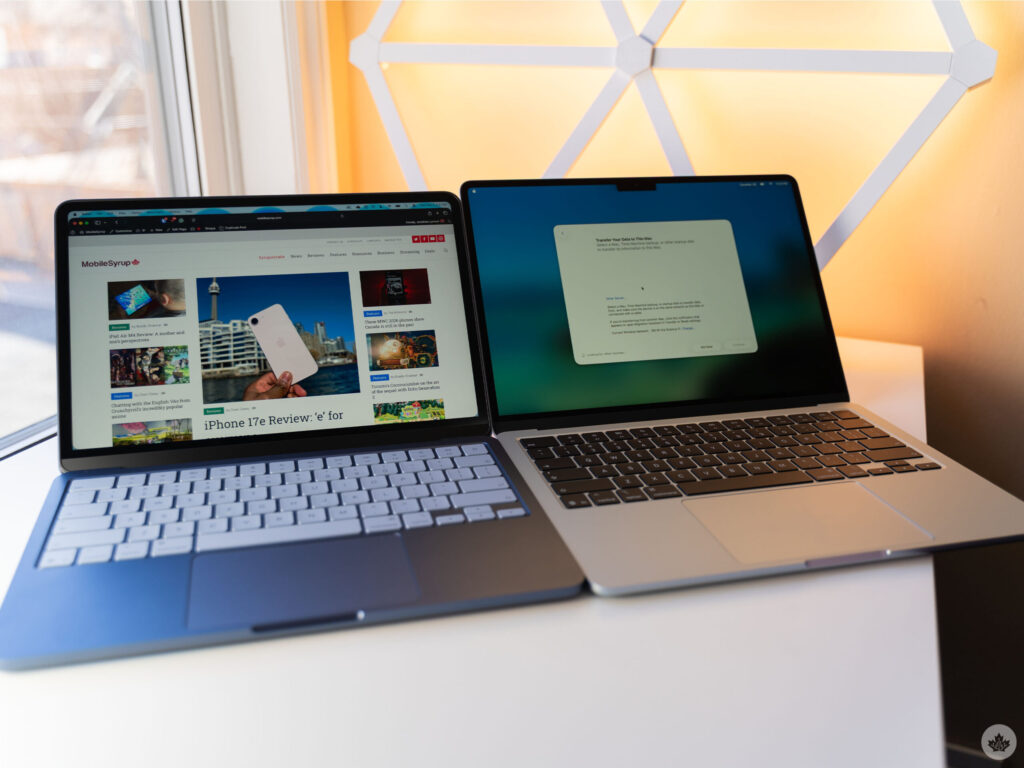
The MacBook Neo is Apple’s newest and most affordable laptop, launched in March 2026 at $599. It is powered by the A18 Pro chip from the iPhone 16 Pro, features a 13-inch Liquid Retina display, and runs macOS Tahoe. It differs from other laptops primarily through its Apple Silicon efficiency, premium aluminum build, and long battery life at an entry-level price. That said, it comes with meaningful trade-offs worth knowing before you buy.
For years, getting into the Mac ecosystem meant spending at least $999. Apple had a clear pricing floor, and if you could not meet it, your options were a used machine or a Windows laptop. The MacBook Neo changes that entirely. At $599, Apple has done something it has never done before: delivered a brand-new, fully supported Mac laptop at a price that directly competes with mainstream Windows machines.
The reaction from both the tech press and everyday buyers has been genuinely enthusiastic. But as with any product that breaks a price barrier, the details matter. The MacBook Neo makes real compromises to reach $599, and understanding exactly what those are, and how the machine stacks up against other laptops at this price, is what this guide is for. I have gone through the full spec sheet, hands-on impressions, and benchmark data so you get the complete picture.
What Exactly Is the MacBook Neo?
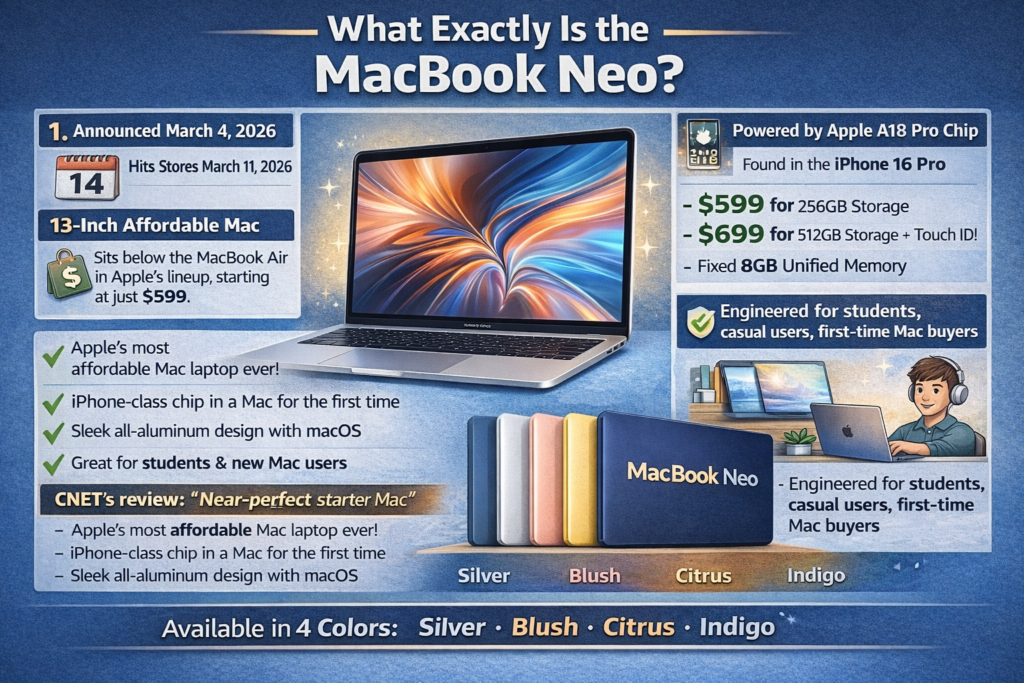
The MacBook Neo is a 13-inch Mac laptop that Apple announced on March 4, 2026, with units hitting store shelves on March 11, 2026. It sits below the MacBook Air in Apple’s lineup, making it the most affordable Mac laptop the company has ever sold.
The machine is powered by the Apple A18 Pro chip, the same processor found inside the iPhone 16 Pro. This is the first time Apple has used an A-series iPhone chip inside a Mac, a notable milestone that signals how capable Apple’s smartphone silicon has become. The Neo comes in two configurations: $599 for 256GB of storage, and $699 for 512GB of storage and Touch ID. Both models are fixed at 8GB of unified memory with no upgrade option.
Apple describes the Neo as designed for students, casual users, and first-time Mac buyers. But the combination of genuine Apple Silicon performance, an all-aluminum body, and macOS means it is more capable than that framing suggests. CNET’s review calls it “near-perfect” as a starter Mac, noting that the only real shortfall is the 8GB memory ceiling. That is a fair and accurate summary.
It is available in four colors: Silver, Blush, Citrus, and Indigo.
MacBook Neo Full Specifications
Full Spec Sheet (2026):
| Spec | MacBook Neo ($599) | MacBook Neo ($699) |
|---|---|---|
| Chip | Apple A18 Pro | Apple A18 Pro |
| CPU | 6-core (2 performance, 4 efficiency) | 6-core (2 performance, 4 efficiency) |
| GPU | 5-core | 5-core |
| Neural Engine | 16-core | 16-core |
| RAM | 8GB unified (fixed) | 8GB unified (fixed) |
| Storage | 256GB SSD | 512GB SSD |
| Display | 13-inch Liquid Retina, 2408×1506, 219 ppi | 13-inch Liquid Retina, 2408×1506, 219 ppi |
| Brightness | 500 nits | 500 nits |
| Color Space | sRGB | sRGB |
| Camera | 1080p FaceTime HD | 1080p FaceTime HD |
| Battery | Up to 16 hours | Up to 16 hours |
| Ports | 2x USB-C (1x USB 3.0 / 1x USB 2.0) | 2x USB-C (1x USB 3.0 / 1x USB 2.0) |
| Charging | USB-C (20W, no MagSafe) | USB-C (20W, no MagSafe) |
| Wi-Fi | Wi-Fi 6E (802.11ax) | Wi-Fi 6E (802.11ax) |
| Bluetooth | Bluetooth 6 | Bluetooth 6 |
| Touch ID | No | Yes |
| Weight | 2.7 pounds (1.23 kg) | 2.7 pounds (1.23 kg) |
| Dimensions | 0.50 x 11.71 x 8.12 inches | 0.50 x 11.71 x 8.12 inches |
| Colors | Silver, Blush, Citrus, Indigo | Silver, Blush, Citrus, Indigo |
| Operating System | macOS Tahoe | macOS Tahoe |
| Starting Price | $599 | $699 |
The A18 Pro Chip: What It Means for Performance

The A18 Pro is where the MacBook Neo tells its most interesting story. Built on TSMC’s 3nm process, it features a 6-core CPU with 2 high-performance cores and 4 efficiency cores, a 5-core GPU, a 16-core Neural Engine, and 60 GB/s of memory bandwidth.
On paper, those specs are a step below Apple’s M-series Mac chips. In practice, the single-core performance is remarkable. In Geekbench 6 benchmarks, the A18 Pro scores approximately 3,461 to 3,535 in single-core tests, placing it roughly 10% ahead of the M3 MacBook Air in single-core performance. It is about 6% slower than the M4 MacBook Air in single-core, and around 13% slower than the newly released M5 MacBook Air.
Multi-core performance is where the gap opens up more noticeably. The A18 Pro’s 6-core configuration scores around 8,700 to 8,920, compared to the M4 MacBook Air’s 12,087. This is a function of core count, not raw per-core efficiency. For the single-threaded tasks that dominate most everyday computing, the Neo holds up impressively. For CPU-heavy sustained workloads like video rendering or compiling large codebases, it is at a meaningful disadvantage relative to the M4 and M5.
Apple claims the Neo is up to 50% faster for everyday tasks like web browsing, and up to 3x faster for on-device AI workloads, compared to the bestselling Intel Core Ultra 5 PC laptops. The AI figure in particular is a product of the A18 Pro’s 16-core Neural Engine, which accelerates Apple Intelligence features including photo cleanup, writing tools, and on-device language processing across macOS Tahoe natively from day one.
Based on what reviewers across publications have reported consistently, the Neo is genuinely fast for its price. Web browsing, document editing, video calls, light photo editing, and streaming all feel responsive and snappy. It handles everything a student or casual professional needs without friction.
How Does the MacBook Neo Differ from Other MacBooks?
This is where the details really matter. The MacBook Neo is not just a cheaper MacBook Air. It has specific trade-offs that set it apart from every other Mac Apple sells.
MacBook Neo vs. MacBook Air M4 and M5
| Feature | MacBook Neo | MacBook Air M4 | MacBook Air M5 |
|---|---|---|---|
| Price | $599 | $1,099 | $1,299 |
| Chip | A18 Pro | M4 | M5 |
| CPU Cores | 6-core | 10-core | 10-core |
| GPU Cores | 5-core | 10-core | 10-core |
| Base RAM | 8GB (fixed) | 16GB (up to 32GB) | 16GB (up to 32GB) |
| Memory Bandwidth | 60 GB/s | 120 GB/s | 120+ GB/s |
| Display Size | 13 inches | 13.6 inches | 13.6 inches |
| Color Gamut | sRGB | P3 wide color | P3 wide color |
| MagSafe | No | Yes | Yes |
| Touch ID | $699 model only | Yes (all models) | Yes (all models) |
| Keyboard Backlight | No | Yes | Yes |
| Max External Monitors | 1 | 2 | 2 |
| Thunderbolt Ports | No (USB-C only) | Yes (Thunderbolt 4) | Yes (Thunderbolt 4) |
| Battery Life | Up to 16 hours | Up to 18 hours | Up to 18 hours |
| Weight | 2.7 lbs | 2.7 lbs | 2.7 lbs |
| Operating System | macOS Tahoe | macOS Tahoe | macOS Tahoe |
The most important differences at a glance:
- The MacBook Air M4 and M5 support P3 wide color on their displays. The Neo uses sRGB only, which is a noticeable step down for photo editing and color-sensitive creative work.
- The MacBook Air starts at 16GB of RAM with upgrade options to 32GB. The Neo is locked at 8GB permanently.
- The MacBook Air has Thunderbolt 4 ports on both sides. The Neo has standard USB-C, with one port limited to USB 2.0 speeds.
- MagSafe is available on the MacBook Air. The Neo charges only via USB-C at 20W, meaning one of its two ports is occupied while charging.
- Keyboard backlighting is absent on the Neo entirely, at both price tiers.
These are not minor footnotes. For a developer, designer, or power user, several of these gaps are disqualifying. For a student, a first-time Mac buyer, or someone replacing an older Intel MacBook, none of them may matter at all.
How Does the MacBook Neo Differ from Windows Laptops?
This is arguably the more interesting comparison for most buyers considering the Neo, since the $599 price puts it in direct competition with a crowded field of Windows machines.
This in-depth MacBook Neo vs. MacBook Air breakdown from YouTube covers the two Apple options well, but the Windows comparison is equally important to understand.
MacBook Neo vs. Budget and Mid-Range Windows Laptops
| Feature | MacBook Neo | Budget Windows ($599) | Mid-Range Windows ($999) |
|---|---|---|---|
| CPU | A18 Pro (6-core, 3nm) | Intel Core Ultra 5 (14-core) | Intel Core Ultra 7 (16-core) |
| RAM | 8GB fixed | 8 to 16GB (often upgradeable) | 16 to 32GB |
| Storage | 256GB to 512GB | 256GB to 1TB | 512GB to 2TB |
| Display | 13-inch, 2408×1506, 500 nits | 13 to 14-inch, 1920×1080, 250 to 300 nits | 13 to 14-inch OLED, 400+ nits |
| Battery | Up to 16 hours | 6 to 10 hours | 8 to 13 hours |
| Weight | 1.23 kg | 1.4 to 1.8 kg | 1.3 to 1.5 kg |
| Build Material | Recycled aluminum | Plastic or aluminum hybrid | CNC aluminum |
| Ports | 2x USB-C (mixed speeds) | USB-C, USB-A, HDMI (varies) | 2x Thunderbolt 4, USB-A, HDMI |
| OS | macOS Tahoe | Windows 11 | Windows 11 |
| Touchscreen | No | Common at this price | Common at this price |
| Upgradeable RAM | No | Often yes | Often yes |
Where the MacBook Neo genuinely beats the competition in its price bracket is in display quality, build quality, battery life, and single-core performance. A $599 Windows laptop typically ships with a 1080p panel at 250 to 300 nits, a plastic chassis, and a battery that lasts 6 to 8 hours under real-world conditions. The Neo’s 2408×1506 display at 500 nits in an all-aluminum body with 16 hours of battery life is meaningfully better hardware than what Windows OEMs typically offer at this price.
Where Windows laptops hit back is RAM flexibility, port variety, touchscreen availability, and software ecosystem breadth. A $599 Windows machine commonly ships with 16GB of RAM upgradeable to 32GB. It often includes USB-A, HDMI, and a card reader in addition to USB-C. Many have touchscreens. And Windows supports a far wider range of software, including most professional applications that macOS does not run natively.
The MacBook Neo’s Key Limitations (Honest Assessment)
No review of the MacBook Neo is complete without a clear-eyed look at what it gives up to reach $599. These are real trade-offs, not minor quibbles.
Fixed 8GB RAM
This is the most discussed limitation and for good reason. 8GB is workable for everyday computing in 2026, but it leaves almost no room for memory-intensive tasks like running multiple browser tabs alongside a creative app, local AI model inference, or any kind of virtual machine work. Crucially, this is not a cost-saving measure Apple could have avoided easily. Because the Neo runs the iPhone 16 Pro’s A18 Pro silicon, the memory is bonded directly to the chip via InFO-PoP packaging. Offering a 16GB tier would require a completely different chip design, which would eliminate the manufacturing cost advantage that makes the $599 price point possible in the first place.
No MagSafe Connector
Every other current MacBook ships with MagSafe, Apple’s magnetic charging connector that detaches safely if someone trips over your cable. The Neo charges via USB-C only, at a maximum of 20W. This means charging is slow compared to other MacBooks, and it consumes one of only two available ports.
No Touch ID on the $599 Model
Touch ID requires the $699 configuration. On the base $599 model, logging in, authenticating App Store purchases, and using Apple Pay all require typing a full password. For a developer or anyone working in Terminal frequently, this is a persistent daily friction point that adds up over time.
No Keyboard Backlight
Both models of the Neo ship without a backlit keyboard. Working in dim conditions means either memorizing your keyboard layout (which most people can do) or finding better lighting. It is a cost cut, and it shows.
One USB 2.0 Port
The Neo has two USB-C ports, but they are not equal. One runs at USB 3.0 speeds (up to 10 Gbps with DisplayPort support), while the other is limited to USB 2.0 (480 Mbps). The slower port is effectively useless for data transfer and only practical for charging. This is a direct limitation of the A18 Pro SoC’s interface support, not a design choice Apple could have worked around.
sRGB Display, Not P3
Every other current Mac ships with a P3 wide color display. The Neo uses sRGB, which has a smaller color gamut. For everyday use, most people will not notice. For photo editing, video color grading, or any color-sensitive creative work, this is a genuine step down from the MacBook Air.
Only One External Monitor Supported
The MacBook Air supports two external displays simultaneously. The Neo supports only one. For users who work with a multi-monitor setup, this is a hard limitation.
What the MacBook Neo Gets Right

Despite the limitations, the MacBook Neo gets several important things right, and it is worth being equally specific about those.
The battery life is exceptional. Apple rates it at 16 hours for video streaming, and real-world reviews consistently report 10 to 13 hours under mixed workloads. That beats almost every Windows laptop at this price by a factor of two.
The build quality is genuinely premium for the price. The full aluminum body, the refined keyboard, the large glass trackpad, and the tight hinge mechanism are all at a level of physical quality you simply do not get from plastic-chassis Windows machines in this bracket.
The display, while not P3, is legitimately good. At 2408×1506 and 500 nits, it is sharper and brighter than nearly every competing $599 Windows display. Text is crisp, color is accurate for everyday use, and the anti-reflective coating handles outdoor and bright-room viewing well.
The 1080p webcam is among the best in any laptop at this price, and the dual microphone array with beamforming technology delivers clear audio for video calls without any adjustments.
And macOS Tahoe is a complete, polished, and deeply integrated operating system that works seamlessly with iPhone, iPad, and Apple Watch. For anyone already invested in the Apple ecosystem, the Neo extends that connection to a Mac at a price that was not possible before. The Neo ships with macOS Tahoe version 26.3.1 or newer out of the box, ensuring full support for the latest Apple Intelligence features from day one without requiring any software updates after setup.
Pro Tip: If you are choosing between the $599 and $699 MacBook Neo, the $100 upgrade is almost always worth it. You get Touch ID (which pays for itself in daily-use convenience within the first week), double the storage, and a machine that will feel less cramped as your app library and file collection grows. The only scenario where the $599 model makes clear sense is education pricing or a situation where budget is the single deciding factor. In every other case, spend the extra $100.
Step-by-Step: Is the MacBook Neo Right for You?
Use this quick decision guide to find out.
Step 1: Check Your Software Requirements
If your work depends on specific Windows-only software, a gaming library, or tools that require DirectX, the MacBook Neo is not your machine. macOS does not run Windows applications natively, and while Parallels and CrossOver exist as solutions, they add cost and complexity.
Step 2: Assess Your RAM Needs
For web browsing, email, streaming, light photo editing, document work, and video calls, 8GB is adequate. If you routinely run virtual machines, heavy creative apps like Final Cut Pro with large projects, or plan to use local AI models offline, 8GB will feel tight. In that case, step up to a MacBook Air M4 with 16GB.
Step 3: Evaluate Your Port Requirements
If you regularly connect external hard drives, SD card readers, HDMI displays, USB-A peripherals, or multiple monitors simultaneously, the Neo’s two mismatched USB-C ports will require a hub and create friction. If you work primarily wirelessly with occasional USB-C connections, the port situation is manageable.
Step 4: Consider Your Color Work
If you edit photos or video professionally and rely on accurate wide color reproduction, the sRGB display is a genuine limitation. For everything else, it is a non-issue.
Step 5: Decide Between the $599 and $699 Models
If you use Terminal, password managers, Apple Pay, or authenticate apps frequently, get the $699 model for Touch ID. If storage of 256GB is sufficient for your needs and budget is the priority, the $599 model is a solid machine.
Step 6: Buy or Skip
Buy the MacBook Neo if you want a premium-feeling, long-battery, lightweight Mac at a breakthrough price for everyday use.
Skip the MacBook Neo if you need more than 8GB of RAM, professional-grade color accuracy, MagSafe, or full-speed Thunderbolt connectivity.
MacBook Neo at a Glance: Pros and Cons
Pros
- $599 entry price is the lowest Apple has ever offered for a new Mac laptop
- A18 Pro single-core performance beats the M3 MacBook Air and outpaces all competing Intel Core Ultra 5 laptops
- Up to 16 hours of real-world battery life, best in class at this price
- Full aluminum build with premium feel that no Windows laptop at $599 can match
- 13-inch Liquid Retina display at 2408×1506 and 500 nits, significantly sharper and brighter than typical $599 Windows displays
- 1080p webcam and beamforming dual mics deliver genuinely good video call quality
- Ships with macOS Tahoe out of the box, including full native Apple Intelligence support from first boot
- Wi-Fi 6E and Bluetooth 6 for fast, modern wireless connectivity
- 2.7 pounds makes it among the lightest laptops at this price
Cons
- 8GB RAM is permanently fixed with no upgrade path at any price tier
- No MagSafe; charges via USB-C at a slow 20W maximum
- No Touch ID on the $599 base model; requires the $699 upgrade
- No keyboard backlight on either model
- One of two USB-C ports is limited to USB 2.0 speeds (480 Mbps)
- Display uses sRGB color space, not P3 wide color like every other current Mac
- Supports only one external monitor at a time
- No Thunderbolt ports at any configuration
2026 Context: Why the MacBook Neo Matters Beyond Its Specs
The MacBook Neo is not just a product. It is a market signal. For years, budget laptops were synonymous with compromised build quality, dim displays, and frustrating battery life. The Windows ecosystem owned the sub-$600 market almost entirely, and that came with its own set of quality ceilings.
The Neo’s arrival at $599 with an aluminum chassis, a sharp 500-nit display, and 16 hours of battery puts direct pressure on Windows OEMs to raise the hardware floor in this price bracket. As Windows Latest notes, PC manufacturers have every reason to respond quickly because the Neo demonstrates that it is possible to deliver a genuinely premium everyday laptop experience at this price point.
It also marks an important milestone for Apple Silicon. The A18 Pro was always a smartphone chip that happened to outperform many laptop processors. By placing it in a Mac, Apple has formalized what many benchmark comparisons already showed: iPhone silicon is genuinely capable computer silicon, and the efficiency advantages of the 3nm process translate directly into better battery life and quieter thermals on a laptop. With analyst Ming-Chi Kuo noting that a second-generation MacBook Neo is expected in 2027, this is clearly a product line with a future, not a one-off experiment.
Frequently Asked Questions
What is the MacBook Neo?
The MacBook Neo is Apple’s most affordable Mac laptop, released in March 2026 at $599. It is powered by the A18 Pro chip from the iPhone 16 Pro, features a 13-inch Liquid Retina display, 8GB of unified memory, and ships with macOS Tahoe out of the box. It is the first Mac to use an A-series iPhone chip rather than an M-series Mac chip.
How is the MacBook Neo different from the MacBook Air?
The MacBook Air M4 costs $1,099 and offers a larger 13.6-inch P3 display, a 10-core M4 chip, 16GB of base RAM upgradeable to 32GB, Thunderbolt 4 ports, MagSafe charging, keyboard backlighting, two external monitor support, and 18 hours of battery. The Neo trades most of those features for a $500 lower starting price, a smaller 8GB fixed RAM ceiling, and USB-C-only charging.
Is the MacBook Neo good for students?
Yes, it is one of the best laptop options for students in 2026. The combination of long battery life, lightweight aluminum build, a sharp display, and a $599 price point is genuinely hard to beat for everyday student workloads including document editing, research, video calls, streaming, and light creative work.
Does the MacBook Neo have Touch ID?
No, the $599 base model does not include Touch ID. The $699 model with 512GB storage adds Touch ID. For anyone who logs in frequently, uses Apple Pay, or authenticates apps regularly, the $699 model is worth the upgrade.
Can the MacBook Neo run Windows?
Not natively. The MacBook Neo runs macOS Tahoe. Windows can be run through virtualization software like Parallels Desktop, but this is a paid third-party solution and not a seamless experience. If Windows compatibility is important for your workflow, a Windows laptop is the more practical choice.
Why does the MacBook Neo only have 8GB of RAM?
The Neo uses the A18 Pro chip from the iPhone 16 Pro, which bonds memory directly to the processor via InFO-PoP packaging. This is how all A-series iPhone chips are built. Offering a 16GB option would require a completely different chip design, which would eliminate the manufacturing cost advantage that makes the $599 price point possible.
Does the MacBook Neo have MagSafe?
No. The MacBook Neo charges only via USB-C at a maximum of 20W, using one of its two available ports. MagSafe is exclusive to the MacBook Air and MacBook Pro lines.
Is the MacBook Neo display good?
For a $599 laptop, yes. The 13-inch Liquid Retina display at 2408×1506 resolution and 500 nits of brightness is significantly better than the typical 1080p, 250 to 300 nit panels found on competing Windows machines at this price. The one notable limitation is that it uses sRGB rather than the P3 wide color gamut found on all other current Macs.
How long does the MacBook Neo battery last?
Apple rates it at up to 16 hours for video streaming. Real-world mixed-use reviews from multiple outlets consistently report 10 to 13 hours, which places it well ahead of most competing Windows laptops in its price range.
Will there be a MacBook Neo 2?
Industry analyst Ming-Chi Kuo has indicated that a second-generation MacBook Neo is expected in 2027. The first generation was confirmed not to include a touchscreen, and Kuo’s latest reports suggest the second generation may also skip a touchscreen. No further confirmed details are available as of March 2026.
Bottom Line
The MacBook Neo is a genuine achievement at $599. It delivers real Apple Silicon performance, a class-leading display, exceptional battery life, and premium build quality at a price point that has never existed in Apple’s laptop lineup before. For students, casual users, and first-time Mac buyers, it is one of the most compelling laptops available right now at any price in its category.
The trade-offs are real, particularly the fixed 8GB RAM, the absent MagSafe, the sRGB-only display, and the missing keyboard backlight. None of those are dealbreakers for the audience this machine is built for. But for power users, developers with heavy workflows, or creative professionals who need P3 color accuracy and more memory headroom, the MacBook Air M4 with 16GB remains the better investment.
If $599 is your ceiling and you want the best everyday laptop experience that money can buy right now, the MacBook Neo earns its recommendation without hesitation.