
Yes, OpenClaw can use Claude Code and it can absolutely write code — but the relationship between these two tools is more nuanced than a simple yes or no, and there are some important billing and setup changes in 2026 that every user needs to know about before diving in.
If you are trying to figure out whether to set up OpenClaw as your AI coding agent, pair it with Claude Code, or use one instead of the other, you are in the right place. This guide breaks it all down.
What Is OpenClaw?
Before answering the coding question directly, it helps to understand what OpenClaw actually is, because a lot of people come in with the wrong mental model.
OpenClaw is a free, open-source AI assistant that acts as a proactive personal agent, connecting AI models with your local files and messaging apps like WhatsApp, Telegram, Discord, and Slack to automate tasks around the clock. It is not a chatbot in the traditional sense. It is a persistent, always-on agent framework that runs locally on your own hardware.
OpenClaw is also fully model-agnostic. It works with Claude (Anthropic), GPT-4 (OpenAI), DeepSeek, Gemini, Grok, and even fully local models via Ollama and vLLM. This is one of the core reasons it became so popular so fast, crossing 331,000 GitHub stars in April 2026 and becoming one of the fastest-growing repositories in GitHub history.
In 2026, OpenClaw has grown into a full-blown autonomous agent platform with over 100 preconfigured AgentSkills and a ClawHub marketplace that now lists over 5,700 verified, community-built skills. It can read and write files, execute shell commands, send emails, control browsers, manage calendars, and yes, write and review code.
Can OpenClaw Write Code?
Yes, OpenClaw can write code. It supports coding tasks through its dedicated coding agent skill, which allows it to plan, write, debug, and even deploy code autonomously. But it approaches coding differently from a tool like Claude Code or GitHub Copilot, and understanding that difference matters a lot for how you set it up.
OpenClaw handles coding through what it calls its Skill architecture. A skill is essentially a Markdown file containing structured instructions that tell the agent exactly what to do, what files to read, what commands to run, and how to verify the result. When you give OpenClaw a coding task, it uses a sub-agent to execute it in the background, often in a sandboxed workspace, while the main agent continues handling other tasks.
From personal experience working with autonomous agents, this architecture is genuinely impressive when it clicks. The agent can handle full project generation, refactoring, pull request reviews, and even running test suites without you watching over its shoulder.
What OpenClaw can do as a coding agent:
-
Generate and scaffold full projects (APIs, full-stack apps, scripts, tools)
-
Write, edit, and refactor code across a codebase
-
Run code and execute tests in an isolated workspace
-
Commit to git and manage branches
-
Review pull requests and suggest improvements
-
Generate documentation and changelogs
-
Debug issues and iterate until tests pass
Pro Tip: When setting up OpenClaw for coding tasks, always point it at your official project documentation before it makes any changes. A common workflow used by experienced developers is: “Read these docs first, document every change you make, and reference those notes before your next action.” This dramatically reduces compounding errors during multi-step coding sessions.
Does OpenClaw Use Claude Code?
OpenClaw can inte
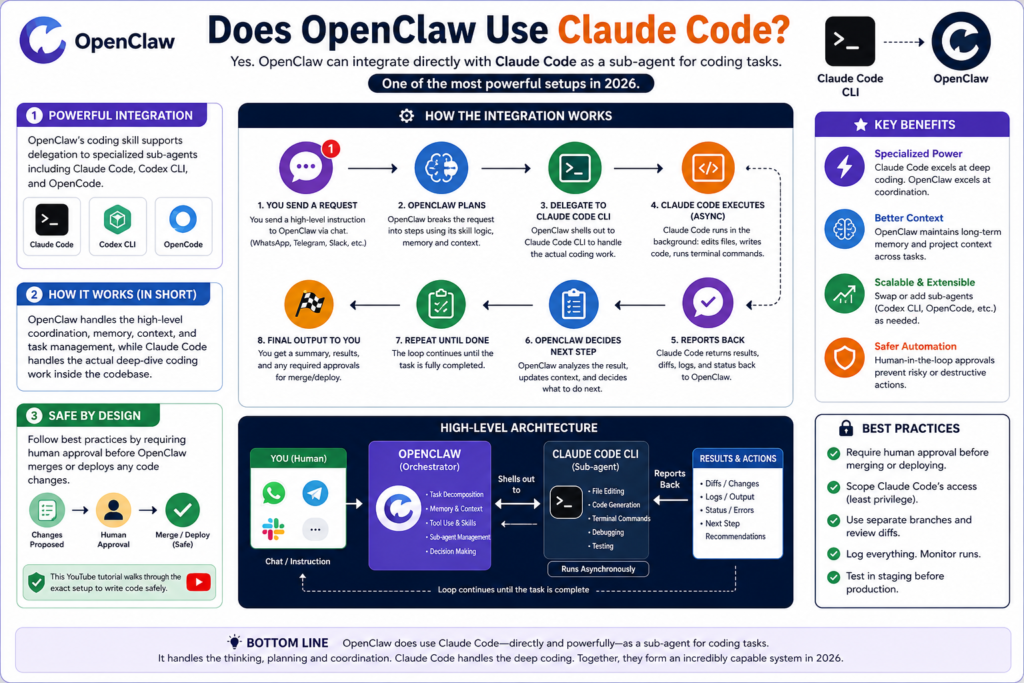
grate directly with Claude Code as a sub-agent for coding tasks. This is one of the most powerful setups available in 2026, and it is where things get interesting.
OpenClaw’s coding skill supports delegation to specialized sub-agents including Claude Code, Codex CLI, and OpenCode. What this means practically is that OpenClaw handles the high-level coordination, memory, context, and task management, while Claude Code handles the actual deep-dive coding work inside the codebase. It is a genuinely useful combination, but you need to understand the architecture before expecting it to just work out of the box.
This YouTube tutorial on setting up OpenClaw to write code safely walks through exactly how to configure this setup, including how to require human approval before OpenClaw merges or deploys any code changes, which is highly recommended before you let any autonomous agent touch production.
The integration works roughly like this: OpenClaw receives a high-level instruction from you via chat (WhatsApp, Telegram, Slack, etc.), breaks it into steps using its skill logic, and then shells out to Claude Code CLI to handle the actual file editing, code generation, and terminal commands. Claude Code runs asynchronously in the background and reports back. OpenClaw then uses the result to decide its next step.
OpenClaw vs Claude Code: What’s the Difference?
This is the question most developers actually want answered. They are not the same tool, and they are not really direct competitors. Think of them as different layers of the same stack.
For pure coding inside a local development environment, Claude Code has a meaningful edge. Its deep integration with the terminal, native git tooling, and tight optimization around Anthropic’s Claude models means it can read large codebases, implement features end-to-end, debug regressions, and write tests with minimal setup.
OpenClaw’s strength is everything around the coding workflow: the planning, the communication, the background running, the cross-app automation, and the ability to let coding happen while you are offline or doing other things.
In my experience, the real sweet spot in 2026 is using both together, with OpenClaw managing the big picture and Claude Code doing the heavy lifting on the codebase itself.
The April 2026 Billing Change: What You Need to Know
This is critical information if you are planning to use Claude as the model powering OpenClaw.
As of April 4, 2026, Anthropic made a significant change to its billing policy. Claude Pro and Max subscribers can no longer use their subscription credits through third-party frameworks like OpenClaw. As TechRadar reported on the Claude billing update, Anthropic removed OpenClaw and other third-party tools from the standard Claude subscription, meaning usage through these external platforms now falls under a separate pay-as-you-go “extra usage” billing system.
Anthropic’s reasoning was straightforward: agentic tools like OpenClaw generate compute usage far beyond what a normal human chat session would produce, and the flat subscription model was never designed to handle that kind of throughput sustainably.
What this means for you in practical terms:
-
If you connect OpenClaw to Claude via your Claude Pro or Max OAuth token, usage will be billed separately at API rates
-
Claude Sonnet 4.7 is approximately $3 per million input tokens and $15 per million output tokens
-
Claude Opus 4.7 runs around $5/$25 per million tokens
-
Using your own Anthropic API key directly in OpenClaw is the cleanest option and gives you full cost control
-
Routing OpenClaw through Claude Code CLI using the ACP protocol keeps usage under your Claude Code subscription, though this workaround could be patched in future updates
-
Anthropic offered a one-time credit matching your subscription price as a transition gesture (expired April 17, 2026)
Your current options for connecting Claude to OpenClaw:
-
Use a direct Anthropic API key in OpenClaw’s model configuration
-
Route OpenClaw through Claude Code CLI using the ACP (Agent Communication Protocol)
-
Use a different model entirely (GPT-4o, DeepSeek, Gemini) where flat-rate subscription access is still supported
-
Upgrade to a usage-based plan if you are running heavy agentic workloads
How to Set Up OpenClaw for Coding Tasks: Step-by-Step
Step 1: Install OpenClaw
Download and install OpenClaw from openclaw.ai. It runs as a local Node.js daemon on your machine. Follow the official setup guide to initialize your agent and create your first SOUL.md identity file.
Step 2: Configure Your Model
Go into your OpenClaw configuration and set your preferred LLM. If you want Claude, add your Anthropic API key directly. If you want to use a different model, OpenClaw supports virtually every major provider. For coding tasks, Claude Sonnet 4.7 offers the best balance of speed and intelligence at a cost-effective rate.
Step 3: Enable the Coding Agent Skill
Navigate to your skills directory and enable or install the coding agent skill. In your SKILL.md file, configure it so that all coding tasks use bash with background:true. This ensures coding tasks run asynchronously and do not block your main agent.
Step 4: Point OpenClaw at Your Codebase
Tell your OpenClaw agent the path to your project. Instruct it to read your README, any architecture docs, and any existing AGENTS.md file before making changes. This context loading step is the single most impactful thing you can do to improve output quality.
Step 5: Set Up Approval Gates
Before giving OpenClaw write access to your production codebase, configure it to require human approval before merging or deploying. You can tell the agent: “Require my explicit approval before any merge, deploy, or destructive operation.” This gives you the benefits of autonomous coding without the risks.
Step 6: Test With a Small Task
Start with something low-risk. Ask OpenClaw to create a new utility function, write a unit test for an existing function, or generate documentation for a module. Review the output carefully before expanding its permissions.
Step 7: Scale Up With Sub-Agent Delegation
Once you are comfortable with the basic coding setup, you can configure Claude Code or Codex CLI as a sub-agent under OpenClaw for more complex tasks. This lets OpenClaw coordinate multi-step projects while Claude Code handles the deep codebase work.
Best AI Models for OpenClaw Coding in 2026
Not all models perform equally when running inside OpenClaw for coding tasks. Based on community testing and benchmarks from early 2026, here is where each major model stands:
For most developers, PCMag’s breakdown of AI coding assistant performance in 2026 aligns with what the community has discovered hands-on: Claude Sonnet 4.7 hits the best balance between output quality and cost when running coding tasks through OpenClaw. Claude Opus 4.7 is the right call when you need deep architectural reasoning across a large codebase, but the cost difference is significant enough that it should be reserved for high-value tasks.
OpenClaw Coding: Real Limitations to Know
OpenClaw is powerful, but it is not magic. There are real limitations you should understand before committing to it as your primary coding agent.
Timeouts are a known issue. When OpenClaw pings Claude Code or another sub-agent, it does not always wait long enough for complex code generation or large codebase analysis to complete. The agent can proceed prematurely, which causes fragmented or incomplete output. This is a known community pain point and something to watch for on longer tasks.
It is not a replacement for an IDE. OpenClaw does not have the deep inline suggestions, intellisense, real-time error highlighting, or debugging interface of a proper development environment. It works best as a background orchestrator, not as a replacement for Cursor, VS Code, or your preferred editor.
Security requires deliberate configuration. By default, OpenClaw has broad system access. Giving it coding permissions without setting up a sandboxed workspace and approval gates is genuinely risky. Always isolate your coding workspace and require approvals for destructive operations.
2026 Trends: Where OpenClaw and AI Coding Are Headed
The biggest trend in 2026 is the move toward multi-agent coding pipelines. Rather than one AI writing all your code, the emerging pattern is an orchestrator agent (like OpenClaw) managing a team of specialized sub-agents: one for writing, one for testing, one for code review, and one for documentation.
OpenClaw is well positioned for this model because its Skill architecture naturally supports delegation. The ClawHub marketplace now hosts over 5,700 verified community skills, and the number of coding-specific ones covering code review, test generation, git commit writing, environment diagnostics, and documentation generation has grown dramatically over the past few months.
There is also growing adoption of OpenClaw in small development teams and solo founders who use it as a force multiplier: keeping the agent running overnight on refactoring tasks, test generation, or documentation updates while the human developer focuses on product and architecture decisions. For developers who want to go deeper on this workflow, DigitalOcean’s guide to OpenClaw Skills development is one of the clearest technical references available right now.
Frequently Asked Questions
Can OpenClaw use Claude Code as a sub-agent?
Yes. OpenClaw can delegate coding tasks to Claude Code CLI using the ACP (Agent Communication Protocol). This setup lets OpenClaw handle high-level task coordination while Claude Code handles the deep coding work inside your codebase. It requires some configuration but is one of the most powerful developer setups available in 2026.
Is OpenClaw free to use for coding?
OpenClaw itself is free and open-source. However, you will need API keys or a subscription for whichever AI model you choose to power it. Since April 4, 2026, Claude Pro and Max subscriptions no longer cover OpenClaw usage, so direct Anthropic API access is the recommended path.
Can OpenClaw write full projects from scratch?
Yes, with the right setup. OpenClaw can scaffold APIs, full-stack apps, scripts, and tools. For best results, give it clear context about your stack, point it at any existing documentation, and configure it to document its own changes as it goes.
Does OpenClaw work without Claude?
Absolutely. OpenClaw is model-agnostic and works with GPT-4o, DeepSeek, Gemini, Grok, and local models via Ollama. Claude is popular for OpenClaw coding tasks because of its strong performance on complex reasoning, but it is not required.
Is Claude Code better than OpenClaw for coding?
For pure, interactive coding in a terminal environment, Claude Code leads. It has deeper filesystem integration, native git tooling, and is purpose-built for coding. OpenClaw is better when you need autonomous background operation, multi-app automation, and the ability to manage coding alongside email, scheduling, and other workflows.
What is the best model to use with OpenClaw for coding in 2026?
Claude Sonnet 4.7 is the community favorite for balanced performance and cost. Claude Opus 4.7 is best for large-scale architecture work but is significantly more expensive per token, so use it selectively.
Can I use OpenClaw with my Claude subscription after April 2026?
Not under the standard flat-rate terms. As of April 4, 2026, Claude Pro and Max credits no longer cover third-party harnesses like OpenClaw. You will need to use a direct Anthropic API key and pay per token, or use a different model provider whose subscription terms still allow third-party integration.
Bottom Line
OpenClaw can write code and it can work alongside Claude Code, making it one of the most flexible autonomous agent setups available in 2026. The key distinction to keep in mind is that OpenClaw is an orchestrator first and a coding agent second. If your primary need is interactive, terminal-based coding, Claude Code is the sharper tool. But if you want an always-on agent that handles coding as part of a broader automated workflow, with the ability to delegate to Claude Code for the heavy lifting, OpenClaw is genuinely hard to beat. Just make sure your billing is set up correctly before you start, because the April 2026 changes from Anthropic have caught a lot of developers off guard.



