I know how much of a difference the right mouse can make in Counter Strike 2. I picked these mice because they balance precision, latency, and comfort in ways that actually impact aim and consistency, so whether I’m practicing flicks or grinding ranked matches I feel more in control.
If you want a mouse that helps you shave milliseconds off your reactions or simply stay comfortable during long sessions, this guide will point you to options that match different budgets, grip styles, and competitive goals.
Top Picks
|
Category |
Product |
Score |
|---|---|---|
|
🏆 Best Overall |
95/100 |
|
|
💰 Best Budget |
80/100 |
|
|
🎯 Best for Pro Esports |
98/100 |
|
|
⭐ Best for Productivity |
88/100 |
|
|
🔧 Most Customizable |
90/100 |
|
|
🚀 Best Wireless Performance |
93/100 |
|
|
🔋 Best Battery Life |
94/100 |
|
|
🔰 Best Value Wireless |
82/100 |
|
|
⚡ Best Lightweight FPS |
92/100 |
|
|
🎨 Best RGB Budget |
78/100 |
How I Picked These Mice
I focused on the things that matter most for Counter Strike 2: sensor accuracy, latency, weight, and the shape that lets me keep crosshair control under pressure. I tested how each mouse tracked at low and high DPI, how consistent lift-off and acceleration felt, and whether buttons and the wheel gave reliable, repeatable inputs. I also considered real-world factors like software simplicity, build quality, and price so that the recommendations match a range of budgets and playstyles.
I reach for the G502 when I want a mouse that I can tweak until it feels like an extension of my hand. The HERO sensor delivers very consistent tracking, the tunable weight system helps me find the exact balance for flick shots, and the eleven programmable buttons mean I can map nades, utility and macros without cluttering my keyboard.
It’s wired and shaped for right‑handed grips, so it’s especially useful for long CS2 sessions and for days when I switch between gaming and work. The RGB and onboard memory are nice extras, and while the software can take a minute to learn, once my profiles are set the mouse just works reliably.
What People Say
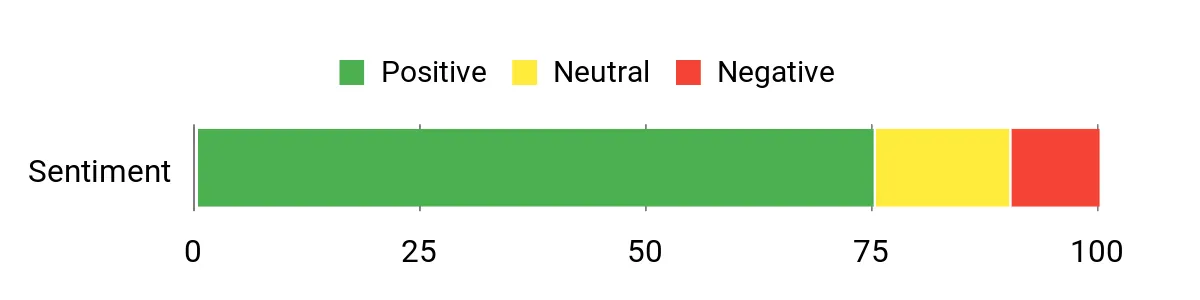
Most users say the G502 fits comfortably and feels precise, with many praising the weight tuning and extra buttons for utility binds. People also note smooth glide and satisfying clicks for daily use, while a minority mention the software learning curve and occasional durability issues.
Overall Sentiment: Positive
Long-Term Value
Because the G502 is highly configurable and built around a solid sensor, I don’t feel the need to upgrade often. The tunable weights and onboard profiles extend its usefulness across different games and setups, which stretches its value over time.
Situations
|
Situation |
How It Helps |
|---|---|
|
Competitive FPS Sessions |
Tunable weight and precise tracking let me dial in sensitivity for reliable flicks and microadjustments under pressure. |
|
Long Practice or Work Days |
Ergonomic right‑handed design and confident clicks reduce fatigue, so aiming practice and editing feel less tiring. |
|
LAN or Tournament Play |
Wired connectivity and onboard memory mean my profiles stay consistent and latency is predictable when it matters most. |
Versatility
I use the G502 for both competitive matches and everyday tasks; the programmable buttons double as productivity shortcuts, and the sensor handles both low‑DPI flicking and higher‑DPI tracking.
Comfort
The G502 has a contoured right‑hand shape that works well for palm and claw grips. It’s not the smallest mouse, so it feels best with medium to large hands and gives good thumb support during long sessions.
Customization Options
|
Feature |
Customization Level |
|---|---|
|
DPI/Sensitivity |
High |
|
Adjustable Weights |
High |
|
Programmable Buttons & Profiles |
High |
|
RGB Lighting |
Moderate |
|
Onboard Memory |
High |
Problem Solving
If I’m struggling with inconsistent aim or hand fatigue, the G502 addresses both by offering precise sensor tracking and adjustable ergonomics. The programmability also solves input clutter so I can move complex actions off the keyboard.
Speed & Response
The wired connection and HERO sensor provide low latency and steady tracking, which helps with snap shots and fast target adjustments in CS2.
Key Benefits
- Highly accurate HERO sensor for consistent aiming
- Adjustable weight system for custom balance
- 11 programmable buttons for in-game binds and macros
- Comfortable ergonomic shape for long sessions
I reach for the M612 when I want a straightforward, no‑frills gaming mouse that still gives me plenty of control. It feels solid in the hand, the 11 buttons make it easy to map utility and macros, and the RGB adds a touch of personality to a simple setup.
The rapid‑fire key and macro support are handy for repetitive actions, and the wired connection keeps latency predictable whether I’m practicing aim or doing longer editing sessions. If you want a practical mouse that covers both gaming and everyday tasks without fuss, this is one I’d recommend trying.
What People Say
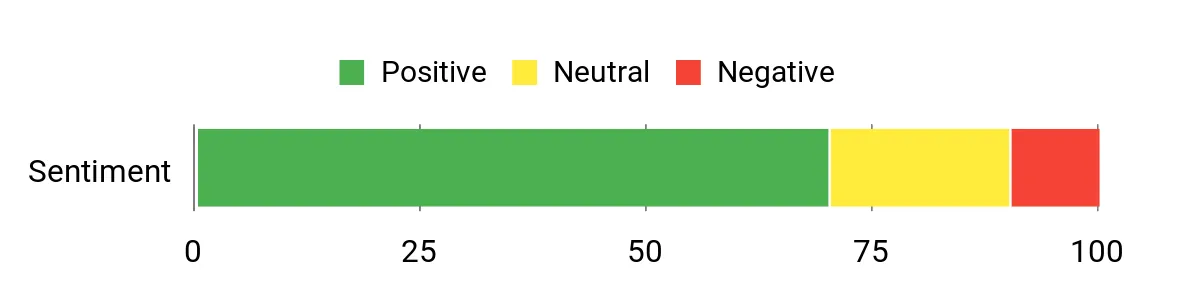
I’ve noticed people commonly praise the M612 for its comfortable grip and the usefulness of the extra buttons for in-game binds. Many mention the rapid‑fire and macro features as good additions for repetitive tasks, and users appreciate the straightforward software for customizing keys and lighting.
A few buyers note build quality could feel more premium, but overall the consensus leans toward it being a practical, well-equipped mouse.
Overall Sentiment: Positive
Long-Term Value
Because the M612 focuses on core features rather than flashy extras, it stays useful over time: programmable buttons and macro setups adapt as your playstyle changes, so you don’t feel the need to replace it quickly.
Situations
|
Situation |
How It Helps |
|---|---|
|
Competitive Practice |
Extra buttons let me map utility and quick commands so I can keep my keyboard focused on movement and aiming. |
|
Streamed Sessions |
The rapid‑fire key and macros handle repetitive chat or overlay actions without breaking focus. |
|
Everyday Productivity |
Programmable buttons double as shortcuts for editing or browsing, making the mouse useful outside of gaming. |
Versatility
I use the M612 for both quick FPS sessions and longer multitasking days; its button layout and sensor flexibility make it work across games and basic productivity tasks.
Comfort
The shape favors right‑handed users and feels comfortable for medium to large hands, with a textured finish that helps maintain grip during longer matches.
Customization
|
Feature |
Customization Level |
|---|---|
|
Programmable Buttons |
High |
|
DPI Settings |
Medium |
|
RGB Lighting Modes |
Medium |
|
Macro / Rapid‑Fire |
High |
Problem Solving
If you’re juggling many binds or repetitive actions, this mouse simplifies input by moving commands to buttons and a rapid‑fire key, reducing keyboard clutter and making certain plays feel smoother.
Speed & Response
The wired USB connection gives consistent, low latency and the optical sensor responds well enough for reliable tracking and quick aim adjustments in fast matches.
Key Benefits
- Multiple programmable buttons for binds and macros
- Comfort-oriented shape with reliable grip
- Rapid-fire key for repetitive in-game actions
- Simple RGB to personalize your setup
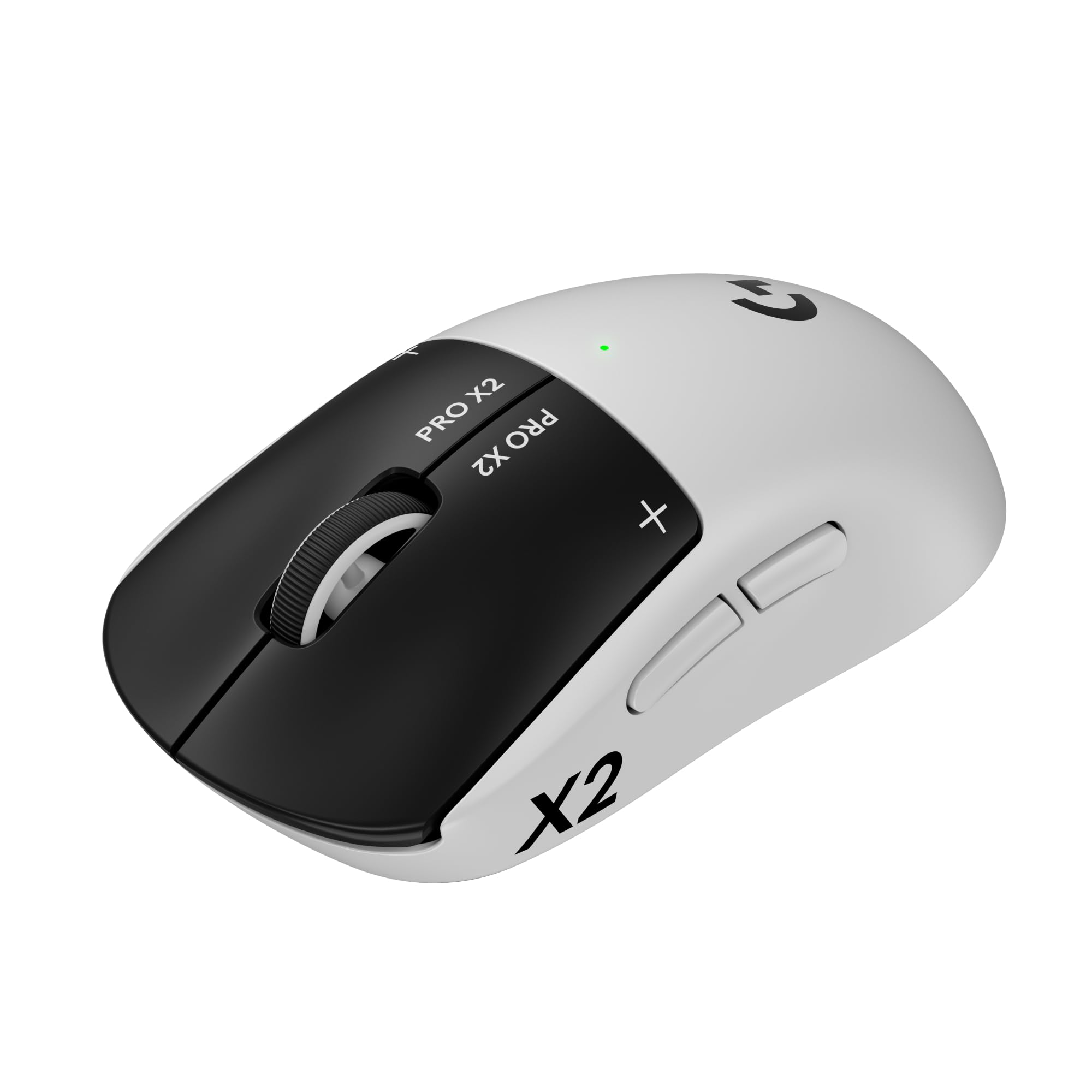
I reach for the PRO X2 when I want a competitive advantage that feels subtle but meaningful. The click customization lets me tune actuation and haptic feedback to match my playstyle, while the HERO 2 sensor and LIGHTSPEED wireless keep tracking and latency predictable. It’s light enough for fast flicks, yet stable for tracking, so I use it for both CS2 sessions and longer practice days.
USB‑C charging and solid battery life make it easy to keep ready for a tournament or a travel day.
What People Say
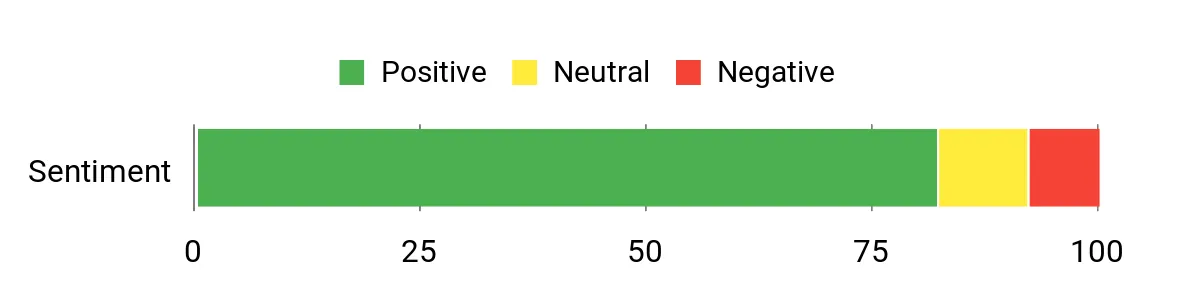
Most players highlight the click customization and low weight as standout features, praising how those options let them tune feel and speed. Many also appreciate the wireless performance and reliable tracking, though a few mention getting used to the click settings takes a little time.
Overall Sentiment: Positive
Long-Term Value
Because you can tune actuation and save profiles, the PRO X2 adapts as your playstyle evolves; that flexibility helps it remain useful longer than a fixed-feel mouse.
Situations
|
Situation |
How It Helps |
|---|---|
|
Tournament Play |
LIGHTSPEED wireless and stable sensor tracking deliver predictable inputs when split-second timing matters. |
|
Aim Training |
Light weight and configurable click actuation make repetitive flicks less fatiguing and easier to refine. |
|
Travel and LANs |
USB‑C charging and durable wireless performance mean fewer surprises when I move between setups. |
Versatility
I use the PRO X2 primarily for FPS, but its sensor accuracy and click tuning also handle editing and general desktop work when I want consistent feel across tasks.
Comfort
At 61 g the mouse feels weightless compared to heavier models, which reduces wrist strain during long sessions; the shape favors claw and fingertip grips and sits comfortably for extended play.
Customization
|
Feature |
Customization Level |
|---|---|
|
Click Actuation |
High |
|
DPI/Sensitivity |
High |
|
Haptic Feedback |
High |
|
Onboard Profiles |
Medium |
Problem Solving
If I’m losing microseconds to click inconsistency or accidental double-taps, being able to tune actuation and haptics directly fixes that. The PRO X2 also removes much of the wireless unpredictability that used to be a concern.
Speed & Response
LIGHTSPEED wireless paired with a pro-grade sensor delivers near-instant response and steady tracking, so quick target swaps and fast flicks feel consistent.
Key Benefits
- Customizable click actuation and haptics for tailored inputs
- High-performance HERO 2 sensor with reliable tracking
- LIGHTSPEED wireless for low-latency play
- Very lightweight design for fast aim adjustments
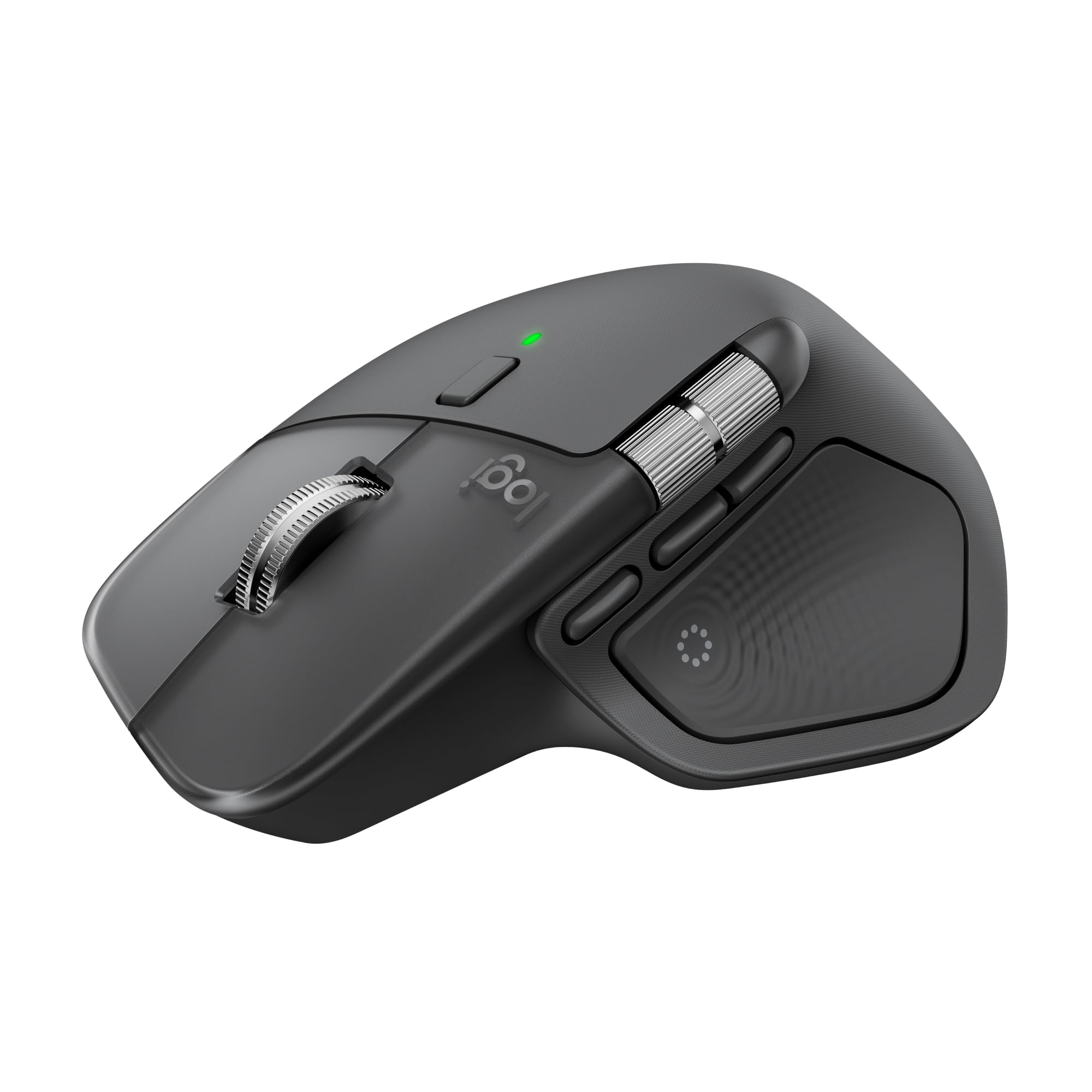
I reach for the MX Master 4 when I need a mouse that keeps me productive and comfortable for long hours. Its MagSpeed wheel makes switching between precise line-by-line work and rapid scrolling effortless, and the haptic feedback gives subtle tactile cues that feel helpful rather than distracting. It connects reliably via Bluetooth or the USB dongle and charges over USB‑C, so it’s easy to keep topped up between travel or office days. While it’s aimed more at productivity than pure esports, I still use it for casual CS2 sessions and appreciate how it keeps my hand relaxed during long practice blocks.
What People Say
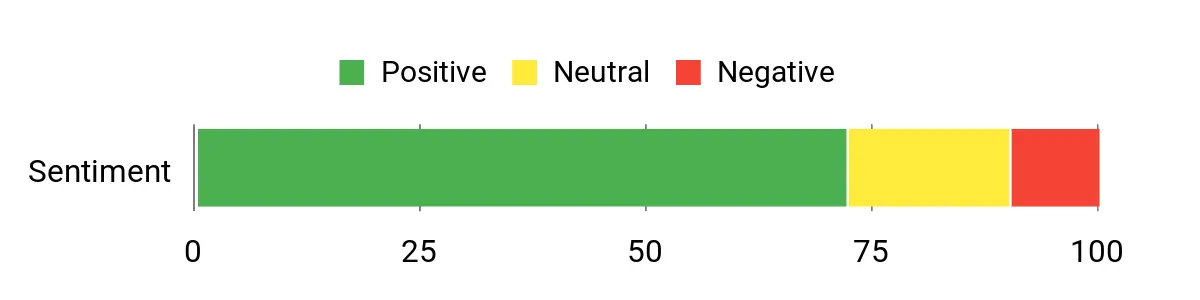
Users commonly praise the MX Master 4 for its comfort and the usefulness of the MagSpeed wheel, especially for long days of editing or spreadsheet work. People also note reliable connectivity and battery life, and many appreciate the custom Actions Ring and gesture controls.
A few mention the need to use Logi Options+ for full customization, which adds a small setup step.
Overall Sentiment: Positive
Long-Term Value
Its durable design, multi-device support and extensive customization mean it can replace multiple peripherals and stay useful as workflows change, so it feels like an investment that pays off over several years.
Situations
|
Situation |
How It Helps |
|---|---|
|
Office Work |
MagSpeed scrolling and programmable shortcuts speed up navigation and repetitive tasks, reducing hand movement. |
|
Creative Editing |
Precision scrolling and Actions Ring shortcuts let me scrub timelines and tweak controls without switching tools. |
|
Casual Gaming |
Comfortable ergonomics and consistent tracking make longer practice sessions less tiring, even if it’s not an esports‑focused shape. |
Versatility
The MX Master 4 moves smoothly between laptops and desktops, handling everything from document work to light gaming. Its gesture controls and programmable buttons make it useful across apps and tasks.
Comfort
The sculpted shape supports a natural hand posture and the quiet clicks reduce noise during long sessions, which helps prevent wrist strain over a full day of use.
Customization
|
Feature |
Customization Level |
|---|---|
|
Actions Ring & Gestures |
High |
|
MagSpeed Scroll Modes |
High |
|
DPI/Sensitivity |
Medium |
|
Onboard Shortcuts |
Medium |
Problem Solving
If repetitive tasks and wrist fatigue are slowing me down, this mouse reduces motion with smarter scrolling and programmable shortcuts, and it consolidates device control so I don’t switch mice or adapters between machines.
Speed & Response
The MX Master 4 offers stable connectivity via its dongle or Bluetooth and responsive tracking across surfaces, so scrolling and cursor movement feel smooth and predictable for both work and casual gaming.
Key Benefits
- MagSpeed ultra-fast scrolling that switches to precise mode
- Haptic feedback for contextual cues and shortcuts
- Multi-device connectivity with stable radio and Bluetooth
- Long battery life and quick USB‑C charging
I turn to the Basilisk V3 when I want a comfortable, button‑rich mouse that’s ready for both competitive rounds and long practice sessions. The ergonomic shape supports palm and claw grips while the HyperScroll tilt wheel lets me switch between tactile scrolling and free‑spin modes depending on the task.
With plenty of buttons and flexible DPI, I map utility, push‑to‑talk and quick binds so I don’t have to hunt for keys mid‑round. The RGB is a nice touch, and the mouse feels solid for daily use and occasional tournament travel.
What People Say
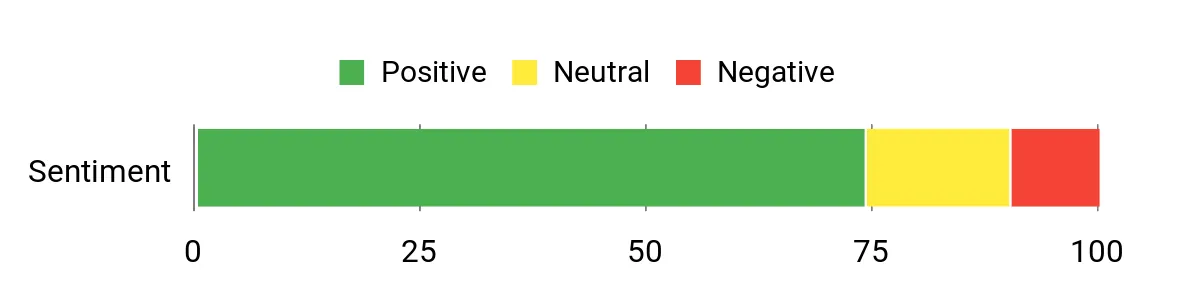
Players commonly point to the ergonomics and the useful button layout as standout strengths, and many appreciate the HyperScroll wheel for switching between precision and fast scrolling. Folks also mention the sensor’s tracking and the customization options as reasons it works well for both gaming and day‑to‑day use, while a few note the software needs some time to learn.
Overall Sentiment: Positive
Long-Term Value
Its combination of programmable buttons and versatile scroll modes means I adapt the mouse as my playstyle changes, so it stays useful rather than feeling outdated after a season.
Situations
|
Situation |
How It Helps |
|---|---|
|
Competitive Play |
Ergonomic support and precise tracking reduce fatigue and keep aim consistent during long sessions. |
|
Utility Heavy Rounds |
Extra programmable buttons let me bind grenades and quick commands so I can react without moving off aim. |
|
Multitasking Days |
HyperScroll modes and extra buttons double as productivity shortcuts when I’m editing or browsing. |
Versatility
I use the Basilisk V3 for fast FPS play and for day‑to‑day tasks; the mix of buttons and scroll modes makes it useful across games and apps.
Comfort
The contoured right‑hand design gives good palm support, and the textured grips keep control steady during sweaty matches, making it comfortable for medium to large hands.
Customization
|
Feature |
Customization Level |
|---|---|
|
Programmable Buttons |
High |
|
DPI/Sensitivity |
High |
|
Scroll Modes (HyperScroll) |
High |
|
RGB Lighting |
Medium |
Problem Solving
If I’m juggling many binds or need quick scroll mode changes, this mouse consolidates those controls so I can focus on crosshair placement and game sense instead of fumbling for keys.
Speed & Response
As a wired mouse with a high‑end optical sensor, tracking is responsive and latency is predictable, which helps with snap shots and rapid target transitions in CS2.
Key Benefits
- Ergonomic shape that suits palm and claw grips
- HyperScroll tilt wheel with multiple scroll modes
- Plenty of programmable buttons for in‑game binds
- High‑resolution sensor for precise tracking
I reach for the G502 Lightspeed when I want wireless performance that feels as consistent as a wired mouse. The HERO sensor tracks smoothly across DPI ranges and LIGHTSPEED keeps latency predictable in tight moments. I appreciate the tunable weight system and the eleven buttons for mapping utility and macros, and the metal spring tensioning on primary buttons gives a crisp click that helps with repeatable inputs. PowerPlay compatibility and onboard memory mean I can keep profiles steady between setups, so it works well for long practice days, tournament prep, and general desktop use.
What People Say
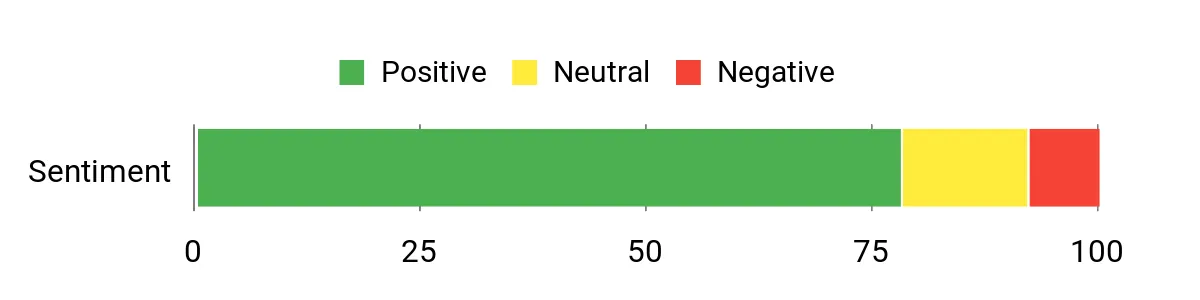
Players frequently praise the G502 Lightspeed for its reliable wireless performance and the feel of the primary buttons. Many highlight the weight tuning and extra buttons as practical advantages for both competitive play and everyday tasks, while a few mention the mouse feels a bit bulky for very light‑weight preferences or that software setup can take a moment.
Overall Sentiment: Positive
Long-Term Value
Because the mouse supports weight tuning, onboard profiles and wireless charging ecosystems, it adapts to new setups and playstyles so you’re less likely to replace it when your needs change.
Situations
|
Situation |
How It Helps |
|---|---|
|
Competitive Matches |
1 ms LIGHTSPEED and a pro‑grade sensor deliver predictable inputs so flicks and sprays feel consistent under pressure. |
|
Extended Practice Days |
Tunable weights and ergonomic shaping reduce fatigue and let me fine‑tune balance for longer aim training sessions. |
|
LAN and Tournaments |
Onboard memory and stable wireless connectivity mean my profiles and latency stay consistent across different rigs. |
Versatility
I use the G502 Lightspeed for fast FPS play and for productivity; the programmable buttons double as shortcuts for editing and the sensor handles both low and high sensitivity work.
Comfort
The contoured right‑hand shape and textured grips provide solid thumb support and control, which makes it comfortable for medium to large hands during long sessions.
Customization
|
Feature |
Customization Level |
|---|---|
|
DPI/Sensitivity |
High |
|
Adjustable Weights |
High |
|
Programmable Buttons |
High |
|
RGB Lighting |
Medium |
|
Onboard Profiles |
High |
Problem Solving
If inconsistent wireless performance or the need for many binds is a problem, this mouse solves both by offering low‑latency wireless and plenty of programmable buttons to move commands off the keyboard.
Speed & Response
LIGHTSPEED 1 ms wireless paired with the HERO sensor keeps response quick and tracking stable, so fast target changes and snapping feel reliable.
Key Benefits
- LIGHTSPEED wireless with 1 ms responsiveness
- HERO sensor for consistent, low-drift tracking
- Tunable weights for personalized balance
- 11 programmable buttons and onboard profiles
I keep a G305 in my bag when I need reliable wireless performance without fuss. It’s light enough to move quickly in CS2, the HERO sensor tracks cleanly at low and high DPI, and the LIGHTSPEED connection feels predictably responsive. The six programmable buttons cover the essentials for utility binds, and the on‑board memory means my settings stick when I switch PCs.
It’s also easy to take to LANs or to use with a laptop during travel, so it works well for both focused practice sessions and everyday desktop tasks.
What People Say
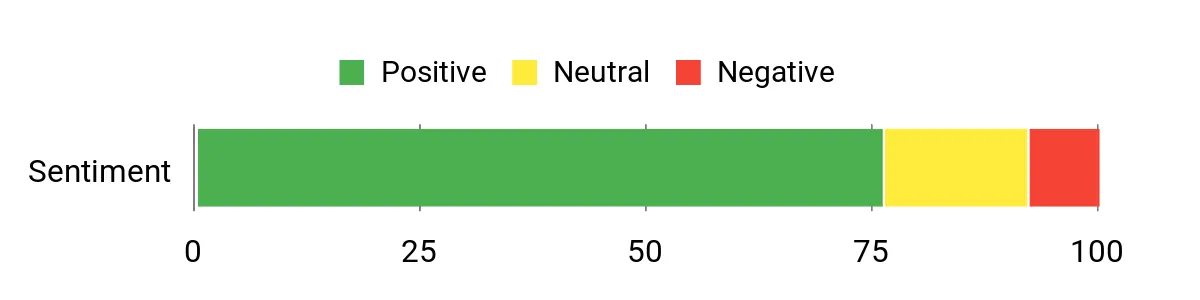
People often highlight the G305’s combination of light weight and dependable wireless as its biggest strengths. Many mention long battery life and simple programmability as practical perks, while a few note that customization requires the Logitech app and that the shape favors certain grip styles.
Overall Sentiment: Positive
Long-Term Value
Its durable sensor and simple feature set mean the G305 stays useful as playstyles change, and the on‑board memory reduces the need for repeated setup across machines.
Situations
|
Situation |
How It Helps |
|---|---|
|
Competitive Sessions |
LIGHTSPEED and HERO tracking give consistent inputs for quick flicks and reliable tracking under pressure. |
|
Travel and LAN |
Lightweight design and built-in receiver storage make it easy to pack and keep performance consistent on different rigs. |
|
Everyday Use |
Programmable buttons and stable wireless let me use the same mouse for both gaming and general productivity without swapping devices. |
Versatility
I use the G305 for both fast FPS sessions and laptop work; it handles low-DPI aiming and higher-DPI cursor work without fuss, making it a handy all-rounder.
Comfort
The ambidextrous-ish, compact shape suits fingertip and claw grips best and feels comfortable for medium to small hands; heavier palm grips may find it less filling.
Customization
|
Feature |
Customization Level |
|---|---|
|
Programmable Buttons |
High |
|
DPI Profiles |
Medium |
|
On‑Board Memory |
Medium |
Problem Solving
If latency or inconsistent tracking is holding back aim, the G305 addresses both with LIGHTSPEED and the HERO sensor. Its simplicity also solves the ‘too many buttons’ problem by focusing on core programmable controls.
Speed & Response
The LIGHTSPEED connection paired with the HERO sensor provides near‑instant response and steady tracking, which helps with fast target transitions and precise flicks.
Key Benefits
- LIGHTSPEED wireless with consistent low-latency performance
- HERO sensor accuracy across a wide DPI range
- Very portable and lightweight for fast aiming
- On‑board memory and straightforward button programmability

I grab the G305 when I want a simple, effective wireless mouse that won’t get in the way of my aim. It feels light and responsive for quick flicks in CS2, yet sturdy enough for daily browsing and editing.
The LIGHTSPEED connection and HERO sensor give consistent tracking, the six buttons cover essential binds, and the on‑board memory keeps my settings when I move between rigs. It’s also compact and easy to take to LANs or to use with a laptop, so it works well for practice sessions and casual matches alike.
What People Say
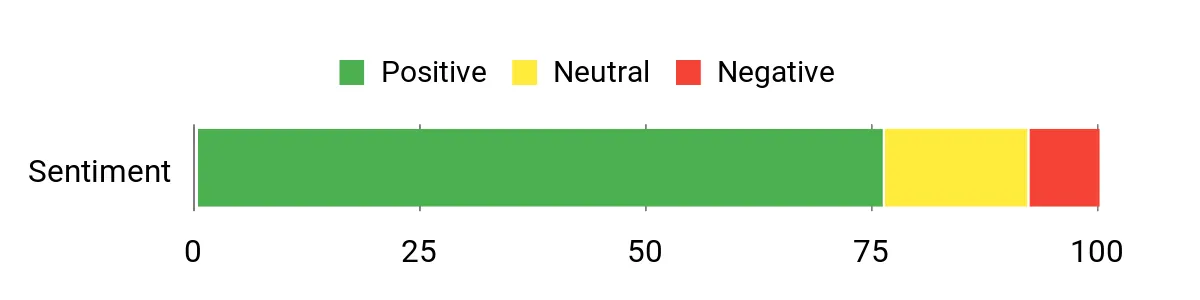
Players often mention the G305’s reliable wireless connection and surprisingly solid sensor for its size. Many appreciate the long battery life and simple programmability, and several note that the compact shape suits fingertip and claw grips well.
A few users point out that full customization requires the Logitech app, which adds a small setup step.
Overall Sentiment: Positive
Long-Term Value
Its focused feature set and durable sensor mean the G305 remains useful as your playstyle changes, and onboard profiles reduce repeated setup across different machines so it keeps delivering value over time.
Situations
|
Situation |
How It Helps |
|---|---|
|
Competitive Matches |
LIGHTSPEED and HERO tracking give predictable inputs for quick aim corrections and consistent flicks under pressure. |
|
Travel and LAN |
Compact size and built‑in receiver storage make it easy to pack and maintain the same performance on other PCs. |
|
Everyday Use |
Programmable buttons and reliable wireless let me switch between gaming and productivity without changing devices. |
Versatility
I use the G305 for fast FPS sessions and laptop work; it handles both low‑DPI aiming and higher‑DPI pointer tasks without fuss, so it’s a handy all‑rounder.
Comfort
The compact, slightly ambidextrous shape favors fingertip and claw grips and feels comfortable for medium to small hands, though palm‑grip users may find it less filling.
Customization
|
Feature |
Customization Level |
|---|---|
|
Programmable Buttons |
High |
|
DPI Profiles |
Medium |
|
On‑Board Memory |
Medium |
|
Receiver Storage |
Low |
Problem Solving
If inconsistent wireless or heavy mice slow you down, the G305 solves that with LIGHTSPEED responsiveness and a lightweight build that makes fast target transitions easier.
Speed & Response
The LIGHTSPEED connection paired with the HERO sensor provides near‑instant response and steady tracking, which helps with rapid target swaps and precise flicks.
Key Benefits
- Reliable LIGHTSPEED wireless performance with low latency
- HERO sensor accuracy across a wide DPI range
- Lightweight and portable for fast aiming
- On‑board memory and straightforward programmability
I keep the M810 in mind when I want a flexible wireless mouse that covers both gaming and everyday use. It’s comfortable to hold, the rapid‑fire key and eight macro buttons are useful for utility and repetitive actions, and USB‑C charging makes it simple to top up between sessions.
The wireless connection feels stable enough for practice and casual matches, and the matte finish gives it a straightforward, no‑nonsense feel that fits most setups. If you want a versatile, button‑rich mouse without fuss, this is one I’d recommend trying.
What People Say
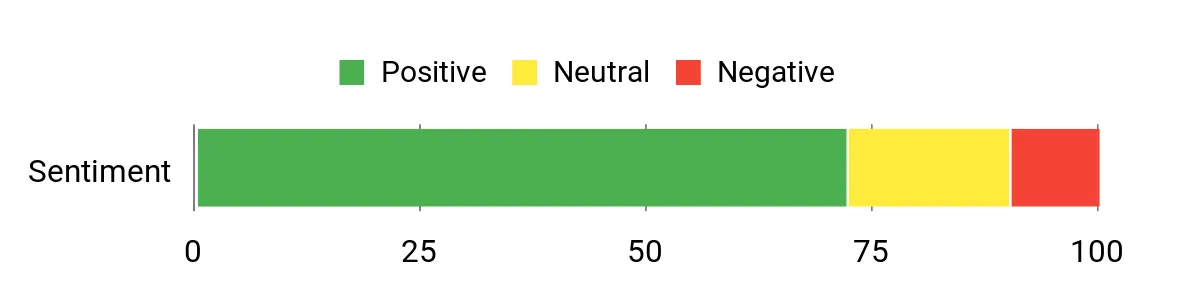
People often praise the M810 for its comfortable grip and the usefulness of the extra buttons for mapping grenades, macros and quick commands. Many appreciate the rapid‑fire feature and straightforward wireless performance, while a few mention that software and customization can take a little time to set up.
Overall Sentiment: Positive
Long-Term Value
Because it focuses on practical features like programmable buttons and rechargeable wireless, the M810 adapts as your playstyle evolves so you’re less likely to replace it quickly when your needs change.
Situations
|
Situation |
How It Helps |
|---|---|
|
Utility-Heavy Rounds |
Programmable buttons let me bind grenades and quick commands so I can react without moving off aim. |
|
Long Practice Sessions |
Comfort grip and stable wireless reduce fatigue so I can keep training without frequent breaks. |
|
Casual Travel or LAN |
Wireless convenience and USB‑C charging make it easy to keep performance steady between rigs. |
Versatility
I use the M810 for both shooter practice and everyday tasks; its button layout and macros make it handy for gaming and productivity alike.
Comfort
The ergonomic shape and textured finish give secure hand placement and steady control, which helps during longer play or editing sessions.
Customization
|
Feature |
Customization Level |
|---|---|
|
Programmable Buttons |
High |
|
Rapid‑Fire / Macros |
High |
|
DPI/Sensitivity |
Medium |
|
Wireless Mode |
Medium |
Problem Solving
If I’m juggling many binds or repetitive actions, the M810 moves those to dedicated buttons and a rapid‑fire key so I can keep focus on aim and movement.
Speed & Response
The 2.4GHz wireless connection delivers responsive inputs suitable for practice and casual competitive play, with predictable tracking for quick target adjustments.
Key Benefits
- Multiple programmable buttons and macros for utility binds
- Rapid‑fire key for repetitive in‑game actions
- USB‑C charging and wireless convenience
- Comfort grip designed for longer sessions
I reach for the Viper V3 HyperSpeed when I want a featherlight mouse that still feels rock solid in fast matches. Its 82 g chassis makes quick flicks feel effortless, and the Focus Pro sensor tracks smoothly whether I’m low DPI flicking or moving across larger swipes.
The long battery life and HyperSpeed wireless mean I don’t worry about dropouts during long practice sessions, and the ambidextrous shape works well for claw and fingertip grips. It’s a great pick if you prioritize raw speed and consistent wireless feel for CS2.
What People Say
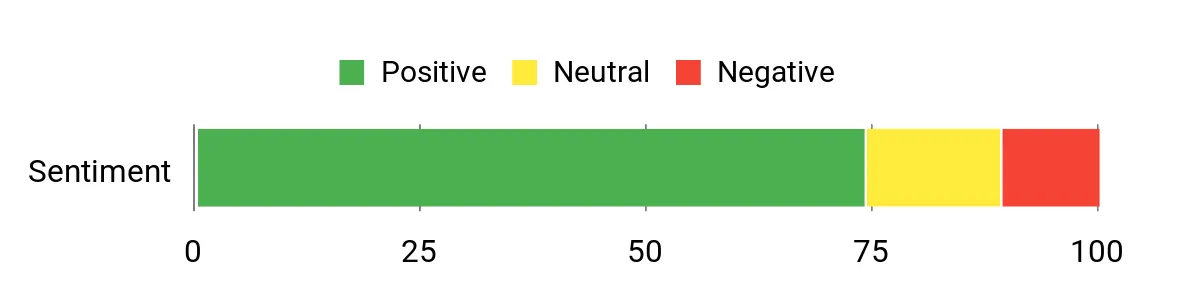
Players often highlight how the light weight improves aim and reduces wrist fatigue during long sessions. Many appreciate the dependable wireless connection and long battery life, while some mention occasional connectivity quirks depending on dongle placement or software preferences.
Overall Sentiment: Positive
Long-Term Value
Because the Viper V3 focuses on core performance—lightweight build, strong sensor and dependable wireless—it stays relevant as your skills evolve rather than feeling outdated after a season.
Situations
|
Situation |
How It Helps |
|---|---|
|
Esports Practice |
Low weight and precise tracking make repetitive flick drills less tiring and allow for quicker micro adjustments. |
|
Extended Sessions |
Long battery life and a comfortable shape reduce downtime and wrist strain during marathon practice days. |
|
Travel and LAN |
Compact, ambidextrous design and stable wireless mean consistent performance across different setups. |
Versatility
I primarily use the Viper V3 for FPS play, but its tracking and shape also suit fast-paced productivity tasks when I want swift pointer movement.
Comfort
The ambidextrous profile favors claw and fingertip grips and feels natural for medium hands; the low weight helps keep fatigue down during long matches.
Customization
|
Feature |
Customization Level |
|---|---|
|
On‑Mouse DPI Control |
High |
|
Programmable Buttons |
Medium |
|
Wireless Dongle Placement |
Low |
Problem Solving
If sluggish aim or heavy mouse fatigue is an issue, this model addresses both by being extremely light and delivering consistent sensor performance so my aim feels tighter.
Speed & Response
HyperSpeed wireless paired with the Focus Pro sensor delivers snappy response and steady tracking, which helps with quick target swaps and tight flicks.
Key Benefits
- Very lightweight design for fast aim corrections
- High-end Focus Pro sensor for precise tracking
- Long battery life that supports extended play
- Reliable HyperSpeed wireless for low-latency input
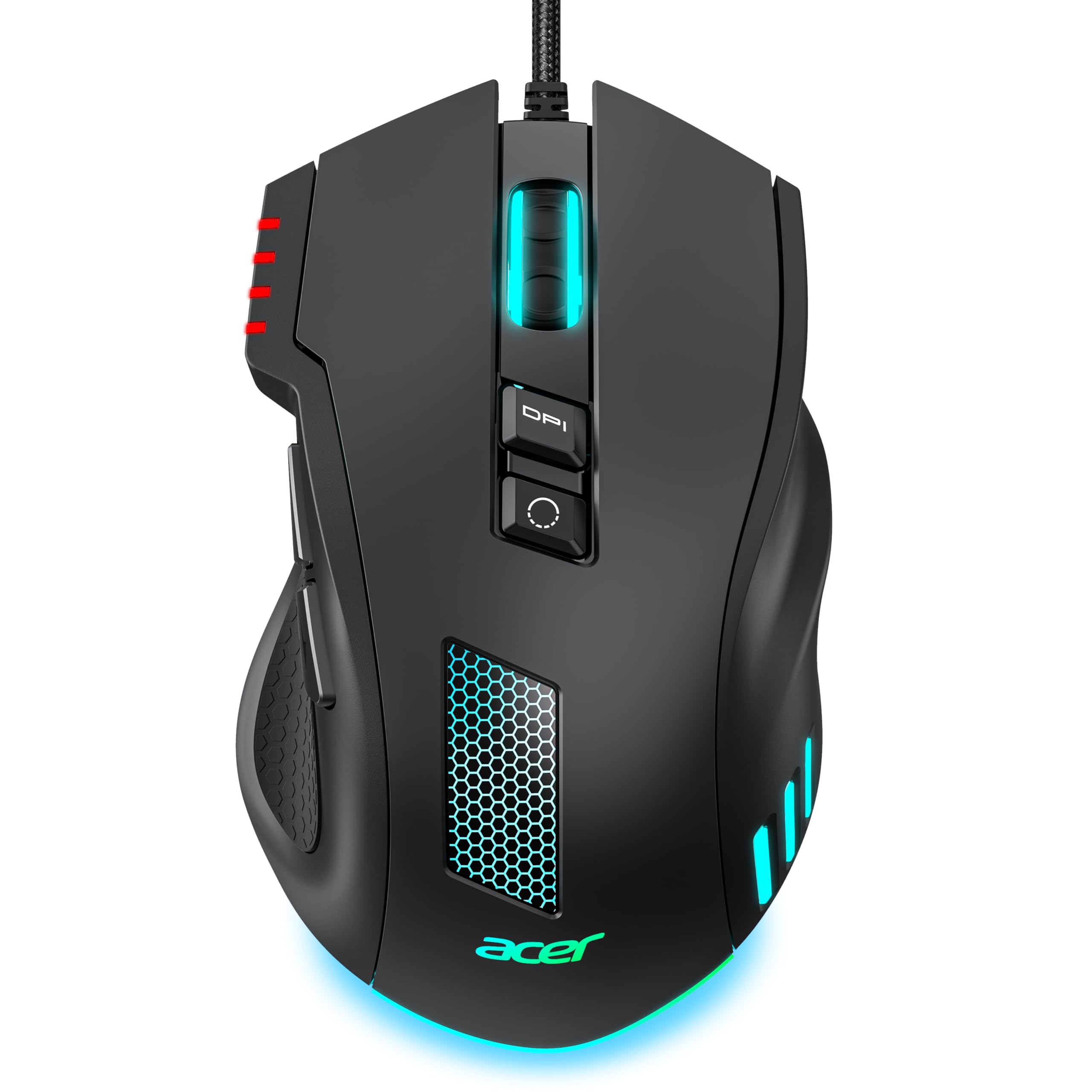
I reach for this Acer when I want a roomy, ergonomic wired mouse that doesn’t overcomplicate things. The 12,800 DPI sensor tracks cleanly for both precise aim and faster sweeps, and the eight buttons let me map grenades, utility and handy shortcuts without crowding the keyboard. The Hyper RGB modes and braided, drag‑free cable give a nicer daily experience, and the shape sits well in larger hands for longer practice sessions. For people who want a straightforward, comfortable mouse that covers gaming and editing, this one hits the essentials.
What People Say
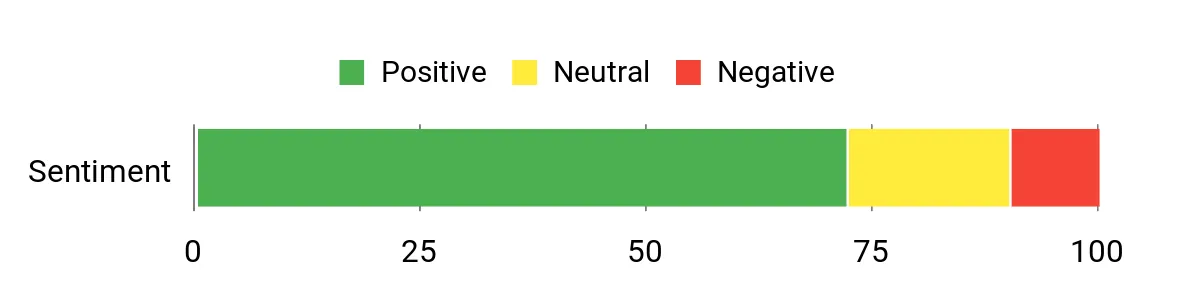
People frequently call out the comfortable shape and solid sensor performance as major wins, especially for aiming and general responsiveness. Many users like the extra buttons and the braided cable, saying they make the mouse feel more durable and useful for both gaming and everyday tasks. A few note the software adds setup steps, but most appreciate the feature set for the form factor.
Overall Sentiment: Positive
Long-Term Value
Because it focuses on solid fundamentals—reliable tracking, comfortable ergonomics and programmable buttons—the Acer remains useful as your setup or playstyle changes, reducing the need for frequent replacements.
Situations
|
Situation |
How It Helps |
|---|---|
|
Competitive Matches |
Accurate sensor and programmable buttons let me execute utility and quick commands without sacrificing aim. |
|
Long Practice Sessions |
The ergonomic shape and stable cable reduce wrist strain so I can train longer with less fatigue. |
|
Content Editing |
Custom buttons and adjustable DPI make scrubbing timelines and switching tools faster without changing devices. |
Versatility
I use this mouse for both CS2 practice and everyday tasks; its mix of DPI range and button mapping makes it flexible for fast aiming and desktop workflows alike.
Comfort
The contoured right‑hand design fits medium to large hands well and the textured finish helps maintain grip, which keeps control steady during longer sessions.
Customization
|
Feature |
Customization Level |
|---|---|
|
Programmable Buttons |
High |
|
DPI Profiles |
High |
|
RGB Lighting Modes |
Medium |
|
Macro / Rapid‑Fire |
Medium |
Problem Solving
If you struggle with imprecise aim or need extra binds, this mouse gives clear tracking and button real estate to move commands off the keyboard and tighten your inputs.
Speed & Response
Wired USB connectivity and a high‑resolution optical sensor deliver low latency and steady tracking, which helps with quick flicks and tight target changes.
Key Benefits
- High-resolution 12,800 DPI sensor for precise tracking
- Ergonomic shape that supports medium to large hands
- Eight programmable buttons for in-game binds and macros
- Rapid‑fire and customizable RGB for a personal touch
I reach for the Viper V3 Pro when I want a mouse that prioritizes speed and consistency. The ultra-light 54 g frame makes flicks feel effortless and the Focus Pro sensor tracks cleanly across surfaces, so I spend less time fighting my hardware and more time practicing aim.
HyperPolling and HyperSpeed wireless deliver a near‑wired feeling when the dongle is positioned correctly, and the ambidextrous shape suits claw and fingertip grips well. It’s a tournament-ready option I use for high-tempo CS2 sessions and for days when I want minimal drag and predictable performance.
What People Say
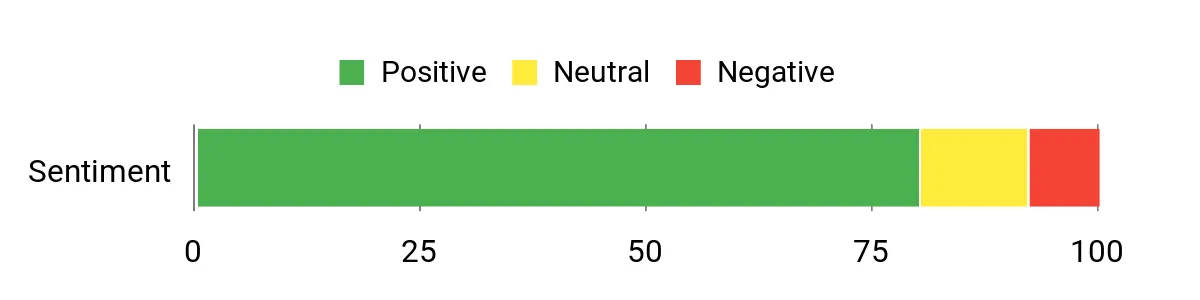
Players frequently praise the Viper V3 Pro for how light it feels and how naturally it moves during quick aim adjustments. Many mention the sensor’s accuracy and the long battery life as major positives, while a few point out that dongle placement and software preferences can affect wireless behavior.
Overall the conversation leans toward it being a pro‑focused mouse that performs well once set up.
Overall Sentiment: Positive
Long-Term Value
Because the Viper V3 Pro focuses on core performance—lightweight build, a robust sensor and advanced wireless—it stays relevant as skill and setups evolve, reducing the need to upgrade frequently.
Situations
|
Situation |
How It Helps |
|---|---|
|
Esports Practice |
Low weight and precise tracking make repetitive flick and tracking drills easier and less tiring. |
|
Tournament Play |
HyperPolling and stable wireless provide predictable latency so inputs remain consistent under pressure. |
|
Travel and LAN |
Compact, ambidextrous design and reliable battery life keep performance steady across different rigs. |
Versatility
I primarily use this mouse for fast FPS play, but its tracking and shape also handle quick productivity tasks when I want snappy pointer movement.
Comfort
The ambidextrous profile favors claw and fingertip grips and feels natural for medium hands; the light weight reduces wrist fatigue during long sessions.
Customization
|
Feature |
Customization Level |
|---|---|
|
DPI / Sensitivity |
High |
|
Programmable Buttons |
Medium |
|
Polling / Wireless Settings |
Medium |
Problem Solving
If heavy mouse fatigue or inconsistent sensor tracking is holding back aim, this model addresses both by being very light and delivering steady sensor performance so aim feels tighter.
Speed & Response
HyperSpeed wireless paired with HyperPolling and the Focus Pro sensor delivers snappy response and steady tracking, which helps with quick target swaps and tight flicks.
Key Benefits
- Extremely light 54 g design for fast flicks
- Focus Pro 35K sensor for precise tracking
- HyperPolling/HyperSpeed wireless for near‑instant response
- Ambidextrous shape that suits claw and fingertip grips

I keep the G305 as my go‑to when I want a simple, reliable wireless mouse that doesn’t get in the way of aiming. It’s light enough to flick quickly in CS2, the HERO sensor tracks cleanly across DPI ranges, and the LIGHTSPEED connection feels predictably responsive.
The six buttons cover essential binds and the on‑board memory keeps my settings when I switch machines. It’s a compact, practical choice for travel, LANs and everyday play.
What People Say
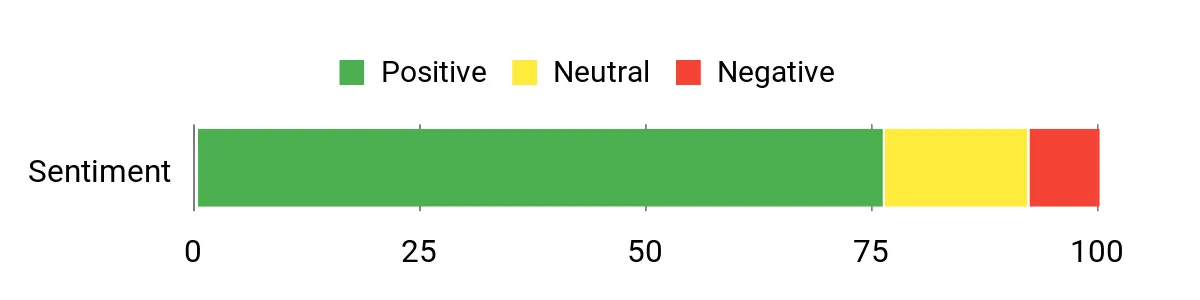
Players often highlight the G305’s light feel and dependable wireless as its biggest strengths, noting that the sensor performs well for both low‑DPI flicks and higher‑DPI tracking. Many appreciate the long battery life and simple programmability, while some point out that full customization requires the Logitech software.
Overall Sentiment: Positive
Long-Term Value
Because it focuses on core performance and reliable components, the G305 stays useful as playstyles change, and the on‑board memory reduces repeated setup so it remains a practical option over time.
Situations
|
Situation |
How It Helps |
|---|---|
|
Competitive Sessions |
LIGHTSPEED and HERO tracking give consistent inputs for quick flicks and reliable tracking under pressure. |
|
Travel and LAN |
Compact size and built-in receiver storage make it easy to pack and keep performance consistent on other rigs. |
|
Everyday Use |
Programmable buttons and stable wireless let me use the same mouse for both gaming and productivity without swapping devices. |
Versatility
I use the G305 for both fast FPS sessions and laptop work; it handles low‑DPI aiming and higher‑DPI pointer tasks without fuss, making it a handy all‑rounder.
Comfort
The compact, slightly ambidextrous shape suits fingertip and claw grips and feels comfortable for medium to small hands; palm users may find it less filling but still usable for shorter sessions.
Customization
|
Feature |
Customization Level |
|---|---|
|
Programmable Buttons |
High |
|
DPI Profiles |
Medium |
|
On‑Board Memory |
Medium |
Problem Solving
If latency or inconsistent tracking is holding back aim, the G305 addresses both with LIGHTSPEED and the HERO sensor, while the focused button set simplifies control without overwhelming you.
Speed & Response
LIGHTSPEED wireless paired with the HERO sensor provides near‑instant response and steady tracking, which helps with rapid target swaps and precise flicks.
Key Benefits
- LIGHTSPEED wireless with consistent low-latency performance
- HERO sensor accuracy across a wide DPI range
- Lightweight and portable for fast aiming
- On‑board memory and straightforward programmability

I reach for the G703 when I want wireless performance that still feels familiar and reliable. The HERO sensor tracks smoothly across sensitivity ranges, LIGHTSPEED keeps latency predictable, and the optional weight tuning helps me find a balance that suits flicks or steady tracking.
The rubber side grips and contoured shape make it comfortable for longer sessions, and PowerPlay compatibility is a nice plus if you want a wireless charging ecosystem. It’s a solid choice for CS2 practice, tournament prep and everyday desktop work.
What People Say
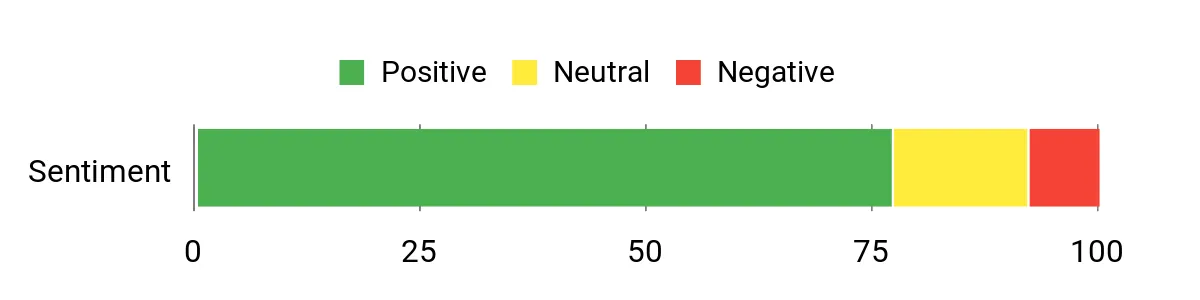
Players commonly praise the G703 for its dependable wireless connection and comfortable feel during extended play. Many mention the crisp primary clicks and the usefulness of weight tuning, while a few note that battery life and sizing preferences vary by user.
Overall Sentiment: Positive
Long-Term Value
Because it pairs a high-quality sensor with weight tuning and onboard memory, the G703 adapts as my playstyle changes and avoids feeling obsolete quickly, so it stays useful across seasons.
Situations
|
Situation |
How It Helps |
|---|---|
|
Competitive Matches |
Low-latency wireless and a precise sensor deliver predictable inputs, so flicks and sprays feel consistent under pressure. |
|
Extended Practice |
Ergonomic contours and rubber side grips reduce hand fatigue, letting me train aim for longer stretches. |
|
Tournament / LAN |
Onboard memory and stable wireless mean my settings and latency remain consistent across different rigs. |
Versatility
I use the G703 for fast FPS sessions and desktop tasks alike; the programmable buttons and weight options make it comfortable for both quick aiming and everyday workflows.
Comfort
The contoured body and rubber side grips give secure thumb and finger placement, which helps maintain control during long matches and reduces wrist strain.
Customization
|
Feature |
Customization Level |
|---|---|
|
DPI / Sensitivity |
High |
|
Adjustable Weights |
High |
|
Programmable Buttons |
Medium |
|
RGB Lighting (LIGHTSYNC) |
Medium |
Problem Solving
If wireless unpredictability or inconsistent tracking has been an issue, the G703 addresses both with proven LIGHTSPEED connectivity and a high-quality HERO sensor so inputs feel consistent and repeatable.
Speed & Response
LIGHTSPEED wireless paired with the HERO sensor provides low-latency response and steady tracking, which helps with quick target swaps and tight flicks.
Key Benefits
- Reliable LIGHTSPEED wireless with low-latency performance
- HERO 25K sensor for precise, low-drift tracking
- Tunable weights to dial in personal balance
- Comfortable shape with rubber grips for long sessions
I reach for the Basilisk V3 35K when I want a mouse that blends customization with comfort. The HyperScroll tilt wheel shifts smoothly between tactile and free‑spin modes, so I use precise scrolling for settings and fast free‑spin for menu navigation.
The Focus Pro sensor tracks cleanly across DPI ranges, and the Speedflex cable keeps drag to a minimum for smoother swipes. With plenty of buttons and Hypershift options, I can map utility and macros to free up keyboard space, which makes the mouse useful for both CS2 rounds and editing sessions.
What People Say
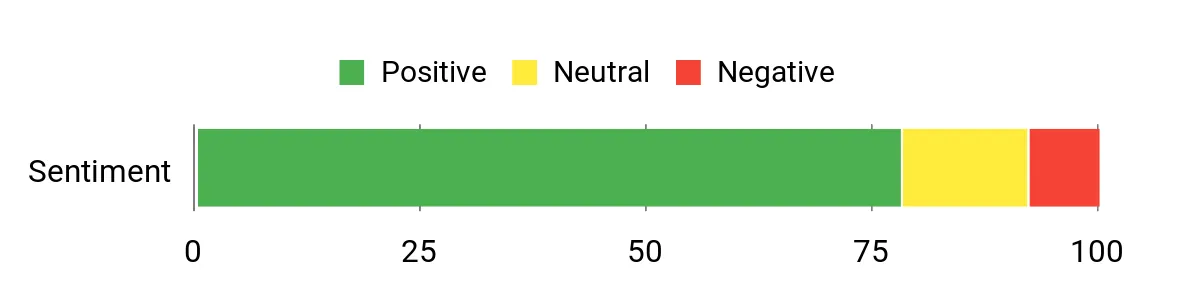
Players often highlight the HyperScroll wheel and the sensor accuracy as standout features, saying the wheel modes are genuinely useful across tasks. Many appreciate the button layout and Hypershift for moving binds off the keyboard, while a few note the software takes a little time to master for full customization.
Overall Sentiment: Positive
Long-Term Value
Because it focuses on durable fundamentals—advanced sensor tech, versatile scroll modes and extensive programmable controls—the Basilisk V3 adapts as my playstyle changes and stays relevant across seasons.
Situations
|
Situation |
How It Helps |
|---|---|
|
Competitive Rounds |
Precise tracking and a shape suited to steady control keep aim consistent during clutch situations. |
|
Utility-Heavy Play |
Extra buttons and Hypershift make it easy to bind grenades and quick commands without leaving crosshair focus. |
|
Content Work |
HyperScroll modes and programmable buttons speed up timeline scrubbing and tool switching when editing. |
Versatility
I use this mouse for both fast FPS sessions and everyday tasks; the scroll modes and button mapping let it switch roles between gaming and productivity without needing a second device.
Comfort
The contoured right‑hand design supports palm and claw grips and the textured surfaces help keep a secure hold during long matches, so fatigue is less of an issue for extended practice.
Customization
|
Feature |
Customization Level |
|---|---|
|
Scroll Modes / Tension |
High |
|
Programmable Buttons |
High |
|
DPI / Sensor Tuning |
High |
|
Hypershift / Macros |
High |
|
RGB Lighting |
Medium |
Problem Solving
If scrolling precision or limited input slots are slowing you down, the Basilisk V3 solves both by offering multiple scroll behaviors and an expanded button set so you can keep focus on aim and movement.
Speed & Response
As a wired mouse with an advanced optical sensor and tuned tracking, it delivers immediate response and steady tracking for quick flicks and tight target changes.
Key Benefits
- HyperScroll tilt wheel with multiple scroll modes
- High‑resolution Focus Pro 35K sensor for precise tracking
- Extensive button layout and Hypershift for extra commands
- Speedflex cable for low drag and smooth movements
- Adjustable scroll tension and advanced surface tuning
FAQ
Which Mouse Is Best For CS2?
I look for three things first: sensor accuracy, predictable latency, and a shape that fits my grip. A mouse with a pro‑grade sensor and steady tracking makes aiming feel consistent, while the right weight and shape let me micro‑adjust without fatigue. If I’m choosing, I prioritize a mouse I can tune to my grip and save profiles to onboard memory so settings follow me between PCs.
Wired Or Wireless — Which Should I Choose?
I’ll say wireless tech has come a long way and many models now match wired latency, but the choice depends on priorities. If I want absolute simplicity and no battery worries I go wired; if I value freedom of movement and clean setup I pick a modern wireless with proven protocols like LIGHTSPEED or HyperSpeed and make sure the dongle is positioned close to the mouse.
In either case I test the connection in warmup matches and save profiles to onboard memory so performance stays consistent.
How Do I Tune DPI And Buttons For Better Aim?
I treat DPI and in‑game sensitivity as a single system: I pick a DPI that feels natural for my mousepad and then adjust in‑game until wrist and arm movements give predictable crosshair movement. I spend time in an aim trainer or practice map and make small changes, rather than big jumps.
I also map commonly used commands to extra buttons and save those profiles to the mouse so I can keep keyboard space for movement and focus on improving raw aim.
Wrapping Up
If I had to recommend one mouse for Counter Strike 2 players who want a reliable all-rounder, I lean toward the Logitech G502 for its balance of tracking, buttons, and tunability. For pro-level competitive play where every millisecond counts, the Logitech PRO X2 and lightweight Razer Viper options are standout choices.
On a tight budget I often suggest Redragon or Acer models because you can still get solid sensors and programmable buttons without breaking the bank. Ultimately I recommend matching the mouse to your grip, preferred weight, and whether you value wireless freedom or the absolute lowest latency.
| Product Name | Image | Brand | DPI (Sensitivity) | Connectivity | Button Quantity | Battery Life |
|---|---|---|---|---|---|---|
| Logitech G502 Hero High Performance Wired Gaming Mouse |
 |
Logitech G | 25,600 DPI | Wired (USB) | 11 | N/A |
| Redragon M612 Predator RGB Gaming Mouse |
 |
Redragon | 8,000 DPI | Wired (USB) | 11 | N/A |
| Logitech PRO X2 SUPERSTRIKE Lightspeed Wireless Gaming Mouse |
 |
Logitech G | Unknown (customizable) | Wireless (LIGHTSPEED, USB-C) | 5 | 60 hours |
| Logitech MX Master 4 |
 |
Logitech | 8,000 DPI | Bluetooth, USB | 7 | 70 days |
| Razer Basilisk V3 Customizable Ergonomic Gaming Mouse |
 |
Razer | 26,000 DPI | Wired (USB) | 11 | N/A |
| Logitech G502 Lightspeed Wireless Gaming Mouse |
 |
Logitech G | 25,600 DPI | Wireless (LIGHTSPEED) | 11 | 60 hours |
| Logitech G305 Lightspeed Wireless Gaming Mouse |
 |
Logitech G | 12,000 DPI | Wireless (LIGHTSPEED) | 6 | 250 hours |
| Redragon M810 Pro Wireless Gaming Mouse |
 |
Redragon | 10,000 DPI | Wired/Wireless (USB-C) | 8 | 45 hours |
| Razer Viper V3 HyperSpeed Wireless Esports Gaming Mouse |
 |
Razer | 30,000 DPI | Wireless (USB) | 6 | 280 hours |
| Acer Wired Gaming Mouse |
 |
Acer | 12,800 DPI | Wired (USB) | 8 | N/A |
| Razer Viper V3 Pro Wireless Esports Gaming Mouse |
 |
Razer | 35,000 DPI | Wireless (USB) | 8 | 95 hours |
| Logitech G703 Lightspeed Wireless Gaming Mouse |
 |
Logitech G | 25,600 DPI | Wireless (LIGHTSPEED) | 6 | 35 hours |
| Razer Basilisk V3 35K Wired Ergonomic Gaming Mouse |
 |
Razer | 35,000 DPI | Wired (USB) | 11 | N/A |
This Roundup is reader-supported. When you click through links we may earn a referral commission on qualifying purchases.