
A GPU server is a computer server that contains one or more Graphics Processing Units (GPUs) alongside the standard CPU, RAM, and storage components every server has. The GPUs handle massive amounts of parallel computation simultaneously, making GPU servers the backbone of artificial intelligence, deep learning, scientific research, video rendering, and any workload that needs to process enormous amounts of data at extraordinary speed. This guide explains exactly what a GPU server is, how it works, what is inside one, who uses them, and how you can access one yourself.
The Simple Way to Understand GPU Servers
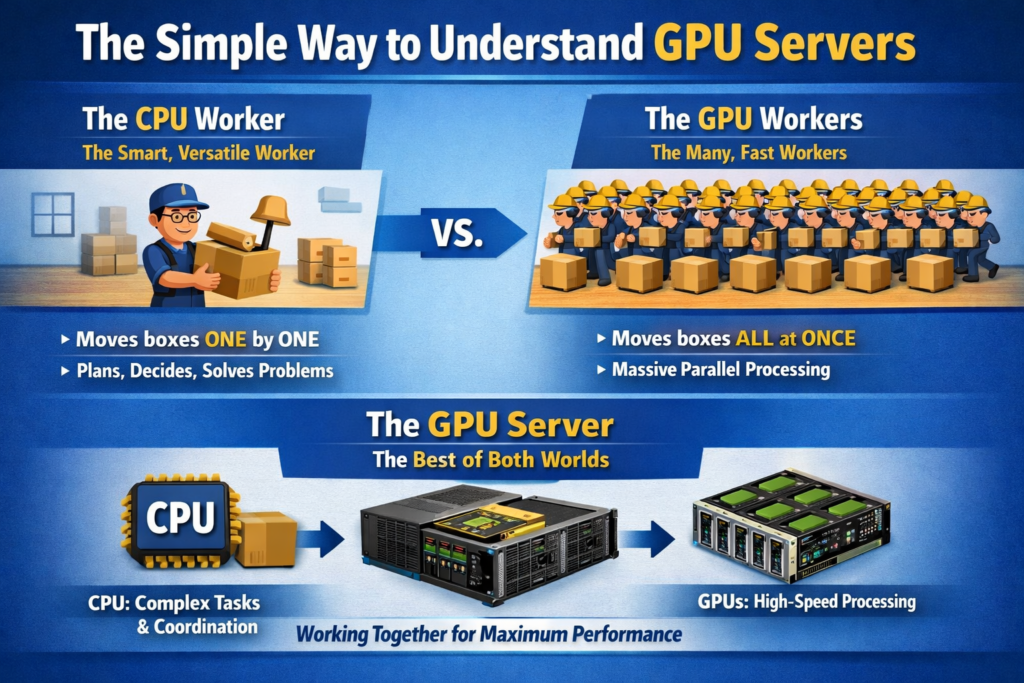
Before getting into the technical details, here is the clearest possible analogy for what a GPU server does differently from a regular server.
Imagine you need to move a thousand boxes from one room to another. A CPU is like having one extremely intelligent, fast, and versatile worker who can carry complex, irregularly shaped boxes, plan the most efficient route, make decisions on the fly, and handle any unexpected problem. A GPU is like having ten thousand workers who are each less individually capable, but they all work at the exact same time. For moving a thousand identical boxes, the ten thousand simultaneous workers finish the job in a fraction of the time.
A GPU server is simply a server that brings both to the same machine. The CPU handles the complex decision-making, operating system, and coordination tasks. The GPUs handle the massive repetitive workloads that benefit from thousands of operations happening simultaneously. Together, they handle jobs that neither could accomplish efficiently alone.
What Is a GPU, and How Is It Different From a CPU?
To understand GPU servers, you first need to understand why GPUs exist at all, because they were not originally invented for AI or data science.
GPUs were invented in the 1990s to handle graphics rendering in video games and visual applications. Rendering a 3D frame requires calculating the color, lighting, and position of millions of pixels simultaneously, which is an inherently parallel task. GPU manufacturers built chips with thousands of small, specialized processor cores designed to do exactly that: process many simple calculations at the same time rather than processing one complex calculation after another.
In the mid-2000s, researchers realized that the same parallel architecture that made GPUs excellent at rendering pixels made them equally excellent at the kinds of matrix mathematics that underpin machine learning. Neural networks, for example, require multiplying enormous matrices together repeatedly. The GPU’s architecture is almost perfectly suited to this task.
BlueServers’ technical breakdown of GPU servers describes it precisely: instead of depending on one or two powerful processor cores, a GPU server relies on thousands of smaller cores that all work simultaneously, creating an architecture that is perfect for the matrix operations, tensor functions, and vectorized tasks that dominate artificial intelligence.
Neither is better than the other in absolute terms. They are complementary. Every GPU server contains both, and each handles the workloads it is architecturally suited for.
What Is Inside a GPU Server?
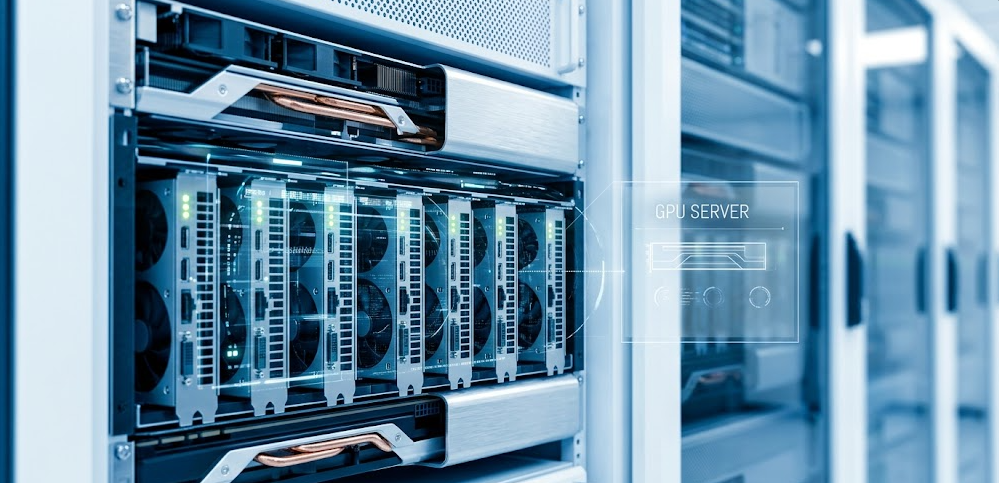
A GPU server looks different from a standard server because it has to physically accommodate multiple large, power-hungry GPU cards alongside all the conventional server components. Here is what every GPU server contains and what each component does:
The GPUs Themselves
The GPU cards are the defining component. A single GPU server typically contains anywhere from one GPU (entry-level research machine) to eight GPUs (a fully configured data center node like the NVIDIA DGX H100). The most common data center GPU families in 2026 are:
-
NVIDIA H100: 80GB of HBM2e memory, 700W TDP, the workhorse of AI infrastructure and still the most widely deployed data center GPU globally. Rental price: $2 to $8 per hour.
-
NVIDIA H200: 141GB of HBM3e memory at 4.8TB/s bandwidth, nearly double the memory capacity of the H100 with 1.4x more memory bandwidth. Ideal for very large language models and HPC workloads.
-
NVIDIA B200: 192GB of HBM3e memory at 8.0TB/s bandwidth, 4,500 TFLOPS at FP8 performance. The current flagship for large-scale AI training. Rental price: $7 to $20 per hour.
-
NVIDIA GB200: This is not simply a GPU. The GB200 is a superchip that integrates NVIDIA’s own Grace CPU (a 72-core ARM-based processor) with two Blackwell GPUs on a single unified module, connected by NVLink-C2C at 900GB/s. This architecture eliminates the need for a separate x86 Intel or AMD host CPU entirely, representing one of the most significant shifts in 2026 server design. A single GB200 superchip delivers 4 to 8x the performance of an H100 for large-scale AI workloads. Rental price: $15 to $35+ per hour.
In addition to these flagship cards, entry and mid-tier GPU servers use cards like the NVIDIA A100, L40S, RTX 4090, and RTX 5090 for more accessible price points.
The CPU
Every conventional GPU server also contains one or two CPUs. The CPU role in a standard GPU server is not to handle the heavy computation (that is the GPU’s job) but to manage the operating system, coordinate data flow between components, run preprocessing tasks on incoming data, manage storage and networking, and handle all the control logic that the GPU’s parallel architecture is not suited for. In GB200-based servers, the Grace CPU integrated into the superchip itself handles these roles, making a dedicated external CPU redundant.
A typical 8-GPU server like the NVIDIA DGX H100 pairs its eight H100 GPUs with two Intel Xeon 8480C CPUs, each with 56 cores. The CPUs are powerful but they are not the bottleneck, and they are not intended to be the performance star of the machine.
VRAM (Video RAM)
VRAM is the GPU’s own dedicated high-speed memory. It is physically mounted on the GPU card itself and operates at speeds many times faster than conventional system RAM. In AI and machine learning contexts, VRAM is often the single most important specification because it determines what fits on the GPU.
A model’s weights, the batch of data currently being processed, and the intermediate calculations (called activations) all need to fit in VRAM simultaneously during training. If a model is too large for the available VRAM, it either cannot run on that GPU at all or must be split across multiple GPUs, which adds coordination overhead and complexity. This is why the jump from the H100’s 80GB to the B200’s 192GB of VRAM is significant: a 70 billion parameter model in FP16 fits on a single B200 but requires two H100s working in coordination.
System RAM
Separate from VRAM, GPU servers also contain large amounts of conventional system RAM (typically 512GB to 2TB in a high-end node). System RAM holds the dataset being fed to the GPU, the operating system and runtime environment, model checkpoints being loaded or saved, and any preprocessing that happens before data moves to the GPU.
Storage
GPU servers use high-speed NVMe SSDs for local storage, typically configured in RAID arrays with total capacities from several terabytes to hundreds of terabytes in a fully configured node. Fast local storage matters because training datasets can be enormous (hundreds of gigabytes to multiple terabytes for large language models), and storage read speed is often the bottleneck that limits how fast data can be fed to the GPU.
High-Bandwidth Networking
GPU servers are rarely used in isolation. In production AI infrastructure, they operate as nodes in clusters where dozens, hundreds, or thousands of GPU servers work together on the same training job. High-speed networking is what makes this possible, and two technologies dominate this space:
NVLink handles GPU-to-GPU communication within a single server. NVLink 5.0 provides up to 1.8TB/s of total bidirectional bandwidth per GPU (900GB/s in each direction), which is approximately 7 times faster than PCIe 5.0. Within a single server containing 8 GPUs, NVLink allows any GPU to read or write any other GPU’s VRAM directly, at high speed, without routing the data through the CPU. This makes multi-GPU training within a single server dramatically more efficient.
InfiniBand handles server-to-server communication across a cluster. HDR and NDR InfiniBand provide up to 400Gb/s per port and is the standard networking technology connecting GPU server nodes in AI data centers. InfiniBand’s Remote Direct Memory Access (RDMA) capability allows one server’s GPU to read data from another server’s memory directly without involving either machine’s CPU, reducing latency and freeing the CPUs for other work.
Power and Cooling
GPU servers consume significantly more power than standard servers. A single NVIDIA B200 GPU has a thermal design power (TDP) of 1,000W. An 8-GPU B200 server therefore requires approximately 8,000W for the GPUs alone, plus additional power for CPUs, networking, storage, and cooling infrastructure.
This power consumption means GPU servers require specialized rack infrastructure with high-density power distribution and either enhanced air cooling or liquid cooling. Modern high-density GPU deployments increasingly use direct liquid cooling (water or liquid coolant flowing through cold plates directly attached to the GPU), which is more efficient than air cooling at the power densities involved.
The NVIDIA DGX: What a Premium GPU Server Looks Like
The NVIDIA DGX line represents the most powerful pre-configured GPU servers commercially available and serves as a useful reference point for understanding what a fully built-out GPU server looks like.
NVIDIA DGX H100 specifications:
-
8x NVIDIA H100 SXM5 GPUs (640GB total GPU memory)
-
2x Intel Xeon 8480C CPUs (56 cores each)
-
2TB system DDR5 RAM
-
30.72TB NVMe SSD storage
-
4x 400Gb/s InfiniBand networking ports
-
4th generation NVSwitch providing 900GB/s all-to-all GPU bandwidth
NVIDIA DGX H200 specifications:
-
8x NVIDIA H200 SXM GPUs (1,128GB total GPU memory)
-
Same CPU, RAM, and networking configuration as the H100 system
NVIDIA DGX B200 specifications:
-
8x NVIDIA B200 GPUs (1,440GB total GPU memory across 8x 180GB cards)
-
Approximately 4x the AI training throughput of the DGX H100
-
Liquid-cooled by default given the 1,000W TDP per GPU
-
The current top-of-the-line production DGX system as of 2026
At approximately $200,000 to $300,000 per DGX H100 system, $350,000 to $400,000 for the H200, and $500,000+ for the B200, these systems are infrastructure-level purchases for enterprises and research institutions, not individual workstations. The DGX line represents the top of the market; GPU servers span a wide range from single-GPU workstations costing a few thousand dollars up to these fully configured multi-GPU nodes.
How a GPU Server Actually Processes a Workload

Understanding the workflow of a GPU server makes its architecture much more intuitive. Here is the step-by-step process of what happens when you submit an AI training job to a GPU server:
Step 1: Job submission
You submit a training job through a framework like PyTorch or TensorFlow. The CPU receives this job and coordinates what happens next.
Step 2: Data loading
The CPU reads training data from storage into system RAM. A preprocessing pipeline (often running on the CPU) handles data cleaning, tokenization, augmentation, and batching.
Step 3: Data transfer to VRAM
A batch of processed training data is transferred from system RAM to the GPU’s VRAM via PCIe or NVLink. This transfer step is a potential bottleneck if not managed correctly, which is why modern GPU servers use PCIe Gen5 or Gen6 (with Gen6 beginning to emerge in enterprise Blackwell-era hardware) or NVLink for maximum bandwidth.
Step 4: GPU computation
The GPU executes the forward pass (computing predictions from inputs) and backward pass (computing gradients for each parameter) across thousands of its cores simultaneously. For a transformer model, this involves enormous matrix multiplications repeated across every layer of the network for every sample in the batch, all happening in parallel.
Step 5: Weight updates
The optimizer (running on the GPU) uses the computed gradients to update the model’s parameters. If training across multiple GPUs, this step involves gradient synchronization across GPUs via NVLink (within a server) or InfiniBand (across servers), so every GPU keeps the same parameter values.
Step 6: Repeat
Steps 2 through 5 repeat for every batch in the training dataset, for as many epochs as the training job requires. A large language model training run might repeat these steps billions of times over days or weeks.
Types of GPU Servers
GPU servers come in different form factors and configurations suited to different use cases and deployment environments:
Rack-Mounted GPU Servers (1U to 4U)
The most common form factor for data center deployments. Rack-mounted GPU servers are designed to slide into standard 19-inch server racks. A 1U server is 1.75 inches tall; a 4U server is 7 inches tall. Most multi-GPU configurations require 4U or 8U to accommodate the physical size of multiple GPU cards and their cooling requirements.
Tower GPU Servers (Workstations)
GPU servers built in tower (desktop-style) form factors are used as local workstations for researchers and developers who need GPU computing power at their desk rather than in a data center. NVIDIA’s DGX Station is the flagship example: an office-friendly tower containing 4 high-end GPUs. Less powerful configurations use 1 to 2 GPUs and standard workstation cases.
Blade GPU Servers
Blade servers are thin, modular computing units that slot into a shared chassis that provides common power, networking, and cooling infrastructure. GPU blade servers pack more compute density into less physical space than rack-mounted servers, but at higher per-unit cost and more complex shared infrastructure.
Hyperscale GPU Clusters
At the largest scale, individual GPU servers become nodes in hyperscale clusters containing thousands of machines. These are the deployments used by AI labs (OpenAI, Anthropic, Google DeepMind) and cloud providers to train frontier AI models. A hyperscale GPU cluster might contain 16,000 to 100,000+ individual GPUs connected by InfiniBand networking in a fat-tree topology, with specialized cooling and power infrastructure supporting tens of megawatts of continuous power draw.
What Are GPU Servers Used For?
GPU servers power every workload that benefits from massive parallelism. Here are the primary use cases in 2026:
Artificial Intelligence and Machine Learning Training
Training AI models is the single largest driver of GPU server demand in 2026. Training a large language model (LLM) like the ones powering modern AI assistants requires performing billions of floating-point operations across a dataset of trillions of tokens. This process runs continuously across hundreds or thousands of GPU server nodes simultaneously, for weeks or months, for a single training run. Without GPU servers, training a frontier AI model would take years on CPU-only infrastructure.
AI Inference
Inference (running a trained model to generate outputs for end users) also benefits from GPU servers, though the requirements are different from training. Inference needs low latency (fast response per request) rather than just raw throughput, and it often runs at very high request volumes simultaneously. GPU servers running optimized inference software serve the AI responses you receive from virtually every AI product in production today.
Scientific Computing and High Performance Computing (HPC)
Molecular dynamics simulations for drug discovery, computational fluid dynamics for aerospace and climate modeling, quantum chemistry calculations, and genomics sequencing analysis all run on GPU servers. These workloads have in common that they involve solving equations across enormous grids of data points simultaneously, which maps naturally onto GPU architecture.
Video Rendering and Visual Effects
Rendering photorealistic 3D animation and visual effects for film and television has used GPU server farms for over a decade. GPU rendering engines like NVIDIA OptiX handle ray tracing calculations (simulating how light bounces through a 3D scene to produce realistic images) across thousands of GPU cores simultaneously.
Computer Vision
Training and running computer vision models (object detection, image classification, medical image analysis, autonomous vehicle perception) requires processing large image datasets with GPU acceleration. Surveillance infrastructure, quality control systems in manufacturing, medical diagnostic imaging, and autonomous driving development all rely on GPU servers.
Cryptocurrency Mining
GPU servers have historically been used for cryptocurrency mining, where GPUs compute cryptographic hash functions at high throughput to validate blockchain transactions and earn block rewards. Mining’s share of GPU server demand has declined substantially since Ethereum moved to proof-of-stake in 2022, but certain cryptocurrencies still use GPU-based proof-of-work algorithms.
Generative Media
Text-to-image models (Stable Diffusion, Midjourney), video generation models, and audio generation systems all run on GPU servers for both training and inference. Generating a high-resolution image or a multi-second video clip requires the same kind of intensive parallel computation as AI language model inference.
Cloud GPU Servers vs. On-Premise GPU Servers
One of the most important practical decisions for anyone needing GPU compute is whether to rent GPU servers from a cloud provider or buy and operate their own. Both approaches have significant trade-offs.
Cloud GPU Servers
Cloud GPU servers are rented on an hourly basis from providers like AWS, Google Cloud, Microsoft Azure, Lambda Labs, CoreWeave, RunPod, and dozens of others. You pay for compute time and stop paying when your job finishes. There is no upfront hardware cost and no infrastructure management burden.
Current cloud GPU pricing (April 2026):
-
RTX A6000: from $0.27/hr per GPU (entry-level providers)
-
NVIDIA A100 80GB: from $0.78/hr to $4.00/hr depending on provider and commitment
-
NVIDIA H100 SXM: from $2.01/hr (specialist providers) to $6.88/hr (AWS on-demand)
-
NVIDIA B200: from $7/hr to $20/hr depending on provider and configuration
-
NVIDIA GB200: from $15/hr to $35+/hr for cluster configurations
Best for: Startups and researchers with variable workloads, projects that do not need GPU compute continuously, teams without data center infrastructure, and anyone who wants to experiment with different GPU configurations without capital commitment.
The downside of cloud: At sustained utilization, cloud GPU costs add up quickly. An H100 at $4/hr runs $35,000/year. At that point, owning the hardware often makes more economic sense for organizations with predictable, continuous compute needs.
On-Premise GPU Servers
Buying and operating GPU servers in your own data center or server room gives you full control over the hardware, lower per-hour effective cost at high utilization rates, and no data leaving your infrastructure (important for privacy-sensitive workloads in healthcare, finance, and defense).
The challenges: High upfront capital cost ($15,000 to $400,000+ per server depending on GPU configuration), ongoing maintenance responsibility, power and cooling infrastructure requirements, and the risk of buying hardware that becomes less competitive as newer GPU generations arrive.
MobiDev’s 2026 analysis of on-premise versus cloud GPU deployments identifies on-premise as the right choice for organizations with strict data security requirements, predictable and continuous long-term GPU usage, and the internal expertise to manage the infrastructure (industries like healthcare, finance, and government).
Hybrid Approaches
Many organizations use a hybrid strategy: owning a baseline GPU server cluster for steady-state workloads and bursting to cloud GPU capacity during peak demand or for experimental workloads. This approach optimizes cost without sacrificing flexibility.
The Software Stack That Makes GPU Servers Work
Hardware alone is not a GPU server. The software stack is what translates a physics training job or an LLM inference request into actual GPU instructions. Here are the critical layers:
CUDA (Compute Unified Device Architecture): NVIDIA’s parallel computing platform and API. CUDA is the foundational software layer that allows programs to run computations on NVIDIA GPUs. Almost all AI software (PyTorch, TensorFlow, JAX) runs on CUDA. The dominance of CUDA is one of the primary reasons NVIDIA dominates the data center GPU market.
cuDNN: NVIDIA’s library of GPU-accelerated primitives for deep learning, including optimized implementations of convolutions, pooling, normalization, and activation functions. PyTorch and TensorFlow call cuDNN functions automatically.
PyTorch and TensorFlow: The two dominant deep learning frameworks. They provide the high-level Python interface researchers and engineers use to define, train, and evaluate neural network models. Both translate Python code into CUDA operations that run on the GPU.
NCCL (NVIDIA Collective Communications Library): Handles gradient synchronization across multiple GPUs and multiple servers during distributed training. When training on 8 GPUs simultaneously, NCCL coordinates the all-reduce operation that averages gradients across all GPUs after each training step.
Kubernetes and container orchestration: In production GPU infrastructure, containers (usually Docker) package AI workloads with all their dependencies, and Kubernetes (often with GPU-specific extensions like NVIDIA’s GPU Operator) schedules and manages those containers across a cluster of GPU servers.
Key Specifications to Look for in a GPU Server
When evaluating a GPU server for purchase or rental, these are the specifications that matter most for AI and ML workloads:
For most AI training workloads, VRAM capacity and memory bandwidth are more practically important than raw TFLOPS, because running out of VRAM causes a job to fail entirely while lower TFLOPS just makes it slower.
The GPU Server Market in 2026
The GPU server market has experienced extraordinary growth driven by the AI boom, and 2026 is a pivotal year for the industry. NVIDIA controls approximately 90 percent of the data center GPU market, with its Hopper (H100/H200) and Blackwell (B200/GB200) architectures dominating enterprise AI deployments.
AMD’s MI300X, with 192GB of HBM3 memory, has gained traction in AI inference workloads and large model deployments where memory capacity is the primary constraint. Intel’s Gaudi 3 accelerators are present in cloud offerings from AWS and Intel’s direct cloud service but have not made significant inroads into training workloads.
This YouTube explanation of GPU server fundamentals from HPE’s Calvin Zito covers the CPU versus GPU distinction and the role each plays in a server clearly and concisely, making it a useful visual companion to the technical details in this guide.
The supply of high-end GPU servers (particularly H100 and B200 nodes) remains constrained relative to demand, with lead times for purchasing or even renting capacity often extending weeks or months for large deployments. This supply constraint is expected to ease as NVIDIA’s Blackwell production ramps through 2026.
Who Uses GPU Servers?
GPU servers are no longer exclusively used by academic research labs and large technology companies. In 2026, the user base spans a much wider range:
AI companies and startups: Training and serving foundation models and fine-tuned derivatives. This is the fastest-growing segment of GPU server demand.
Cloud providers (AWS, Google Cloud, Azure, CoreWeave): Operating GPU infrastructure and renting it to customers as a service, forming the supply side of the cloud GPU market.
Research institutions and universities: Running HPC simulations, training research models, and exploring AI applications across every scientific discipline.
Enterprise IT departments: Running on-premise AI infrastructure for private LLM deployments, data analysis, and computer vision applications where data cannot leave the organization’s control.
Media and entertainment studios: Running rendering farms for CGI, visual effects, and real-time virtual production.
Healthcare and pharmaceutical companies: Drug discovery simulations, medical image analysis, genomics research, and hospital AI diagnostic tools.
Financial services firms: Quantitative modeling, risk simulation, fraud detection, and algorithmic trading research.
Independent developers and researchers: Renting GPU server time by the hour from cloud providers or specialist platforms for personal AI projects, model fine-tuning, and research.
Frequently Asked Questions
Do I need a GPU server or just a GPU workstation?
If you are doing AI training or inference for production use, need more than 24GB of VRAM, want to use multiple GPUs simultaneously, or need the system to run continuously without interruption, you need a GPU server or cloud GPU instance. If you are doing personal projects, game development, or light ML experimentation, a high-end GPU workstation (desktop with one or two consumer GPUs) may be sufficient.
Can a GPU server run without a GPU?
A GPU server physically requires at least one GPU to fulfill its role, but the CPU and rest of the server can operate normally without GPUs installed. In practice, GPU servers are always deployed with their GPU cards installed because without them they are simply an expensive conventional server.
What operating system do GPU servers run?
Almost universally Linux, specifically Ubuntu Server (20.04 or 22.04) for AI workloads. Linux has the best CUDA driver support, the most mature containerization tooling, and the smallest overhead for server workloads. Windows can run CUDA workloads but is rare in data center GPU server deployments.
How many GPUs can a single server hold?
Standard configurations hold 1, 2, 4, or 8 GPUs. Specialized high-density chassis can hold 16 or more GPUs in a single rack unit configuration, but these are engineering-intensive builds with significant power and cooling challenges. The NVIDIA DGX line uses 8 GPUs as its standard configuration.
What is the difference between a GPU server and a GPU cluster?
A GPU server is a single machine with multiple GPUs. A GPU cluster is multiple GPU servers connected by high-speed networking (InfiniBand) and managed as a unified computing resource. Training frontier AI models requires GPU clusters with hundreds to tens of thousands of GPU servers working together.
Is a gaming PC the same as a GPU server?
No, though they share the same fundamental GPU technology. Gaming PCs use consumer-grade GPUs (GeForce RTX series) that are optimized for gaming workloads, lack the error-correcting memory (ECC) of data center GPUs, have much less VRAM, and are not designed for continuous high-load operation. Data center GPUs like the H100 and B200 use server-grade components, ECC memory, much higher VRAM capacities, and are built for 24/7 operation under sustained full load.
What makes the GB200 different from all prior GPU architectures?
The GB200 represents a fundamental departure from the traditional CPU-plus-GPU server model. Because the Grace CPU is integrated directly onto the same superchip as the Blackwell GPUs, the memory hierarchy changes entirely: the CPU and GPU share access to the same HBM memory pool via NVLink-C2C at 900GB/s, eliminating the PCIe bottleneck between host and device that has constrained conventional GPU server designs for years. The result is a single coherent memory space that both the CPU and GPU can access with equal bandwidth, which dramatically simplifies programming models for memory-intensive workloads.
The Bottom Line
A GPU server is the foundational hardware that powers the AI revolution in 2026. At its core it is a server that combines the CPU’s ability to handle complex, varied, sequential logic with the GPU’s ability to execute thousands of simple calculations simultaneously, creating a machine that can train neural networks, run AI inference, simulate molecular dynamics, and render photorealistic 3D content at speeds that would be impossible with conventional CPU-only infrastructure.
The key components (GPUs, VRAM, high-speed interconnects like NVLink and InfiniBand, fast NVMe storage, and specialized cooling) all work together to solve the same fundamental problem: getting data to the GPU as fast as possible, processing it in parallel across thousands of cores, and synchronizing results across multiple GPUs and multiple servers without creating bottlenecks that waste that parallel processing power. Whether you access one by renting cloud GPU time by the hour or by owning dedicated hardware, GPU servers are the engine behind virtually every meaningful AI workload running in production today.


