
Yes, OpenClaw can already replace humans in at least 10 well-defined professional roles as of 2026, particularly in knowledge work, administrative tasks, and digital operations. It runs 24/7, takes real action without being prompted, and costs a fraction of a human salary. But before you write off the human workforce entirely, there are some important distinctions worth understanding, and a few roles where humans still hold a decisive edge.
OpenClaw is not a chatbot. It is not a productivity plugin. And it is certainly not just another AI wrapper that saves you a few minutes a week. What Austrian programmer Peter Steinberger quietly built and released into the open-source world is something fundamentally more disruptive: a fully autonomous AI agent that executes real tasks, manages real workflows, and reports back like a real employee, all from a messaging app on your phone.
In TechXplore’s exclusive interview with OpenClaw’s creator, Steinberger described how he was already checking himself into flights, clearing his inbox, and managing complex calendar logistics through a single Telegram message before most people had even heard the word “agent.” Today, Steinberger has been recruited by OpenAI itself to lead the next generation of personal agents, and Nvidia CEO Jensen Huang has called OpenClaw “the next ChatGPT.”
The question professionals across every industry are now genuinely asking is not whether AI will disrupt their jobs someday. It is whether OpenClaw is already doing it right now. Based on everything I have seen while testing and researching agentic AI throughout early 2026, the honest answer for a significant number of roles is a clear yes.
What Is OpenClaw?
OpenClaw is an open-source, self-hosted AI agent framework that transforms large language models into autonomous workers. Think of it as giving an AI model a body, a persistent memory, a toolset, and a task list, then letting it run independently around the clock.
It was originally built by Steinberger in late 2025 while he was experimenting with AI coding tools to organize his own digital life. The project quickly exploded in popularity, spawning a global community, a dedicated conference called “ClawCon” in Tokyo, and eventually a talent war between the world’s top AI labs for its creator. OpenClaw is MIT-licensed, meaning it is free to use, modify, and deploy.
Unlike every chatbot that came before it, OpenClaw does not sit and wait for you to type something. It operates proactively, messaging you with updates, executing scheduled tasks, and taking initiative across your digital environment without needing a prompt each time. That shift from reactive to proactive is the entire reason this tool changes the job market conversation.
How OpenClaw Actually Works
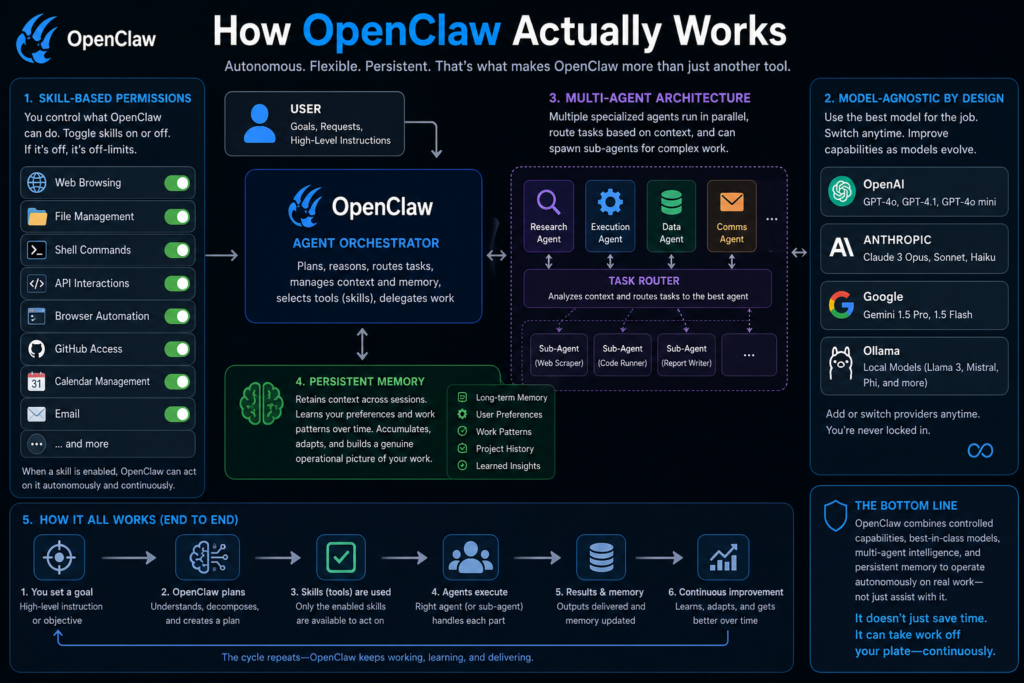
The architecture behind OpenClaw is what makes it a genuine threat to specific job roles rather than just another productivity novelty.
At its core, OpenClaw uses a skill-based permission system. You toggle on or off specific capabilities: web browsing, file management, shell commands, API interactions, browser automation, GitHub access, calendar management, email, and more. When a skill is enabled, OpenClaw can act on it autonomously and continuously. When it is disabled, that capability is simply off-limits.
It is also fully model-agnostic. You can power it with OpenAI’s GPT models, Anthropic’s Claude, Google Gemini, or a local model through Ollama. You are not locked into any single provider, which means as model capabilities improve, so does your OpenClaw agent. The system also supports multi-agent setups, where multiple specialized agents run in parallel, routing tasks between themselves based on context, and even spawning sub-agents for complex delegated work.
Most critically, OpenClaw has persistent memory. It retains context across sessions, learning your preferences and work patterns over time. This is not the kind of memory that resets when you close a browser tab. It accumulates, adapts, and builds a genuine operational picture of your work.
OpenClaw vs. Traditional Chatbots: Why This Time Is Different
To understand why OpenClaw threatens jobs in a way that ChatGPT never quite managed, you need to understand the one core distinction between a chatbot and an agent.
A chatbot waits. You type, it responds, you close the tab and it stops. It has no memory of yesterday, no awareness of tomorrow’s priorities, and zero ability to send a follow-up email you forgot to schedule. It is a tool that amplifies your effort only when you actively use it.
OpenClaw acts. It schedules, executes, monitors, follows up, and reports back without being asked each time. While testing various agentic setups over the past several months, this was the behavior change that genuinely surprised me. The difference between asking an AI to do something and having an AI that just does it without being asked is enormous in practice.
This transition from reactive AI to proactive AI is exactly what Steinberger meant when he told reporters at ClawCon: “2023 and 2024 was the year of ChatGPT, last year was the year of the coding agent, this year is going to be the year of the general agent.” That statement deserves to be taken seriously.
The Top 10 Professions OpenClaw Can Replace Right Now
Let me walk through each role, what it involves day-to-day, and precisely how OpenClaw handles it at a level that matches or exceeds human performance.
1. Virtual Assistant
This is the most complete and immediate replacement OpenClaw offers, and it is the role the tool was essentially designed around.
A virtual assistant’s core responsibilities are managing calendars, responding to emails, booking travel, handling scheduling conflicts, setting reminders, and keeping their employer organized across multiple platforms. OpenClaw does every single one of these natively. It connects directly to your calendar and inbox, drafts and sends emails with your tone and signature, books appointments, resolves scheduling conflicts, and proactively surfaces reminders for upcoming commitments.
The human VA exists to serve as a reliable intermediary between you and your organizational infrastructure. OpenClaw removes that intermediary entirely, runs 24 hours a day including weekends, and costs a fraction of a monthly retainer. For the vast majority of VA use cases, the replacement is already complete.
2. Customer Service Representative
Customer service is the industry where AI displacement stopped being theoretical and became undeniable. Klarna cut 700 customer service positions after deploying AI. UPS eliminated 20,000 roles. Entry-level job postings in the US dropped 35% in just two years. OpenClaw accelerates this trend further.
Configured as a customer support agent, OpenClaw connects to your support channels, reads incoming tickets, pulls relevant context from your knowledge base, and drafts and sends personalized responses. It handles escalation logic automatically, routing complex cases to a human while independently resolving everything else. It also follows up on open tickets, tracks resolution rates, and delivers weekly performance summaries.
In most real-world support queues, roughly 80% of incoming tickets are routine and pattern-based. OpenClaw handles that 80% completely autonomously. For businesses with high ticket volumes, the economics of running a human support team versus an OpenClaw-powered agent are increasingly difficult to justify.
3. Social Media Manager (Coordinator Level)
The strategic layer of social media management, brand direction, crisis response, influencer partnerships, and audience development, still benefits from human judgment. The execution layer, however, is deeply and thoroughly automatable right now.
OpenClaw can be configured to pull content from an approved queue, schedule and publish posts across platforms, monitor brand mentions and engagement metrics, generate performance reports, and draft replies to standard DMs and comments using a tone and voice you define in its SOUL.md configuration file. It handles competitive monitoring by periodically browsing competitor profiles and summarizing relevant observations.
The social media coordinator role, which typically involves executing against a strategy someone else sets, is almost entirely covered by what OpenClaw can do today. In my opinion, this is one of the fastest-hollowing roles at the junior and coordinator level across the digital marketing industry right now.
4. Content Writer and Copywriter (Entry to Mid-Level)
SEO blog posts, product descriptions, email copy sequences, ad variations, category page content, and meta descriptions. These are the everyday output of an entry-level or mid-level content writer, and they map almost completely onto what OpenClaw can produce when connected to a capable underlying model.
An OpenClaw content agent can be given a content calendar, a set of briefs, brand voice guidelines, and a keyword strategy. It will then work through the calendar autonomously, producing drafts on schedule, conducting basic keyword research through web browsing, and uploading content to a CMS. It does not wait to be reminded. It just works through the queue.
High-level editorial work, original investigative reporting, deeply creative long-form storytelling, and content that sets cultural conversation rather than follows it remain human advantages. But the $40,000-a-year entry-level content associate who was primarily executing against templates and briefs? That profile has become genuinely hard to justify when an OpenClaw agent covers most of the same ground at near-zero marginal cost.
5. Junior Software Developer
This is the one that consistently surprises people the most, and the evidence for it is now well-documented. A Wall Street Journal report in early 2026 detailed startups combining OpenClaw with AI coding tools to automate their developer roles at the junior level almost entirely.
OpenClaw handles code reviews against defined style guides, writes and runs unit tests, refactors legacy code to modern patterns, fixes documented bugs pulled from a GitHub issues queue, updates and maintains documentation, and runs automated test suites on a scheduled basis. Connected to a coding-capable model, it processes a development queue the same way a junior developer would, but without context switching, without sick days, and without the onboarding curve.
Senior engineers, architects, and product-level developers are not at risk in the same way. The complexity, the systems thinking, the stakeholder communication, and the creative problem-solving at that level remain distinctly human. But the junior developer whose daily work is primarily maintenance, ticket resolution, and small feature implementations is facing real structural pressure in 2026.
6. Research Analyst (Entry-Level)
Junior research analysts spend a substantial portion of their working hours gathering publicly available data, compiling industry reports, monitoring competitors, summarizing publications, and building structured documents for senior stakeholders. This is precisely the kind of work OpenClaw handles through its web browsing, file management, and scheduled task capabilities.
An OpenClaw research agent can be instructed to monitor a list of competitor pricing pages weekly, summarize relevant industry news daily, build and maintain a structured research document in Notion or Google Docs, and deliver a condensed briefing to Slack every Monday morning. It does all of this without prompting, on schedule, without missing a week.
Exploding Topics’ comprehensive 2026 data on AI job displacement confirms that data-heavy and research-compilation roles face some of the steepest displacement curves in the current AI cycle, and OpenClaw is a significant part of why.
7. Sales Development Representative (SDR)
SDRs run the top of the sales funnel: prospecting for leads, sending cold outreach, managing multi-touch follow-up sequences, qualifying interested prospects, and updating the CRM with every interaction. It is high-volume, highly repetitive work that follows predictable decision trees.
OpenClaw can manage an entire SDR workflow end-to-end. It sends personalized initial outreach emails, monitors replies, triggers follow-up sequences at defined intervals, qualifies leads based on the content of their responses, books discovery calls directly into the sales team’s calendars, and logs every touchpoint in the CRM automatically. It runs this across hundreds of leads simultaneously, around the clock, without losing track of a single thread.
For companies running high-volume B2B prospecting campaigns, deploying an OpenClaw SDR agent over a human team is a decision that is already being made at scale in 2026. The economics are simply too compelling to ignore.
8. Email Marketing Coordinator
Email marketing coordinators manage campaign calendars, write copy variants, schedule sends, monitor open rates and click-through data, maintain subscriber segments, and set up A/B test configurations. Nearly every one of these tasks is a direct match for OpenClaw’s native capabilities.
An OpenClaw email marketing agent can be given a campaign calendar and brand guidelines. It will draft campaigns from a brief, schedule them through an ESP integration, monitor performance metrics after each send, tag and update subscriber segments based on behavior, and deliver weekly performance summaries with observations. The strategic decisions about audience strategy and brand positioning still benefit from human oversight, but the operational execution layer is fully handled.
9. Data Entry and Administrative Clerk
This one requires the least explanation. Data entry clerks exist to move information from one system to another: filling out forms, updating spreadsheets, transferring data between platforms, and maintaining records. Every one of those tasks maps directly onto OpenClaw’s core skill set.
With browser automation and file management enabled, an OpenClaw agent can log into web portals, extract data, reformat it according to a defined structure, input it into target systems, and flag anomalies for human review. It does this repeatedly, without error accumulation over time, and at a speed no human data entry clerk can match.
This role has arguably seen the most complete displacement of any knowledge work category in early 2026. The combination of browser automation and persistent scheduling makes it almost entirely redundant for a well-configured agent. As Business Insider’s in-depth feature on Kuse CEO Xiankun Wu documented, even companies that were skeptical of AI automation are now deploying agents to handle exactly this kind of work.
10. Scheduling Coordinator
Scheduling coordinators manage the logistics of meetings, appointments, and calendar access across teams and organizations. They send invites, handle rescheduling requests, send day-of reminders, and ensure the right people have the right information before every engagement.
OpenClaw is, almost by design, a complete replacement for this role. Calendar management is one of its most mature native capabilities. It reads availability across connected calendars, proposes meeting times, sends invites, handles confirmation and rescheduling responses, and fires reminders at defined intervals before each event. A human scheduling coordinator adds value in high-stakes, politically sensitive situations requiring careful judgment. For standard scheduling operations, OpenClaw handles it completely.
OpenClaw vs. Human Worker: Side-by-Side Breakdown
How to Deploy OpenClaw as an AI Employee: Step-by-Step
Step 1: Install OpenClaw on your server or local machine
OpenClaw is open-source and MIT-licensed. While developers can clone the repository directly from GitHub, the easiest way to install it on a VPS, home server, or local machine is by running the official one-line curl installer in your terminal. It handles all dependencies automatically and gets you to a running instance in a matter of minutes.
Step 2: Choose your AI model
Connect OpenClaw to your preferred model provider. Options include OpenAI GPT models, Anthropic Claude, Google Gemini, or a local model via Ollama. Each performs differently depending on the role you are automating, so choose based on the task profile.
Step 3: Configure the SOUL.md file
This is where you define your agent’s name, personality, tone, communication style, and behavioral boundaries. Think of it as the job description and culture guide for your AI employee. A well-written SOUL.md is what separates a polished agent from a clunky one.
Step 4: Enable the relevant skills
Toggle on only the capabilities your specific role requires. A virtual assistant agent needs calendar, email, and reminders. A developer agent needs shell commands, GitHub, and file management. A research agent needs web browsing and document creation. Only enable what is necessary.
Step 5: Connect your messaging platform
Link OpenClaw to Telegram, WhatsApp, Slack, or Discord based on where your team operates. This becomes your primary interface for giving the agent instructions and receiving its outputs.
Step 6: Define recurring workflows and schedules
Set up the tasks that should run automatically. Research summaries every Monday. Email campaign drafts every Thursday. CRM updates every evening. Competitor monitoring every Sunday. The scheduling system is what turns OpenClaw from a responsive tool into a proactive employee.
Step 7: Test in a limited environment first
Run the agent on a narrow task set before giving it full access. Monitor outputs carefully for the first week. Refine the SOUL.md and skill configuration based on what you observe. This step saves a significant amount of cleanup later.
Step 8: Scale by adding specialized agents
Once one agent is performing reliably, deploy additional specialized agents for other functions. Each runs its own domain, and all are accessible through the same messaging interface. This is where the real productivity multiplication begins.
Pro Tip: The most underused feature in OpenClaw is the multi-agent routing architecture. Instead of configuring one generalist agent that tries to handle everything, set up a “manager” agent that receives all incoming requests and delegates them to specialized sub-agents. Your manager agent sits in Slack or Telegram, receives a task, and routes it: writing tasks go to the content agent, research requests go to the analyst agent, scheduling goes to the calendar agent, and dev tasks go to the GitHub agent. This structure mirrors how a real team operates and produces dramatically better results than a single catch-all configuration. It also makes troubleshooting infinitely easier.
What OpenClaw Still Cannot Replace
To be accurate and fair, there are real and meaningful limits to OpenClaw’s capabilities right now.
Physical presence requirements are obviously off the table entirely. No matter how capable the underlying model becomes, OpenClaw cannot attend an in-person meeting, conduct a site inspection, or perform hands-on technical work. Any job requiring physical dexterity or presence remains outside its scope.
Within knowledge work, high-stakes strategic decision-making that involves navigating organizational politics, long-range business vision, or irreversible resource commitments still requires the kind of contextual wisdom that agents have not demonstrated. Client relationships built on years of personal trust, the kind that exist in law firms, investment banking, and senior consulting, are not easily replicated by an AI agent, even a persistent and memory-capable one.
Deep creative origination, the kind of editorial vision, artistic direction, or strategic brand positioning that actually moves markets, also remains a human advantage. OpenClaw can execute against a creative direction. It cannot reliably generate one from scratch at a level that changes the game.
And anything requiring genuine emotional intelligence, crisis counseling, conflict mediation, therapeutic relationships, and nuanced human connection, is nowhere near OpenClaw’s current capability.
2026 Trends: Where This Is All Heading
Multi-agent workforces are becoming standard operating procedure. The most sophisticated OpenClaw deployments in 2026 are not single agents. They are structured teams of specialized agents, each with a defined role and domain, collaborating on complex workflows that span multiple business functions simultaneously.
AI employees are now assigning work to humans. This is the development that the Business Insider feature on Kuse CEO Xiankun Wu captured most vividly. Wu’s OpenClaw agents do not just respond to requests. They identify work independently and assign tasks to human team members. “When you see an AI assigning you a task,” Wu told Business Insider, “the relationship shifts. It feels like a real colleague.” His team even created a dedicated human-only Slack channel just to get a mental break from constant AI-generated task generation.
The talent economy is bifurcating sharply. The roles facing replacement are concentrated in one profile: high-volume, process-driven, pattern-based work with predictable inputs and outputs. The roles gaining value are the opposite: strategic, creative, relational, and judgment-intensive. The 2026 labor market is rapidly separating into two tracks, and the middle is collapsing fastest.
Self-hosted AI agents are becoming an enterprise preference. Because OpenClaw runs on your own hardware, your operational data never passes through a third-party server. In an era of rising data regulation and competitive intelligence concerns, this is a meaningful differentiator. Large enterprises that previously hesitated over cloud-based AI tools are finding self-hosted agentic AI far easier to adopt from a compliance standpoint.
As This detailed breakdown on YouTube, “OpenClaw Will Take Your Job in 2026”, shows visually, the speed of this transition is outpacing what most analysts predicted even 18 months ago. One operator in the video runs four distinct job roles through a single phone using OpenClaw agents for development, marketing, research, and business analytics, with zero additional employees.
Frequently Asked Questions
What exactly is OpenClaw and what does it do?
OpenClaw is an open-source, self-hosted AI agent framework that turns large language models into autonomous workers. It connects to messaging apps like WhatsApp, Telegram, and Slack, and executes real tasks proactively: managing emails, calendars, running research, handling customer support, writing and testing code, and more. Unlike chatbots, it operates 24/7 without waiting to be prompted.
Is OpenClaw free to use?
Yes. OpenClaw is MIT-licensed and completely free to download and use. Your main ongoing costs will be the AI model API fees (such as OpenAI or Anthropic pricing) and hosting costs if you run it on a cloud server. For personal or small-team use, these costs are minimal.
Can OpenClaw actually replace a full-time employee?
For roles that are primarily procedural, high-volume, and pattern-based, yes, in most cases quite completely. Virtual assistants, customer service coordinators, data entry clerks, SDRs, and scheduling coordinators are the clearest examples. For roles requiring deep strategic judgment, original creativity, or trusted human relationships, a full replacement is not realistic with today’s technology.
How is OpenClaw different from ChatGPT or Claude?
ChatGPT and Claude are reactive: they answer when you ask and stop when you close the tab. OpenClaw is proactive: it takes action on a schedule without being prompted, retains full memory across sessions, and operates continuously in the background completing tasks autonomously. The underlying models can be the same. The agent layer on top is what makes the difference.
What does “self-hosted” mean and why does it matter?
Self-hosted means OpenClaw runs on hardware you control, whether that is a personal server, a VPS, or a home machine. Your data never passes through a third-party company’s servers. This matters for privacy, compliance, and security, especially for businesses handling sensitive operational or customer data.
Is it safe to give OpenClaw access to business systems?
OpenClaw gives you granular control over exactly which skills are enabled. You can allow calendar access but block file management, or enable web browsing but restrict shell commands. That said, any autonomous system operating on real business infrastructure requires a thoughtful setup, proper testing, and ongoing monitoring, especially in the early stages.
Which professions are most at risk from OpenClaw right now?
The roles at highest risk are those where the daily work is primarily process-driven: scheduling coordination, data entry, customer service for standard queries, sales outreach and follow-up, social media execution, junior development tasks, research compilation, and entry-level content production. Roles requiring strategic judgment, emotional intelligence, or deep creative origination remain much safer for now.
Can one person use OpenClaw to do the work of an entire team?
In limited contexts, yes. Several documented cases in 2026 show solo operators running what would traditionally require four to six employees by using a multi-agent OpenClaw setup. This is most achievable in digital-native, process-heavy operations like content agencies, SaaS startups, or e-commerce businesses.
Does setting up OpenClaw require coding skills?
Some technical familiarity is genuinely helpful for the initial installation and configuration. However, the OpenClaw community has produced extensive setup guides, and the official one-line curl installer makes the process far more accessible than it used to be. Non-technical users can deploy it with patience and the right documentation, especially when using one of the third-party managed deployment options that have emerged.
What is the SOUL.md file in OpenClaw?
SOUL.md is the configuration file where you define your agent’s personality, name, communication tone, behavioral guidelines, and operational boundaries. It functions like a combination of a job description and a culture handbook for your AI employee. A well-crafted SOUL.md is one of the most important factors in how polished and effective the agent behaves in practice.
Bottom Line
OpenClaw represents the clearest evidence yet that autonomous AI agents have moved from concept to workforce reality. For the ten roles outlined above, the technology to automate the majority of daily work exists today, runs 24/7, and costs a fraction of the human equivalent. Kuse CEO Xiankun Wu put the current state plainly: roughly 60 to 70 percent of work can now be handled by AI employees. That number is only going in one direction. The professions at greatest risk are not the ones that require wisdom, creativity, or human connection. They are the ones built primarily on procedure, volume, and predictable pattern execution. If your daily work looks like a checklist more than it looks like a conversation, it is worth paying very close attention to where OpenClaw is heading next.



