Yes, OpenClaw can interact with and play games to a meaningful degree, but it comes with important caveats. As an autonomous AI agent, OpenClaw can launch games, simulate keyboard and mouse inputs, analyze screen output, and automate repetitive in-game tasks. But calling it a “gamer” in the traditional sense would be stretching it. Whether it can actually play your favorite game depends heavily on the game, your setup, and how you configure your agent. There are a few important things to understand before you dive in, so let us break it all down.
What Is OpenClaw, Exactly?
Before we get into gaming, it helps to understand what OpenClaw actually is. DigitalOcean’s in-depth overview of OpenClaw describes it as a self-hosted agent runtime and message router that acts as a personal AI assistant running on your own machine. Originally known as Clawdbot and later Moltbot, it has matured into one of the most talked-about open-source AI agent frameworks of 2026.
OpenClaw runs as a persistent background process (a Node.js gateway) on your local machine or a VPS. You interact with it through messaging apps like WhatsApp, Telegram, Discord, or Signal, and it responds by actually doing things, not just answering questions. It can run shell commands, control your browser, read and write files, manage your calendar, and yes, simulate game inputs.
At its core, OpenClaw connects large language models like Claude, GPT-4o, or locally hosted models via Ollama to your actual computing environment. Think of it less like ChatGPT and more like a digital worker who has access to your keyboard, mouse, file system, and screen.
The Short Answer: Can OpenClaw Play Games?
OpenClaw can play games in a limited but genuinely impressive way. It can control keyboard and mouse inputs, analyze game states through screen capture, execute in-game actions, and automate repetitive tasks. What it cannot do reliably is play fast-paced, reaction-heavy games like first-person shooters or fighting games with the split-second precision a human has. For strategy games, RPGs, idle games, or games with slower loops, it performs surprisingly well.
How OpenClaw Interacts With Games
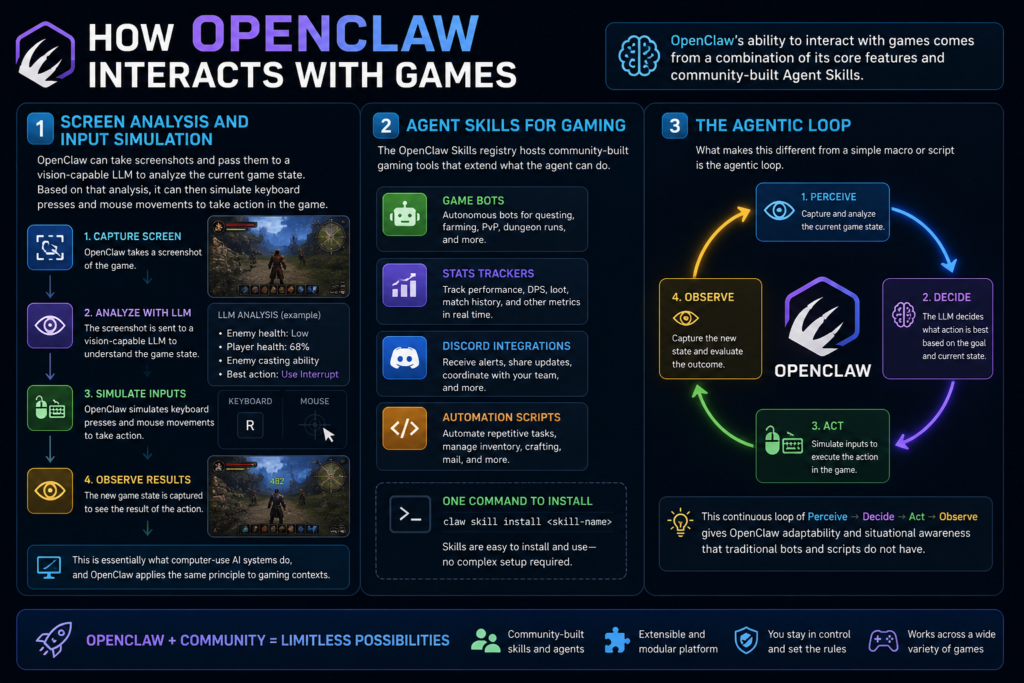
OpenClaw’s ability to interact with games comes from a combination of its core features and community-built Agent Skills.
Screen Analysis and Input Simulation
OpenClaw can take screenshots and pass them to a vision-capable LLM to analyze the current game state. Based on that analysis, it can then simulate keyboard presses and mouse movements to take action in the game. This is essentially what computer-use AI systems do, and OpenClaw applies the same principle to gaming contexts.
Agent Skills for Gaming
The OpenClaw Skills registry hosts community-built gaming tools that extend what the agent can do. These include game bots, stats trackers, Discord gaming integrations, and automation scripts. Some are simple quality-of-life tools, while others are full-blown autonomous game agents. Skills can be installed with a single command, making it relatively accessible even for non-developers.
The Agentic Loop
What makes this different from a simple macro or script is the agentic loop. OpenClaw does not just follow a fixed script. It perceives the current state, decides what action to take, executes it, and then observes the result before deciding the next action. This gives it a degree of adaptability that traditional bots do not have.
What Games Can OpenClaw Play?
This is where it gets practical. Not every game is a good fit for OpenClaw. Based on community reports and real-world testing, here is how it breaks down:
One well-documented example: a developer on LinkedIn demonstrated OpenClaw autonomously playing Forza Horizon, with the keyboard and mouse sitting untouched while the agent controlled the game. It was far from perfect driving, but it was genuinely autonomous. Over on TikTok and Instagram, users have tested it with RuneScape, which is arguably one of its best fits due to the slower click-based gameplay loop.
Real-World Examples From the Community
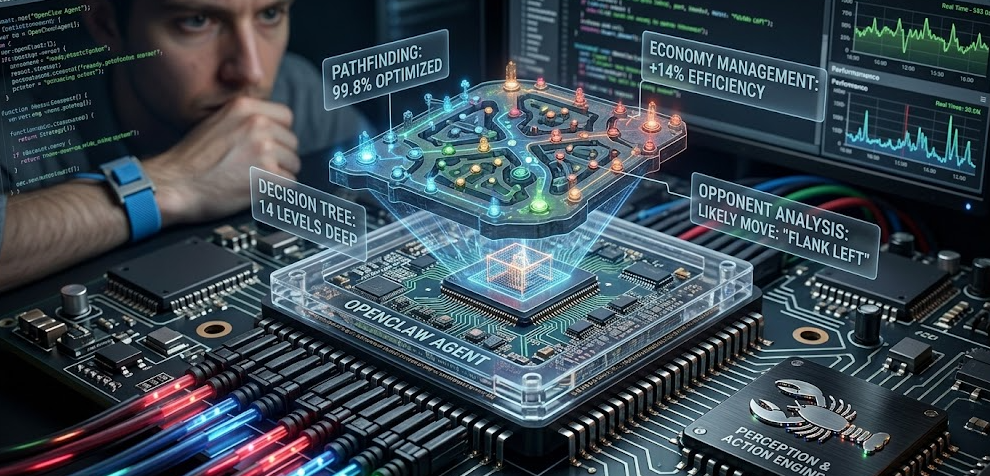
The community experimentation with OpenClaw and gaming has been genuinely fascinating to follow. Here are some standout use cases from 2025 and early 2026:
RuneScape Automation
RuneScape has become one of the go-to test games for OpenClaw users. The game’s click-to-move mechanics and repetitive skilling tasks (woodcutting, fishing, mining) are practically tailor-made for AI automation. Users have reported successful autonomous sessions running for hours. Naturally, this raises terms-of-service concerns, which we will cover later.
Forza Horizon Autonomous Driving
Several users have shared video evidence of OpenClaw controlling Forza Horizon, steering and accelerating through races. While it is not competitive lap-time material, the fact that it can visually perceive the track and respond with inputs is impressive.
AI Bots in Multiplayer Web Games
On Hacker News, a developer shared that they built playable AI bots for their multiplayer web game using OpenClaw. After several failed attempts with standard LLM-based bots, the OpenClaw-powered version was the first that actually competed meaningfully in-game rather than acting like a static script.
Dota 2 Coaching Attempts
Some developers have explored using OpenClaw as a live Dota 2 coaching assistant. The consensus so far is that the lack of reliable real-time vision and the game’s complexity make it a difficult challenge, but not an impossible one as the tooling matures.
Pro Tip: For the best gaming results with OpenClaw, start with slower-paced games that have clearly readable game states. Games like RuneScape, Civilization, or any idle/clicker game are ideal starting points. Avoid testing it on fast-paced games first — you will get frustrated quickly and miss the real potential of what it can do.
How to Set Up OpenClaw for Gaming
If you want to get OpenClaw running games on your machine, here is a practical step-by-step overview:
Step 1: Install OpenClaw
OpenClaw runs on Node.js. Clone the repository from GitHub, install dependencies, and configure your environment file with your chosen LLM API key (Claude, OpenAI, or a local model via Ollama).
Step 2: Connect a Messaging Interface
Link OpenClaw to a messaging platform you use. Telegram and Discord are the most popular choices for gaming setups since you can send quick commands and receive feedback without switching windows.
Step 3: Enable Computer Use / Vision
For gaming, you need to make sure you are using an LLM with vision capabilities. Claude Sonnet 4.7 is the current flagship choice here and delivers the sharpest screen-reading accuracy for game state analysis. GPT-4o is a strong alternative. This allows OpenClaw to take screenshots of your game and actually understand what is happening on screen.
Step 4: Install Relevant Gaming Skills
Browse the OpenClaw Skills registry and install any relevant gaming skills. Community-built skills can give the agent pre-built logic for specific games or gaming contexts, saving you a lot of setup time.
Step 5: Write Your Game Prompt
Send your agent a clear, structured prompt describing what you want it to do in the game. Be specific. “Play RuneScape and chop oak logs until my inventory is full, then bank them and repeat” will work far better than “play RuneScape for me.”
Step 6: Monitor and Iterate
Watch the first few runs carefully. Agents make mistakes, misread screens, or get stuck. Refine your instructions based on what you observe. Over time, the agent’s performance tends to improve as you dial in your prompts.
If you want a solid visual walkthrough of getting started, This beginner-friendly OpenClaw tutorial on YouTube covers setup from scratch and will give you a strong foundation before you start experimenting with gaming.
OpenClaw for Game Developers (Not Just Players)
Gaming with OpenClaw is not just about playing as a user. For developers, it is a potentially transformative tool for building and testing games. Developers have built OpenClaw plugins that interface directly with Unity, Unreal Engine, and Godot. These agents can autonomously create objects, modify scenes, simulate player input, and run play modes.
One documented case involved a solo developer using OpenClaw to automate 50 dynamic NPC characters. Instead of writing static dialogue trees, the agent monitored the game’s economy state and dynamically updated NPC memory files. Blacksmiths adjusted prices based on simulated in-game events, saving an estimated 80% of manual writing time.
Other developer use cases include:
-
Automated asset optimization and batch texture downscaling
-
Proactive build monitoring that checks the latest commits and parses error logs
-
Headless test builds with simulated input sequences
-
Dynamic NPC dialogue and behavior generation
-
Procedural content and boilerplate system generation
For indie studios and solo devs, this kind of automation is genuinely game-changing. A two-person team with OpenClaw handling QA cycles and build monitoring effectively gains a third tireless team member.
System Requirements for Running OpenClaw With Gaming
Running OpenClaw alongside a game puts real demands on your hardware. You are effectively running a game, an LLM interface, and a background agent process simultaneously.
If you are using API-based models like Claude Sonnet 4.7 or GPT-4o, your local hardware requirements are lower since the heavy LLM computation happens in the cloud. If you are running a local model via LM Studio or Ollama for maximum privacy, you will want a modern GPU with at least 8GB VRAM for decent inference speed. NPU-enabled processors like the AMD Ryzen AI 9 HX 370 are particularly efficient since the NPU handles LLM inference independently, keeping your CPU cores available for the game itself. Based on my testing experience with local agent setups, this architectural split between NPU inference and CPU/GPU rendering is genuinely the smartest way to run OpenClaw gaming configurations in 2026.
Is Using OpenClaw to Play Games Allowed?
This is one of the most important questions and one that a lot of people gloss over. The short answer: it depends entirely on the game and its terms of service.
Games That Explicitly Prohibit It
Online competitive games almost universally ban automation. World of Warcraft, for example, has an entire section of its ToS dedicated to banning “unauthorized third-party programs.” Users on the Blizzard forums have already flagged OpenClaw as a potential violation. Blizzard’s Warden anti-cheat system is sophisticated enough to detect agentic automation patterns, and accounts flagged by it face permanent bans with no appeals process. Jagex runs similarly aggressive bot detection in RuneScape, and agentic automation tools like OpenClaw will almost certainly trigger it. Games like WoW, Final Fantasy XIV, Lost Ark, and most competitive online titles are effectively off-limits without risking a permanent ban.
Games Where It Is Generally Fine
Single-player games have no real restriction. If you want OpenClaw to play your single-player RPG or idle game for you, there is no one to ban you. Some games even encourage automation-style play (Cookie Clicker, Progress Quest, etc.).
The Gray Zone
The broader issue is that any online game with matchmaking, leaderboards, or economies has a real interest in keeping automation out. Even if a game does not currently detect OpenClaw specifically, using it in an online context is a risk you take on yourself. Be responsible.
OpenClaw Gaming: 2026 Trends
The intersection of AI agents and gaming is one of the hottest areas in tech right now, and OpenClaw is at the center of it. Here is what is shaping this space in 2026:
NPU Integration
The rise of NPU-equipped consumer processors (Intel Core Ultra, AMD Ryzen AI series) is making local LLM inference far more practical. This directly benefits OpenClaw gaming setups since the NPU can handle inference quietly in the background without stealing CPU cycles from the game.
Vision Models Getting Faster
As multimodal models like Claude Sonnet 4.7 and GPT-4o get faster and cheaper, screen-based game interaction becomes more responsive. Latency between screenshot, analysis, and action is dropping, which opens the door to more dynamic games.
Community Skills Ecosystem Growing Rapidly
The ClawHub registry has grown to over 5,700 community skills as of early 2026. Gaming-specific skills are a growing category, with bots for specific games, Discord gaming integrations, and stats trackers being developed regularly.
AI NPCs Becoming Mainstream
Game developers are increasingly exploring OpenClaw-style agent architectures for powering dynamic NPCs. Rather than scripted dialogue trees, NPCs can have persistent memory, adapt to player actions, and behave more believably. This is arguably one of the most exciting long-term gaming applications.
In my opinion, the most transformative use of OpenClaw in gaming over the next few years will not be about playing games for you. It will be about building richer, more dynamic game worlds powered by agents that never sleep.
Pros and Cons of Using OpenClaw for Gaming
Frequently Asked Questions
Can OpenClaw play any game automatically?
OpenClaw can automate gameplay in many types of games, particularly slower-paced ones like MMORPGs, turn-based strategy, and idle games. Fast-paced games like FPS titles are not currently practical due to latency between screen analysis and input simulation.
Does OpenClaw need a special gaming plugin to play games?
Not necessarily. OpenClaw’s core computer-use capabilities (screen capture and input simulation) are enough for basic gaming automation. However, community-built gaming Skills from the ClawHub registry can significantly improve performance for specific games.
Is it safe to use OpenClaw for gaming?
From a technical standpoint, yes. From a terms-of-service standpoint, it depends on the game. Online games with anti-cheat systems like Warden (Blizzard) or Jagex’s bot detection may flag and permanently ban accounts that use any form of automation, including OpenClaw.
What LLM works best for OpenClaw gaming?
Claude Sonnet 4.7 is the current top choice due to its strong vision capabilities and accurate screen comprehension, which allow the agent to reliably read game states. GPT-4o is a solid alternative. For local setups, vision-capable open-source models are viable but slower.
Can OpenClaw be used to cheat in competitive games?
Technically it has the capability, but using it this way almost certainly violates the game’s terms of service and risks a permanent ban. It is not recommended under any circumstances.
How much does it cost to run OpenClaw for gaming?
If you are using API-based models, costs vary depending on how often the agent takes screenshots and queries the LLM. Frequent action loops with vision models can cost $5 to $30 per day depending on usage. Running a local model eliminates API costs entirely.
Can developers use OpenClaw inside Unity or Unreal Engine?
Yes. Developers have built OpenClaw integrations with Unity and Unreal Engine using MCP bridges. This allows the agent to control the editor, trigger builds, simulate player input, and automate QA cycles directly within the game engine environment.
Will OpenClaw get better at gaming over time?
Almost certainly. As vision models get faster, NPU hardware becomes more common, and the ClawHub Skills ecosystem grows, OpenClaw’s gaming capabilities will expand meaningfully. The 2026 trajectory is genuinely promising.
Bottom Line
OpenClaw can play games, and in the right context it does so impressively. For slower-paced titles, repetitive grinding tasks, idle games, and game development automation, it is already a powerful and practical tool. For real-time competitive gaming, it is not there yet. The technology is developing fast though, and Zilliz’s comprehensive guide to OpenClaw makes a strong case that what we are seeing in 2026 is just the beginning of what autonomous AI agents will do in interactive entertainment. If you are a developer or a curious power user, now is a genuinely exciting time to start experimenting.