A great laptop balances performance, portability, display quality, battery life, and value for your specific use case. But before you pull out your wallet, there are several key factors worth understanding, because the “best” laptop for a graphic designer is completely different from the best one for a college student or a hardcore gamer. This guide walks you through everything you need to know to make a smart, confident decision in 2026.
A great laptop is one that meets your needs without making you pay for features you will never use. At minimum, look for a modern processor (Intel Core Ultra, AMD Ryzen AI, Apple M-series, or Qualcomm Snapdragon X2), at least 16GB of RAM, a fast SSD, a quality display, and enough battery life to get through your day. Read on for the full breakdown.
Why Picking the Right Laptop Matters More Than Ever in 2026
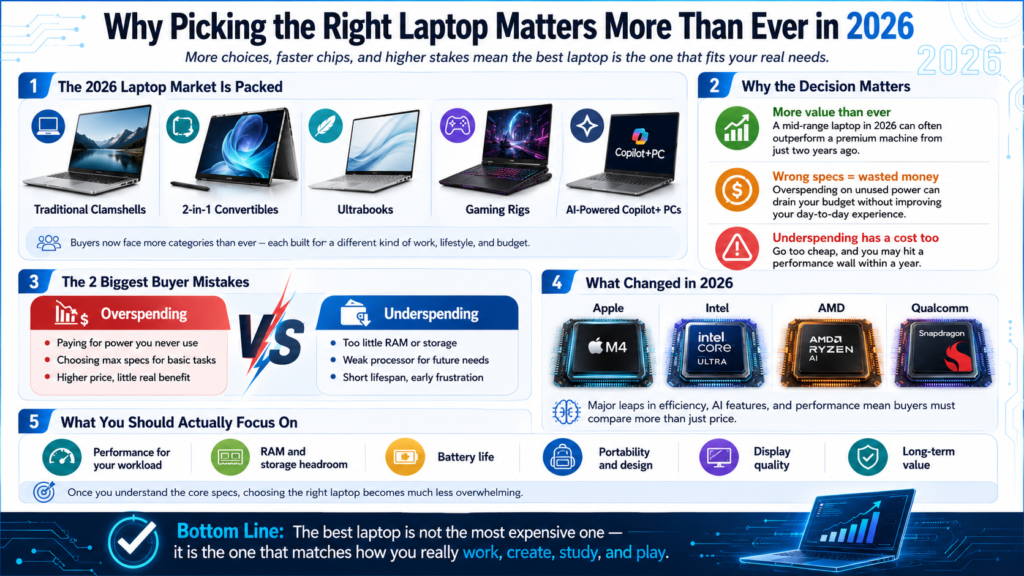
The laptop market in 2026 has exploded with options. You have traditional clamshells, 2-in-1 convertibles, ultrabooks, gaming rigs, and AI-powered Copilot+ PCs all competing for your attention. On top of that, chip architectures from Apple, Intel, AMD, and Qualcomm have all made significant leaps, meaning a mid-range laptop today often outperforms a premium machine from just two years ago.
In my experience reviewing laptops over the years, the single biggest mistake buyers make is either overspending on specs they do not need, or underspending and hitting a performance wall within a year. Getting this decision right from the start saves you real money and a lot of frustration.
The good news is that once you understand what the core specifications actually mean, the decision becomes a lot less overwhelming. Let us break it all down.
The Operating System: Your First Big Decision
The operating system you choose determines everything else about your laptop experience, from software compatibility to hardware options.
There are three main choices in 2026: Windows 11, macOS (on Apple Silicon Macs), and ChromeOS. Windows gives you the widest hardware variety and software compatibility, running on machines from Dell, HP, Lenovo, Asus, and dozens of other manufacturers. It integrates well with both Android phones and iPhones and supports the broadest range of professional and creative software.
macOS, exclusive to Apple’s MacBook lineup, is built around the M-series chips (currently the M5 generation) and offers outstanding performance-per-watt, exceptional battery life, and a polished, tightly integrated ecosystem. ChromeOS, found on Chromebooks, is lightweight and affordable, best suited for web-based work and education environments.
The Processor (CPU): The Brain of Your Laptop
The processor is the most important spec in any laptop because it determines how fast your machine handles every task, from opening apps to rendering video.
In 2026, the major chip families to know are:
-
Intel Core Ultra (300 series, “Panther Lake”): Intel’s Panther Lake architecture officially debuted at CES 2026 as the Core Ultra 300 series (Series 3), succeeding the 200 series Lunar Lake and Arrow Lake chips. These latest chips bring strong multi-core performance and built-in NPUs for AI tasks. The Core Ultra 5 is great for everyday productivity, while the Core Ultra 7 and Ultra 9 handle demanding workloads.
-
AMD Ryzen AI (300 series): AMD’s Ryzen AI 9 is one of the most powerful processors available in Windows laptops right now, with excellent multi-threaded performance and impressive integrated graphics.
-
Apple M5: Found in the MacBook Air (released March 2026) and MacBook Pro, the M5 chip offers graphics performance that rivals the previous M3 Pro, making it a powerhouse for creative professionals.
-
Qualcomm Snapdragon X2 (Elite/Plus): Qualcomm moved on from the original Snapdragon X generation in early 2026, with the new Snapdragon X2 generation now on shelves. These ARM-based chips deliver excellent battery life and strong everyday performance, with software compatibility that has improved significantly compared to earlier ARM Windows devices.
As a general rule: for basic tasks like browsing and document editing, a Core Ultra 5 or Ryzen 5 is more than enough. For video editing, 3D modeling, or heavy multitasking, aim for a Core Ultra 7/9 or Ryzen 7/9.
Pro Tip: Do not just look at the processor name. Pay attention to whether it is a “U-series” (ultra-low power, thinner laptops) or an “H-series” (high-performance, thicker builds). An Intel Core Ultra 7 in a thin ultrabook will perform differently than the same chip in a larger, better-cooled machine. High-end CPUs often throttle inside thin ultrabook chassis under heavy sustained loads like long code compilations or 3D rendering. If you do not actually need to work from a coffee shop, a Mini PC or NUC-style desktop can deliver significantly better sustained thermal performance for the same price. Always check thermal design and form factor alongside the CPU tier.
RAM: How Much Do You Actually Need?
RAM (Random Access Memory) is your laptop’s short-term workspace, and having enough of it is critical for a smooth, responsive experience in 2026.
Think of RAM like your physical desk. The more desk space you have, the more tasks you can have open and accessible at once. Run out of it and things start to slow down or crash.
Here is a practical guide to RAM in 2026:
-
8GB: The absolute minimum for budget laptops. Acceptable for very light use (email, basic web browsing), but you will notice slowdowns if you multitask.
-
16GB: The sweet spot for most users in 2026. Handles everyday productivity, moderate photo editing, video calls, and dozens of browser tabs without breaking a sweat.
-
32GB: Ideal for content creators, developers, video editors, and power users running multiple demanding apps simultaneously.
-
64GB+: Reserved for workstation-class laptops used for 3D rendering, large dataset analysis, virtual machines, and professional video production.
One important note: many modern laptops, especially ultra-thin models, have RAM soldered directly onto the motherboard, meaning you cannot upgrade it later. Always buy the amount you think you will need now, plus a little extra.
Storage: SSD Is Non-Negotiable

In 2026, there is no reason to buy a laptop with a traditional spinning hard drive (HDD) as a primary storage drive. SSDs are faster, more reliable, and widely affordable.
An NVMe SSD (the fastest type) can load your operating system in under 10 seconds and open apps almost instantly. Here is what to look for:
-
256GB SSD: Tight but workable for light users who store most things in the cloud.
-
512GB SSD: Comfortable for most users with a standard app library and moderate file storage.
-
1TB SSD: Recommended for anyone storing large media files, games, or creative projects locally.
-
2TB+: For professionals with large video libraries, game collections, or extensive project files.
Wired’s comprehensive laptop buying guide notes that storage speed matters as much as size, and recommends prioritizing NVMe SSDs over SATA-based ones for the best day-to-day experience.
The Display: Where You Spend All Your Time
The display is arguably the most underrated spec in a laptop purchase, because you are staring at it for hours every day.
A few things to consider:
Resolution matters for sharpness. A Full HD (1920×1080) screen looks fine on a 13-inch laptop, but on a 15-inch or larger screen, you will notice the pixels more. Aim for at least 2K (2560×1600) on larger screens for crisp, comfortable viewing.
Panel type shapes your visual experience significantly in 2026:
Refresh rate also matters more than people think. A 120Hz display makes scrolling and animations look dramatically smoother compared to a standard 60Hz panel. If you are gaming or just want a premium feel, look for at least 90Hz.
Brightness is measured in nits. For indoor use, 300 to 400 nits is adequate. If you work outdoors or near windows, aim for 500 nits or higher.
Battery Life: The Real-World Reality
Battery life is one of the most important practical considerations for a laptop, and the numbers on the spec sheet do not always tell the full story.
Manufacturers test battery life under ideal, low-brightness, low-load conditions. Real-world usage is typically 20 to 30 percent lower than advertised. A laptop claiming 18 hours might realistically deliver 12 to 14 hours of mixed use.
In 2026, some standout performers include ARM-based machines like the MacBook Air M5 and Snapdragon X2-powered Windows laptops, which regularly achieve true all-day battery life (10 to 14 real-world hours) thanks to their efficient chip architectures.
PCMag’s extensive 2026 laptop testing found that the HP OmniBook 5 14 leads the Windows category with field-leading battery life, making it one of the best options for users who need all-day endurance without a charger.
For battery longevity over time, follow the 20/80 rule: try to keep your battery between 20% and 80% charge rather than running it to 0% or leaving it constantly at 100%. This significantly extends the lifespan of your lithium-ion cells.
Build Quality, Design, and Portability
A laptop’s build quality determines how well it holds up over years of daily use, and portability matters more than most people anticipate before they start carrying one around.
Key things to look for:
-
Chassis material: Aluminum and magnesium alloy builds are sturdier and feel more premium than plastic. However, quality plastics like those used in some ThinkPads are perfectly durable.
-
Weight: Ultrabooks typically weigh between 2.5 and 3.5 pounds. Gaming laptops and mobile workstations can exceed 5 to 6 pounds. If you carry your laptop daily, every ounce matters.
-
Keyboard quality: Check for key travel depth (1.2mm to 1.5mm is comfortable), key spacing, and backlight options. A bad keyboard can ruin even the most powerful laptop.
-
Trackpad: Larger glass trackpads with smooth gestures are generally better. Look for precision touchpad certification on Windows laptops.
-
Hinge quality: A stiff, sturdy hinge keeps the screen at your chosen angle without wobbling. 360-degree hinges are required for 2-in-1 convertibles.
-
Military-grade durability (MIL-SPEC): Some business and rugged laptops carry MIL-STD-810H certification, meaning they have been tested against drops, dust, humidity, and temperature extremes.
A note for stationary users: If you work primarily from a fixed desk and rarely need to take your machine on the road, consider whether a laptop is actually the right tool at all. High-performance Mini PCs and NUC-style desktops offer significantly better sustained thermal performance at the same price point, because they are not constrained by thin chassis and tiny cooling systems. You get more CPU headroom, better thermals under long workloads, and often more ports, all without the portability premium baked into laptop pricing.
Ports and Connectivity: Do Not Overlook This
Ports might seem like a minor detail, but running out of the right connections is one of the most frustrating daily-use problems laptop buyers regret not checking.
Here is what to look for in 2026:
-
USB-C / Thunderbolt 4 or USB4: Essential. Used for charging, data transfer, external displays, and docking stations.
-
USB-A: Still needed for older peripherals, flash drives, and accessories.
-
HDMI: Useful for connecting to external monitors and projectors without a dongle.
-
SD Card Reader: A must-have for photographers and videographers.
-
3.5mm Headphone Jack: Increasingly rare on thin laptops but still very useful.
-
Wi-Fi 6E or Wi-Fi 7: Make sure your laptop has modern wireless for fast, stable connections.
If the laptop you want is thin and port-light, factor in the cost of a quality USB-C hub or docking station.
Graphics: Integrated vs. Dedicated GPU
For most users, integrated graphics are completely sufficient in 2026. You only need a dedicated GPU for gaming, video production, 3D modeling, or machine learning tasks.
Intel Arc integrated graphics (found in Core Ultra 300 series chips) and AMD Radeon 890M (in Ryzen AI 9 chips) have gotten surprisingly capable for casual gaming and light creative work. Apple’s M5 GPU is in a class of its own for integrated graphics performance.
For serious gaming or GPU-heavy creative work, look for an Nvidia GeForce RTX 5070 or higher from Nvidia’s Blackwell architecture lineup, which has successfully rolled out to laptops in 2026. The Laptop Buying Guide 2026 on YouTube is a great video resource that walks through what GPU tier makes sense at each price point and use case.
Laptop Categories: Which Type Is Right for You?
Step-by-Step: How to Match Your Laptop Type to Your Lifestyle
Step 1: Identify your primary use case.
Are you primarily browsing the web and using productivity apps? Working with creative software? Gaming? Or doing specialized professional work?
Step 2: Pick your category.
Step 3: Set your budget.
-
Under $500: Chromebooks and entry-level Windows laptops. Good for students and light users.
-
$500 to $800: Mid-range Windows and MacBook Air base models. Solid everyday performance.
-
$800 to $1,200: Where the best value lives. Strong processors, quality displays, solid build.
-
$1,200 to $2,000: Premium ultrabooks, high-end MacBooks, mid-range gaming laptops.
-
$2,000+: High-end gaming machines, professional workstations, top-tier creative laptops.
Step 4: Narrow down by display and portability needs.
Do you want a compact 13-inch for travel, or a larger 15 to 16-inch for productivity at a desk? Do you need OLED for content creation, or is IPS fine for document work?
Step 5: Check the keyboard and trackpad in person if possible.
If you are buying online, read reviewer feedback specifically about keyboard feel and trackpad quality. These are the two things you interact with most and they vary wildly between models.
2026 Laptop Trends You Should Know About
The laptop market in 2026 is shaped by several significant developments that directly affect what you should buy:
AI Integration (Copilot+ PCs): Microsoft’s Copilot+ platform requires a dedicated NPU capable of 40+ TOPS of AI performance. These laptops support features like real-time translation, AI-assisted photo editing, and on-device AI tasks. Qualcomm Snapdragon X2, AMD Ryzen AI 300, and Intel Core Ultra 300 series chips all qualify.
ARM-Based Windows Laptops Are Finally Mainstream: After years of growing pains, ARM Windows laptops in 2026 have excellent software compatibility and deliver industry-leading battery efficiency. The Snapdragon X2 Elite and X2 Plus are genuinely competitive options that belong on any shortlist.
OLED Displays Going Mid-Range: OLED panels, once reserved for $1,500+ laptops, are now aggressively moving into mid-range machines. Tom’s Guide’s 2026 laptop testing found that the Samsung Galaxy Book 6 Ultra’s OLED touchscreen with 120Hz refresh rate is among the best displays tested this year.
Thinner Gaming Laptops: Graphics card efficiency improvements from Nvidia’s Blackwell RTX 50-series mean gaming-class GPUs are now fitting into laptops under 15mm thick and under 3 pounds, a previously impossible combination.
Dual-Screen Laptops Going Mainstream: Devices like the Asus Zenbook Duo (2026) have made dual-screen setups a practical mainstream option rather than a novelty.
Frequently Asked Questions (FAQs)
Q: How much RAM do I need in a laptop in 2026?
16GB is the sweet spot for most users in 2026. It handles multitasking, everyday productivity, and moderate creative tasks comfortably. Go for 32GB if you edit video, work with large datasets, or run virtual machines regularly.
Q: Is 8GB of RAM enough in 2026?
It is the absolute minimum for a budget laptop, but it is increasingly tight. With modern browsers, background apps, and operating system overhead, 8GB will feel slow if you multitask. If you are on a budget, prioritize getting 16GB over a faster processor.
Q: SSD vs HDD: Which should I choose for my laptop?
Always choose an SSD in 2026. HDDs are dramatically slower, more fragile (they have moving parts), and are nearly obsolete in the laptop market. An NVMe SSD makes every aspect of using your laptop faster, from boot times to file transfers.
Q: What is the best laptop display type in 2026?
It depends on your use. OLED is the best for visual quality, color accuracy, and creative work. IPS LCD is reliable, bright, and more affordable with no burn-in risk. Mini-LED hits a sweet spot for brightness and HDR performance. For most users, a high-quality IPS or OLED panel at 1080p or higher is excellent.
Q: How many hours of battery life is good for a laptop?
A real-world battery life of 8 to 10 hours is good, and 12+ hours is excellent. Keep in mind that manufacturer claims are usually tested under ideal conditions, so expect your actual experience to be somewhat lower depending on screen brightness, active apps, and workload.
Q: Should I buy a Windows laptop or a MacBook?
It depends on your ecosystem and needs. MacBooks with Apple Silicon offer exceptional performance, battery life, and build quality. Windows laptops give you far more variety in form factor, price point, and hardware customization. If you are already in the Apple ecosystem or do creative work, a MacBook is hard to beat. For gaming, business software compatibility, or budget flexibility, Windows is the better platform.
Q: What screen size should I get for my laptop?
13 to 14-inch screens are ideal for portability and daily commuting. 15 to 16-inch screens offer more screen real estate for productivity and media without being too bulky. 17-inch laptops are best for desktop replacement use where portability is less important.
Q: Is a gaming laptop good for everyday use?
Yes, but there are trade-offs. Gaming laptops have powerful hardware that handles everything from video editing to demanding software. However, they tend to be heavier, louder due to fans, and have shorter battery life compared to ultrabooks. In my opinion, if you only game occasionally and mostly do productivity work, a capable ultrabook will serve you better day-to-day.
Q: What ports should a laptop have?
At minimum: at least one USB-C (Thunderbolt 4 preferred), at least one USB-A, HDMI, and a headphone jack. If you work with cameras or memory cards, an SD card reader is very useful. Wi-Fi 6E or Wi-Fi 7 support is also worth checking.
Q: What is a Copilot+ PC and do I need one?
A Copilot+ PC is a Windows laptop with a dedicated AI chip (NPU) capable of 40+ TOPS of processing. It enables on-device AI features in Windows 11 like live captions, AI photo tools, and Recall. For most everyday users, these features are useful but not essential. If you are buying a new Windows laptop in 2026, most mid-range and above machines already qualify, so you will likely get one by default.
Q: How long should a laptop last?
A well-built laptop with good specs for your needs should last 4 to 6 years comfortably. The most common reasons laptops become obsolete early are insufficient RAM, slow storage, or a degraded battery. Buying 16GB RAM and a 512GB+ NVMe SSD from the start significantly extends useful lifespan.
Quick Reference: Laptop Buying Checklist for 2026
Bottom Line
A great laptop in 2026 comes down to matching the right specs to your actual lifestyle. Start with 16GB of RAM and a fast NVMe SSD as your baseline, and build from there based on display preferences, portability needs, and budget. The good news is that at nearly every price point, you get significantly more value today than you did even two years ago, thanks to the rapid pace of improvement across Intel’s Panther Lake, AMD Ryzen AI, Apple M5, and Qualcomm Snapdragon X2 platforms. Take your time, use this guide as your checklist, and you will walk away with a machine that serves you well for years to come.