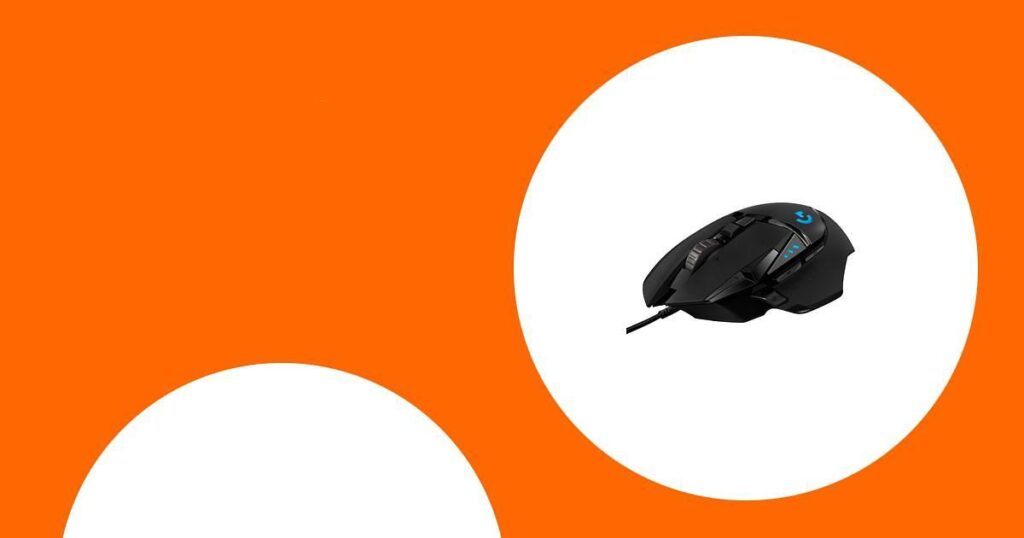
I know from hours of matches and aim practice that the right mouse can make a real difference in Valorant. Choosing a mouse affects flicks, tracking, and comfort during long sessions, so I focused on options that deliver low latency, precise sensors and a shape that suits competitive play.
Below I share picks across budgets and playstyles so you can find a mouse that actually improves your game and feels good to use.
Top Picks
|
Category |
Product |
Score |
|---|---|---|
|
🎯 Best For Button Customization |
92/100 |
|
|
💼 Best For Comfort |
78/100 |
|
|
🏆 Best Pro-Level Clicks |
96/100 |
|
|
💰 Best Budget Wireless |
87/100 |
|
|
💸 Best Budget Wired |
80/100 |
|
|
🔧 Best Customizable Comfort |
88/100 |
|
|
🚀 Best For Esports Pros |
95/100 |
|
|
⚡ Best For Lightweight Performance |
94/100 |
|
|
🔋 Best For Endurance |
86/100 |
|
|
🛍️ Best Value Wireless |
81/100 |
How I Picked These Mice
I chose mice based on what matters for Valorant: sensor consistency, wireless latency or wired reliability, weight and shape for fast flicks, button layout for practical use, and software for tuning DPI and macros. I also prioritized real-world tradeoffs like battery life and price so the recommendations work whether you play casually, stream, or compete. Each pick reflects those priorities and aims to solve a specific need you might have at the desk.
I reach for the G502 Hero when I want a do-it-all mouse that still feels tuned for competitive play. It combines a very accurate HERO sensor with a comfortable ergonomic shape, a tunable weight system and plenty of side buttons for utility. I use it for long work sessions, editing and light productivity as much as for aim practice and clutch rounds in Valorant. The wired connection keeps latency predictable, the wheel can switch between free-spin and indexed modes for different tasks, and the RGB and on-board profiles make it easy to move between PCs without reconfiguring everything.
If you want one mouse that handles daily work and serious FPS sessions, the G502 is a reliable, versatile choice I often recommend.
What People Say
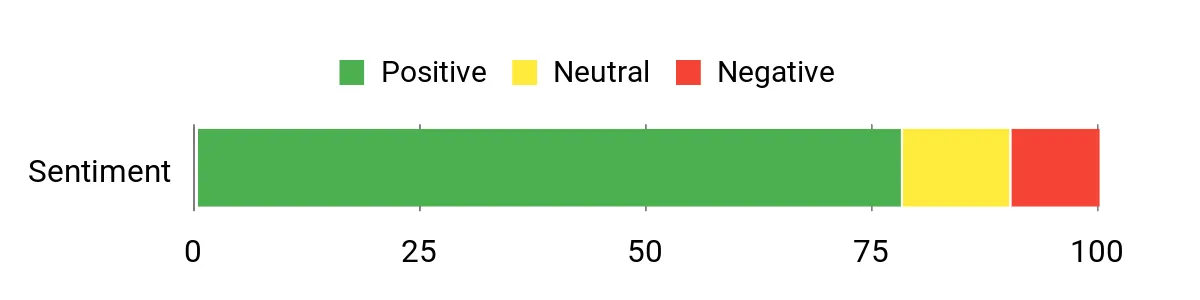
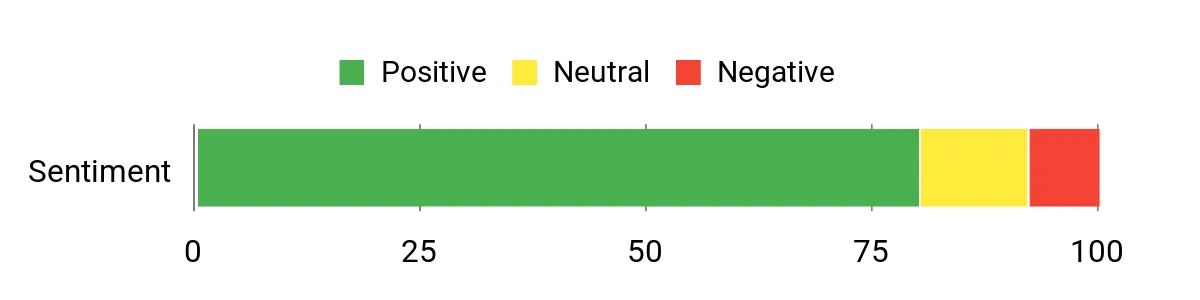
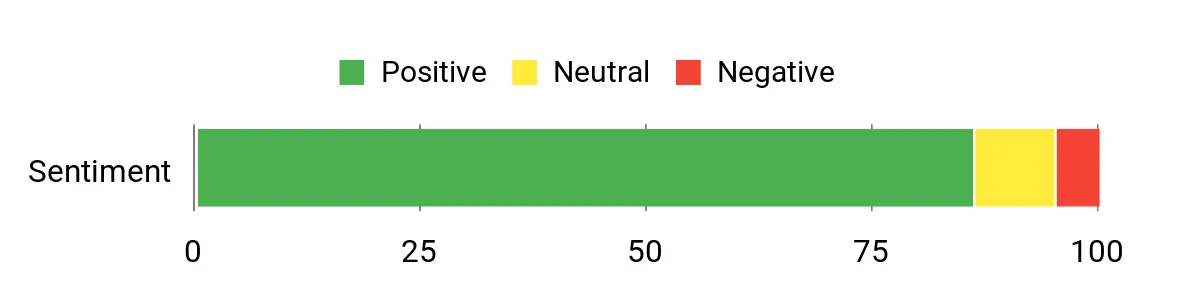
Across many owners the G502 earns praise for its comfort and tracking, with people highlighting the grip, smooth glide and usefulness of the extra buttons. Users often mention the weight tuning and wheel modes as practical perks.
A recurring note is that Logitech software can feel clumsy to learn, and a small portion of users report occasional hardware failures, but most find the mouse dependable for both work and gaming.
Overall Sentiment: Positive
Long-Term Value
Because the sensor and core components are solid, the G502 stays relevant as aiming needs evolve and software updates continue. The tunable weight and onboard profiles help the mouse adapt to new setups, and its versatile feature set reduces the need to buy separate productivity and gaming peripherals over time.
How It Helps In Different Situations
|
Situation |
How It Helps |
|---|---|
|
Competitive Matches |
Consistent HERO tracking and a wired connection give predictable aim and low latency for clutch plays. |
|
Daily Productivity |
Multiple programmable buttons and a switchable scroll wheel speed make spreadsheet work and editing faster. |
|
Traveling Between Setups |
On-board memory stores profiles so your key binds and DPI travel with the mouse without extra software. |
|
Fine-Tuning Feel |
Adjustable weights let you change balance quickly to suit fingertip or palm grip preferences. |
Ease Of Use
|
Feature |
Ease Level |
|---|---|
|
Plug-and-play wired setup |
Easy |
|
On-board profile switching |
Easy |
|
Logitech software customization |
Moderate |
|
Weight tuning (physical) |
Moderate |
Durability
Mostly robust with solid components and a reputable build, though some owners report rare failures like scroll-wheel or button wear. Treat it as a long-lasting option but expect normal wear over years of heavy use.
Comfort
The ergonomic right-hand design is one of the G502’s strengths; it fits medium to large hands comfortably and reduces fatigue during long practice sessions or marathon study days.
Customization
|
Feature |
Customization Level |
|---|---|
|
DPI and sensor tuning |
High |
|
Programmable buttons and macros |
High |
|
Adjustable weights |
High |
|
RGB lighting profiles |
Moderate |
Fun Factor
High for players who like fiddling with settings and macros; the RGB and tactile wheel modes add personality and practical flair to both gaming and daily use.
Key Benefits
- Very precise HERO optical sensor for consistent aiming
- Adjustable weight system to dial in balance and feel
- 11 side buttons for macros, binds and quick utility
- Ergonomic right-hand shape that suits long sessions
- On-board memory and RGB that travel with the mouse
I reach for the MX Master 4 when the day mixes heavy productivity with a little downtime gaming because it balances comfort and clever features. The haptic feedback gives tactile cues for shortcuts and desktop switches, the MagSpeed wheel shifts between hyper-fast and precise scrolling, and the 8k sensor tracks reliably even on glass.
It pairs with multiple devices and the USB-C charging gets you back quickly, so it works for long editing sessions, spreadsheet marathons, and casual Valorant matches. If you want a mouse that makes work smoother while still feeling enjoyable in play, this one is an easy grab.
What People Say
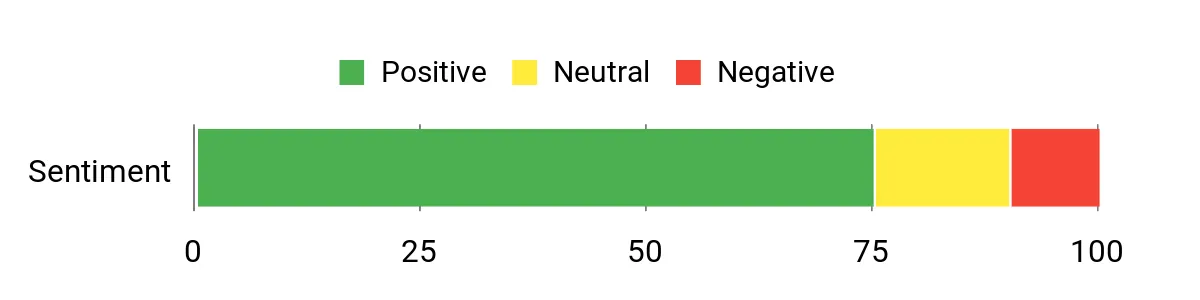
Users commonly praise the MX Master 4 for its comfort and the quality of the scrolling experience, noting the MagSpeed wheel and haptic cues as standout features. Many appreciate the battery life and multi-device switching, while a few mention that the Logi Options+ app takes some time to learn for deeper customization.
Overall Sentiment: Positive
Long-Term Value
Built with recycled materials and a durable design, this mouse can reduce replacement needs and the long battery life lowers charging frequency, so it tends to save you time and fuss over multiple years.
Use Cases
|
Situation |
How It Helps |
|---|---|
|
Office Work |
The ergonomic shape and quiet clicks reduce fatigue during long document or spreadsheet sessions. |
|
Creative Work |
Fast, precise scrolling and customizable shortcuts speed up timeline scrubbing and tool switching. |
|
Casual Gaming |
Responsive tracking and comfortable grip make it suitable for relaxed Valorant sessions between practice. |
|
Multi-Device Setups |
Bluetooth and the USB-C dongle let you jump between laptop and desktop without re-pairing. |
Ease Of Use
|
Feature |
Ease Level |
|---|---|
|
Pairing and connectivity |
Easy |
|
Basic browsing and scrolling |
Easy |
|
Customizing actions via Logi Options+ |
Moderate |
|
Haptic intensity adjustment |
Moderate |
Durability
Solid everyday durability with stain-resistant finishes and robust construction; built to last for years under typical office and home use.
Comfort
Designed to keep your hand in a natural posture, it’s one of the most comfortable mice I use for long editing or study sessions and stays pleasant through extended play.
Customization
|
Feature |
Customization Level |
|---|---|
|
Actions Ring shortcuts |
High |
|
Haptic feedback intensity |
High |
|
Button mapping and macros |
High |
|
DPI and tracking settings |
Moderate |
Fun Factor
Moderate — it’s satisfying to use thanks to the wheel and haptics, but it leans more toward productivity enjoyment than flashy gaming flair.
Key Benefits
- Haptic feedback for actionable cursor prompts and shortcuts
- MagSpeed wheel for ultra-fast or pixel-precise scrolling
- Comfort-first ergonomic shape for long sessions
- Multi-device pairing and reliable connectivity
- Long battery life with quick USB-C top-ups
I reach for the PRO X2 when I want a competition-ready mouse that I can tune to feel exactly right. It’s featherlight at 61 g, wireless with reliable Lightspeed performance, and the haptic click system lets me set actuation points and feedback to match my playstyle. That combination makes flicks snappy and consistent during tense Valorant rounds, while USB-C charging and solid battery life keep it practical for travel and long sessions.
If I’m chasing minimal input lag and a click that feels custom, this is the mouse I’d pick.
What People Say
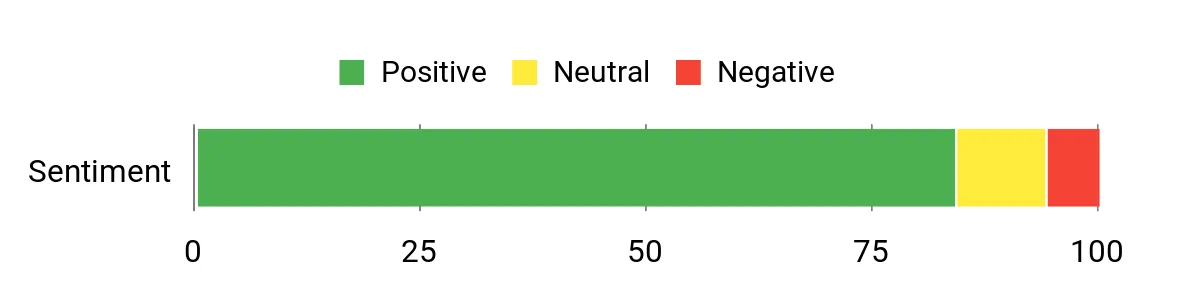
Owners often highlight the click customization and lightweight build as the standouts, saying the mouse feels tuned to their playstyle once configured. Many appreciate the wireless reliability and consistent sensor performance, while a few mention a short learning curve for dialing in haptics and actuation settings.
Overall Sentiment: Positive
Long-Term Value
Because you can tune the core feel and actuation, the PRO X2 stays relevant as your preferences change, reducing the need to replace it. The rechargeable battery and robust wireless system also mean fewer accessory swaps over time.
How It Helps
|
Situation |
How It Helps |
|---|---|
|
Competitive Matches |
Adjustable actuation and low weight let you optimize click timing and flick speed for clutch plays. |
|
Practice Sessions |
Consistent sensor and click feel make aim training translate directly into game performance. |
|
LANs and Travel |
Compact, rechargeable design and reliable wireless mean quick setup and consistent performance on different setups. |
|
Streamer Setups |
Tactile haptics and a polished aesthetic give a professional feel while staying functional for long streams. |
Ease Of Use
|
Feature |
Ease Level |
|---|---|
|
Wireless pairing and Lightspeed |
Easy |
|
USB-C charging |
Easy |
|
On-mouse actuation tuning |
Moderate |
|
Software customization |
Moderate |
Durability
Built to pro standards with quality components and a two-year warranty; the lightweight shell uses sturdy plastics that balance low mass with durability.
Comfort
Shaped for competitive grips like claw and fingertip, it stays comfortable during long sessions thanks to the low weight and streamlined profile.
Customization
|
Feature |
Customization Level |
|---|---|
|
Click actuation settings |
High |
|
Haptic feedback intensity |
High |
|
DPI and sensor tuning |
Moderate |
|
Onboard profile storage |
Moderate |
Fun Factor
High — tuning the click and feeling the difference in-game is rewarding for competitive players who enjoy tweaking their setup.
Key Benefits
- Customizable click actuation and haptic feedback for tailored feel
- Ultra-light 61 g design for fast flicks and low fatigue
- HERO 2 sensor and LIGHTSPEED wireless for reliable tracking
- USB-C charging and portable form factor for on-the-go use
- Pro-focused layout that prioritizes core controls
I keep the G305 in my bag for days when I need solid wireless performance without fuss. It pairs fast, feels light in hand and offers competitive tracking thanks to the HERO sensor, so flicks and tracking in Valorant stay predictable.
The single AA battery life is impressively long, and the built-in receiver storage means the dongle never wanders when I move between rigs. It’s a straightforward choice if you want reliable wireless performance, portability and enough programmable buttons to cover common binds.
What People Say
Owners often highlight the wireless reliability and long battery life as major wins, noting the G305 feels snappy even compared with wired mice. The light weight and comfortable ambidextrous shape get frequent praise, and people appreciate the simple on-board profile storage.
A handful of users mention the need to learn the customization software to make deeper edits.
Overall Sentiment: Positive
Long-Term Value
Energy-efficient components and a long single-battery runtime cut down on charger dependency, while a durable, simple build means fewer replacements or repairs over time.
How It Helps
|
Situation |
How It Helps |
|---|---|
|
LAN Events |
Lightweight and dongle-ready so setup is quick and transport is stress-free. |
|
Daily Commute |
Compact size and long battery life keep you productive without frequent charging. |
|
Competitive Play |
HERO sensor and LIGHTSPEED deliver consistent tracking and low latency for precise aim. |
|
Multi-Device Use |
Simple USB receiver storage and easy pairing make switching systems fast. |
Ease Of Use
|
Feature |
Ease Level |
|---|---|
|
Wireless pairing |
Easy |
|
USB receiver storage |
Easy |
|
Button programming |
Moderate |
|
Battery replacement |
Easy |
Durability
Simple, well-built plastic shell that stands up to daily transport and extended sessions; design favors longevity over fragile extras.
Comfort
Ambidextrous shape and low weight make it comfortable for claw and fingertip grips, and it stays easy on the wrist during long play or work periods.
Customization
|
Feature |
Customization Level |
|---|---|
|
DPI adjustments |
High |
|
Programmable buttons |
Moderate |
|
On-board profile storage |
Moderate |
Fun Factor
Moderate — it’s not flashy, but the responsive wireless and lightweight feel make aim practice and casual matches more enjoyable.
Key Benefits
- LIGHTSPEED wireless with near-wired responsiveness
- HERO sensor for accurate tracking across DPI ranges
- Very long single-battery runtime for low maintenance
- Compact, lightweight design ideal for travel
- On-board memory and six programmable buttons for quick binds
I keep the M612 around as a solid, no-nonsense wired mouse that covers everything a Valorant player might need on a tight budget. It feels sturdy in the hand, the extra buttons are useful for quick binds or utility swaps, and the rapid-fire option can be handy in certain practice drills.
The RGB modes add a bit of personality without being over the top, and the wired connection keeps things simple and predictable for competitive play. If you want a feature-rich mouse that won’t overcomplicate your setup, this is a dependable pick I often suggest for newcomers and casual competitors.
What People Say
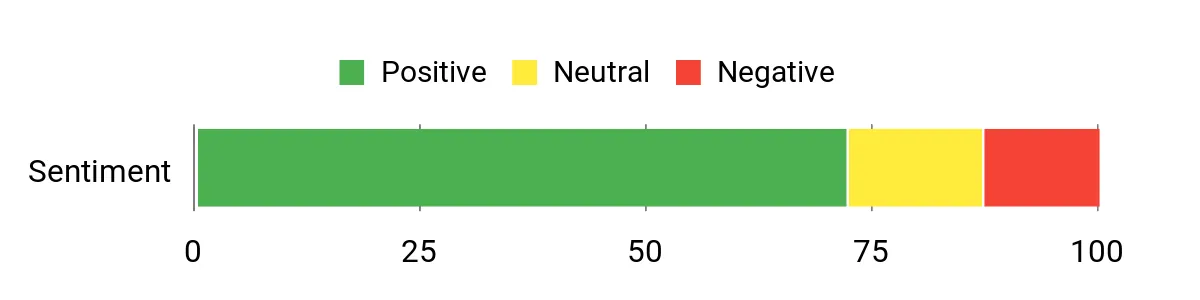
People tend to praise the M612 for packing a lot of features into an approachable package, especially the programmable buttons and comfortable grip. Many mention the responsive tracking and how the rapid-fire option feels useful for specific scenarios.
A few note the software takes a bit to learn and some owners have wished for a sturdier build, but most find it great value for everyday gaming and practice.
Overall Sentiment: Positive
Long-Term Value
Because it’s a straightforward wired design without exotic parts, the M612 is easy to keep running and replace if needed. The extensive button set means it can adapt to new games and workflows, reducing the need to upgrade as your needs change.
How It Helps
|
Situation |
How It Helps |
|---|---|
|
Tactical Shooters |
Extra buttons let you bind grenades and utilities for faster access without breaking aim. |
|
Macro-Heavy Play |
Programmable keys and rapid-fire support speed up repetitive actions and testing setups. |
|
Everyday Use |
Comfort grip and predictable wired connection make long sessions or work bursts easy to manage. |
|
Streamer/Starter Setups |
RGB lighting and multiple buttons provide customization that looks good on camera while remaining practical. |
Ease Of Use
|
Feature |
Ease Level |
|---|---|
|
Wired plug-and-play |
Easy |
|
Button programming |
Moderate |
|
Rapid-fire mode |
Moderate |
|
RGB mode switching |
Easy |
Durability
The ABS shell and matte finish stand up well to daily use and transport; it’s built to last for regular play though some heavy users may notice wear over years.
Comfort
Designed with a comfort grip and a slightly larger profile, it suits palm and claw grips and stays comfortable during longer practice sessions or multi-hour work stretches.
Customization
|
Feature |
Customization Level |
|---|---|
|
Programmable buttons |
High |
|
Rapid-fire configuration |
Moderate |
|
RGB lighting modes |
Moderate |
|
Macro assignment via software |
Moderate |
Fun Factor
Moderate — the rapid-fire and RGB add personality, and tinkering with macros makes practice sessions feel more interactive.
Key Benefits
- 11 programmable buttons for macros and quick binds
- Comfort-oriented shape that suits palm and claw grips
- Rapid-fire and macro support for customizable play
- Simple wired connection for consistent latency
- RGB backlighting for subtle personalization
I reach for the Basilisk V3 when I want an ergonomic mouse that still feels tuned for aggressive play. The shape supports palm and claw grips comfortably, the HyperScroll wheel switches between free-spin and tactile modes for both browsing and weapon swaps, and the button layout gives plenty of quick-access binds for Valorant utilities.
The RGB adds a bit of personality and the wired connection keeps input predictable, which I appreciate during tense rounds and long practice sessions. It’s a great middle ground if you want a comfortable daily driver that’s also ready for competitive moments.
What People Say
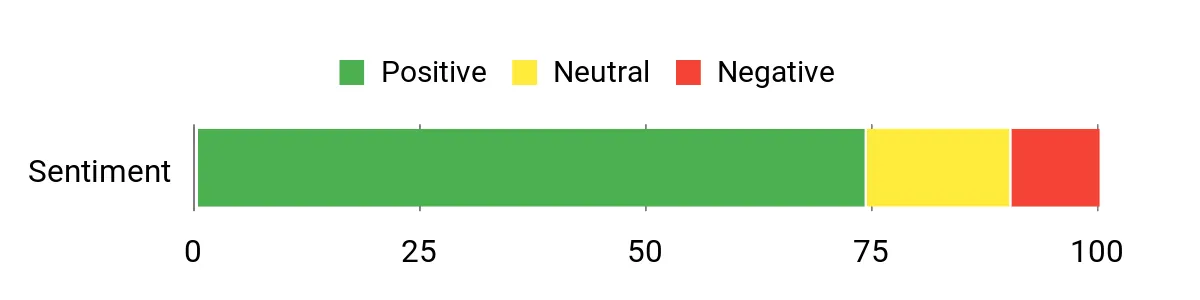
Players often praise the Basilisk V3 for its comfortable fit and the versatility of the HyperScroll wheel, which works well for both in-game swaps and desktop tasks. The extra buttons and RGB customization get consistent mentions as practical and fun, while some users note the configuration app takes a bit of learning to unlock deeper settings.
Overall Sentiment: Positive
Long-Term Value
A well-rounded feature set means the Basilisk can handle evolving playstyles without needing frequent replacements; programmable buttons and adjustable scroll behavior keep it useful as your setup or game needs change.
How It Helps
|
Situation |
How It Helps |
|---|---|
|
Tactical Matches |
Extra buttons let you bind utilities for faster access without breaking aim. |
|
Aim Practice |
Comfortable shape and consistent tracking make longer training sessions less tiring. |
|
Everyday Use |
Wheel modes and ergonomics make browsing and editing smoother between games. |
|
Streamer Setups |
Custom RGB and programmable keys add visual polish and practical shortcuts during streams. |
Ease Of Use
|
Feature |
Ease Level |
|---|---|
|
Wired plug-and-play |
Easy |
|
Switchable scroll modes |
Easy |
|
Button programming |
Moderate |
|
Software customization |
Moderate |
Durability
Generally solid construction with reliable switches; it holds up well to regular use though heavy daily wear may show over years.
Comfort
Right-handed ergonomic profile that supports natural wrist posture and stays comfortable during multi-hour sessions.
Customization
|
Feature |
Customization Level |
|---|---|
|
Programmable buttons |
High |
|
HyperScroll wheel modes |
High |
|
RGB lighting |
Moderate |
|
DPI adjustment |
Moderate |
Fun Factor
Moderate — the wheel behavior and RGB make both practice and casual play more engaging without feeling gimmicky.
Key Benefits
- Ergonomic shape that supports long sessions
- HyperScroll tilt wheel for fast or precise control
- 11 programmable buttons for utility and macros
- High‑resolution sensor for consistent tracking
- Razer Chroma RGB for subtle personalization
I reach for the Viper V4 Pro when I want the lightest, fastest-feeling mouse for aim-intensive sessions. Its 49 g weight and pro-trusted shape make rapid flicks feel effortless, while the Focus Pro sensor and high polling options keep tracking consistent across fast movements.
The optical switches and optical scroll wheel reduce mechanical wear and the battery modes let me choose endurance or ultra-low latency. For serious Valorant play or long aim practice, it’s one of the few mice that feels built around twitch aiming and tournament-style reliability.
What People Say
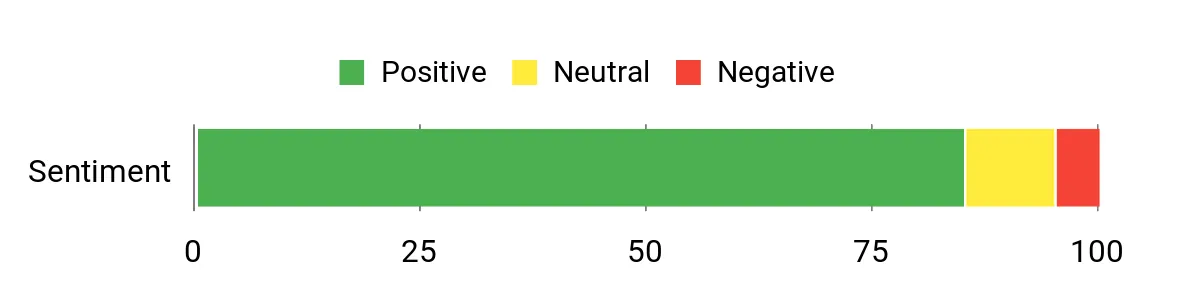
Players commonly highlight how much the light weight and trusted shape improve aim and reduce wrist strain during long sessions. Many point to the advanced sensor and polling options for dependable tracking in fast play, and the optical switches earn mentions for a crisp, consistent click feel.
A few owners note that getting the polling and battery balance right can take a little testing.
Overall Sentiment: Positive
Long-Term Value
Durable optical switches and efficient wireless modes mean fewer replacements and less fiddling with chargers, while a high-quality sensor keeps the mouse useful as your aim improves, so it tends to stay relevant longer than basic models.
How It Helps
|
Situation |
How It Helps |
|---|---|
|
Tournament Play |
Ultra-light weight and low-latency polling deliver the responsiveness pros rely on during clutch moments. |
|
Aim Training |
Consistent tracking and minimal inertia make muscle-memory drills translate smoothly into game performance. |
|
Long Sessions |
Low weight and ergonomic shape reduce fatigue, and adjustable battery modes keep you going between charges. |
|
LAN Events |
Compact wireless setup with reliable dongle performance means quick, stable setups away from home. |
Ease Of Use
|
Feature |
Ease Level |
|---|---|
|
Wireless pairing and dongle |
Easy |
|
USB-C charging |
Easy |
|
Polling and battery mode switching |
Moderate |
|
Software customization (Razer Synapse) |
Moderate |
Durability
Built with optical switches and an optical scroll mechanism to reduce mechanical wear; designed to withstand heavy competitive use while staying lightweight.
Comfort
Symmetrical, pro-trusted shape and minimal weight make it comfortable for claw and fingertip grips, letting me play longer without wrist strain.
Customization
|
Feature |
Customization Level |
|---|---|
|
Polling and battery modes |
High |
|
DPI and sensor tuning |
High |
|
Button mapping and macros |
Moderate |
|
Onboard profile storage |
Moderate |
Fun Factor
High — the lightweight feel and snappy clicks make aim practice and competitive rounds more engaging and satisfying.
Key Benefits
- 49 g ultra-light build for fast flicks and low fatigue
- Focus Pro high-resolution sensor for precise tracking
- True 8000 Hz polling option for ultra-low latency
- Gen‑4 optical switches and optical scroll wheel for durability
- Adjustable battery/polling modes to balance endurance and speed
I reach for the G Pro Superlight when I want a no-nonsense, competition-focused mouse that simply lets my aim do the talking. It’s extremely light, wireless without noticeable lag, and the HERO sensor delivers consistent tracking so flicks feel predictable. The minimalist shape and smooth PTFE feet make movement effortless across a good mousepad, and the rechargeable battery keeps me playing through multi-day practice sessions. If I need a lightweight, reliable tool for Valorant sessions or aim training, this is the one I choose.
What People Say
Players frequently single out how the light weight and clean shape help with quick flicks and less wrist strain. The reliable wireless connection and accurate sensor get regular praise for making aim feel natural, while many note the simple, minimal design keeps distractions to a minimum.
A few mention the need to get used to fewer buttons if they’re coming from feature-heavy mice.
Overall Sentiment: Positive
Long-Term Value
Its focused feature set and durable core components mean you’re less likely to chase upgrades for basic performance gains. The rechargeable battery and solid sensor quality keep the mouse useful as your skill evolves, so it tends to stay relevant longer than flashier, short-lived peripherals.
How It Helps
|
Situation |
How It Helps |
|---|---|
|
Competitive Matches |
Low weight and dependable tracking let you make fast, confident flicks when rounds matter. |
|
Aim Training |
Minimal inertia and consistent sensor data make muscle memory practice translate cleanly into gameplay. |
|
Long Play Sessions |
Reduced strain from the lightweight build helps prevent fatigue across extended practice or streaming. |
|
Streamlined Setups |
A simple, compact design fits tidy desks and pairs reliably without cluttering the workspace. |
Ease Of Use
|
Feature |
Ease Level |
|---|---|
|
Wireless pairing |
Easy |
|
Basic plug-and-play |
Easy |
|
Software customization |
Moderate |
|
Battery charging |
Easy |
Durability
Despite the featherlight build, the Superlight uses solid internals and quality feet to hold up under frequent use; it’s built to withstand competitive routines while staying light.
Comfort
The pared-down shape fits a range of grip styles, especially fingertip and claw, and the low weight reduces wrist strain during long practice or play sessions.
Customization
|
Feature |
Customization Level |
|---|---|
|
Button mapping |
Moderate |
|
DPI tuning |
High |
|
Onboard profiles |
Moderate |
|
Lighting (minimal) |
Low |
Fun Factor
High for competitive players who enjoy crisp, responsive control; it’s less about flashy features and more about a clean feeling that makes aiming satisfying.
Key Benefits
- Ultra-light design that reduces fatigue during long sessions
- HERO sensor for consistent, precise tracking
- Lightspeed wireless for minimal latency
- Smooth PTFE feet for friction-free glide
- Sleek, minimal shape trusted by pros
I reach for the Viper V3 HyperSpeed when I want a reliable, lightweight mouse that still feels solid for competitive play. Its 82 g profile and pro-oriented shape make quick flicks feel natural, while the Focus Pro sensor keeps tracking consistent during fast movements.
The long battery life and easy AA replacement mean I can game or work without fuss, and the dongle-based wireless pairing gets me back into matches quickly. It’s a strong pick if you want a straightforward, tournament-minded mouse that’s also comfortable for everyday use.
What People Say
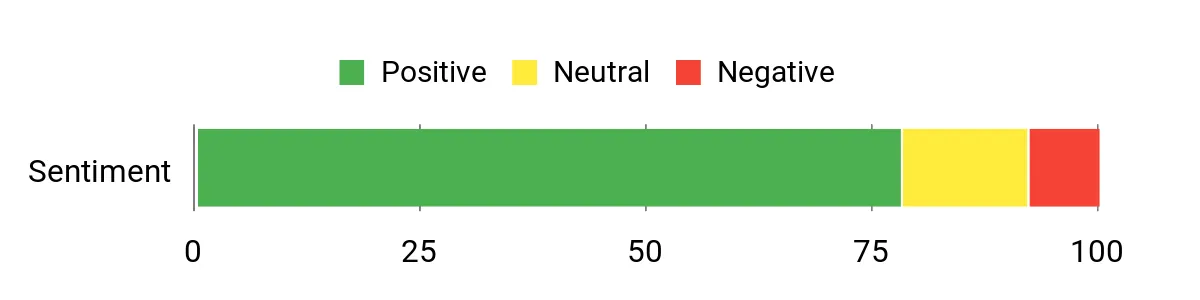
Players regularly mention the weight and shape as major advantages for aim and reduced wrist strain, and many appreciate the long battery runtime and straightforward dongle pairing. The sensor and click feel get positive notes for responsiveness, while a subset of users reports occasional wireless hiccups and finds the software less friendly than expected.
Overall Sentiment: Positive
Long-Term Value
Durable switches and efficient power use mean fewer replacements and less time spent charging, and the AA battery design lets you keep playing without waiting for a recharge, which can save time and hassles over the mouse’s lifetime.
How It Helps
|
Situation |
How It Helps |
|---|---|
|
Tournament Play |
Lightweight and low-latency wireless give fast, consistent inputs when every millisecond matters. |
|
Aim Training |
Predictable tracking and minimal inertia help muscle-memory drills translate into game performance. |
|
Daily Use |
Comfortable shape and long battery life make it suitable for both work and casual gaming sessions. |
|
LAN Events |
Dongle-based pairing and easy setup let you move between setups with minimal fuss. |
Ease Of Use
|
Feature |
Ease Level |
|---|---|
|
Wireless pairing with dongle |
Easy |
|
On-mouse DPI control |
Easy |
|
Battery replacement (AA) |
Easy |
|
Software customization (Razer Synapse) |
Moderate |
Durability
Built with reliable switches and a focus on low mechanical wear; designed for competitive cycles with a long click lifespan and robust internals.
Comfort
The ambidextrous, pro-inspired shape and 82 g weight make it comfortable for claw and fingertip grips and help reduce fatigue over long sessions.
Customization
|
Feature |
Customization Level |
|---|---|
|
DPI tuning |
High |
|
Polling and performance modes |
High |
|
Button mapping |
Moderate |
|
Onboard profile storage |
Moderate |
Fun Factor
High — the responsive feel and lightweight handling make both practice and competitive rounds more engaging.
Key Benefits
- Lightweight ambidextrous design for fast flicks
- High-resolution Focus Pro sensor for consistent tracking
- Very long battery life with easy AA replacement
- True wireless with dongle for simple pairing
- On-mouse DPI control for quick sensitivity changes
I reach for the M810 Pro when I want a flexible wireless mouse that still feels familiar and practical. It offers a comfortable grip, a generous set of macro buttons and a rapid-fire feature that can be useful for specific drills or bindings in Valorant. The wireless dongle and USB-C support make switching between setups straightforward, and the RGB adds a little flair without getting in the way.
For players who want a dependable all-rounder with extra buttons to map utility and macros, this mouse covers the bases.
What People Say
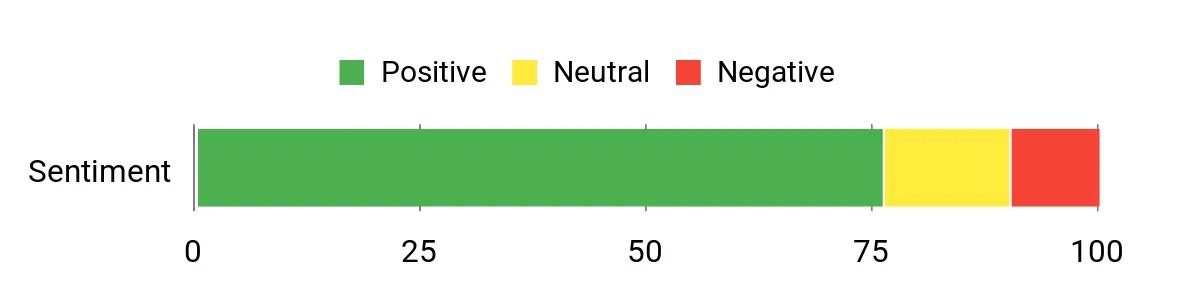
Owners commonly praise the M810 Pro for packing useful features into a straightforward package, especially the programmable buttons and comfortable shape. Many people appreciate the reliable wireless connection and the long runtime, while a portion of users mention the software takes a bit of exploring to get macros and rapid-fire tuned the way they like.
Overall Sentiment: Positive
Long-Term Value
A simple wireless design with replaceable battery habits and durable, no-frills construction means fewer unexpected replacements. The macro capability also lets the mouse adapt to new games or workflows, stretching its useful life.
How It Helps
|
Situation |
How It Helps |
|---|---|
|
Tactical Matches |
Extra buttons let you bind utilities and quick commands so you don’t interrupt your aim. |
|
Macro-Heavy Tasks |
Programmable keys and rapid-fire make repetitive testing or scripting more efficient. |
|
Travel and LANs |
Wireless dongle storage and compact profile make it easy to move between setups. |
|
Everyday Use |
Comfortable grip and predictable tracking keep long work or study sessions comfortable. |
Ease Of Use
|
Feature |
Ease Level |
|---|---|
|
Wireless pairing and dongle |
Easy |
|
Button programming via software |
Moderate |
|
Rapid-fire mode activation |
Moderate |
|
USB-C charging and battery handling |
Easy |
Durability
Built with a sturdy ABS shell and a matte finish that resists scuffs; it’s designed for regular gaming use and holds up well to transport and daily handling.
Comfort
The comfort grip and slightly larger profile fit palm and claw styles nicely, keeping my hand relaxed even during longer play or work sessions.
Customization
|
Feature |
Customization Level |
|---|---|
|
Programmable buttons |
High |
|
Rapid-fire configuration |
Moderate |
|
RGB lighting modes |
Moderate |
|
DPI adjustment |
Moderate |
Fun Factor
Moderate — the extra buttons and rapid-fire option make practice and casual matches more interactive without being flashy.
Key Benefits
- Eight programmable buttons for binds and macros
- Comfort-focused grip suitable for extended sessions
- Rapid-fire key for repetitive input scenarios
- 2.4Ghz wireless with USB-C charging and decent battery life
- RGB customization for a personalized look
FAQ
Wired Or Wireless?
I usually weigh reliability against convenience. These days high-quality wireless systems can match wired lag for most players, but for tournament play I still prioritize lowest possible latency and a stable connection, so wired or top-tier wireless dongles are my go-to.
If you choose wireless, keep the dongle close to the mouse, check polling modes, and be ready to swap batteries or charge between sessions.
What Should I Look For In A Mouse?
I focus on a few practical things: a consistent sensor, a weight and shape that match my grip, durable switches, and smooth feet. Sensor consistency matters more than headline DPI numbers, and a comfortable shape will reduce fatigue during long Valorant sessions. I also look for on-board profile storage so my settings travel with the mouse and avoid relying on software every time I switch rigs.
Do I Need Lots Of Buttons And Fancy Software?
For Valorant I find a handful of well-placed side buttons is enough for utilities and quick binds, while too many extra keys can get in the way of clean aiming. Software is useful for fine-tuning DPI, remaps and macros, but I prefer mice with easy on-device profile switching so I can jump between setups without opening apps.
My tip is to keep keybinds simple, test them in the practice range, and only add macros when they truly save time.
Wrapping Up
In short, the right mouse for Valorant depends on how you play: I recommend ultra-light models like the G Pro Superlight or Viper V4 Pro if you prioritise twitchy flicks and minimal fatigue, the PRO X2 if you want pro-level click tuning, and the G502 Hero or Basilisk V3 if you need lots of buttons and on-the-fly customization. For budget-conscious wireless play the G305 is a standout, while MX Master 4 is a better pick if comfort and productivity matter as much as gaming.
Use this list to match a mouse to your grip, aim style and budget so you can focus on improving instead of fighting your gear.
| Product Name | Image | Button Quantity | Max DPI | Battery Life |
|---|---|---|---|---|
| Logitech G502 Hero High Performance Wired Gaming Mouse |
 |
11 | 25,600 | N/A |
| Logitech MX Master 4 |
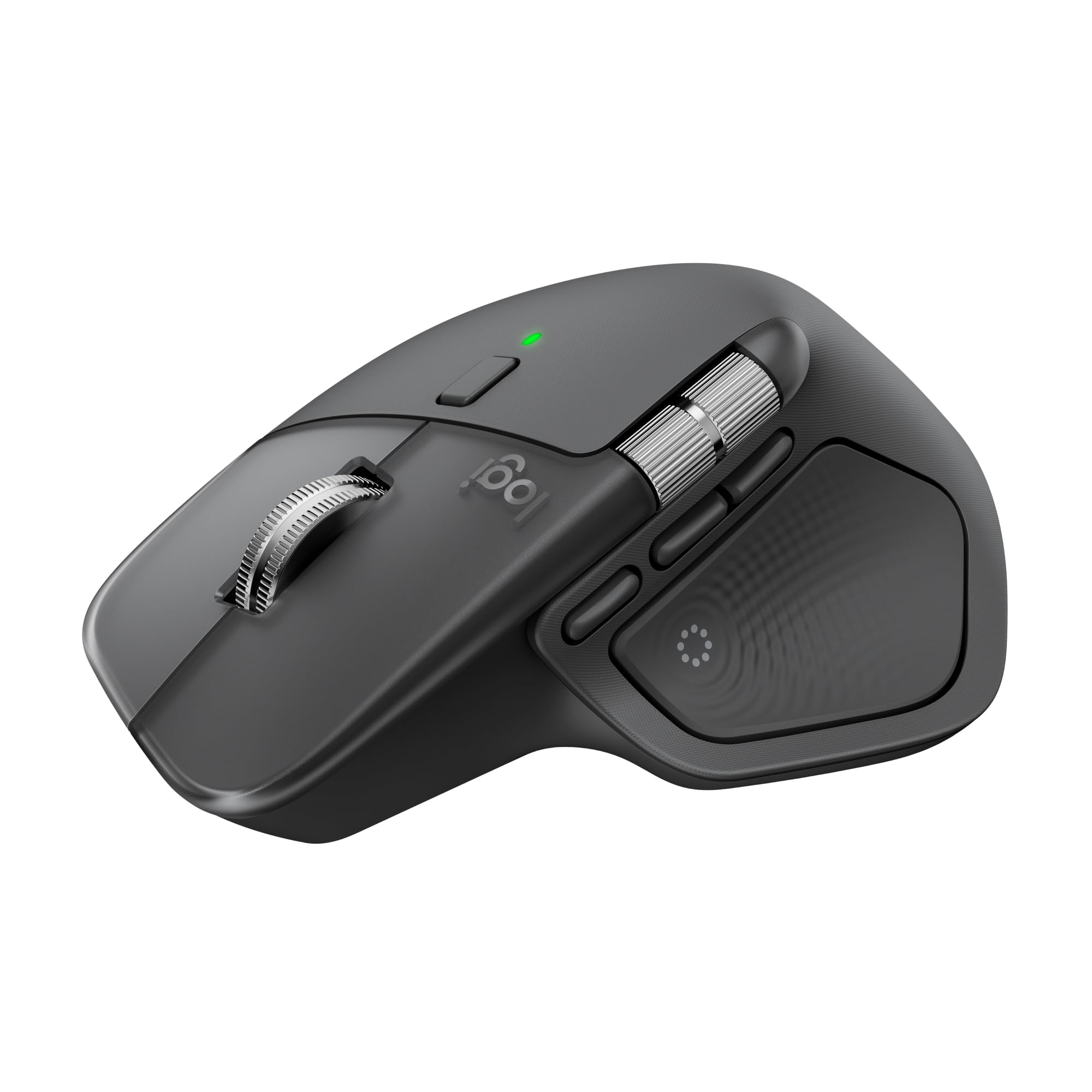 |
7 | 8,000 | 70 days |
| Logitech PRO X2 SUPERSTRIKE Lightspeed Wireless Gaming Mouse |
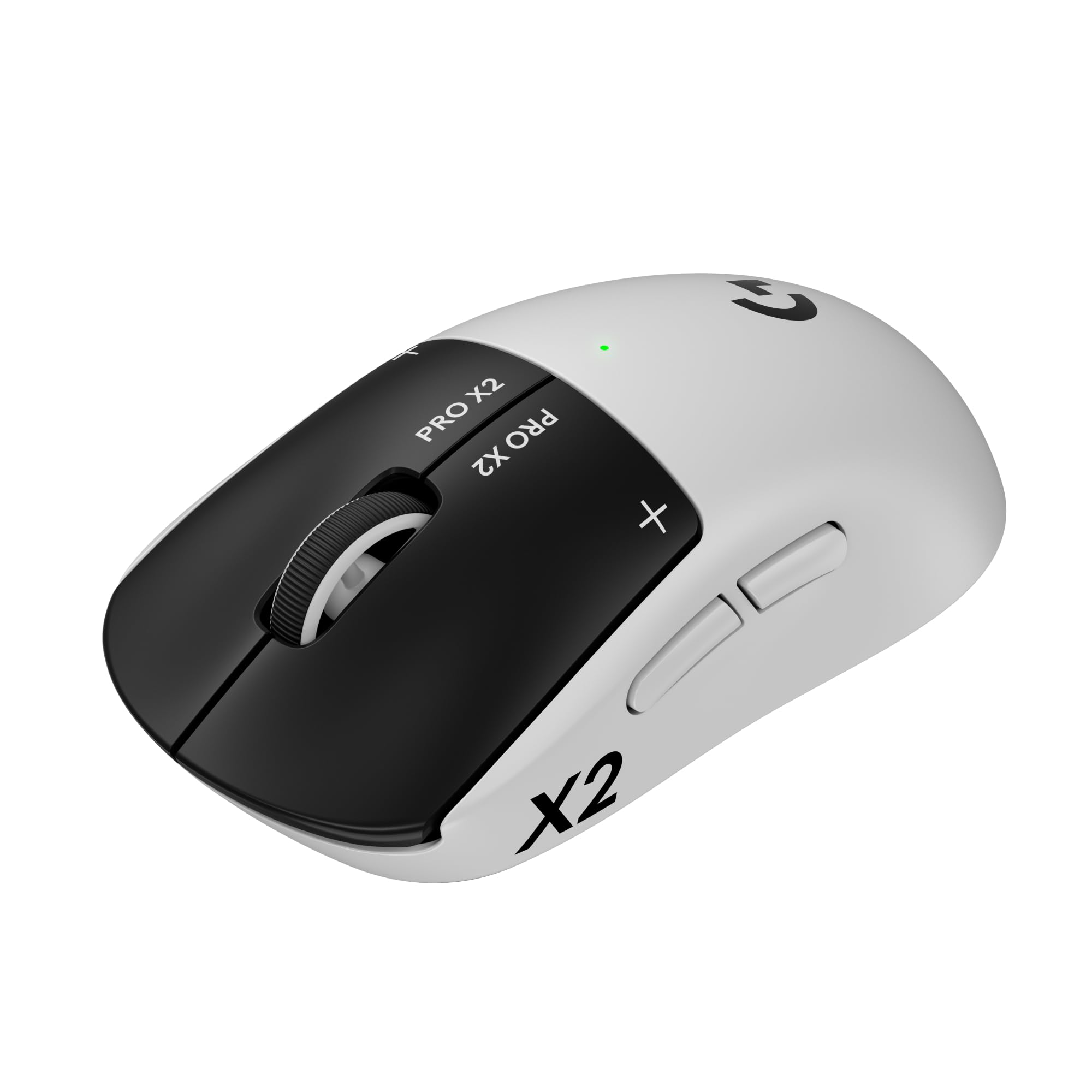 |
5 | N/A | 60 hours |
| Logitech G305 Lightspeed Wireless Gaming Mouse |
 |
6 | 12,000 | 250 hours |
| Redragon M612 Predator RGB Gaming Mouse |
 |
11 | 8,000 | N/A |
| Razer Basilisk V3 Customizable Ergonomic Gaming Mouse |
 |
11 | 26,000 | N/A |
| Razer Viper V4 Pro Wireless Esports Gaming Mouse |
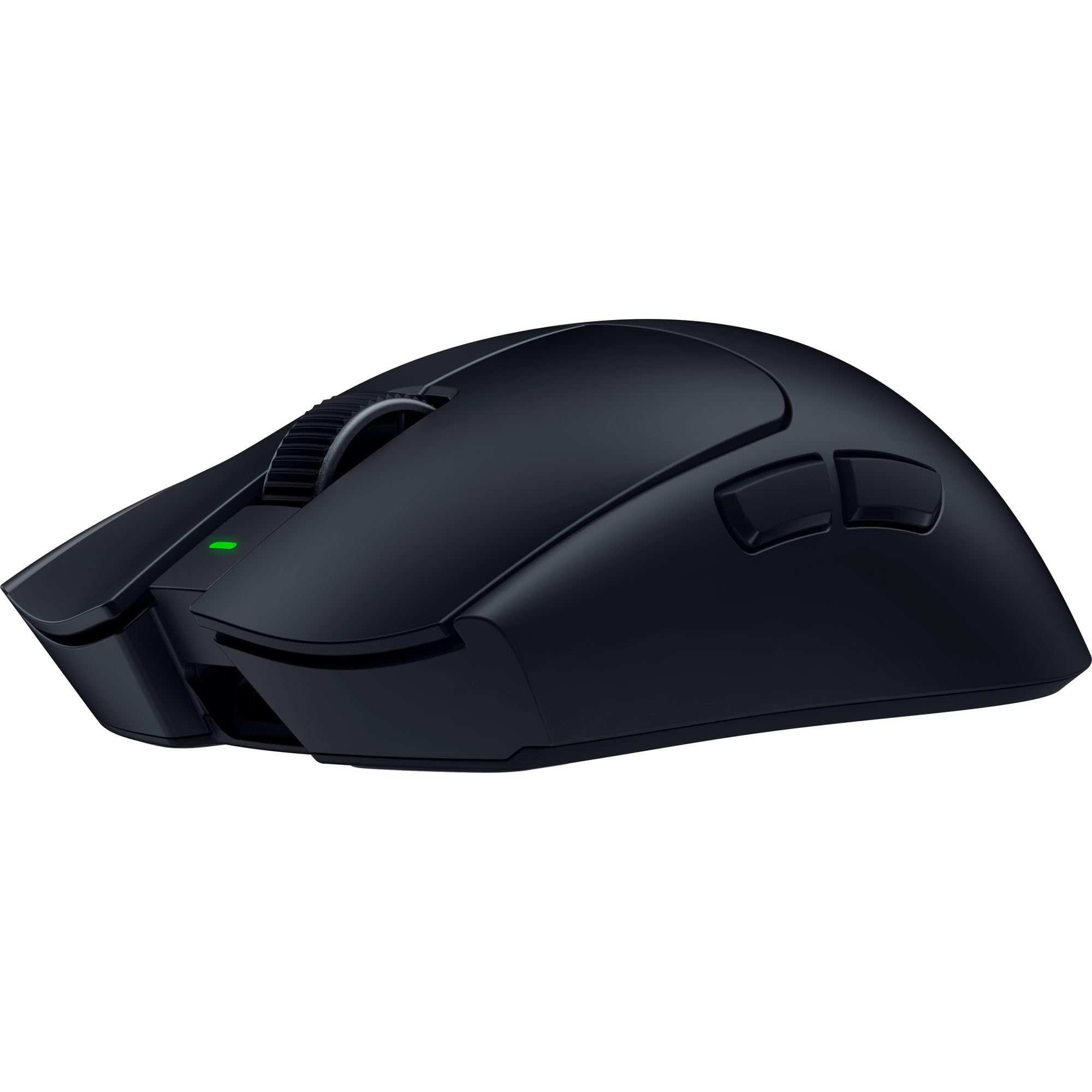 |
6 | 50,000 | 180 hours |
| Logitech G PRO X Superlight Wireless Gaming Mouse |
 |
5 | 25,600 | 70 hours |
| Razer Viper V3 HyperSpeed Wireless Esports Gaming Mouse |
 |
6 | 30,000 | 280 hours |
| Redragon M810 Pro Wireless Gaming Mouse |
 |
8 | 10,000 | 45 hours |
This Roundup is reader-supported. When you click through links we may earn a referral commission on qualifying purchases.