

The MacBook Neo wins for most people. At the same $599 starting price, it delivers a full macOS experience, better raw multi-core performance for everyday tasks, more storage out of the box, and greater versatility. However, if you need a portable creative powerhouse with a stunning display and Apple Pencil support, the iPad Pro or iPad Air M4 still has strong arguments in its corner. But let’s not call it so fast, because the right answer really depends on how you work and what you need day to day.
The Apple product lineup has never been more confusing, and in 2026 that confusion hit a new peak. Apple quietly launched the MacBook Neo, a $599 laptop powered by the A18 Pro chip, and suddenly it’s sitting right next to the $599 iPad Air M4. Two Apple devices. Same price. Completely different experiences.
Add the iPad Pro into the mix, and you have a three-way battle that has been stirring up debate across tech forums, subreddits, and YouTube comment sections all year. I’ve been reviewing Apple hardware for years and I’ll be honest: this one is genuinely tricky to call. But after deep-diving into the specs, real-world performance data, and actual use cases, there is a clear winner for most people. Let’s break it all down.
What Exactly Is the MacBook Neo?
The MacBook Neo is Apple’s newest entry-level laptop, announced in March 2026 and designed to be the most affordable Mac ever made. It starts at just $599 (or $499 for students and educators), making it a direct answer to budget-conscious buyers who want a true laptop experience without spending over a thousand dollars.
It runs a 13-inch Liquid Retina display at 2408×1506 resolution, comes in four colors (Silver, Blush, Indigo, and Citrus), and is powered by the A18 Pro chip, the same silicon that drove the iPhone 16 Pro lineup. It ships with 8GB of unified memory and either 256GB or 512GB of SSD storage. There is no RAM upgrade option available, which is something to keep in mind before buying.
Macworld’s complete MacBook Neo breakdown confirms the Neo packs a 36.5 watt-hour battery rated for up to 16 hours of video playback, though real-world web browsing tests by Tom’s Guide landed closer to 13.5 hours, which is still seriously impressive at this price point.
The iPad Lineup in 2026: Which iPad Are We Comparing?
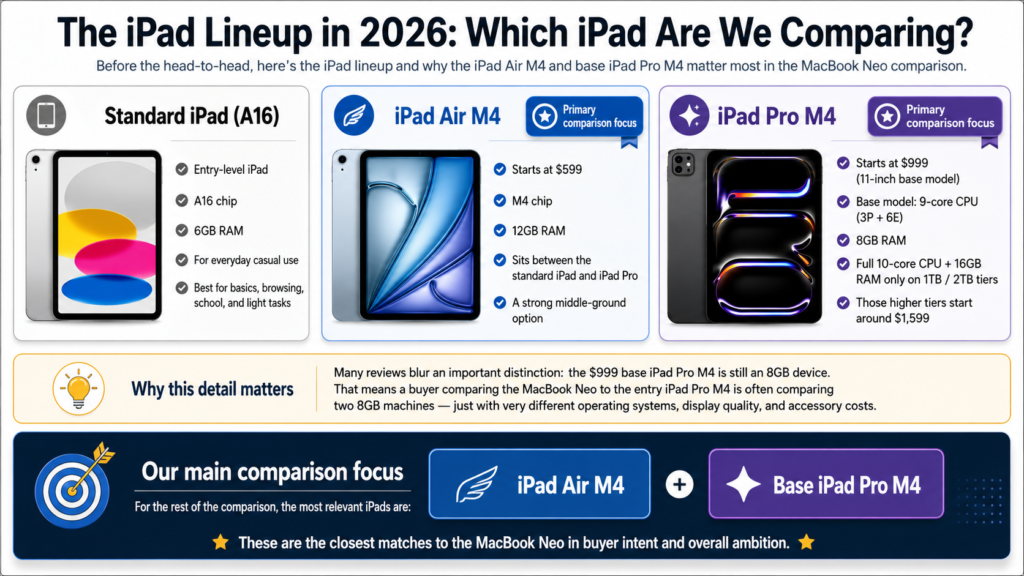
Before we dive into the head-to-head, it’s worth clarifying which iPad we’re talking about, because Apple sells several.
-
Standard iPad (A16): The base model entry-level tablet with Apple’s A16 chip and 6GB RAM, positioned for everyday casual use
-
iPad Air M4: Also starting at $599, powered by Apple’s M4 chip with 12GB RAM, positioned between the standard iPad and iPad Pro
-
iPad Pro M4: Starting at $999 for the 11-inch base model, which ships with a 9-core CPU (3P + 6E) and 8GB of RAM. It is important to note that Apple gates the full 10-core CPU and 16GB of RAM behind the 1TB and 2TB storage tiers, which start at around $1,599
That last point matters more than most reviews acknowledge. A buyer comparing the MacBook Neo to the entry iPad Pro M4 at $999 is actually comparing two 8GB devices, just with very different operating systems, display quality, and accessory costs.
For this comparison, we’ll primarily focus on the iPad Air M4 and the base iPad Pro M4 since those are the most relevant competitors to the MacBook Neo in terms of ambition and buyer intent.
MacBook Neo vs iPad Air M4 vs iPad Pro M4: Full Specs Comparison
Important note on iPad Pro M4 RAM: The 10-core CPU and 16GB of RAM are exclusively available on the 1TB and 2TB iPad Pro M4 models, starting at approximately $1,599. The base $999 model ships with the 9-core variant and 8GB of RAM, the same RAM figure as the MacBook Neo at $400 less.
Performance: Where the A18 Pro Stands Against the M4
This is where things get interesting. The MacBook Neo uses Apple’s A18 Pro chip, which is derived from iPhone silicon, while both the iPad Air M4 and iPad Pro M4 use Apple’s M-series desktop-class chip. On paper, the M4 wins in raw throughput. But the real story is more nuanced.
The M4 chip delivers roughly twice the memory bandwidth of the A18 Pro (120 GB/s vs 60 GB/s), has more CPU and GPU cores, and handles sustained heavy workloads significantly better. This detailed A18 Pro vs M4 benchmark analysis shows the M4 performing up to 86% better in floating-point computation and achieving substantially higher AnTuTu scores. In multi-core CPU tests, the M4 inside the iPad Air pulls meaningfully ahead.
However, here is the part that matters most for average users: single-core performance on the A18 Pro is genuinely excellent. In Geekbench 6 testing, the MacBook Neo scores around 3,530 in single-core, placing it squarely between the M3 and M4. For everyday tasks like browsing, email, writing, video calls, and light photo editing, most users will rarely notice a practical difference.
Where the iPad’s M4 chip starts to pull ahead is in sustained creative workloads. Video editing in DaVinci Resolve, 3D rendering, and running multiple heavy apps simultaneously reveal the M4’s superior architecture. The MacBook Neo will throttle under sustained high loads in ways the M4 iPad does not. That said, for the base $999 iPad Pro M4 buyer who is also working with 8GB of RAM, the real-world multitasking advantage over the Neo narrows considerably.
The Operating System Factor: macOS vs iPadOS
In my opinion, this is the single biggest factor that determines which device is right for you, and it doesn’t get talked about enough in spec comparisons.
macOS is a full desktop operating system. You can run virtually any app, use any browser extension, connect external displays without restrictions, manage files in a true file system, run command-line tools, use multiple windows freely, and connect to virtually any peripheral. If you are a developer, writer, student, or professional, macOS gives you the full computer experience.
iPadOS, even in its most recent versions, is still fundamentally a tablet OS. Apple has been steadily improving multitasking and windowing, and iPadOS 26 is expected to bring meaningful improvements to the windowing system that will close the gap further. But as of today, if you need to run specific Mac apps, use complex workflows, or rely on software that only exists on desktop platforms, iPadOS still cannot match macOS for depth and flexibility.
That said, iPadOS shines in specific contexts. If your work revolves around drawing, illustration, music production in GarageBand, photo culling with Apple Pencil annotations, or casual media consumption, the iPad’s touchscreen-first design and Apple Pencil support give it a real edge that the MacBook Neo simply cannot replicate.
Pro Tip: If you are buying your first Apple device and your budget is $600, go with the MacBook Neo. You will get a real computer with a built-in keyboard, more storage, a bigger screen, and full macOS. If you already own a Mac and want a secondary device, the iPad Air M4 is a fantastic complement. They serve very different roles, and honestly, knowing your workflow is the key to making the right call here.
Display Quality: The iPad Pro Wins This Round
Let’s be straight: if display quality is your top priority, the iPad Pro M4 is in a completely different league. Its Ultra Retina XDR Tandem OLED panel delivers 264 ppi resolution with ProMotion 120Hz adaptive refresh rate, true blacks, and exceptional color accuracy. It is genuinely one of the best displays on any portable device ever made, and that holds true regardless of which storage tier you buy.
The MacBook Neo’s 13-inch Liquid Retina IPS panel at 219 ppi and 60Hz is a solid display for its price point. It covers the standard sRGB color space and is pleasant for everyday work, but it lacks the contrast depth and visual richness of OLED. For color-critical creative work, the iPad Pro’s display wins without much debate.
The iPad Air M4 sits in between, with a nice Liquid Retina IPS panel but no ProMotion and no OLED. At the same $599 starting price as the Neo, you are trading the larger laptop display and keyboard for a more portable tablet form factor.
Portability and Form Factor: Tablet Wins, But With Caveats
The iPad is obviously the more portable device. The iPad Air M4 weighs around 1 pound, fits in almost any bag, and works equally well as a reading device, drawing canvas, or video player on the couch. The MacBook Neo at approximately 2.7 pounds is still lightweight for a laptop, but it is a laptop.
Here is what I’ve noticed through testing though: the portability advantage of the iPad shrinks significantly once you start adding accessories. If you buy the Magic Keyboard for iPad Air (around $299 on its own), you are now carrying something that weighs almost as much as the MacBook Neo, costs more in total, and runs a less capable OS for desktop-style work. The Magic Keyboard with trackpad brings the iPad Air setup to nearly $900, while the MacBook Neo at $599 already includes a keyboard, trackpad, and twice the base storage.
PCMag’s MacBook Neo vs iPad comparison makes exactly this point well, with the reviewer admitting they regretted choosing an iPad shortly before the Neo launched, calling out the stark difference in versatility and value once you account for accessory costs.
Battery Life: MacBook Neo Pulls Ahead
Both devices deliver excellent battery life by any standard, but the MacBook Neo has a meaningful edge in everyday web browsing and productivity tasks.
Tom’s Guide testing measured the MacBook Neo at 13 hours and 28 minutes in continuous web browsing, which is remarkable for a $599 laptop. The iPad Air M4 manages around 10 hours in similar tests, and the iPad Pro M4 performs similarly to the Air in real-world battery benchmarks. The Neo clearly holds its charge longer during typical workday use.
What drives this difference is the A18 Pro chip’s origin as an ultra-efficient mobile processor designed for a device with a much smaller battery. The iPhone heritage gives the Neo surprising stamina relative to its compact 36.5 watt-hour battery. One downside worth flagging: the MacBook Neo does not support fast charging and comes with only a 20W adapter in the box. Charging from low to full takes noticeably longer than on the MacBook Air or iPad Pro.
Ports and Connectivity: Neo Has the Advantage
The MacBook Neo ships with two USB-C ports (one USB 3, one USB 2) plus a 3.5mm headphone jack, meaning you can simultaneously charge, connect a storage drive, and use wired headphones without any adapter. That combination is surprisingly useful in real-world scenarios.
The standard iPad has a single USB-C port. The iPad Pro M4 upgrades that to a Thunderbolt 4 USB-C connection, which is faster and more capable, but it’s still a single port without a hub. The MacBook Neo also supports Wi-Fi 6E and Bluetooth 6, compared to the base iPad’s Wi-Fi 6 and Bluetooth 5.3, giving the laptop slightly better wireless connectivity specs across the board.
Value for Money: A Step-by-Step Cost Breakdown

Option 1: MacBook Neo at $599
Full macOS laptop, built-in keyboard, 256GB storage, 8GB RAM, all cables included. Total out-of-pocket: $599.
Option 2: iPad Air M4 at $599 for Productivity Use
Tablet only, no keyboard, 128GB storage, 12GB RAM. Add the Magic Keyboard for iPad Air at around $299. Total for keyboard-based productivity setup: approximately $898.
Option 3: iPad Pro M4 11-inch (Base $999) for Creative Use
Best portable display, Thunderbolt 4, 256GB storage, 8GB RAM (same as the Neo). Add Magic Keyboard for iPad Pro at around $349. Total for full setup: approximately $1,348. Apple Pencil Pro adds another $129 if needed. And critically, you are still at 8GB RAM at this price. To unlock 16GB, you need the 1TB model at around $1,599 before accessories.
The value argument for the MacBook Neo is even stronger than most reviews let on. You have to spend over $1,599 on an iPad Pro just to get past the 8GB RAM barrier, while the Neo delivers that same 8GB at $599 with a full macOS environment and a built-in keyboard included.
Who Should Buy the MacBook Neo?
The MacBook Neo is the right choice if you fall into any of these categories:
-
Students and first-time Mac buyers who need a full computer for school, assignments, web browsing, and productivity
-
Remote workers who rely on specific Mac apps, need solid battery life, and want portability without sacrificing capability
-
Budget-conscious buyers who want the most versatile $599 device for general computing
-
Developers and coders who need a terminal, Xcode, or full desktop app support
-
Casual creators who edit photos or videos occasionally but don’t depend on Apple Pencil workflows
Who Should Buy the iPad Instead?
The iPad Pro or iPad Air M4 still makes more sense in specific scenarios:
-
Digital artists and illustrators who rely on Apple Pencil Pro for drawing, sketching, and annotation
-
Musicians and producers using GarageBand or other touch-optimized audio tools
-
Media consumers and light users who primarily stream, read, and browse and want the lightest possible device
-
People who already own a Mac and want a complementary portable device, not a full replacement
-
Professionals with specific iPad-only workflows, such as those deeply invested in Procreate, LumaFusion, or Notability at a serious level, and who are willing to invest in the higher storage tiers for full performance
MacBook Neo vs iPad: 2026 Trends Worth Knowing
In 2026, the battle between laptops and tablets is more competitive than it has ever been. Apple’s iPadOS 26 is introducing a revamped windowing system that brings the iPad closer to a desktop-like experience, which may shift the calculus in future comparisons. As of today though, macOS still holds a clear lead for software depth and workflow flexibility.
The MacBook Neo’s launch has also disrupted the entry-level device market in a way few expected. At $599 with full macOS and 8GB of RAM, it matches the base iPad Pro M4 on memory at $400 less, something that would have seemed unlikely just a couple of years ago. This honest side-by-side YouTube review from Mark Ellis captures this tension well, even pointing out creative use cases where the two devices actually complement each other, including using the iPad as a secondary display alongside the Neo.
Apple Silicon’s efficiency continues to improve across both product lines. Buying either device in 2026 means investing in hardware that will comfortably stay relevant for five to six years minimum.
Frequently Asked Questions
Is the MacBook Neo better than the iPad Pro?
For most everyday users, yes. The MacBook Neo offers full macOS, more storage for the price, better battery endurance during typical use, and a built-in keyboard with more ports. The base $999 iPad Pro M4 actually ships with the same 8GB of RAM as the Neo, so the RAM advantage only kicks in on the 1TB and 2TB tiers at $1,599 and above. The iPad Pro pulls ahead specifically for display quality and Apple Pencil creative work.
Is the MacBook Neo A18 Pro chip as good as the iPad’s M4 chip?
No, the M4 is more powerful in raw benchmarks, offering roughly double the memory bandwidth and significantly more GPU compute. However, for everyday tasks like browsing, writing, email, and streaming, the A18 Pro is fast enough that most users will never feel the performance gap in practice.
Can the MacBook Neo replace an iPad?
It can replace a productivity-focused iPad setup for most users, especially if you don’t use Apple Pencil or rely on touch-first apps. It cannot replicate the tablet experience for drawing, annotation, or casual couch browsing the way a lightweight iPad can.
What is the MacBook Neo best for?
The Neo is best for students, first-time Mac buyers, remote workers, and anyone who needs a full macOS laptop on a tight budget. It handles everyday computing, light creative work, and general productivity smoothly and reliably.
Does the MacBook Neo have a touchscreen?
No. The MacBook Neo is a traditional laptop with a keyboard and trackpad only. There is no touchscreen or Apple Pencil support.
Can the iPad replace a MacBook?
For some users, yes. If your workflow is primarily touch-based, you use creative apps optimized for iPadOS, and you don’t rely on Mac-specific software, an iPad with a Magic Keyboard can serve as a capable laptop alternative. For most traditional computer tasks, macOS still provides a more complete and flexible experience.
Which has a better display, the MacBook Neo or iPad Pro?
The iPad Pro M4 wins on display quality by a significant margin. Its Ultra Retina XDR Tandem OLED panel with ProMotion 120Hz support, true blacks, and outstanding color accuracy makes it one of the best portable displays available. The MacBook Neo’s Liquid Retina IPS panel is solid for everyday use but does not come close to the visual quality of the iPad Pro screen.
Does the base iPad Pro M4 have 16GB of RAM?
No. This is a common misconception. The base $999 iPad Pro M4 (256GB storage) ships with 8GB of RAM and a 9-core CPU. The 16GB RAM and 10-core CPU configuration is exclusively available on the 1TB and 2TB models starting at around $1,599.
Is the MacBook Neo worth buying in 2026?
Yes, absolutely. At $599, the MacBook Neo is one of the best value Apple products released in years. Full macOS, excellent battery life, more base storage than the comparable iPad Air, and a built-in keyboard make it an exceptional deal for first-time Mac buyers and budget-conscious shoppers alike.
Bottom Line
The MacBook Neo is the clear winner for most buyers at the $599 price point. It gives you more storage, full macOS, better everyday battery life, a built-in keyboard, and genuine versatility in a package that costs the same as the iPad Air M4 before you even add accessories. What many buyers don’t realize is that the base $999 iPad Pro M4 ships with just 8GB of RAM, the same amount as the Neo, meaning you’d need to spend $1,599 or more to meaningfully outclass the Neo on memory alone. The iPad Pro remains a powerhouse for creative professionals who need that exceptional Tandem OLED display and Apple Pencil support, but the value math has never tilted more firmly in the MacBook Neo’s favor. Choose the Neo if you want the most capable everyday computer at this price. Choose the iPad if your workflow genuinely demands what only a tablet can deliver.



