
I know picking a laptop for computer engineering feels overwhelming because you need a machine that can compile code quickly, run virtual machines, and sometimes handle GPU-accelerated workloads while still being portable enough for classes and labs. This guide helps you cut through specs and price tags so you can choose a laptop that fits your workflow, budget, and long-term needs, whether you prioritize raw performance, battery life, or value.
Top Picks
|
Category |
Product |
Price |
Score |
|---|---|---|---|
|
🏆 Best Overall |
$999.00 |
96/100 |
|
|
🎮 Best for GPU Performance |
$1,599.00 |
88/100 |
|
|
💰 Best Budget Buy |
$369.99 |
75/100 |
|
|
🎨 Best for Creative Work |
$999.00 |
95/100 |
|
|
⭐ Best for Portable Power |
$1,299.99 |
86/100 |
|
|
🎯 Best for Classes |
$265.00 |
70/100 |
|
|
💼 Best for Power Users |
$1,199.00 |
92/100 |
How I Picked These Laptops
I focused on the factors that matter most for computer engineering students: raw CPU performance for compiling and running simulations, sufficient RAM and fast storage for virtual machines, and a capable GPU when workloads include parallel compute or ML. Portability and battery life were important because I expect to carry my laptop between classes, while display quality and keyboard comfort influence long coding sessions. I also weighed price and value so you can see options across budgets and operating systems that match campus requirements and internship workflows.
🏆 Best Overall
I reach for the 15-inch MacBook Air when I want a laptop that balances everyday coding, long study sessions, and occasional creative work without weighing me down. The M4 chip keeps builds and multitasking smooth, the Liquid Retina display makes reading schematics and debugging more comfortable, and the long battery life means I can sit through lab blocks without scrambling for an outlet.
It’s quiet, solidly built, and simple to carry between lectures and group projects. For students who prefer macOS and want a machine that handles most engineering workloads while staying portable, this is a reliable, easy-to-live-with choice.
Long-Term Cost Benefits
Because it runs efficiently and retains value well, the MacBook Air can save money over a few years through lower power use, fewer replacements, and better resale when you upgrade.
Situational Benefits
|
Situation |
How It Helps |
|---|---|
|
Back-to-back lectures and labs |
Battery life and fast wake mean I can take notes, run small VMs, and code between classes without hunting for a charger. |
|
Group project demos |
The bright, color-accurate display and reliable wireless make sharing screens and presenting work straightforward. |
|
Remote internships and interviews |
Clear webcam and microphone, plus stable performance during video calls and coding interviews, keep things professional. |
|
Light machine learning or simulation work |
Integrated M4 performance handles smaller model training and data preprocessing comfortably without needing a bulky GPU laptop. |
Versatility
I find this Air covers a wide range of student needs: writing code, running containers and lightweight VMs, document work, and media tasks. It’s not a dedicated gaming or heavy-GPU machine, but it’s versatile for most academic workflows.
Practicality
The MagSafe charging, two Thunderbolt ports, and long battery life make daily use practical. The 15-inch size is a sweet spot for a bigger screen without sacrificing portability.
Best For
Suitable for beginners through advanced students who need a dependable, portable machine and who are comfortable with macOS for development.
Performance
Very fast for compilation, multitasking, and productivity apps. It handles moderate compute tasks quickly and feels responsive even under typical engineering workloads.
Reliability
Solid build quality and passive cooling contribute to consistent, quiet operation. Apple’s ecosystem and software updates add to long-term reliability.
Key Benefits
- Strong single‑thread and multicore performance for compiling and simulation
- Excellent battery life for full days on campus
- Lightweight build and high-quality display for long coding sessions
Current Price: $999.00
Rating: 4.8 (total: 2431+)
🎮 Best for GPU Performance
I reach for the MSI Katana when I need desktop-class GPU performance in a laptop I can still carry between dorm and lab. The combo of a Core i9 and RTX 5070 chews through heavy simulations, GPU-accelerated code, and modern games without flinching.
The 165Hz QHD panel makes visual work and frame-rate dependent debugging feel smoother, and the cooling keeps sustained loads in check. It’s not the lightest or longest-lasting on battery, but for anyone who wants a powerful, portable machine for ML experiments, parallel compute, or a solid gaming break after a long study sesh, this is a sensible pick.
Long-Term Cost Benefits
Investing in strong CPU and GPU specs reduces the need to upgrade for a few years, and the large SSD and RAM keep the laptop useful across multiple courses and side projects.
Situational Benefits
|
Situation |
How It Helps |
|---|---|
|
Training small to mid-size ML models |
The RTX 5070 accelerates training times and lets you iterate faster without needing a remote GPU every time. |
|
Compiling large codebases |
Core i9 and 32GB RAM shorten build and test cycles, which saves time during tight deadlines. |
|
Presentations and demoing projects |
High-res display and multiple ports make hooking up to projectors or external monitors easy and visually reliable. |
|
Gaming or decompressing between study sessions |
The gaming-grade GPU and high refresh rate provide a smooth, enjoyable experience when you need a break. |
Versatility
This laptop handles a wide range of student needs: heavy compute, graphics work, and gaming. It’s less ideal if you prioritize ultra-lightweight portability or all-day battery life.
Practicality
With plenty of ports, strong cooling, and a roomy keyboard, it’s practical for lab benches and desktop replacements, though the roughly 5 lb weight and ~2-hour battery under load mean you’ll want a charger nearby.
Best For
Best for intermediate to advanced students who need powerful hardware for GPU-accelerated coursework or who want a machine that doubles as a gaming rig.
Performance
Very fast under load; the i9 and RTX 5070 combine to deliver high frame rates and quick compute times, with sustained performance supported by aggressive cooling.
Reliability
Solid build quality and Cooler Boost 5 help with thermal stability during long sessions, though heavier use will still tax fans and battery life over time.
Key Benefits
- Top-tier GPU performance for ML, simulations, and rendering
- High-refresh QHD display for crisp visuals and smoother motion
- Generous 32GB RAM and 1TB NVMe for multitasking and large projects
- Robust cooling to sustain long compute or gaming sessions
Current Price: $1,599.00
Rating: 4.3 (total: 241+)
💰 Best Budget Buy
I recommend the NIMO for students who want a capable machine without breaking the bank. It feels roomy for coding and document work, the 16GB RAM and 512GB SSD keep multitasking smooth, and the backlit keyboard and fingerprint reader are thoughtful touches for late-night study sessions.
It’s great for everyday development tasks, web projects, remote classes, and media. It won’t replace a high-end workstation for heavy simulations or modern AAA gaming, but for most coursework and personal projects it delivers very sensible performance for the price.
Long-Term Cost Benefits
Affordable upfront cost and solid core specs mean you can get through most of your degree without needing an early upgrade, and the included two-year warranty reduces repair risk.
Situational Benefits
|
Situation |
How It Helps |
|---|---|
|
All-day class schedules |
Decent battery life and light weight let you move between lectures without constantly hunting for an outlet. |
|
Writing and testing code |
16GB RAM and a fast SSD keep editors, compilers, and local dev servers responsive for small to medium projects. |
|
Remote labs and video calls |
Built-in webcam and stable wireless handle video meetings and screen sharing for group work or remote instruction. |
|
Tight budgets |
Offers core features students need—ample RAM, solid-state storage, and warranty—at a low price point. |
Versatility
This laptop handles a wide set of student tasks: coding, spreadsheets, document editing, light container work, and media consumption. It’s not aimed at heavy GPU workloads but covers the essentials well.
Practicality
Practical features like Type-C charging, numeric keypad, multiple USB ports, and an HD webcam make daily campus life and group projects straightforward.
Best For
Best for beginners to intermediate students who need reliable, budget-friendly hardware for coursework and personal projects.
Performance
Snappy for general development, web apps, and multitasking; expect slower performance with large VMs, heavy simulations, or modern gaming.
Reliability
Generally reliable for everyday use, with a two-year warranty adding confidence; battery life and real-world performance can vary by workload.
Key Benefits
- 16GB RAM and 512GB SSD for responsive multitasking and fast storage
- Backlit keyboard and fingerprint reader that help in practical daily use
- 65W Type-C charging and a lightweight 15.6″ design for campus portability
- Good battery life claim that supports a typical school day
Current Price: $369.99
Rating: 4.6 (total: 42+)
🎨 Best for Creative Work
I reach for the Sky Blue MacBook Air when I want a laptop that makes design, UI work, and long coding sessions feel less tedious. The 15.3-inch Liquid Retina display is bright and color-accurate, which helps when I’m checking visuals or annotating diagrams. The M4 chip keeps apps responsive, so toggling between code, browser tabs, and design tools stays smooth.
It’s light enough to carry around campus, has solid battery life for full days, and the built-in camera and mics make remote presentations clearer. For students who dabble in graphics, web design, or content projects alongside their engineering coursework, this model balances polish and portability.
Long-Term Cost Benefits
Strong performance and build quality reduce the need for upgrades, and Apple laptops often hold resale value, which lowers total ownership cost over the degree timeline.
Situational Benefits
|
Situation |
How It Helps |
|---|---|
|
Working on visual projects and portfolios |
The high-res, wide-color display makes color checks and layout work more reliable without external monitors. |
|
All-day lab sessions |
Long battery life and efficient performance let you compile code and take notes between classes without running out of power. |
|
Remote presentations and interviews |
Center Stage camera and clear mics help you look and sound professional during demos and video calls. |
|
Quick prototyping and testing |
Responsive OS and fast storage speed up build times for small to medium projects and local testing. |
Versatility
This Air adapts well to coding, documentation, light ML experiments, and creative work; it’s a good all-around student machine unless you need a discrete GPU.
Practicality
MagSafe charging, two Thunderbolt ports, and solid battery performance make it practical for daily campus use and quick desk setups.
Best For
Great for beginners through advanced students who prefer macOS and need a dependable, portable machine for coursework and side projects.
Performance
Very responsive for compilation, multitasking, and medium-sized creative tasks; handles typical engineering workflows with ease.
Reliability
Quiet, well-built, and thermally efficient thanks to the M4 design, which contributes to steady performance and fewer annoyances over time.
Key Benefits
- Large, color-accurate Liquid Retina display ideal for visual work
- M4 performance that handles multitasking and creative apps smoothly
- Lightweight design and long battery life for campus mobility
- Handy features like Touch ID and Center Stage camera for daily use
Current Price: $999.00
Rating: 4.8 (total: 2431+)
⭐ Best for Portable Power
I reach for the Acer Nitro V when I want a laptop that feels powerful without being a desk anchor. It packs a Ryzen 7 and an RTX 5060 into a surprisingly slim chassis, so I can run heavier code, compile projects, and even test GPU-accelerated workloads while still carrying it between lectures. The 180Hz 16″ panel is helpful for visual clarity and smoother motion when inspecting simulations or taking a quick gaming break. Battery life and weight aren’t ultralight, but for students who need near-desktop performance in a transportable package, this hits a sweet spot.
Long-Term Cost Benefits
Choosing a well-specced laptop like this delays the need for upgrades; strong GPU and ample RAM keep it relevant for several years, reducing total cost of ownership.
Situational Benefits
|
Situation |
How It Helps |
|---|---|
|
On-the-go coding and compiling |
Powerful CPU and plenty of RAM reduce build times so I spend less waiting and more iterating between classes. |
|
Running GPU-accelerated labs |
The RTX 5060 lets me test CUDA or ML pipelines locally without always relying on cloud GPUs. |
|
Working in tight desk spaces |
Slim footprint and quad-intake cooling keep thermals in check while fitting into crowded study tables. |
|
Quick presentations or demos |
Multiple ports and an HDMI output make hooking up to external displays or projectors straightforward. |
Versatility
It doubles as a portable workstation and a capable gaming rig, so I can shift from development to visualization or leisure without needing a second device.
Practicality
Generous port selection, a backlit keyboard with numeric keypad, and relatively restrained fan noise make it practical for long lab sessions and shared spaces.
Best For
Best for intermediate to advanced students who need a portable machine capable of heavier compute and occasional creative workloads.
Performance
Fast in both CPU-bound and GPU-bound tasks; the Ryzen 7 and RTX 5060 deliver strong day-to-day responsiveness and good throughput for larger jobs.
Reliability
Solid thermal design and stable performance under load provide dependable results, though heavy sessions will still require occasional breaks for cooling and battery management.
Key Benefits
- Dedicated RTX 5060 GPU for GPU-accelerated tasks and light ML experiments
- 32GB DDR5 and 1TB Gen4 SSD for smooth multitasking and fast storage
- Slim, portable chassis compared with other gaming-grade laptops
- High-refresh 16″ display for clearer visuals during work and play
Current Price: $1,299.99
Rating: 4.2 (total: 126+)
🎯 Best for Classes
I reach for the HP Stream when I want a simple, no-fuss laptop for classes, notes, and light coding. It boots quickly, runs Office and browser-based tools smoothly, and is easy to carry between lectures.
The modest specs mean it won’t handle heavy simulations or large VMs, but for class labs, essays, online lectures, and basic development it gets the job done without adding weight to my bag. If you need a reliable machine for coursework and remote classes on a tight budget, this is a practical pick.
Long-Term Cost Benefits
Low upfront cost and included cloud storage reduce the need for immediate upgrades; for students who stick to coursework and web-based tools, this stretches your budget further over the degree.
Situational Benefits
|
Situation |
How It Helps |
|---|---|
|
Back-to-back lectures |
Lightweight chassis and solid battery life let me take notes all day without hunting for outlets. |
|
Writing reports and lab writeups |
Office 365 and a responsive keyboard make drafting and formatting documents painless. |
|
Remote labs and group calls |
Built-in HD webcam and decent mic setup handle video meetings and screen sharing for demos. |
|
Tight budgets |
Affordable price and included software mean you get a usable student machine without extra purchases. |
Versatility
It’s best for course work, browser-based dev, and media consumption. It won’t replace a workstation for heavy compilation or GPU tasks, but it covers the daily tasks students rely on.
Practicality
Full-size keyboard, multiple ports, SD card reader, and a compact design make it easy to use in lecture halls, libraries, and coffee shops.
Best For
Best for beginners and undergraduates who need a dependable, budget-friendly laptop for classes and light development work.
Performance
Responsive for web apps, terminals, and light IDE use; expect slower results with large builds, heavy containers, or demanding simulations.
Reliability
Reliable for everyday student tasks with stable performance and a lightweight design; Windows 11 S mode adds security but can limit some app installs unless you switch modes.
Key Benefits
- Lightweight and portable for moving between classes
- Affordable price with Office 365 and cloud storage included
- Decent everyday performance for browsing, docs, and video calls
- Good battery life and basic connectivity with Wi‑Fi 6
Current Price: $265.00
Rating: 4.7 (total: 25+)
💼 Best for Power Users
I reach for the ThinkBook when I need a laptop that behaves like a small workstation. The Core Ultra 7 and 32GB of DDR5 make short work of big builds, databases, and multiple VMs, and the 1TB SSD keeps projects and datasets local without constant juggling.
The roomy 16″ FHD+ screen is great for side-by-side windows, and the abundant ports—including Thunderbolt and HDMI 2.1—mean I can plug into dual monitors or lab equipment without adapters. It’s not a gaming-first laptop, but for anyone who wants a reliable, quiet machine that handles demanding coursework, research, and internships, this is a very practical choice.
Long-Term Cost Benefits
Top-tier specs delay the need for upgrades, reducing total ownership cost; strong IO and storage also let you reuse peripherals and avoid extra purchases.
Situational Benefits
|
Situation |
How It Helps |
|---|---|
|
Developing and compiling large codebases |
Multi-core performance and ample RAM shorten build times and make iterative testing less frustrating. |
|
Running multiple VMs or containers |
32GB RAM and fast SSD let you run several environments locally for testing without constant swapping. |
|
Desktop replacement at a dorm or home desk |
Thunderbolt, HDMI, and Ethernet support full workstation setups with external displays and fast wired networks. |
|
Remote work and presentations |
FHD camera, solid microphones, and a privacy shutter help keep video calls clear and secure. |
Versatility
This ThinkBook shifts smoothly between development, data analysis, virtual labs, and productivity tasks. It’s versatile enough for research projects, teaching assistant duties, and daily coursework.
Practicality
A slim profile with a full complement of ports, fingerprint power button, and good battery life makes it practical for campus use and longer work sessions away from a desk.
Best For
Best for advanced undergraduates, grad students, and power users who need workstation-level performance in a portable package.
Performance
Very quick for multi-threaded tasks, database work, and multitasking; responsive even with many background processes and active VMs.
Reliability
Quiet operation, solid thermals, and business-class features like TPM and a privacy shutter contribute to consistent, dependable performance.
Key Benefits
- Powerful CPU and 32GB RAM for heavy compiling, VMs, and data work
- 1TB PCIe SSD provides fast local storage for large projects
- Plenty of ports including Thunderbolt, HDMI 2.1, Ethernet and SD card reader
- FHD+ 16″ display that’s comfortable for multitasking and dual-monitor setups
Current Price: $1,199.00
Rating: 4.6 (total: 16+)
FAQ
How Much Power Do I Need For Computer Engineering?
I usually recommend focusing on CPU, RAM, and fast storage first because those impact daily coding and compilation the most. Aim for at least 16GB RAM and an SSD—512GB or larger if you plan to keep datasets or multiple VMs locally—while a modern multicore CPU (recent Intel/AMD or Apple M-series) will speed builds and parallel tasks. A discrete GPU is useful if your coursework includes GPU-accelerated simulations or machine learning, but it’s not mandatory for most classes; a machine like the MacBook Air at around $999 handles most student workloads, while a GPU-first laptop such as the MSI Katana at $1,599 is better if you need heavy parallel compute.
Mac Or Windows: Which Is Better For Engineering?
I pick based on the software my courses require and my workflow rather than brand loyalty; macOS gives a Unix-like terminal that many developers like, Windows is often needed for specific engineering tools or labs, and Linux is still common in research. If your department uses Windows-only tools, choose Windows or plan to run a VM; if you prefer macOS, check compatibility and consider WSL or a Linux VM for anything Windows-specific. The key is to confirm required software ahead of time and choose a machine you can run those tools on comfortably.
How Should I Balance Portability And Battery Versus Performance?
I weigh my typical day first: if I’m carrying a laptop between classes and labs I prioritize lighter weight and longer battery life, since a machine that runs out of power mid-day disrupts work; the MacBook Air models often hit long battery times for that reason. If I need heavy compute or a dedicated GPU regularly, I accept more weight and shorter unplugged time and bring a charger or dock. A practical approach is to choose the best CPU/RAM/storage you can afford for your workload, then pick the lightest chassis with acceptable battery life—carry a small power brick or use campus workstations when you need extra horsepower.
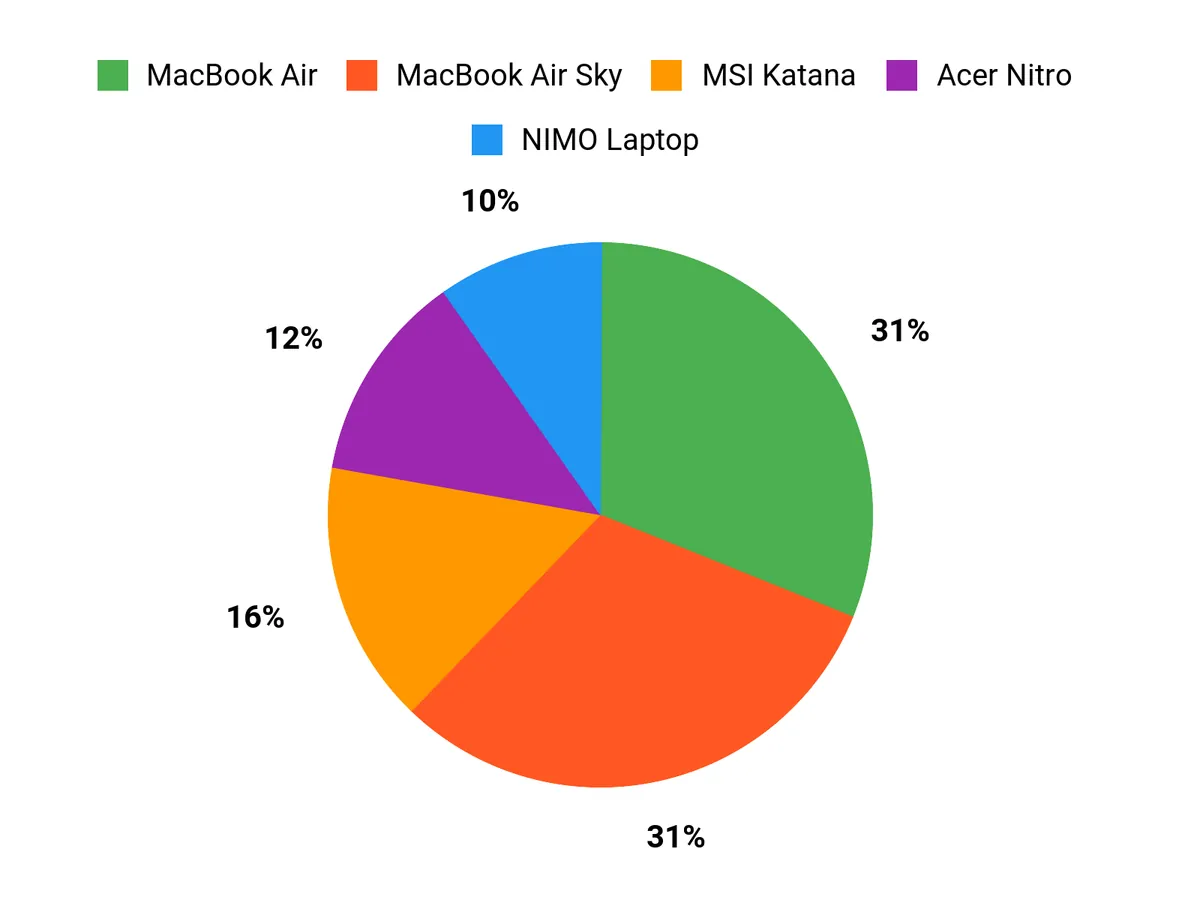
What Students Prefer
When choosing between the MacBook Air, MSI Katana, and NIMO, I see students prioritize a balance between portability and performance—many pick the MacBook Air for its battery life, smooth macOS experience, and lightweight design. Others who need heavy GPU work or gaming lean toward the MSI Katana for raw power, while budget-conscious students opt for the NIMO because it offers solid RAM and storage at a low price.
Wrapping Up
If I had to pick one laptop for a computer engineering student, the MacBook Air stands out for its combination of performance, battery life, and a superb display that makes long days easier, and it works well for both software development and light ML tasks. For students who need dedicated GPU power for simulations or GPU-accelerated coursework, the MSI Katana and Acer Nitro offer strong graphics and high-refresh displays.
Budget-conscious students will find the NIMO and HP Stream useful for classes and basic development, while the Lenovo ThinkBook is the pick for power users who want a Windows workstation with lots of RAM and ports. Match your choice to the software you must run, and prioritize CPU, RAM, and storage for the smoothest engineering experience.
| Product Name | Image | Rating | Price | Processor | Graphics | RAM | Storage | Battery Life |
|---|---|---|---|---|---|---|---|---|
| Apple 2025 MacBook Air 15-inch Laptop with M4 Chip |
 |
4.8/5 (200+ reviews) | $999.00 | Apple M4 Chip (10-core CPU) | Integrated GPU | 16 GB Unified Memory | 256 GB SSD | Up to 18 hours video streaming |
| MSI Katana 15 HX 15.6” Gaming Laptop |
 |
4.3/5 (241 reviews) | $1,599.00 | Intel Core i9-14900HX | NVIDIA GeForce RTX 5070 | 32 GB DDR5 | 1 TB NVMe SSD | Approximately 2 hours |
| NIMO 15.6” FHD IPS Student Laptop |
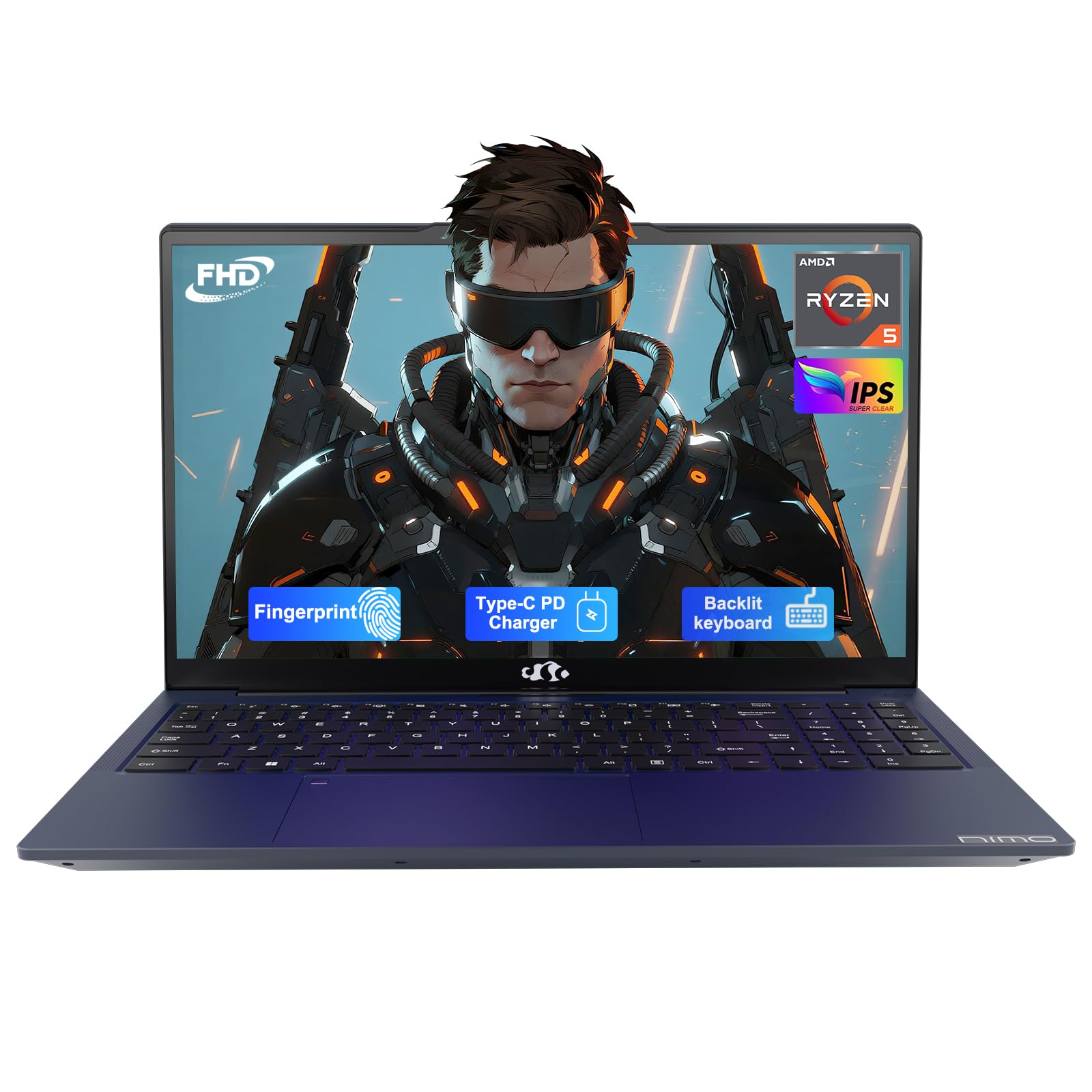 |
4.6/5 (42 reviews) | $369.99 | AMD Ryzen 5 (up to 3.7 GHz) | Integrated Graphics | 16 GB DDR4 | 512 GB SSD | Up to 9 hours |
| Apple 2025 MacBook Air 15-inch Laptop with M4 Chip (Sky Blue) |
 |
4.8/5 (200+ reviews) | $999.00 | Apple M4 Chip (10-core CPU) | Integrated GPU | 16 GB Unified Memory | 256 GB SSD | Up to 18 hours video streaming |
| Acer Nitro V 16S Gaming Laptop |
 |
4.2/5 (126 reviews) | $1,299.99 | AMD Ryzen 7 260 (up to 3.8 GHz) | NVIDIA GeForce RTX 5060 | 32 GB DDR5 | 1 TB SSD | N/A |
| HP Stream 14 Laptop |
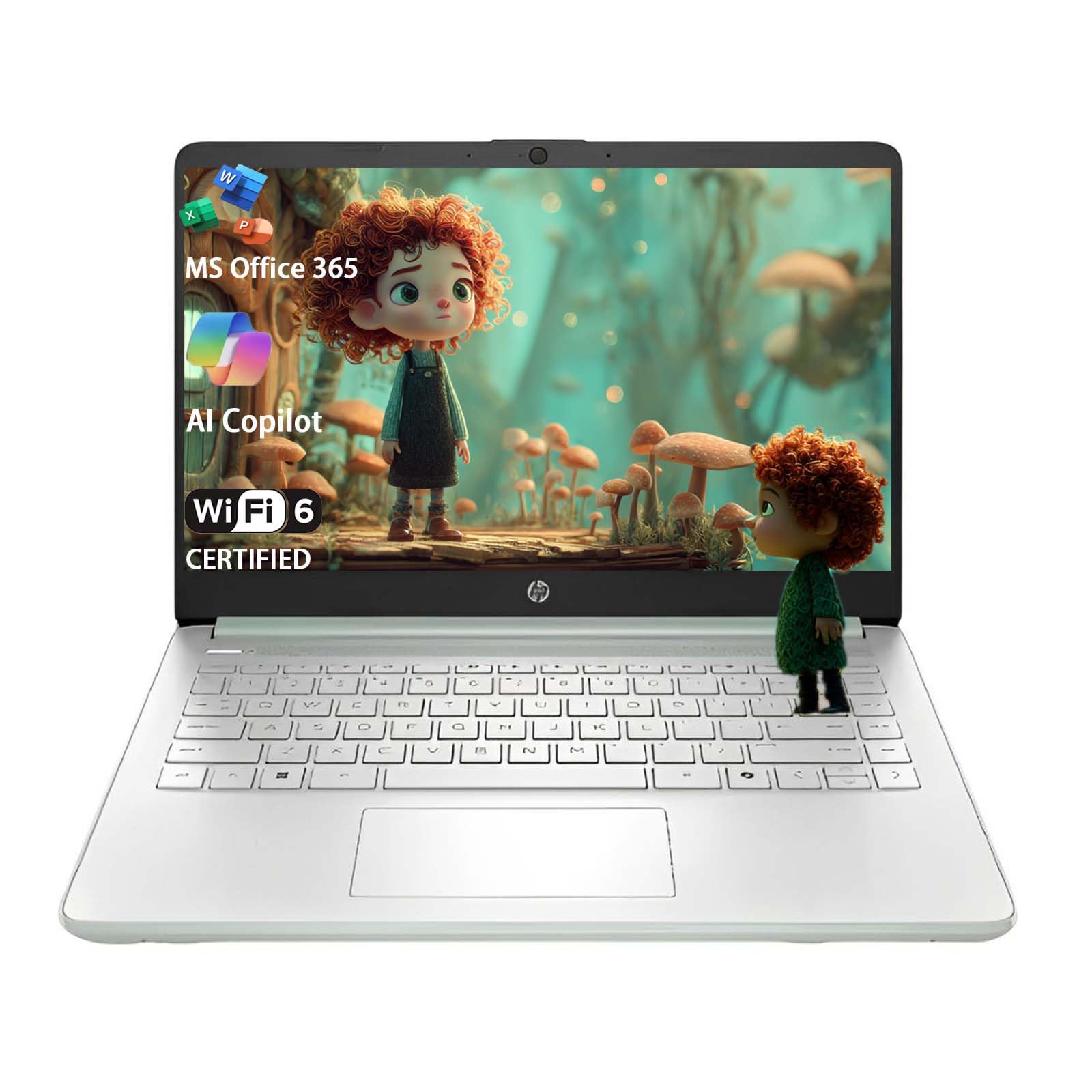 |
4.7/5 (25 reviews) | $265.00 | Intel N150 (up to 3.6 GHz) | Integrated Graphics | 8 GB DDR4 | 128 GB UFS | N/A |
| Lenovo ThinkBook 16 Gen 8 Laptop |
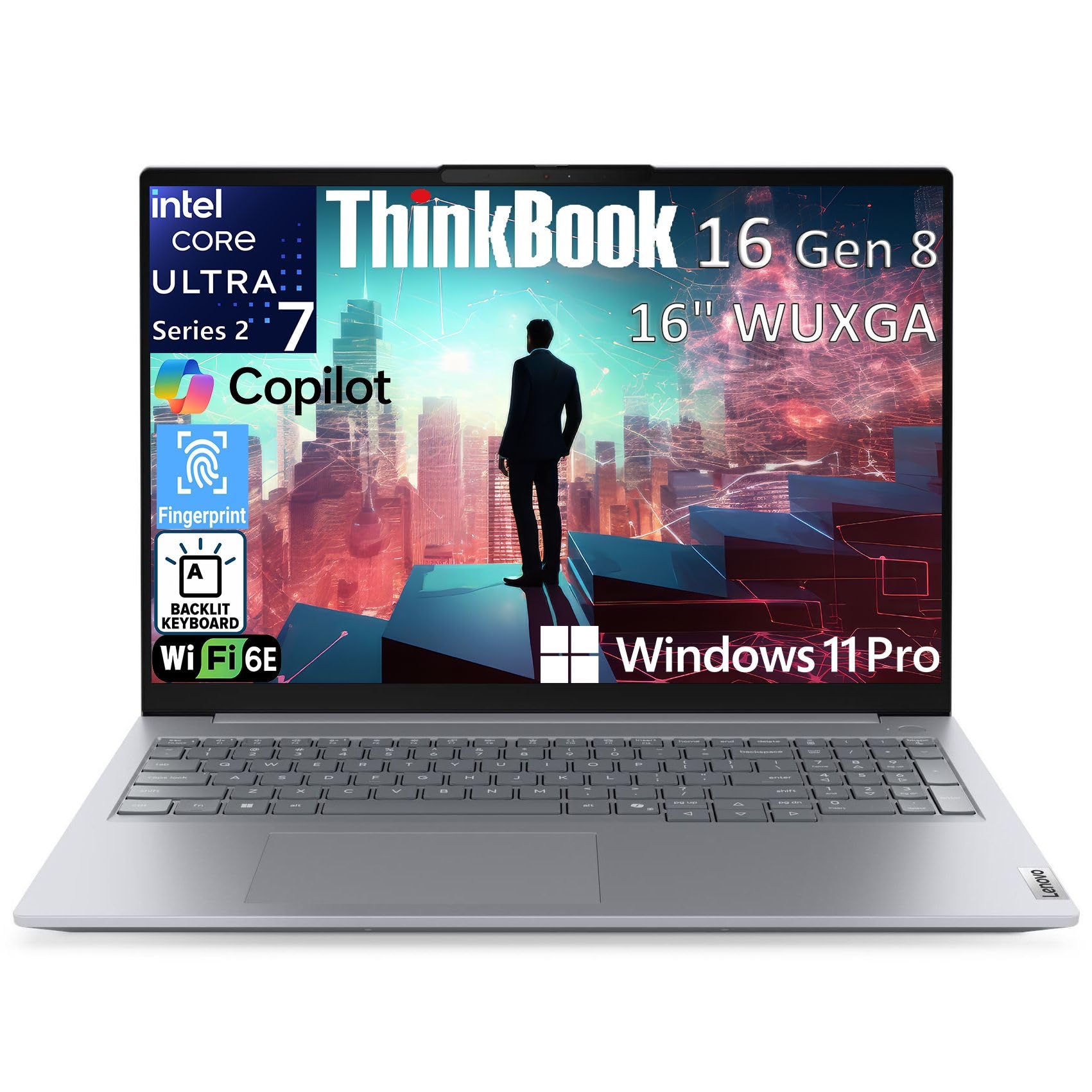 |
4.6/5 (16 reviews) | $1,199.00 | Intel Core Ultra 7 255H | Intel Arc | 32 GB DDR5 | 1 TB PCIe SSD | N/A |
This Roundup is reader-supported. When you click through links we may earn a referral commission on qualifying purchases.



