Replit is expensive primarily because of its effort-based pricing model, which charges credits based on how much compute time and AI processing the Agent actually uses per task, and those costs can spiral fast if you are not careful. That said, there are proven ways to bring your monthly bill under control without sacrificing your workflow. Keep reading, because some of these tips can cut your costs by 60 to 80 percent.
If you have found yourself staring at a $150 bill after a day of building on Replit, you are not alone. The platform’s pricing model has been one of the most debated topics in the developer community going into 2026, and for good reason. What starts as a $25/month Core plan can balloon into hundreds of dollars a month for power users. But once you understand exactly why this happens, you can start working smarter with your credits.
What Is Replit and Why Are People Paying So Much?
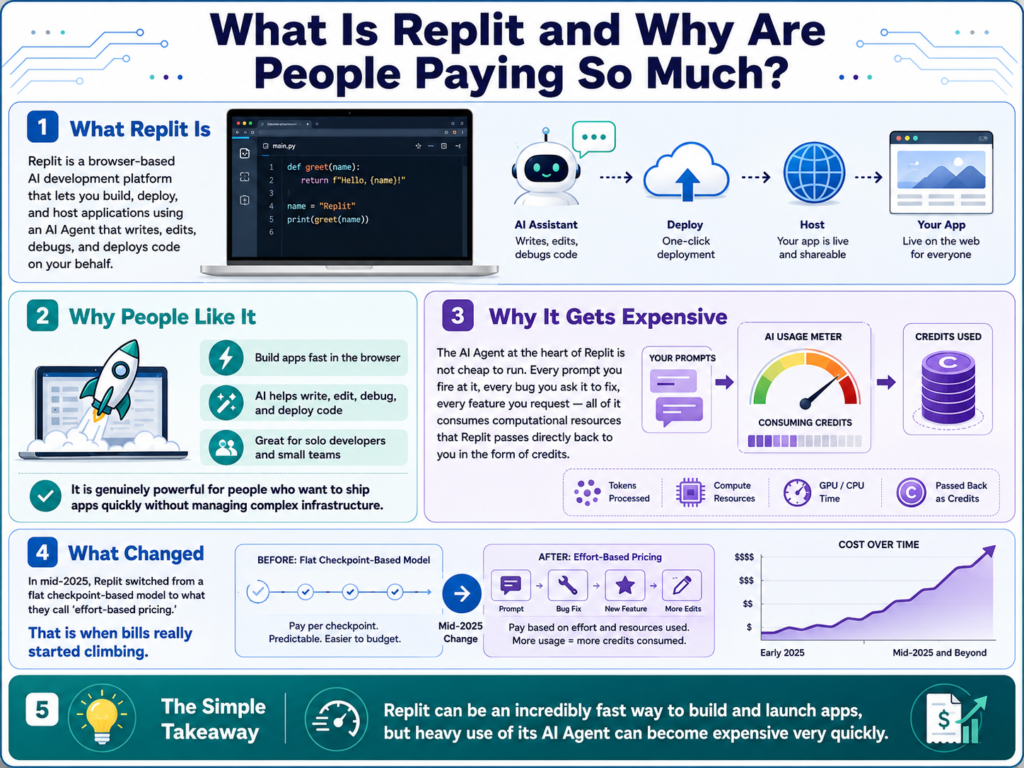
Replit is a browser-based AI development platform that lets you build, deploy, and host applications using an AI Agent that writes, edits, debugs, and deploys code on your behalf. It is genuinely powerful, especially for solo developers and small teams who want to ship apps fast without managing complex infrastructure.
The problem is that the AI Agent at the heart of Replit is not cheap to run. Every prompt you fire at it, every bug you ask it to fix, every feature you request all of it consumes computational resources that Replit passes directly back to you in the form of credits. In mid-2025, Replit switched from a flat checkpoint-based model to what they call “effort-based pricing,” and that is when bills really started climbing.
Understanding Replit’s Effort-Based Pricing Model
Effort-based pricing means you are charged based on the actual compute time and AI model usage each task requires, not a flat fee per action. Simple edits might cost less than $0.25, but a complex feature request that requires extended reasoning and hundreds of lines of code can cost $3 to $8 or more in a single prompt.
Before this model, Replit charged $0.25 per checkpoint, regardless of complexity. A massive refactor cost the same as changing a button color. The new model was designed to be fairer in theory, simple tasks cost less, complex ones cost more. In practice though, users found that the Agent often performed far more work than expected, generating enormous bills from tasks that seemed small on the surface.
Replit’s own blog post on effort-based pricing explains that the model is meant to align what users pay with what Replit actually spends on compute, and they have made efficiency improvements that passed savings back to users. But for heavy builders, the math still does not always work in your favor.
Replit Pricing Plans in 2026: A Quick Breakdown
As of February 2026, Replit restructured its plans significantly. The old Teams plan was retired, and the new Pro plan was introduced. Here is a clear breakdown of what each plan actually includes:
A few important notes here. First, the credits included in your subscription are not bonus credits, they are essentially prepaid usage. On the Core plan billed monthly, your $25/month buys you $25 in credits, which can disappear in a single heavy session. If you pay annually, you lock in the $20/month rate, which is a meaningful saving over 12 months. Second, once your included credits run out, usage continues at pay-as-you-go rates with no hard spending cap by default. That is where most surprise bills come from.
The Pro plan introduced credit rollover (unused credits carry to the next month), tiered bulk credit discounts, and up to 15 collaborators sharing one pool of credits. For teams, that works out to roughly $6.67 per person per month on the base plan, which is genuinely competitive if you are already buying credits anyway.
Why Do Replit Bills Spiral Out of Control?

Understanding the specific triggers for high spending is the first step toward controlling it. There are a handful of behaviors that reliably drain credits faster than most users expect.
Using Agent Mode for everything is the single biggest credit drain. Power Mode is the most capable setting, but it is also the most expensive. Using it to rename a variable or tweak a margin is like using a sledgehammer to hang a picture frame.
Vague or iterative prompting forces the Agent to attempt, fail, revise, and attempt again, and you pay for every single attempt. A two-sentence prompt that leads to three rounds of corrections can cost 4x more than a single well-specified prompt.
Leaving “Code Optimizations” and “App Testing” enabled for quick edits adds significant overhead. Code Optimizations causes the Agent to review its own output, and App Testing spins up a browser to test the changes, both of which burn credits fast on tasks that do not need them.
Running Power Mode for routine tasks is one of the most common and avoidable cost mistakes. Replit’s 2026 UI offers lighter modes specifically built for smaller jobs, and skipping straight to Power for everything is like running your GPU at full load to open a text file.
Deploying and running apps also consumes credits for compute time, not just AI interactions. Hosting costs are separate from Agent usage, and both draw from the same credit pool.
Pro Tip: Before you hit that big blue “Build” button, switch to Plan Mode first. It lets the Agent lay out a complete development plan without writing a single line of code. I have found that reviewing the plan often reveals scope creep early, and trimming it before execution can cut per-session costs by 40 percent or more.
10 Tips To Optimize and Control Your Replit Costs
Tip 1: Use Plan Mode Before Every Major Build
Plan Mode is one of the most underused and most powerful cost-saving features on the platform. When enabled, the Agent maps out a complete development plan, including task breakdowns and implementation steps, without making any code changes. You review and approve the scope before a single token is spent on actual code generation.
This prevents one of the most common and costly Replit experiences: the Agent doing 400 lines of work that you never actually wanted. Think of it as a free estimate before the expensive renovation begins.
Tip 2: Match Your Agent Mode to the Task at Hand
This is genuinely one of the highest-impact habits you can build, and in 2026, Replit finally gives you the granularity to do it properly. The platform now features a segmented control with three primary modes: Lite, Economy, and Power, with Turbo available as an advanced sub-toggle inside Power for the heaviest tasks.
Lite Mode is the real secret weapon for saving credits. It is specifically optimized for quick, inexpensive visual tweaks and straightforward bug fixes things like adjusting a layout, fixing a typo in logic, or changing styling values. The cost per task in Lite Mode is significantly lower than Economy, making it the right default for anything you would describe as a “small change.”
Economy Mode sits in the middle ground well suited for everyday builds, feature additions, and learning-oriented sessions where you want solid output without the full cost of Power.
Power Mode is for heavy lifting only: complex multi-file refactors, architecture-level decisions, and tasks that require deep reasoning across a large codebase. According to This detailed walkthrough from a developer who spent 6 months studying Replit usage patterns, moving from Power to Economy or Lite for appropriate tasks represents roughly a 10x reduction in per-task cost, and that is not a small difference over a month of active development.
Tip 3: Write Precise, Comprehensive Prompts
The quality of your prompts is directly proportional to your credit bill. A vague prompt like “fix the login bug” forces the Agent to interpret what you mean, make assumptions, write code based on those assumptions, and often get it wrong triggering a costly revision cycle.
A precise prompt like “The login button on the /auth page is not redirecting to /dashboard after successful authentication. The issue is in the handleLogin function in auth.js. Fix only that function without touching any other files” gives the Agent exactly what it needs. Less interpretation means fewer tokens, fewer revisions, and a lower bill.
Tip 4: Do Architecture and Planning in Claude or ChatGPT First
This is one of the highest-leverage strategies available to Replit users right now. Before starting a new feature or project in Replit, take your requirements to a free or low-cost AI like Claude (free tier), ChatGPT, or Gemini. Use it to generate architecture plans, data models, API schemas, and detailed implementation specifications.
Then bring that fully-formed specification into Replit. The Agent is not planning anymore, it is just executing. Community members have reported completing 85 percent of complex enterprise apps on just $27 in Replit credits by pre-planning in Claude first. That is remarkable ROI.
Tip 5: Disable App Testing and Code Optimizations for Simple Tasks
In 2026, Replit consolidated its UI significantly. The older “High Power” and “Extended Thinking” toggles from the mid-2025 rollout are gone. What you need to manage now are two key switches found in the Advanced Settings dropdown: App Testing and Code Optimizations.
These two features are the hidden credit killers that catch a lot of users off guard. App Testing tells the Agent to spin up a browser environment and actually test the changes it made, which is thorough but expensive. Code Optimizations causes the Agent to review and self-critique its own output before delivering it, adding meaningful overhead to every task.
Both are genuinely valuable for complex builds where quality assurance matters. But for simple, well-understood tasks, they are pure waste. Make it a habit to open Advanced Settings before each session and disable both features unless you specifically need them. Stepping down from Power Mode entirely for simple tasks compounds these savings even further, lower mode plus disabled testing and optimizations is the leanest possible configuration for quick edits.
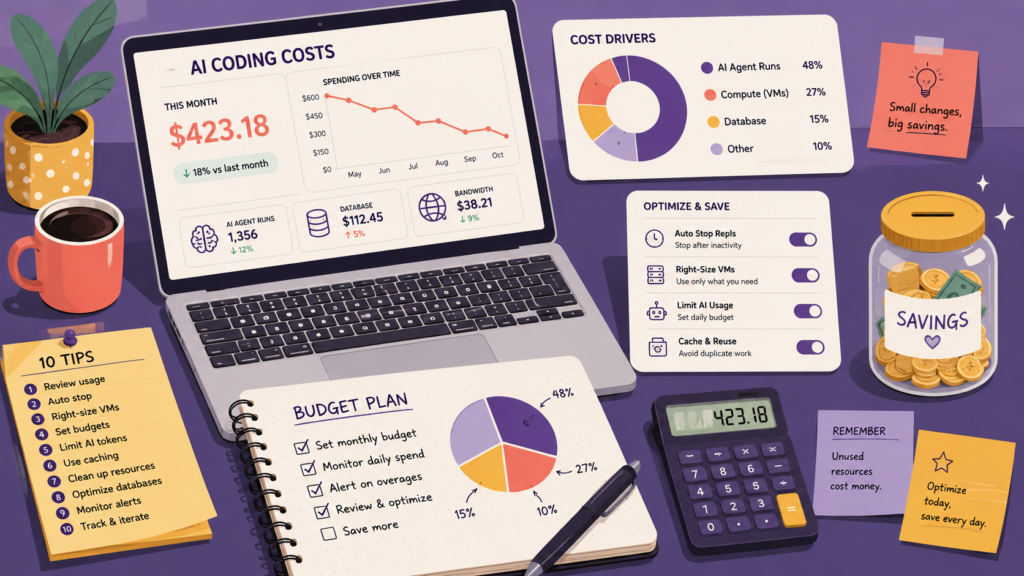
Tip 6: Set a Spending Limit and Monitor Credits Daily
Replit allows you to set spending caps and budget alerts in your account settings. This is not optional if you are on a tight budget, it is essential. Without a hard cap, the platform will happily keep billing you on a pay-as-you-go basis after your included credits run out.
Go to your billing dashboard and set a monthly spending limit that reflects your actual budget. Enable email notifications when you hit 50 percent, 75 percent, and 90 percent of your limit. Multiple users have reported $150 to $350 bills that could have been prevented with a simple spending cap.
Tip 7: Use the Shell and Manual Edits for Small Changes
Not every change needs the Agent. Replit gives you access to a full shell and code editor. For small, well-understood changes like updating an environment variable, fixing a typo, changing a color hex value, or updating a dependency version, just open the file and edit it directly.
This sounds obvious, but many users reflexively fire up the Agent for tasks that take 30 seconds to fix manually. Every Agent session has a minimum cost, so avoiding it entirely for micro-edits adds up to meaningful savings over a month of active development.
Tip 8: Batch Your Requests Instead of Prompting Incrementally
Each time you send a new message to the Agent, it starts a new task with its own overhead cost. If you have five small related changes to make, do not send five separate prompts. Combine them into one clear, well-organized request.
Structure batched prompts with numbered lists so the Agent processes everything in a single session rather than spinning up five separate executions. This alone can reduce per-feature costs significantly for users who tend to work in short, iterative back-and-forth sessions.
Tip 9: Use GitHub Copilot or Cursor for Line-Level Code Completion
Replit Agent is powerful for high-level tasks, but it is economically inefficient for line-by-line code completion. Tools like GitHub Copilot (which costs a fraction per suggestion) or Cursor are far more cost-effective for the low-level, repetitive coding work that fills most development sessions.
Startup Growth Labs’ analysis of Replit cost patterns found that using Copilot for implementation and reserving Replit Agent for architecture and complex features can reduce overall AI development costs by 60 to 80 percent. The key is treating each tool as a specialist, not a general-purpose replacement for everything else.
Tip 10: Evaluate Whether the Pro Plan Credit Rollover Is Worth It
If you are on the Core plan and regularly buying credit add-ons, it is worth running the numbers on the Pro plan. At $100/month, Pro includes $100 in credits, up to 15 collaborators, tiered discounts on additional credit purchases, and credit rollover for one month.
If you consistently spend $80 to $100 per month on credits anyway, Pro’s rollover feature means unused credits do not disappear at month end. Over time, that reduces waste and effectively lowers your average cost per credit. It will not make sense for everyone, but for teams or active solo builders, the math often works out.
How Replit Costs Compare to Alternatives in 2026
One of the most useful exercises before committing to Replit long-term is benchmarking it against alternatives for your specific use case.
The honest takeaway here is that Replit is not the cheapest option for pure coding assistance. Where it genuinely earns its cost is in the combination of AI coding, live deployment, hosting, and collaboration in a single integrated environment. For users who need all of that together, it remains compelling. For users who only need AI code assistance, cheaper dedicated tools exist.
Is Replit Worth It in 2026?
For the right user profile, yes. If you are a non-technical founder or a developer who wants to ship full-stack apps with minimal infrastructure overhead, Replit’s integrated environment is hard to beat. The ability to go from idea to deployed, publicly accessible app in a single session has real value that competitors have not fully replicated.
The platform has also made genuine improvements to cost transparency and control since the chaotic rollout of effort-based pricing in mid-2025. The February 2026 update with the new Pro plan, credit rollover, and improved spending controls signals that Replit is listening to the community and iterating.
For developers who primarily want a coding assistant, or who are already comfortable with deployment pipelines and infrastructure, the math probably does not work in Replit’s favor compared to Cursor, Copilot, or Claude Code. In my experience reviewing AI development tools, the users who get the most value out of Replit are those who use it as an end-to-end product platform, not just a glorified AI chatbot for code.
Replit Cost Optimization: Step-by-Step Workflow
Here is a practical workflow you can start using today to keep costs under control on every session.
-
Plan externally first. Take your feature requirements to Claude or ChatGPT. Get a complete technical specification before opening Replit.
-
Open Plan Mode. Paste your specification into Replit Agent with Plan Mode enabled. Review the generated plan and cut any scope that is not essential for this session.
-
Select Lite Mode for visual tweaks and micro-edits. Use Economy for everyday builds. Reserve Power only for genuinely complex, multi-file work.
-
Open Advanced Settings and disable App Testing and Code Optimizations before confirming the build, unless your task specifically needs them.
-
Write one batched prompt. List all related changes in a single, numbered, precise request.
-
Make micro-edits manually. After the Agent completes the main task, handle small follow-up fixes directly in the file editor.
-
Check your credit balance. Before ending a session, check where you stand so you are not surprised at the end of the month.
Frequently Asked Questions
Why is Replit so expensive compared to other AI tools?
Replit charges based on the effort the AI Agent exerts per task, including compute time, model usage, and code complexity. Unlike flat-rate tools, there is no ceiling per task, so complex requests can cost several dollars each. The platform also charges separately for hosting and deployment, which draws from the same credit pool as AI usage.
What is Replit’s effort-based pricing model?
Effort-based pricing means you pay for the actual computational work the Agent performs on each request. Simple edits cost less than $0.25, while complex features requiring extended reasoning or large code rewrites can cost $3 to $8 or more per task. The cost is determined after the task completes.
How do I stop Replit from charging me after my credits run out?
Go to your billing settings and set a hard monthly spending cap. By default, Replit continues billing you at pay-as-you-go rates after your included credits are exhausted. Enabling a spending limit and credit alert emails will prevent unexpected charges.
Is the Replit Core plan worth it for beginners?
For casual learners and small personal projects, the Core plan is a reasonable entry point. At $25/month billed monthly, or $20/month billed annually, it gives you a functional amount of credits to start building. However, beginners often burn through credits quickly because of inefficient prompting habits. Starting with the free Starter plan and learning efficient prompting patterns first is a smarter move.
Can I use Replit without spending a lot on the Agent?
Yes. You can write and edit code directly in Replit’s editor and use the shell without touching the Agent at all. The Agent is the expensive part. Many developers use Replit primarily for its hosting and deployment features while doing most of their coding in Cursor or with GitHub Copilot, keeping Replit Agent usage to a minimum.
What is the best Replit plan for solo developers in 2026?
The Core plan is the best starting point for solo developers. At $20/month billed annually, it is the most cost-efficient entry into the full Replit experience. If you consistently spend $80 or more per month on credits, upgrading to Pro for the rollover feature and bulk credit discounts often makes financial sense.
Does Replit offer refunds for Agent mistakes?
Replit does not have an automatic refund policy for Agent errors. However, if the Agent causes a significant unintended change, you can contact support and make a case. The community has had mixed results with this approach. The better strategy is to use Plan Mode so you can review and reject the Agent’s proposed actions before they execute and charge credits.
Bottom Line
Replit is genuinely expensive for heavy users, but it is not a bad deal if you use it strategically. The effort-based pricing model rewards disciplined, well-specified prompting and punishes vague, iterative conversations with the Agent. By combining external planning tools, Lite and Economy mode for appropriate tasks, disabled App Testing and Code Optimizations for simple builds, batched prompts, and spending caps, most users can cut their monthly Replit bill by 50 to 80 percent without meaningfully slowing down their development pace. If you want a deeper visual breakdown of the cost patterns in action, This developer’s $2,000 Replit spending breakdown on YouTube is one of the most practical and honest looks at where money actually goes on the platform.