
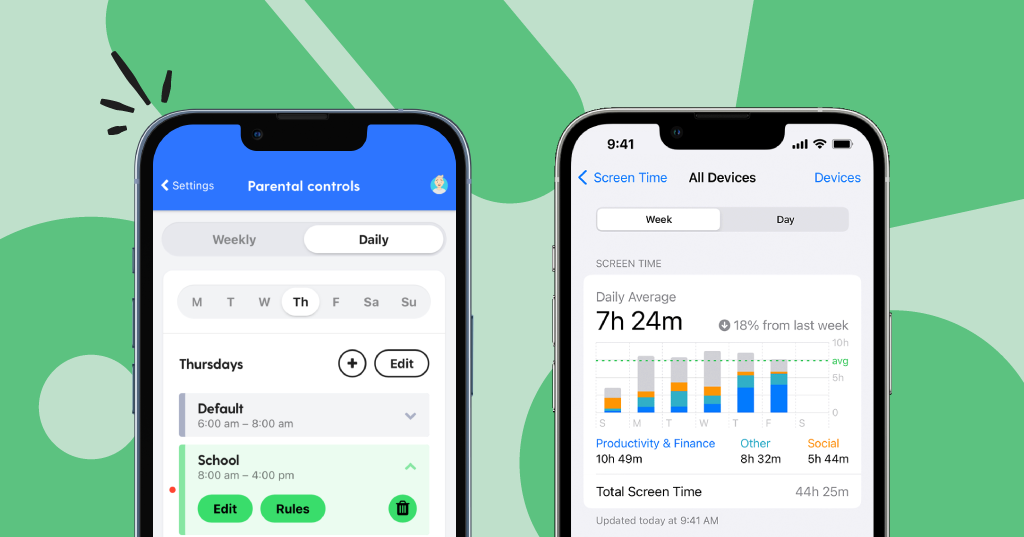
The best parental control app for iPhone in 2026 is Qustodio, thanks to its deep feature set, clean dashboard, real-time reporting, and one of the most polished iOS experiences of any third-party parental control solution available today. But the right choice really depends on your child’s age, your parenting style, and what you actually need to monitor, so read on before you commit.
Keeping kids safe on iPhone has never been more complicated. Between social media rabbit holes, YouTube autoplay, late-night texting, and apps that seem innocent but aren’t, parents are juggling more than ever. I’ve spent a lot of time reviewing and testing parental control solutions across platforms, and the iPhone specifically presents a unique challenge because Apple’s own privacy restrictions limit what third-party apps can actually do. That means not every app that works great on Android will perform equally well on iOS. This guide breaks down the top 10 options for 2026, names one clear winner, and gives you a practical framework for choosing what actually fits your family.
Why iPhone Parental Controls Are Different (And Harder)
Before diving into the apps, it’s worth understanding why iPhones are trickier to monitor than Android devices. Apple’s sandboxing and privacy framework limits how much access third-party apps have to system-level activity. That means features like SMS monitoring, call logging, and cross-app tracking, which work seamlessly on Android, are either unavailable or heavily restricted on iOS.
PCMag’s 2026 roundup of parental control software makes this point clearly, noting that Apple’s own built-in Screen Time and Family Sharing tools often outperform third-party apps specifically on iOS devices because of how deeply they’re integrated into the operating system. Any third-party app you choose will be working within Apple’s guardrails, not around them.
This doesn’t mean third-party apps aren’t worth it. Many of them add significant value through better reporting, AI-powered alerts, location tracking, and cross-platform support if your family uses a mix of iOS and Android devices. You just need to know what to realistically expect.
The One Clear Winner: Qustodio
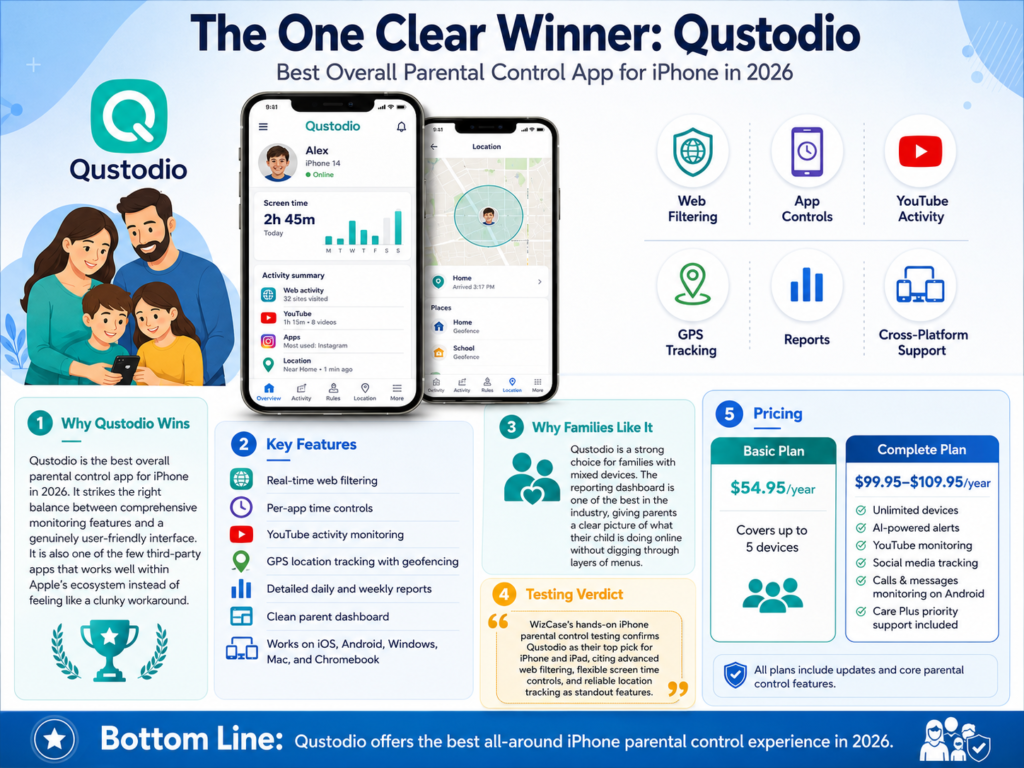
Qustodio is the best overall parental control app for iPhone in 2026. It strikes the right balance between comprehensive monitoring features and a genuinely user-friendly interface, and it’s one of the few third-party apps that actually works well within Apple’s ecosystem rather than feeling like a clunky workaround.
With Qustodio, you get real-time web filtering, per-app time controls, YouTube activity monitoring, GPS location tracking with geofencing, and detailed daily and weekly reports, all from one clean parent dashboard. It’s available on iOS, Android, Windows, Mac, and Chromebook, making it a strong choice for families with mixed devices.
WizCase’s hands-on iPhone parental control testing confirms Qustodio as their top pick for iPhone and iPad, citing its advanced web filtering, flexible screen time controls, and reliable location tracking as standout features. In my own experience testing it, the reporting dashboard is one of the best in the industry, giving you a clear picture of what your child is doing online without making you dig through layers of menus.
Pricing starts at $54.95/year for the Basic plan covering up to 5 devices. The Complete plan runs between $99.95 and $109.95 per year depending on current promotions, and it covers unlimited devices with no cap. That top tier also includes AI-powered alerts, YouTube monitoring, social media tracking, calls and messages monitoring on Android, and Care Plus priority support included at no extra charge.
Pro Tip: If you’re setting up Qustodio on an iPhone for the first time, complete the full iOS profile installation on your child’s device before configuring settings in the parent app. Skipping this step is the most common reason parents experience gaps in monitoring.
Top 10 Parental Control Apps for iPhone in 2026
Here’s a rundown of all 10 top contenders, what they’re best for, and where they fall short.
1. Qustodio (Best Overall)
Already covered above as the winner. Deep reporting, strong web filtering, cross-platform support, and one of the cleanest parent dashboards available. Best for parents who want detailed visibility without having to micromanage every setting.
2. Bark (Best for Older Kids and Teens)
Bark takes a completely different approach from most parental control apps. Instead of letting you monitor everything your child does, it uses AI to scan for specific warning signs, things like signs of bullying, depression, self-harm, or contact with predators across 30+ platforms. When it detects something concerning, it sends you an alert. Bark Premium costs $14/month or $99/year and includes unlimited devices.
It’s a smart tool for parents of teenagers who want to respect their child’s privacy while still being alerted to serious issues. The catch on iPhone is that its monitoring is limited by Apple’s restrictions, and it can only scan content over WiFi, not cellular. Still, for families dealing with older kids and social media, it’s arguably the most sophisticated monitoring tool on this list.
3. Apple Screen Time (Best Free Option)
Don’t overlook what’s already built into your iPhone. Apple’s Screen Time, combined with Family Sharing, offers app limits, content restrictions, downtime scheduling, communication limits, and location sharing through Find My, all for free. For iOS-only households, this built-in combination is remarkably capable and the right place to start before spending money on anything else.
The limitation is that it doesn’t offer the advanced reporting or cross-platform consistency that paid apps provide. It’s also easier for tech-savvy kids to find workarounds.
4. Aura (Best All-in-One Family Safety Platform)
Aura bundles parental controls with identity theft protection, a family VPN, antivirus, dark web monitoring, and up to $5 million in identity theft insurance. If you want a single subscription that covers your family’s digital safety from multiple angles, Aura is worth serious consideration.
One critical thing to know before purchasing: Aura’s parental controls and child coverage are only available on the Family Plan, which runs approximately $25 to $32 per month (billed annually). The Individual and Couple plans do not include any parental controls or child monitoring features whatsoever. So if you’re buying Aura specifically to monitor your kids, make sure you’re looking at the Family Plan and not the cheaper individual tiers. The Family Plan covers up to 5 adults, unlimited children, and up to 50 devices, which is genuinely generous for the price.
5. Norton Family (Best for Web Monitoring and Reporting)
Norton Family has been a reliable name in parental controls for years, and it’s still one of the best options for web activity monitoring and content filtering in 2026. It supports unlimited devices, offers geofencing with customizable alerts, and keeps 30 days of usage history. Parents appreciate its “House Rules” feature, which frames parental controls as a family agreement rather than pure surveillance.
6. Bark Home (Best for Home Network Control)
For parents who want router-level control across every device in the house, including gaming consoles, smart TVs, and laptops that aren’t easy to install apps on, Bark Home is the best current option. It’s a small physical device that sits between your modem and router and lets you pause internet access, filter content, and set time limits across your entire home network.
Unlike the Circle Home Plus hardware, which was officially discontinued in April 2023 after the company was acquired by Aura, Bark Home is actively sold and maintained in 2026. It pairs with the standard Bark app subscription and extends the same filtering and monitoring controls you’d set on a phone out to your whole home network. It works particularly well as a complement to Bark Premium rather than a standalone tool.
7. Bark Jr (Best Budget App Option)
At $5/month or $49/year, Bark Jr. is the most affordable dedicated parental control app that still offers meaningful features. You get content filtering, screen time scheduling, and location tracking, without the full social media scanning of Bark Premium. It’s a solid entry-level option for younger children who aren’t yet on social platforms.
8. mSpy (Best for Comprehensive Remote Monitoring)
mSpy is one of the most feature-rich monitoring apps on the market, covering GPS tracking, call and SMS logs on Android, app usage, and browsing history. On iPhone, some features are limited without an iCloud backup connection, but for parents who want maximum visibility across both iOS and Android, it’s a strong contender.
9. OurPact (Best for Scheduled App Blocking)
OurPact is particularly iPhone-friendly and known for its visual, calendar-based approach to screen time scheduling. You can set “grant” and “block” periods for specific apps throughout the day, making it great for school schedules and bedtime routines. It’s a lighter-weight option than Qustodio, but it’s clean, intuitive, and works well within iOS.
10. Net Nanny (Best for Content Filtering Depth)
Net Nanny has long been respected for having one of the most accurate web content filtering engines in the industry. It’s particularly strong at catching inappropriate content in real time rather than relying solely on category-based blacklists. If your primary concern is what your child is seeing online, Net Nanny is worth a serious look.
Side-By-Side Comparison: Top 10 Parental Control Apps for iPhone 2026
How To Choose The Right Parental Control App for Your iPhone: A Practical Guide
Choosing the right app comes down to five key factors. Getting clear on these before you open the App Store will save you a lot of time and money.
Step 1: Know Your Child’s Age and Digital Habits
A 7-year-old and a 15-year-old need completely different tools. For younger children, you want simple content filtering, screen time limits, and app blocking. For teenagers, social media monitoring and AI-powered alerts like those in Bark become far more relevant. Think about where your child actually spends their time online before deciding which features matter most.
Step 2: Decide Between Monitoring and Restricting
There’s a real philosophical difference between apps that restrict what kids can do and apps that monitor what they’re doing. Tools like OurPact and Bark Home lean toward restriction. Tools like Bark lean toward monitoring with alerts. Qustodio and Aura try to do both. Neither approach is wrong, but knowing which style fits your parenting philosophy will help you narrow the field quickly.
Step 3: Consider Cross-Platform Needs
If you have kids on both iPhones and Android devices, or if your child uses a Windows laptop for school, you’ll want an app that works consistently across all platforms. Qustodio, Norton Family, and Aura all offer solid cross-platform support. Bark Jr. and OurPact have more limited reach.
Step 4: Understand iOS Limitations Before Buying
As noted earlier, Apple’s privacy restrictions limit what any third-party app can do on iPhone. Before purchasing a premium plan, make sure you’re not paying for features that simply won’t work on iOS. SMS and call monitoring, for example, are largely unavailable on iPhone through third-party apps. If that’s important to you, consider whether your family’s devices could include Android instead.
This YouTube deep-dive on the best parental control apps for iPhone in 2026 does a great job of explaining exactly what works and what doesn’t on iOS specifically, and it’s well worth watching before making a final decision.
Step 5: Start With Apple’s Built-In Tools First
Honestly, if you haven’t set up Apple Screen Time and Family Sharing yet, do that first. It’s free, it’s deeply integrated, and it handles the basics well. Once you’ve done that, you’ll have a much clearer sense of which gaps you need a third-party app to fill.
2026 Trends in iPhone Parental Controls
The parental control space is evolving fast, and a few trends are worth knowing about as you make your decision.
AI-powered content detection is becoming standard. Apps like Bark have been doing this for years, but in 2026, more platforms including Qustodio and Aura are incorporating machine learning to flag concerning patterns rather than just applying blunt keyword or category filters. This means fewer false positives and smarter alerts for parents.
Mental health monitoring is a new priority. Following years of research linking social media use to teen mental health issues, several apps now specifically flag language associated with depression, anxiety, eating disorders, and self-harm. Bark has been a leader here, but other platforms are catching up quickly.
Privacy-first parental controls are gaining traction. There’s growing awareness that heavy surveillance can damage trust and push kids to find workarounds. Tools that focus on transparency, letting kids know they’re being monitored, and graduated autonomy, loosening restrictions as kids demonstrate responsibility, are increasingly popular among child development professionals.
Tom’s Hardware’s analysis of family security tools in 2026 also highlights how router-level and device-level controls are increasingly being used together rather than as competing approaches, giving parents layered protection that’s harder to circumvent.
Frequently Asked Questions
What is the best parental control app for iPhone in 2026?
Qustodio is the best parental control app for iPhone in 2026 for most families. It offers the strongest combination of features, reporting, and iOS compatibility. That said, Bark is a better choice for families with teenagers who need social media monitoring, and Apple’s own Screen Time is the best free option.
Do parental control apps work on iPhone without jailbreaking?
Yes, all the apps on this list work without jailbreaking. However, because Apple restricts third-party access to certain system functions, some features like SMS monitoring are unavailable on standard iPhones through third-party apps.
Can my child bypass parental control apps on iPhone?
Tech-savvy kids can find workarounds for most parental controls, including switching to cellular data to bypass WiFi-based filters, using VPNs, or creating new Apple IDs. The most bypass-resistant setup combines Apple’s Screen Time with a third-party app for additional monitoring.
Is Apple Screen Time good enough, or do I need a third-party app?
For many families, especially those with younger children and iOS-only households, Apple Screen Time is genuinely enough. Where third-party apps add value is in advanced reporting, AI-powered alerts, social media monitoring, cross-platform support, and geofenced location tracking.
What is the best free parental control app for iPhone?
Apple’s built-in Screen Time and Family Sharing is the best free option by a wide margin. Among third-party free tiers, OurPact offers a limited but functional free plan, and Qustodio’s free plan covers one device with basic web filtering and screen time limits.
Does Aura include parental controls on all plans?
No, and this is an important distinction. Aura only includes parental controls and child coverage on its Family Plan, which starts at approximately $25 per month billed annually. The Individual and Couple plans do not include any parental monitoring features, so make sure you’re subscribing to the right tier.
How much should I expect to pay for a good parental control app?
Most quality parental control apps cost between $50 and $100 per year for basic plans. Premium plans covering more devices or adding advanced features typically run $100 to $150 per year. Qustodio’s Complete plan at $99.95 to $109.95 per year with unlimited devices is one of the best value propositions at that price point.
At what age should I start using parental controls on my child’s iPhone?
Most experts and child development professionals recommend setting up parental controls when you hand your child their first smartphone, regardless of age. Starting with stricter settings and gradually relaxing them as your child gets older is widely considered the most effective approach.
Does Qustodio work well on iPhone specifically?
Yes. Qustodio is one of the best-performing third-party parental control apps on iOS. It requires the installation of an iOS profile on your child’s device, which enables deeper integration than most competitors. Features like YouTube monitoring and real-time location tracking work reliably on iPhone with the profile installed.
Bottom Line
Qustodio is the best parental control app for iPhone in 2026 for most families, offering the deepest feature set with the most polished iOS experience. Its Complete plan covers unlimited devices for under $110 per year, which is hard to beat for larger families. Bark is the smarter call if your main concern is your teenager’s social media activity and you’d rather get intelligent alerts than monitor everything yourself. And if you’re on a tight budget or have younger kids, Apple’s own Screen Time is surprisingly capable and completely free. Start there, figure out what’s missing, and then add a paid app to fill those specific gaps.



