
I care about watching live sports and streaming shows without hiccups, and I know many readers do too. Choosing the right laptop affects picture quality, sound, battery life and how smoothly streams play.
The Apple MacBook Neo delivers a compact package with a bright Liquid Retina display, hardware video decoding for modern codecs and clear speakers, so I can enjoy games and movies with minimal fuss and great image fidelity.
TL;DR
|
Feature |
Verdict |
|---|---|
|
Display |
🎨 ⭐️⭐️⭐️⭐️ – 13-inch Liquid Retina at 2408×1506 with 500 nits and Dolby Vision makes sports and movies look vivid and detailed. |
|
Performance |
🔍 ⭐️⭐️⭐️⭐️ – A18 Pro chip with hardware-accelerated H.264, HEVC and AV1 keeps streams smooth and lets pages and apps load quickly. |
|
Audio |
🔊 – Dual speakers with Spatial Audio and Dolby Atmos provide immersive, room-filling sound for commentary and cinema tracks. |
|
Battery & Portability |
⏱️ – Up to 16 hours of video streaming and a lightweight aluminum chassis mean long viewing sessions on the go. |
|
Ease of Use |
⭐️⭐️⭐️⭐️⭐️ – macOS integration, an excellent trackpad and seamless iPhone pairing make setup and daily streaming effortless. |

I find the MacBook Neo hits a sweet spot when I want a simple, pleasant machine for streaming and everyday use. The 13-inch Liquid Retina screen is bright and sharp, and the A18 Pro chip handles modern video codecs so streams play smoothly without hiccups. Battery life is solid enough for long games or movie marathons, and the lightweight aluminum body makes it easy to move from couch to café. The speakers are surprisingly good for a laptop and Spatial Audio support adds a nice sense of space when watching matches or films.
For someone who already uses an iPhone, the seamless macOS pairing cuts setup time and keeps login and sharing effortless. I reach for this when I want a reliable, attractive laptop for live sports, Netflix nights, and casual creativity without wrestling with complicated settings.
|
Pros |
Cons |
|---|---|
|
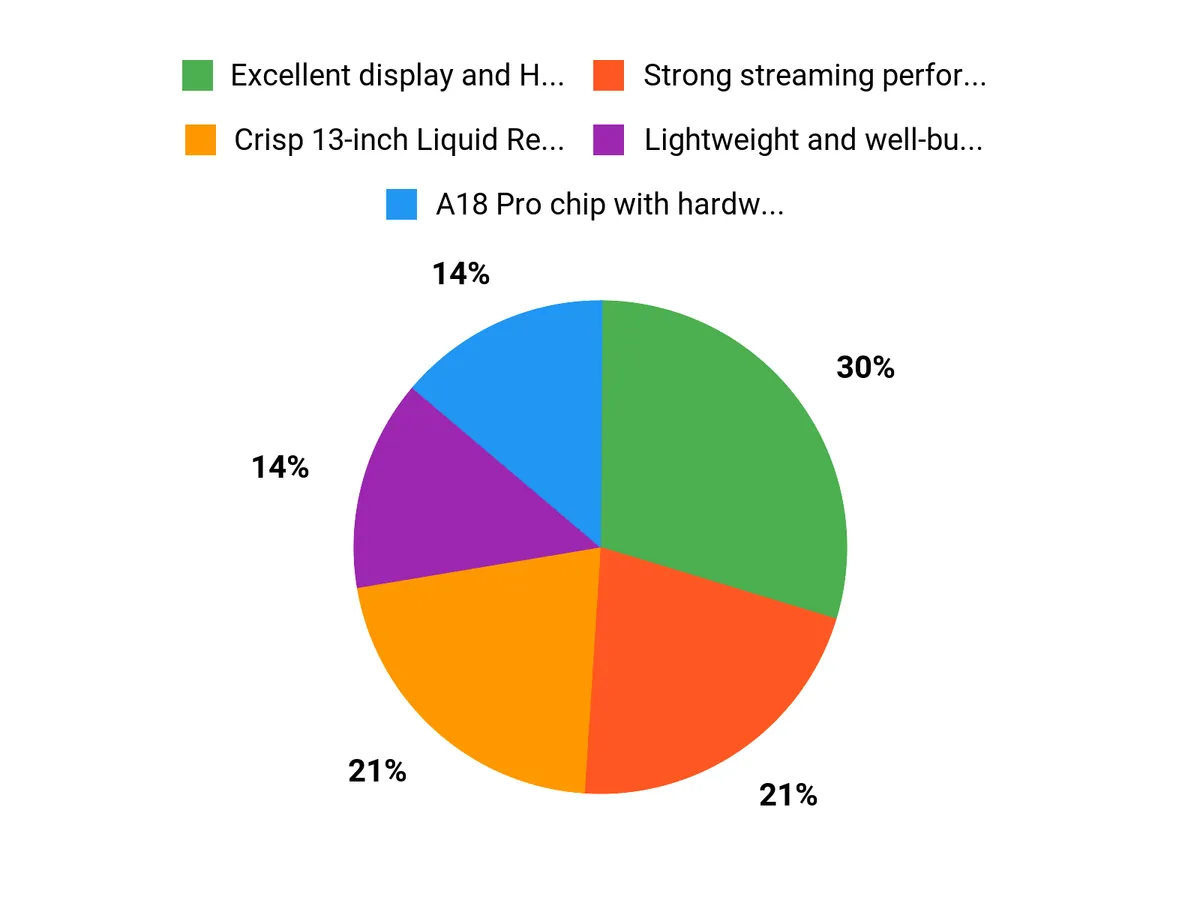
✅ Excellent display and HDR support for cinematic visuals |
❌ 8GB memory and 256GB SSD are modest for heavy multitasking or large local media libraries |
|
✅ Strong streaming performance thanks to A18 Pro and codec support |
❌ Limited port variety — mainly USB-C — so adapters may be needed |
|
✅ Lightweight and well-built chassis that feels premium |
❌ Integrated graphics are not intended for demanding gaming |
|
✅ Good speakers and 1080p webcam for video calls and content |
|
|
✅ Seamless integration with iPhone and the Apple ecosystem |
Long-Term Cost Benefits
Because it runs efficiently and is built with an aluminum chassis, the Neo tends to stay useful longer and feels sturdy in daily use. macOS updates and Apple’s ecosystem compatibility mean fewer forced upgrades, and good battery longevity reduces the need to replace the device prematurely.
Return On Investment
For entertainment-focused users I see the return in consistent, hassle-free viewing and fewer headaches with streaming performance. The time saved on setup, stable playback during live events and the machine’s durability make it a worthwhile choice for someone who values reliability over cutting-edge specs.
Situational Benefits
|
Situation |
How It Helps |
|---|---|
|
Watching Live Sports |
The bright HDR-capable display and hardware video decoding keep fast action smooth and clear so I don’t miss plays or color detail during broadcasts. |
|
Movie Night With Friends |
Dual speakers with Spatial Audio create a fuller soundstage, and the lightweight profile makes it easy to move to a TV or connect to an external display for a bigger screen. |
|
Travel and Commutes |
Long streaming battery life and a slim, light design let me catch a full episode or game without hunting for an outlet. |
|
Video Calls and Streaming Setup |
A 1080p FaceTime camera and clear microphones improve call quality, and macOS integration makes connecting to apps and accessories quick. |
Ease Of Use
|
Feature |
Ease Level |
|---|---|
|
Initial Setup and iPhone Pairing |
Very Easy |
|
Streaming App Compatibility |
Easy |
|
Trackpad and Keyboard |
Very Easy |
|
Connecting Peripherals |
Moderate |
|
System Updates and Maintenance |
Easy |
Versatility
The Neo works well for streaming, browsing, light photo or video editing, note-taking and productivity. It isn’t aimed at heavy gaming or professional video editing, but it handles everyday creative tasks and can drive an external 4K display for movie nights or multitasking.
Aesthetic Appeal
I like the Indigo finish and slim profile; it looks modern without drawing too much attention. The rigid aluminum body feels premium and clean, which makes it pleasant to use in shared spaces.
Innovation
The A18 Pro brings efficient hardware decoding for the latest codecs and a Neural Engine for on-device AI features. That combination improves streaming efficiency, keeps playback smooth and enables a few smart conveniences that make daily use feel faster.
Brand Trustworthiness
Apple’s long history of hardware and software integration gives me confidence that the MacBook Neo will receive updates and remain compatible with other Apple devices. The build quality and consistent software experience are reasons I trust the brand for a device I use every day.
Key Benefits
- Crisp 13-inch Liquid Retina display with HDR support for vivid picture quality
- A18 Pro chip with hardware video decoding for smooth playback of modern codecs
- Lightweight, durable aluminum design that’s easy to carry for on-the-go viewing
- Dual speakers with Spatial Audio for better immersion during movies and sports
- Long streaming runtime and efficient power use for extended viewing sessions
FAQ
Is the MacBook Neo Good for Live Sports And Streaming?
Yes, I find the Neo well suited to live sports and streaming because the 13-inch Liquid Retina display with HDR support and the A18 Pro’s hardware-accelerated decoding for H.264, HEVC and AV1 keep video smooth and color-rich. The built-in dual speakers with Spatial Audio give commentary and crowd noise more presence than you might expect from a compact laptop, and the 1080p FaceTime camera and mics make it useful for livestream chats or watch parties.
For the most reliable streams I stick to native apps or Safari when possible, keep background apps closed, and use a stable network connection to avoid buffering during key moments.
Will 8GB Of RAM And 256GB Storage Be Enough For My Needs?
For pure streaming, browsing and everyday use I’ve found 8GB of memory and a 256GB SSD to be perfectly adequate, since most video is streamed rather than stored locally and macOS manages memory efficiently. If I plan to keep large movie libraries, work on big video projects or run many heavy apps at once, I treat the internal storage and RAM as modest and rely on an external SSD or cloud storage to offload files.
It’s worth planning storage from the start because internal upgrades are limited, so using iCloud or a fast external drive makes the Neo feel more flexible over time.
How Do I Connect The Neo To A TV Or External Accessories?
Connecting the Neo is straightforward but you should expect to use adapters for some setups since the machine leans on USB‑C. It supports an external display up to 4K at 60Hz over USB‑C (DisplayPort 1.4), and I usually use a small USB‑C hub with HDMI and USB‑A if I need legacy ports.
For casual casting I prefer AirPlay to send video to an Apple TV or compatible smart TV because it keeps setup simple, while a wired USB‑C to Ethernet adapter helps when I want the absolute best stability for live events.
Why Choose MacBook Neo
I choose the MacBook Neo because its bright Liquid Retina screen, A18 Pro with hardware video decoding, and solid battery life make live sports and movies look and play smoothly. I also appreciate the lightweight, well-built chassis and tight macOS integration that keep streaming reliable and setup simple.
Wrapping Up
I recommend the MacBook Neo when you want a budget-friendly Mac that excels at live sports, streaming and movie nights. Its 13-inch Liquid Retina display, wide HDR support and hardware-accelerated decoding for modern formats like AV1 and HEVC make picture quality and playback reliability stand out.
The A18 Pro chip keeps playback smooth and responsive while the dual speakers with Spatial Audio and Dolby Atmos create an engaging soundstage. Battery life rated for long streaming sessions, solid Wi‑Fi and Bluetooth performance, a crisp 1080p FaceTime camera and a lightweight, durable chassis all add up to a machine that feels premium without the complexity.
For anyone who wants great visuals, dependable streaming performance and seamless integration with the Apple ecosystem, the MacBook Neo hits the right balance.
This Roundup is reader-supported. When you click through links we may earn a referral commission on qualifying purchases.



